
Batch Review
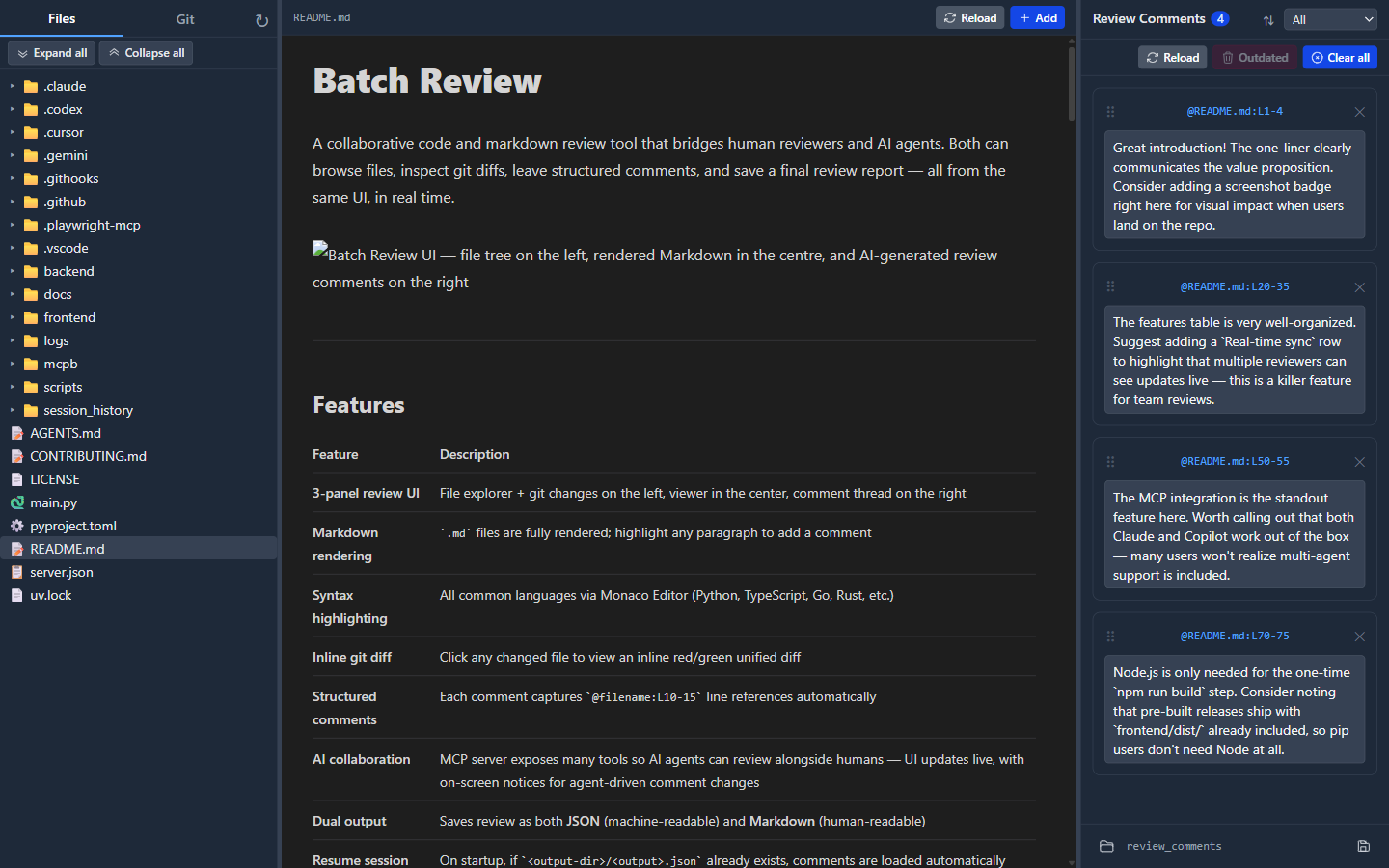
A collaborative code and markdown review tool that bridges human reviewers and AI agents. Both can browse files, inspect git diffs, leave structured comments, and save a final review report — all from the same UI, in real time.
Features
| Feature | Description |
|---|---|
| 3-panel review UI | File explorer + git changes on the left, viewer in the center, comment thread on the right |
| Markdown rendering | .md files are fully rendered, including GitHub-style math with KaTeX: inline $…$ and GitHub’s dollar-backtick inline form, display $$…$$ blocks, and fenced math code blocks; plus Mermaid fenced diagrams and WaveDrom fenced diagrams (digital timing diagrams, bit-field/register diagrams, and logic/schematic diagrams), each with a toolbar toggle between rendered and source views; highlight any paragraph to add a comment |
| HTML previewing | .html and .htm files render in a sandboxed center-panel preview with scripts disabled; select rendered elements, text, or a visual region to add source-backed comments, including a saved PNG crop for region comments |
| PDF viewing | .pdf files render in the center panel with page-aware text or region comments and reload support |
| DOCX/PPTX viewing | .docx and .pptx files render locally in the browser with docx-preview and @aiden0z/pptx-renderer; select document text or a normalized page/slide region to add comments, with Office region selections saved as PNG screenshots beside the review JSON/Markdown output, without LibreOffice or Microsoft Office |
| Office document safety | Office packages are fetched as binary data; git diff mode reports them as binary instead of showing misleading ZIP/XML text |
| Syntax highlighting | All common languages via Monaco Editor (Python, TypeScript, Go, Rust, etc.) |
| Inline git diff | Click changed files to view inline red/green unified diffs for local changes, a previous commit/ref vs HEAD, or current checkout vs a GitHub PR head |
| Structured comments | Each comment captures @filename:L10-15 line references automatically, with richer rendered-view anchors where useful; Office anchors include document kind, page/slide, normalized region, selected text, and a renderer fingerprint |
| Outdated recovery | When a text comment goes stale, refresh its stored highlight from the current file directly from the right panel |
| AI collaboration | MCP server exposes many tools so AI agents can review alongside humans — UI updates live, with on-screen notices for agent-driven comment changes. Also ships a token-efficient CLI client mode (batch-review <verb>) for coding agents and a Claude Code plugin with a review-workflow skill |
| Dual output | Saves review as both JSON (machine-readable) and Markdown (human-readable) |
| Resume session | On startup, if {output-dir}/{output}.json already exists, comments are loaded automatically |
| Cross-platform | Runs on Windows and Linux |
| Theme toggle | Switch the web UI between the original dark theme and a warm light theme from the left-panel top bar |
GitHub-style math example
The preview uses the delimiter rules from Writing mathematical expressions: inline $…$, GitHub’s dollar-backtick inline form (rewritten to $…$ before parsing), display $$…$$, and fenced math code blocks. Rendering is KaTeX rather than GitHub’s MathJax, so a few uncommon macros can differ even when markdown syntax matches.
This app does not embed raw HTML in the markdown preview, so GitHub’s <span>$</span> workaround for literal dollar signs in prose is unavailable here—inside math, escape $ as \$ per GitHub’s docs.
Examples:
Inline: $\sqrt{3x-1}+(1+x)^2$
Dollar-backtick (GitHub-compatible): $e^{i\pi} + 1 = 0$
$$ \nabla_\theta J(\theta) = \mathbb{E}{(s, a) \sim \pi\theta} \left[\nabla_\theta \log \pi_\theta(a \mid s), R(s, a)\right] $$
WaveDrom example
Fenced ```wavedrom blocks are parsed as WaveJSON (via
JSON5, so unquoted/single-quoted keys are fine) and rendered inline, with the same
source/rendered toolbar toggle as Mermaid. Three diagram kinds are supported, selected
automatically from the JSON shape:
A digital timing diagram (signal):
{signal: [
  {name: 'clk',  wave: 'p.....'},
  {name: 'data', wave: 'x.345x', data: ['head', 'body', 'tail']},
  {name: 'req',  wave: '0.1..0'},
  {name: 'ack',  wave: '1.....'}
]}
A bit-field / register diagram (reg):
{reg: [
  {bits: 7, name: 'opcode'},
  {bits: 5, name: 'rd'},
  {bits: 3, name: 'funct3'},
  {bits: 5, name: 'rs1'},
  {bits: 12, name: 'imm[11:0]'}
], config: {bits: 32}}
A logic / schematic diagram (assign):
{assign: [["z", ["|", "a", ["&", "b", "c"]]]]}
Architecture
At runtime, Batch Review is a single Python application that serves the browser UI, exposes REST and WebSocket endpoints for that UI, and optionally exposes the same review session to MCP clients.
flowchart LR
    CLI["CLI entry point<br/>`uv run batch-review`"]
    Browser["Browser UI<br/>React + Zustand"]
    McpHost["MCP host<br/>Cursor / Claude Desktop / VS Code / other clients"]
    AgentCli["Coding agent<br/>Claude Code / Cursor CLI / Codex<br/>`batch-review <verb>`"]

    subgraph Backend["Batch Review backend process"]
        Server["FastAPI app<br/>static frontend `/`<br/>REST `/api/*`<br/>WebSocket `/ws`"]
        Mcp["FastMCP server<br/>stdio transport<br/>HTTP transport `/mcp`"]
        State["Shared AppState<br/>repo root, comments, MCP session,<br/>connected WebSocket clients"]
    end

    Repo["Git repository under review"]
    Output["Saved review output<br/>`review_comments.json`<br/>`review_comments.md`"]
    PortFile[".batch_review/server.json<br/>discovery file"]

    CLI --> Server
    CLI --> Mcp
    Server --> Browser
    Browser -->|"REST reads/writes"| Server
    Browser <-->|"live sync"| Server
    Server --> State
    Mcp --> State
    McpHost -->|"stdio or HTTP MCP"| Mcp
    AgentCli -->|"REST `/api/*`"| Server
    AgentCli -.->|"reads for discovery"| PortFile
    Server -.->|"writes on start"| PortFile
    State -->|"read files, diffs, existing review data"| Repo
    State -->|"save/load review reports"| Output
    State -.->|"broadcast UI events"| Browser
- The browser loads the React app from the FastAPI server, fetches files/comments/config over REST, and stays synchronized through
/ws. - MCP tools and REST routes both operate on the same in-memory
AppState, so agent-created comments appear in the UI immediately. - In
--mcpmode, the HTTP server keeps the web UI available while FastMCP also runs over stdio for editor and CLI hosts. - In CLI client mode, coding agents invoke
batch-review <verb>(e.g.add-comment,diff) which calls the same REST endpoints — no MCP tool schemas loaded into agent context. The server writes.batch_review/server.jsonon startup so CLI verbs can discover it.
Distribution
- PyPI —
batch-review-mcp— published wheels and sdist forpip/uv. - Official MCP Registry —
io.github.hevangel/batch-review-mcp— latest published server metadata (JSON API; the registry site is still preview).
Requirements
- Python ≥ 3.13 with uv
- Node.js ≥ 22 (for the one-time frontend build; matches GitHub Actions)
Installation
git clone https://github.com/hevangel/batch-review-mcp.git
cd batch-review-mcp
uv sync
The first run will automatically build the React frontend if frontend/dist/ does not exist (requires Node.js + npm on PATH).
Usage
Standalone mode (browser opens by default)
# Review the current directory
uv run batch-review

# Review a specific git repository
uv run batch-review --root /path/to/your/repo

# Custom host / port
uv run batch-review --root /path/to/repo --host 0.0.0.0 --port 9100

# Specify output filenames
uv run batch-review --root /path/to/repo --output review --output-dir /tmp/reviews
# → saves /tmp/reviews/review.json and /tmp/reviews/review.md
The server auto-selects a free port in the 9000–9999 range if the default port is already in use.
MCP stdio mode (Claude Desktop / Cursor / any MCP client; browser opens by default)
uv run batch-review --mcp --root /path/to/repo
The HTTP server starts in a background thread (so the browser UI remains accessible), your default browser opens to the app URL (same as standalone mode; use --no-browser to skip), and the MCP stdio transport runs in the main thread.
Claude Desktop config (claude_desktop_config.json):
{
  "mcpServers": {
    "batch-review": {
      "command": "uv",
      "args": ["run", "batch-review", "--mcp", "--root", "/path/to/repo"]
    }
  }
}
CLI client mode (token-efficient agent interface)
For coding agents (Claude Code, Cursor CLI, Codex, etc.), the CLI client mode is more token-efficient than loading 18 MCP tool schemas into context. Each verb is one process invocation that emits a single JSON document to stdout. The CLI talks to a running server over REST, so every comment and highlight also appears in the human reviewer's browser UI in real time.
# Start the server in the background (browser opens by default)
batch-review start --root .
# {"web_url": "http://127.0.0.1:9000", "pid": 12345, "port": 9000}

# List changed files
batch-review changes
# [{"path": "main.py", "status": "M", ...}, ...]

# Inspect a diff
batch-review diff main.py

# Add a comment anchored to a line range
batch-review add-comment main.py 10 15 "This null check is redundant."

# Save the review report (JSON + Markdown)
batch-review save

# Stop the server when done
batch-review stop
Server discovery — verbs auto-discover a running server in priority order: the BATCH_REVIEW_WEB_URL env var, then <repo_root>/.batch_review/server.json (written by start), then probing ports 9000–9999.
Verb reference — all verbs accept --root PATH (default: cwd):
| Verb | Args | Description |
|---|---|---|
start |
[--port N] [--no-browser] |
Start the server in the background |
stop |
— | Stop the running server |
config |
— | Server config (output stem, dir, web URL) |
url |
— | Connection URLs (web UI, WebSocket, MCP HTTP) |
changes |
[--mode local|commit|pr] [--base REF] [--pr N] |
List changed files |
diff |
<path> [--mode ...] |
Unified diff + original/modified content |
ls |
[path] [--depth N] |
List files/directories |
file |
<path> |
Read file content + line count + language |
add-comment |
<path> <L1> <L2> [text] [--highlighted TEXT] |
Add a comment |
list-comments |
— | List all comments |
update-comment |
<id> <text> |
Edit a comment's text |
delete-comment |
<id> |
Delete one comment |
clear |
— | Delete all comments |
delete-outdated |
— | Delete stale comments |
recompute-stale |
— | Recompute outdated flags |
save |
[--stem NAME] [--dir DIR] |
Save to JSON + Markdown |
load |
<stem> |
Load a saved review |
list-reviews |
— | List saved review stems |
open |
<path> [--mode view|diff] |
Open a file in the browser UI |
highlight |
<path> <L1> <L2> |
Highlight a line range in the UI |
jump |
<comment-id> |
Jump to a comment's location in the UI |
Output contract: JSON on stdout, progress messages on stderr, non-zero exit on error. The start verb is backward-compatible — if a server is already running, it reports the existing URL instead of starting a duplicate.
Claude Code plugin
This repo ships a Claude Code plugin (CLI-only — no MCP server entry, so agents don't load tool schemas into context). Install it from the marketplace:
/plugin marketplace add hevangel/batch-review-mcp
/plugin install batch-review@batch-review
The plugin bundles:
- Skill (
skills/batch-review/SKILL.md) — teaches the agent the review workflow using CLI verbs. - Command (
commands/batch-review.md) — a/batch-reviewslash command that triggers the skill. - Plugin manifest (
.claude-plugin/plugin.json) + marketplace (.claude-plugin/marketplace.json).
Agent skill (skills.sh)
The review-workflow skill is also installable into any agent that supports the open Agent Skills standard (Claude Code, Cursor, Codex, Gemini CLI, Copilot, ZCode, and 60+ others) via the npx skills CLI:
# Install globally (available across all your projects)
npx skills add hevangel/batch-review-mcp --global --yes

# Or install into a specific agent only
npx skills add hevangel/batch-review-mcp --skill batch-review --agent claude-code --global

# List available skills without installing
npx skills add hevangel/batch-review-mcp --list
Once installed, the skill auto-triggers when you ask your agent to review code, inspect diffs, or leave review comments. Discovery and listing on skills.sh happens automatically via install telemetry — there is no manual submission step.
Official MCP registry
This project includes a root-level server.json for the Model Context Protocol registry (preview). The entry uses registryType": "mcpb": the download URL must be a public GitHub release asset, and fileSha256 must match those bytes exactly (the Release workflow builds the .mcpb on Linux, which can differ from a pack produced on Windows).
Recommended order for a new version (e.g. v0.4.3):
- Bump
versioninpyproject.toml,mcpb/manifest.json, andserver.json(top-levelversionpluspackages[0].identifierURL:.../releases/download/v0.4.3/batch-review-mcp-0.4.3.mcpb). - Commit and push that release-prep change to
main. - Push the tag (e.g.
git tag v0.4.3 && git push origin v0.4.3). - The Release workflow builds the Linux artifacts again, runs
scripts/update_server_json_mcpb_sha.pyto patchserver.jsonin the workflow workspace from the Linux-built.mcpb, runsscripts/verify_release_mcp_registry.py, creates or updates the GitHub release, publishesserver.jsonto the MCP Registry via GitHub Actions OIDC (mcp-publisher login github-oidc), and publishes the wheel/sdist to PyPI whenPYPI_API_TOKENis configured. Ifidentifieror versions do not match the tag, or if the patchedserver.jsonstill does not match the Linux-built.mcpb, the job fails so you never publish a broken asset to the registry.
The separate MCP registry preflight (Linux MCPB hash) workflow is now optional. It is still useful when you want to inspect the Linux-built bundle bytes before tagging or debug a registry mismatch, but normal releases no longer require copying a SHA into server.json by hand.
If a tag already exists but the Release workflow itself needed a workflow-only fix, you can
rerun it manually from Actions via workflow_dispatch by providing release_tag
(for example v0.4.3). That manual path checks out the tag you name, overlays the current
release metadata from main, and reuses the existing tag name, so you can recover the
release without moving the tag or rebuilding from a different code revision. That rerun path
also repairs MCP Registry publication because the workflow republishes server.json from the
current main branch metadata and recomputes the Linux fileSha256 before verify/publish.
scripts/build_mcpb.py rewrites the packed archive deterministically after mcpb pack, so
the Linux SHA from preflight should match the Linux SHA seen again in the Release workflow
for the same source tree.
Local mcp-publisher login github remains useful for one-off manual publishes, but normal
tagged releases no longer require workstation device-code confirmation.
CLI flags
The batch-review command dispatches on its first argument: if it's a known CLI verb (start, stop, changes, diff, add-comment, etc.), it runs as a token-efficient client that talks to a running server over REST. Otherwise, it runs as the server with these flags:
| Flag | Default | Description |
|---|---|---|
--root PATH |
current directory | Git repository to review |
--host HOST |
127.0.0.1 |
Bind address |
--port PORT |
9000 |
Preferred port (auto-increments if busy) |
--output NAME |
review_comments |
Base filename for saved output (no extension) |
--output-dir DIR |
repo root | Directory to write output files |
--mcp |
off | Enable MCP stdio transport |
--no-browser |
false (omit) | Normal behavior (flag omitted): browser opens automatically ~1.2s after the server is ready in standalone, --dev, and --mcp. Pass --no-browser to disable. |
--skip-build |
off | Skip the npm build step |
See CLI client mode above for the full verb reference, or run batch-review --help.
UI Walkthrough
Left panel — two tabs
Files tab — lazy directory tree. The first render loads only the first few levels so large repositories stay responsive; expanding a folder loads its children on demand while deeper folders continue hydrating in the background. Click a file to open it in the center panel.
The top bar also includes a theme toggle next to the reload control. The app starts in dark mode and remembers your light/dark choice in the browser.
Git tab — lists files changed relative to the active compare mode with status badges:
- 🟡
Mmodified - 🟢
Aadded - 🔴
Ddeleted - ⚪
Uuntracked
Use Local for working tree/index changes vs HEAD, Commit for a previous commit/ref vs current HEAD, or PR for current checkout vs a GitHub PR head (enter a PR number or URL). Click a changed file to open it in inline diff mode with labels for the selected left and right sides.
Center panel
- No file selected — shows a lightweight getting-started panel with the app title and a short reminder: open a file or diff on the left, add comments, then save the review.
- Markdown files — fully rendered with a toolbar toggle between rendered preview and Markdown source. Relative image embeds render inline, GitHub-compatible math syntax (KaTeX) supports inline
$…$, dollar-backtick inline, display$$…$$, and fenced math blocks (GitHub docs), Mermaid fenced blocks can switch between rendered diagrams and raw source via the center-panel toolbar, WaveDrom fenced blocks (```wavedrom) render digital timing diagrams, bit-field/register diagrams (reg), and logic/schematic diagrams (assign) with the same source/rendered toolbar toggle, links to other repo files open in the app, and links likeother.md#headingopen that file and jump to the heading in the center panel. - HTML files — rendered in a sandboxed preview with scripts disabled and a toolbar toggle back to source. Hover/click rendered elements or select rendered text to create comments anchored to the source HTML line range plus an element selector/fingerprint; use Region mode for visual layout issues, which stores a normalized rendered-page rectangle and a PNG crop saved beside the review JSON. Repo-local CSS and image assets load through a safe raw-content endpoint.
- PDF files — rendered page-by-page in the center panel. Text-selection comments remember the highlighted text on that page even if you click the toolbar Add button, while region comments keep a page rectangle and save a PNG crop beside the review JSON (
Ctrl+Alt+C). - DOCX files — rendered locally as best-effort Word pages in the browser and scaled down to fit the available center-panel content width while preserving page proportions; the fit calculation includes rendered page descendants so wide content is included before scaling. Select text for a page-aware document anchor, or switch to Region mode to comment on a visual page region; the selected region is captured as a PNG saved beside the review JSON/Markdown output. This uses
docx-preview; complex Word layout and pagination can differ from Microsoft Word, and document anchors are retained as best-effort fingerprints rather than backend-verified stale text ranges. - PPTX files — rendered locally as browser-native slides using
@aiden0z/pptx-renderer. Select text where the browser renderer exposes it, or use Region mode for a slide rectangle; selected slide regions are captured as PNG files saved beside the review JSON/Markdown output. Embedded EMF/PDF fallback rendering is disabled to keep the existing PDF.js 4.x dependency unchanged. - Office diffs — DOCX/PPTX changes are reported as binary packages instead of raw ZIP/XML diffs. Open the current document viewer for visual review; semantic old/new document diffing is not yet provided.
- Code files — Monaco Editor with syntax highlighting. Select lines and click + Add Comment in the toolbar.
- Diff view — Monaco DiffEditor showing the selected compare sides inline (red = removed, green = added). Switch back to normal view via the Git tab or by clicking the file in the Files tab.
Right panel
Each comment shows:
@filename:L10-15reference — click to jump to that location in the center panel- A text area for your review notes (auto-saves on blur)
- For outdated text comments, a refresh icon inside the textbox that re-captures the current highlighted text at that line range and clears the outdated state
- A delete button
The 💾 Save Review button saves all comments to:
{output-dir}/{output}.json— machine-readable JSON array{output-dir}/{output}.md— human-readable Markdown report grouped by file
Rendered HTML, PDF, DOCX, and PPTX region screenshots are saved as PNG files in the same output directory and referenced by filename from the matching JSON comment (and copied alongside custom output paths).
When the server starts, if that JSON file already exists it is loaded into the session so you can continue a saved review (invalid files are skipped with a log warning). Loading a saved review from the right-panel folder button also updates the active review stem shown in the footer so subsequent saves target that loaded review name by default.
MCP Tools
AI agents connect via http://localhost:PORT/mcp (HTTP transport) or stdio (--mcp flag).
The MCP surface is intentionally review-first. Batch Review is not trying to be a general repo browser or editor API; it is a shared review-state server for:
- identifying the review scope
- inspecting diffs and just enough file context
- adding or updating anchored review comments
- saving or resuming the review session
A typical agent flow is:
- Call
get_git_changes() - Call
get_git_diff(path)for files worth reviewing - Use
get_file_content(path)only when extra non-diff context is needed - Add or update comments, optionally driving the shared UI with open/highlight/jump tools
- Save or load the review session with the review file tools
Protocol compatibility
This server now uses fastmcp 4.0.2 with the MCP Python SDK 2.x (mcp>=2.0.0,<3.0). FastMCP 4 supports both MCP protocol eras, so existing hosts can continue using the legacy connection-scoped initialize handshake while modern clients use the stateless protocol path.
The legacy era uses protocol revision 2025-11-25 and Mcp-Session-Id session management for streamable HTTP. The MCP spec's modern revision 2026-07-28 replaces that handshake with per-request _meta.io.modelcontextprotocol/* fields, adds MCP-Protocol-Version / Mcp-Method / Mcp-Name headers to streamable HTTP, and requires server/discover. FastMCP and the MCP SDK own this negotiation and transport behavior; Batch Review does not add a competing protocol-compatibility layer.
FastMCP 4.0.2 also requires the newer Starlette generation, so the project declares fastapi>=0.133.0 and uvicorn[standard]>=0.35.0 alongside the FastMCP upgrade. The exact reproducible versions are recorded in uv.lock, currently FastMCP 4.0.2 and MCP 2.1.1.
The active protocol version is surfaced in the get_config MCP tool and the GET /api/config REST endpoint under a protocol key:
{
  "active_protocol_version": "2026-07-28",
  "supported_protocol_versions": ["2025-11-25", "2026-07-28"],
  "pending_protocol_versions": [],
  "modern_era_available": true
}
The single source of truth for these values is backend/mcp_compat.py.
Repo-local MCP host configuration
This repository includes checked-in defaults so common agents can use Batch Review and Playwright together:
| Product | Config file | Format |
|---|---|---|
Cursor (editor and agent CLI) |
.cursor/mcp.json |
mcpServers with "type": "stdio" |
| VS Code / GitHub Copilot | .vscode/mcp.json |
servers with "type": "stdio" (reference) |
| Claude Code | .mcp.json |
Project mcpServers (stdio) |
| OpenAI Codex CLI | .codex/config.toml |
[mcp_servers.NAME] stdio blocks (loaded for trusted projects) |
| Gemini CLI | .gemini/settings.json |
Top-level mcpServers (guide) |
All definitions run uv run batch-review --mcp --root . --skip-build so the review root is the workspace directory hosts use as the server cwd. Cursor’s agent CLI does not always expand ${workspaceFolder} inside args, so these configs use "." for --root (VS Code may still use ${workspaceFolder} in .vscode/mcp.json, which that host expands).
Verifying stdio MCP
# Smoke test with the official Python MCP client
uv run python scripts/test_mcp_client.py

# Cursor Agent CLI (after install: https://cursor.com/docs/cli )
cd /path/to/batch_review_mcp
agent mcp enable batch-review
agent mcp list-tools batch-review
agent --approve-mcps -p "Your prompt that may call MCP tools"
| Tool | Description |
|---|---|
init_batch_review_session(coding_agent, model_name?, client_version?) |
Call first once per MCP connection; registers the host and model. Other tools return an error until this succeeds (except get_config, get_review_web_url, and resource batch-review://server/urls). |
get_git_changes() |
List changed files vs HEAD |
get_git_diff(path) |
Unified diff + original/modified content |
add_comment(...) |
Add a review comment; source comments use line ranges, while DOCX/PPTX comments can use document_kind, document_page, normalized regions, document_anchor, and document_fingerprint; shows a short notice in the UI |
update_comment(comment_id, text) |
Edit comment body; UI notice |
delete_comment(id) |
Delete a comment; UI notice |
clear_all_comments() |
Remove every in-memory comment at once; UI notice |
delete_outdated_comments() |
Remove comments with outdated true; UI notice |
list_comments() |
List all in-memory comments |
recompute_comment_stale() |
Re-scan files vs highlighted_text and set each comment's outdated flag; UI notice |
list_review_files() |
List stems of *.json reviews in output_dir |
load_review_by_stem(stem) |
Replace comments from {stem}.json; UI notice |
save_comments(output_stem?, output_dir?) |
Save JSON + Markdown report, returns paths |
get_file_content(path) |
Read file content as structured data (content, line_count, language, path) when diff context alone is not enough |
list_directory(path) |
Minimal repo navigation helper for hosts that want the review file tree |
open_file_in_ui(path, mode) |
Open a file in the center panel (view or diff); same path+mode refreshes the view |
highlight_in_ui(path, line_start?, line_end?, pdf_page?, region_x1?, …) |
Source files: line_start–line_end (1-based). PDFs: pdf_page + region_* normalized 0–1 on that page. Images: region_* in original pixels. DOCX/PPTX: document_page + normalized region_* (and optional document_kind/anchor fields) |
jump_to_comment_in_ui(comment_id) |
Same as clicking a comment’s @file:L… link: open the file and highlight that anchor |
get_config() |
Return output_stem, output_dir, and web_ui_url (when the server has bound) |
get_review_web_url() |
Return web_ui, websocket, and mcp_http URLs for the running app |
| (resource) | MCP resource URI batch-review://server/urls — same URL JSON as get_review_web_url (resources/read); readable before init_batch_review_session |
Agents should call init_batch_review_session immediately after connecting (with a non-empty coding_agent, e.g. Cursor or Claude Desktop). The server enforces this: calling any other tool first yields a clear “call init…” error.
Comment add, update, delete, clear_all_comments, delete_outdated_comments, recompute_comment_stale, and load_review_by_stem also push a dismissible toast at the bottom of the right panel (similar styling to the post-save path hints).
Output formats
JSON (review_comments.json)
[
  {
    "id": "4c66b5fc-...",
    "file_path": "src/auth.py",
    "line_start": 42,
    "line_end": 55,
    "reference": "@src/auth.py:L42-55",
    "text": "Token is never validated — add expiry check.",
    "highlighted_text": "…",
    "region_screenshot_file": null,
    "region_screenshot_width": null,
    "region_screenshot_height": null,
    "outdated": false,
    "created_at": "2026-04-15T10:00:00+00:00"
  }
]
Markdown (review_comments.md)
# Code Review

_Generated: 2026-04-15 10:00 UTC — 3 comment(s)_

---

## src/auth.py

### `@src/auth.py:L42-55`
> Token is never validated — add expiry check.

---
Development
# Backend only (no frontend build needed)
uv run batch-review --root . --skip-build --no-browser

# Frontend dev server (proxies API to port 9000)
cd frontend && npm run dev

# Full production build
cd frontend && npm run build
For contributor documentation, name session_history/ files with the actual date of the AI session that produced the change rather than copying the date from an older entry.
License
1 maintainer

Metadata
1 maintainer
Release files for batch-review-mcp 1.3.0
For a detailed explanation of source distributions (sdists) and built distributions (wheels), please see the package formats documentation.
Source distribution (sdist)
| File | Size | Uploaded | Provenance | |
|---|---|---|---|---|
| batch_review_mcp-1.3.0.tar.gz | 3.4 MB | Without provenance | Details |
Built distribution (wheel)
| File | Interpreter | ABI | Platform | Reset |
|---|---|---|---|---|
| batch_review_mcp-1.3.0-py3-none-any.whl | Python 3 | none | any | Details |
Total release size: 6.4 MB
Release files / batch_review_mcp-1.3.0.tar.gz
| Download URL | batch_review_mcp-1.3.0.tar.gz |
|---|---|
| Size | 3.4 MB |
| Tags | Source |
|
SHA-256 checksum How to use checksums |
9ef7b34916cf3afe771cdc4599ad9b882c181adeccc30d3bd443c9fcb7782b12
|
|
BLAKE2b-256 checksum How to use checksums |
6c2de454874e9582768d98d910c4179d2d77c2222c9d3238be33021a090c426d
|
| Upload date | |
|
Uploaded using Trusted Publishing? What is trusted publishing? |
No |
| Uploaded via |
uv/0.12.10 {"installer":{"name":"uv","version":"0.12.10","subcommand":["publish"]},"python":null,"implementation":{"name":null,"version":null},"distro":{"name":"Ubuntu","version":"24.04","id":"noble","libc":null},"system":{"name":null,"release":null},"cpu":null,"openssl_version":null,"setuptools_version":null,"rustc_version":null,"ci":true}
|
Release files / batch_review_mcp-1.3.0-py3-none-any.whl
| Download URL | batch_review_mcp-1.3.0-py3-none-any.whl |
|---|---|
| Size | 3.0 MB |
| Tags | Python 3 |
|
SHA-256 checksum How to use checksums |
88772f3f8ed2491290a0eba8fc58523148f575ee05d2c458aaccb79bee17131f
|
|
BLAKE2b-256 checksum How to use checksums |
8990b3a4a7881188fdd841b47b6f9999a5f136df764b72d1d0977e01a344987f
|
| Upload date | |
|
Uploaded using Trusted Publishing? What is trusted publishing? |
No |
| Uploaded via |
uv/0.12.10 {"installer":{"name":"uv","version":"0.12.10","subcommand":["publish"]},"python":null,"implementation":{"name":null,"version":null},"distro":{"name":"Ubuntu","version":"24.04","id":"noble","libc":null},"system":{"name":null,"release":null},"cpu":null,"openssl_version":null,"setuptools_version":null,"rustc_version":null,"ci":true}
|
Security for batch-review-mcp 1.3.0
Provenance
Provenance describes where a file came from. On PyPI, provenance is shared via attestations, which provide a verifiable record of the build or publishing details. View details, limitations and caveats.
No provenance found
None of the files in this release were uploaded with provenance metadata.
A note on package security
PyPI is a repository for distributing packages, not a service for auditing them. While third-party security researchers and our staff do their best to detect and remove malicious packages, PyPI cannot guarantee the quality, security or suitability of any given package.
To learn more about protecting yourself from malicious actors, visit our package security documentation.














