
⬤ Batchroom
Your own media pipeline. No meters, no quotas, no cloud.
Self-hosted batch background removal · resizing · format conversion · marketplace preset packs
Quick start · Recipes · API · Watch folders · Models & licenses · FAQ
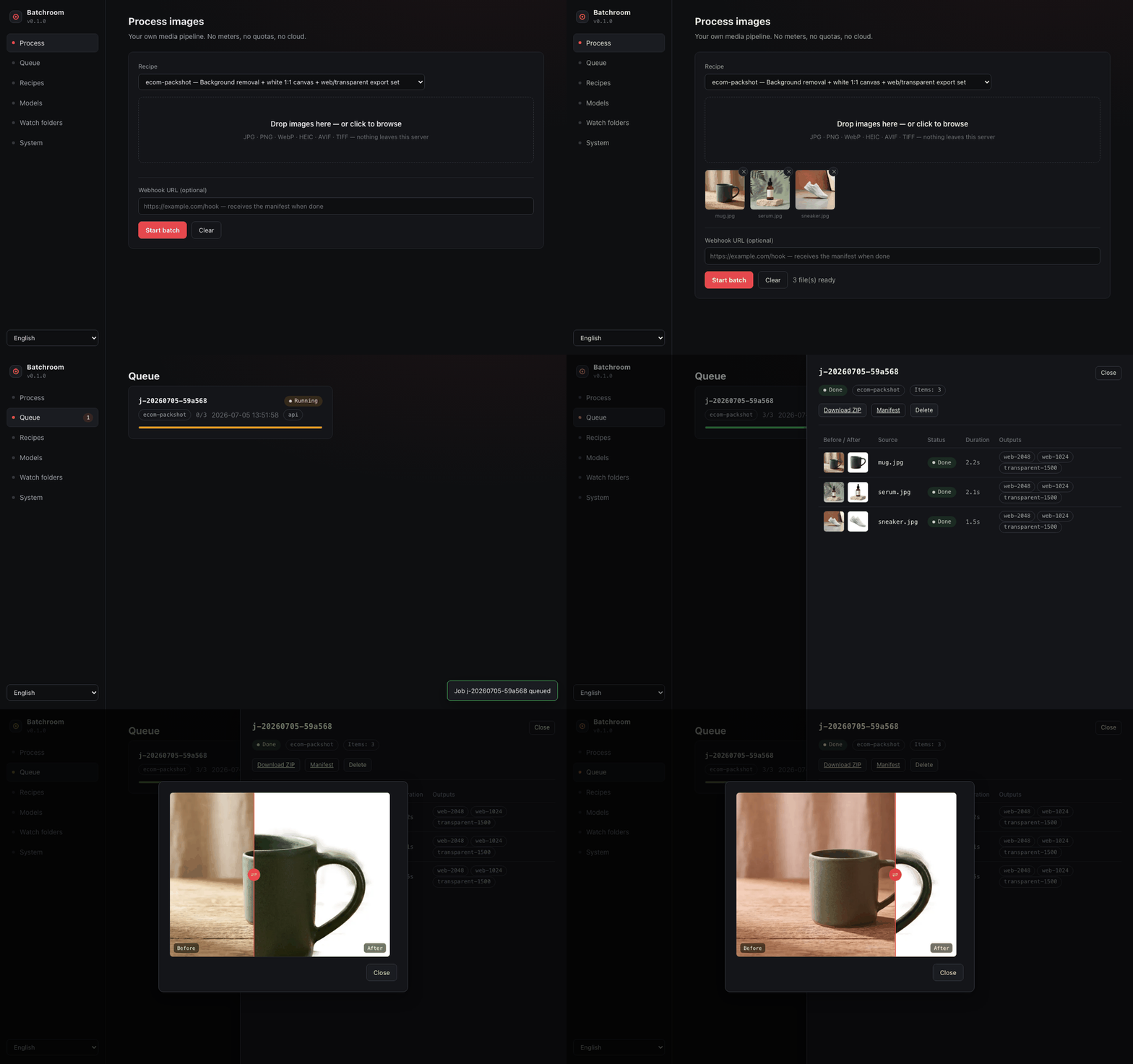
Drop 500 product photos into a folder. Batchroom removes the backgrounds, sets them on clean white canvases, exports every marketplace size (Amazon, Etsy, Shopify, Trendyol, Instagram — or every Steam capsule), names the files, writes a machine-readable manifest — on your hardware, with no per-image fees, no upload queues, and no image ever leaving your network.
It is to Photoroom/remove.bg what Stirling-PDF is to Acrobat: the same day-to-day work, self-hosted and unmetered.
Why people switch
| Cloud tools (Photoroom, remove.bg) | Batchroom | |
|---|---|---|
| Pricing | $0.02–0.10 per image, subscription tiers | Free, unlimited (MIT core) |
| Your images | Uploaded to their cloud | Never leave your server |
| Batch of 500 | Rate limits, credit anxiety | One drag & drop (or one folder drop) |
| Marketplace sizes | Manual, per-platform | One recipe → every size, named and sorted |
| API | Metered | Unmetered REST + webhooks |
| Works offline / air-gapped | No | Yes (after one-time model download) |
vs. other self-hosted tools: withoutBG does one operation (background removal) — Batchroom is the multi-step production line around it. IOPaint is an interactive single-image editor — complementary, not competing. Upscayl is a desktop upscaler with no server/API/batch story. ComfyUI can do anything if you build the graph and babysit the Python env — Batchroom is docker run and a recipe.
Quick start
docker run -d --name batchroom -p 5151:5151 -v batchroom-data:/data ghcr.io/ekinarca/batchroom:latest
Open http://localhost:5151 — drag images in, pick a recipe, download the ZIP.
docker compose (with watch folders)
services:
  batchroom:
    image: ghcr.io/ekinarca/batchroom:latest
    restart: unless-stopped
    ports: ["5151:5151"]
    volumes:
      - batchroom-data:/data
      - ./watch:/watch
      - ./output:/output
volumes:
  batchroom-data:
pip (bare metal, Python ≥ 3.11)
pip install batchroom
batchroom serve                       # UI + API on :5151
batchroom run ecom-packshot ./photos -o ./out    # or fully headless
AI models are not baked into the image. The first run that needs one downloads it once (SHA-256 verified) into /data/models — pick and pre-pull from the Models page or batchroom models pull isnet-general.
Recipes
A recipe is a YAML pipeline. Steps run top-to-bottom on every image; nothing is re-encoded until the final write.
# recipes/etsy-packshot.yaml
name: etsy-packshot
description: Background off, white canvas, Etsy + Instagram set
steps:
  - op: remove-background
    model: auto              # isnet-general by default
    alpha_matting: true      # guided-filter edge refinement
  - op: composite
    background: "#FFFFFF"
    padding: 8%
    aspect: "1:1"
  - op: preset-pack
    presets:
      - { name: etsy-primary,   size: 2000x2000, format: jpg, quality: 90 }
      - { name: etsy-thumb,     size: 570x456,   format: jpg }
      - { name: instagram-feed, size: 1080x1080, format: jpg }
  - op: rename
    pattern: "{original}-{preset}"
output: { structure: per-preset-folder, manifest: true }
Ships with three curated recipes:
ecom-packshot— background removal → white 1:1 canvas → web + transparent exportsmarketplace-pack— one photo → Amazon 2000², Etsy 2000×1500, Shopify 2048², Trendyol 1200×1800, Instagram 1080²steam-capsule-pack— one key art → every Steam capsule (main 1232×706, header 920×430, small 462×174, vertical 748×896, library 600×900, hero 3840×1240)
Ops available today: remove-background, upscale (2×/4×, Real-ESRGAN or Lanczos), resize (contain/pad/cover/stretch), trim, composite, convert (JPG/PNG/WebP/AVIF/HEIC/TIFF), preset-pack, rename, strip-metadata (EXIF privacy). Full parameter reference: docs/RECIPES.md.
Write your own in the built-in editor (with validation) or drop YAML files into /data/recipes — user recipes override built-ins by name.
Watch folders
The NAS workflow. Configure /data/watch.yaml:
watch:
  - folder: /watch/products
    recipe: marketplace-pack
    output: /output/products
Files dropped into the folder are picked up only after they finish copying (size-stability check — safe on SMB/NFS, which is why Batchroom polls instead of using inotify), processed, then moved to done/ or failed/ beside the folder. Outputs + manifest.json land in the output directory. Half-copied files, our own outputs and hidden files are never ingested.
REST API
Everything the UI does is plain HTTP (docs at /api/docs):
# async batch: upload files
curl -F recipe=ecom-packshot -F files=@a.jpg -F files=@b.png \
     -F webhook_url=https://example.com/hook \
     http://localhost:5151/api/jobs
# → {"id":"j-20260705-1a2b3c", "status":"queued", ...}

curl http://localhost:5151/api/jobs/j-20260705-1a2b3c      # progress + per-item results
curl -O http://localhost:5151/api/jobs/j-20260705-1a2b3c/archive   # everything as ZIP

# or process files already on the server (NAS mounts, CI):
curl -H 'Content-Type: application/json' -d '{
  "recipe": "steam-capsule-pack",
  "paths": ["/assets/keyart.png"],
  "output_dir": "/assets/steam"
}' http://localhost:5151/api/jobs
On completion Batchroom POSTs the manifest to your webhook_url (3 retries, backoff). Every batch writes manifest.json — outputs with sizes, dimensions and SHA-256 per file — so integrations never scrape directories. Originals are never modified; interrupted batches resume where they stopped after a restart.
Performance (honest numbers)
Measured on an Apple M-series CPU (32 cores, CPU inference only — no GPU required). Smaller CPUs scale roughly linearly; a typical 8-core server is ~3-4× slower than these numbers.
| Operation | Model | Measured |
|---|---|---|
| Background removal, 1080p | isnet-general (default) |
0.31 s/image |
| Background removal, 1080p | u2netp (fast/small) |
0.06 s/image |
| Background removal, 1080p | silueta (43 MB) |
0.12 s/image |
| Background removal, 1080p | birefnet-general-lite (best edges) |
2.3 s/image |
| Resize + convert | libjpeg/libwebp | ~0.01 s/image |
| Upscale 4× (512²→2048²) | realesrgan-x4 |
~10 s/image |
Model rows are pure inference time. End-to-end (decode → inference → PNG encode, 4 parallel workers) the same machine sustains ~7,800 images/hour of 1080p background removal — measured by scripts/acceptance_test.py, which re-verifies every claim in this README against a live server.
Upscaling on CPU is slow — that's physics, not a bug. The queue is built for it: submit, walk away, get a webhook.
AI models & licenses
Only permissively-licensed models ship in the catalog — verified per weight file, pinned by SHA-256, license shown in the UI before download. Popular models with non-commercial weights (e.g. BRIA RMBG) are deliberately not included and PRs adding them are declined (CONTRIBUTING.md).
| Model | Task | License | Size |
|---|---|---|---|
isnet-general (default) |
background removal | Apache-2.0 | 170 MB |
u2net |
background removal | Apache-2.0 | 168 MB |
u2netp |
background removal | Apache-2.0 | 4.4 MB |
silueta |
background removal | MIT | 42 MB |
birefnet-general-lite |
background removal | MIT | 214 MB |
realesrgan-x4 |
4× upscale | BSD-3-Clause | 64 MB |
Provenance, hashes and the reproducible Real-ESRGAN ONNX conversion: docs/MODELS.md.
Web UI in 10 languages
English, Türkçe, Français, Italiano, 日本語, 中文, Español, العربية (full RTL), Polski, Русский — complete catalogs, enforced by CI. Dark, keyboard-friendly, drag-and-drop, live queue via SSE, before/after compare slider.
Security model
Designed for the classic self-hosted trust model: bind to localhost or your LAN behind your reverse proxy. Highlights:
- Optional API key (
BATCHROOM_API_KEY) for UI + API;/api/healthstays open for container healthchecks. - Output/thumbnail serving is path-traversal-safe; uploads are size-capped and name-sanitized.
- EXIF is dropped by default on outputs (opt back in with
keep_metadata). - Models verify against pinned SHA-256 — a tampered mirror can't swap weights.
- No telemetry. Nothing phones home. Full notes: SECURITY.md.
Configuration
| Env var | Default | Meaning |
|---|---|---|
BATCHROOM_DATA_DIR |
./data (/data in Docker) |
state: models, queue DB, jobs, recipes |
BATCHROOM_HOST / BATCHROOM_PORT |
127.0.0.1 / 5151 (0.0.0.0 in Docker) |
bind address |
BATCHROOM_WORKERS |
min(4, cores/2) |
parallel image workers |
BATCHROOM_API_KEY |
unset | require a key for UI/API |
BATCHROOM_MAX_UPLOAD_MB |
512 |
per-file upload cap |
BATCHROOM_WATCH |
1 |
enable watch folders |
BATCHROOM_ONNX_THREADS |
auto | threads per inference |
BATCHROOM_SMTP_URL |
unset | Pro: smtp://user:pass@host:587?from=addr for completion emails |
BATCHROOM_NOTIFY_EMAIL |
unset | Pro: fallback notification recipient |
FAQ
Does it need a GPU? No. Everything runs on CPU (see the numbers above). GPU support is on the roadmap, not required.
Video? No — and not soon. Batchroom stays focused on doing images extremely well (the Stirling-PDF lesson: own one category).
Generative fill / inpainting? Out of scope for the core. A bring-your-own-key generative step is under consideration for v2 — the self-hosted pipeline stays local-first.
Where do my files go? data/jobs/<job-id>/out/ for uploads, your configured output for watch/path jobs. Deleting a job from the UI removes only files Batchroom created.
Can I run it on a Raspberry Pi / ARM NAS? Yes — the image is amd64 + arm64. Use u2netp or silueta on small boards.
Contributing & development
git clone https://github.com/ekinarca/batchroom && cd batchroom
python3.12 -m venv .venv && .venv/bin/pip install -e ".[dev]"
.venv/bin/pytest                 # 151 tests incl. golden-image regression suite
.venv/bin/batchroom serve
PRs welcome — recipes and marketplace preset updates especially (sizes drift; that curation is the product). See CONTRIBUTING.md and docs/ARCHITECTURE.md.
Pro (for teams)
The core above is the full product for individuals — MIT, unmetered, forever. Batchroom Pro (€24/mo or €240/yr per server — buy here) adds what companies ask for: team accounts with roles and per-user API keys, priority queueing, email notifications, priority support. Licenses are offline Ed25519-signed keys — no phone-home, air-gap friendly, and an expired subscription never locks anyone out of their data. See docs/PRO.md.
License
MIT for the entire core. The Pro module (src/batchroom/pro/) is source-available under LICENSE-PRO; its features activate only with a license key, and no core functionality ever depends on it.
1 maintainer

Metadata
1 maintainer
Release files for batchroom 0.1.0
For a detailed explanation of source distributions (sdists) and built distributions (wheels), please see the package formats documentation.
Source distribution (sdist)
| File | Size | Uploaded | |
|---|---|---|---|
| batchroom-0.1.0.tar.gz | 136.0 kB | Details |
Built distribution (wheel)
| File | Interpreter | ABI | Platform | Reset |
|---|---|---|---|---|
| batchroom-0.1.0-py3-none-any.whl | Python 3 | none | any | Details |
Total release size: 272.4 kB
Release files / batchroom-0.1.0.tar.gz
| Download URL | batchroom-0.1.0.tar.gz |
|---|---|
| Size | 136.0 kB |
| Tags | Source |
|
SHA-256 checksum How to use checksums |
dafbaaaa73360801dc2b152440de77fda48e9bcd1d5cf514c0e77b59ac699c68
|
|
BLAKE2b-256 checksum How to use checksums |
ddb16ff4a13665de4418aa3a20ac22c4f1ffb7d04114464d742cc6854a529217
|
| Upload date | |
|
Uploaded using Trusted Publishing? What is trusted publishing? |
No |
| Uploaded via |
twine/6.2.0 CPython/3.12.13
|
Release files / batchroom-0.1.0-py3-none-any.whl
| Download URL | batchroom-0.1.0-py3-none-any.whl |
|---|---|
| Size | 136.4 kB |
| Tags | Python 3 |
|
SHA-256 checksum How to use checksums |
17a79df2493992e07f79edbd536e0a4a429bb765e56fb7a7bd4ec5306c8456e2
|
|
BLAKE2b-256 checksum How to use checksums |
faaf5143b32f491cf64f4f9d59ad217548069d47b53b9f61c7e21a5c50a73024
|
| Upload date | |
|
Uploaded using Trusted Publishing? What is trusted publishing? |
No |
| Uploaded via |
twine/6.2.0 CPython/3.12.13
|













