
BatchWizard: Manage OpenAI batch processing jobs with ease
Verified details
These details have been verified by PyPIProject links
GitHub Statistics
Maintainers

Project description
BatchWizard
BatchWizard is a powerful CLI tool for managing OpenAI batch processing jobs with ease. It provides functionalities to upload files, create batch jobs, check their status, and download the results. The tool uses asynchronous processing to efficiently handle multiple jobs concurrently.
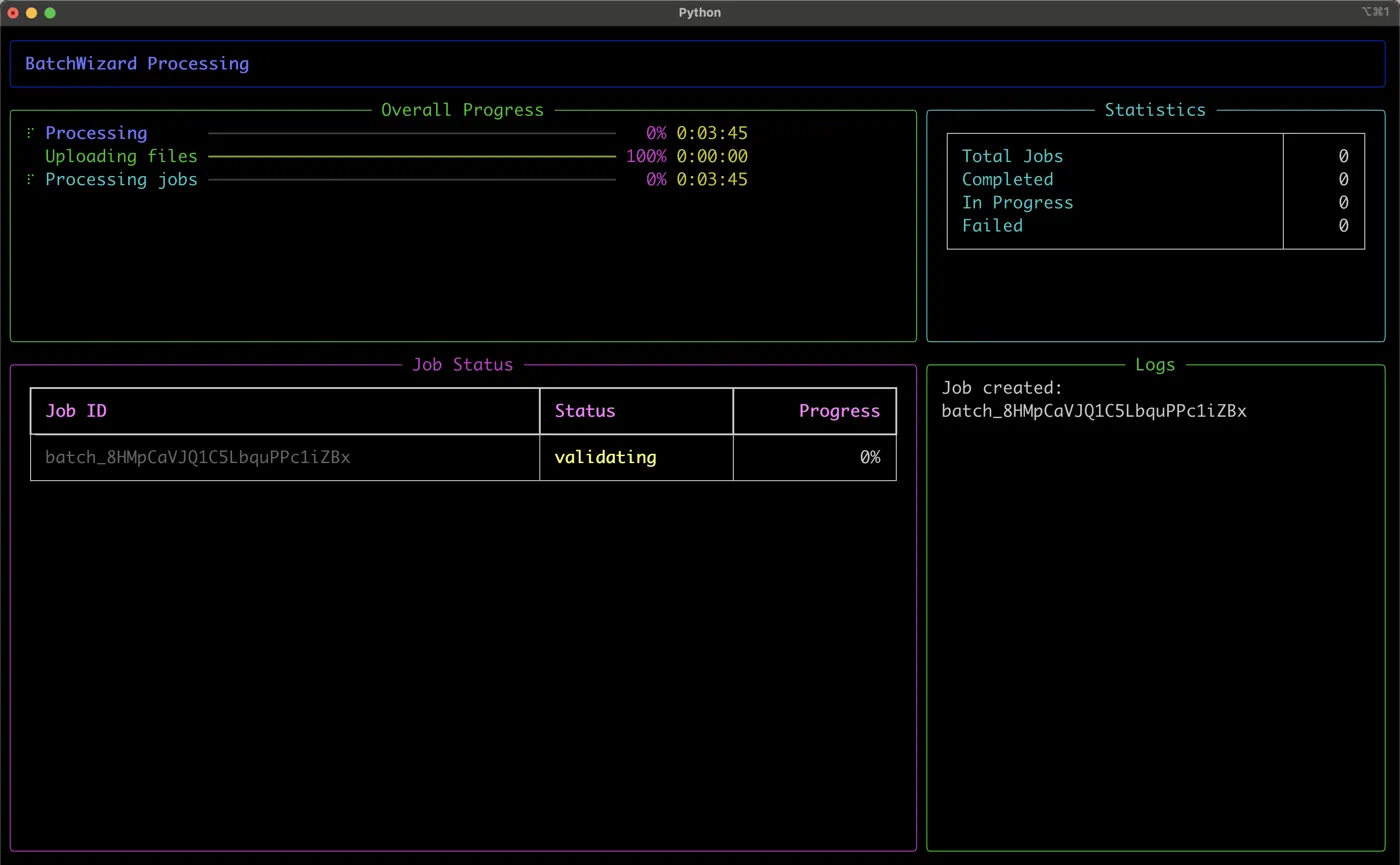
Table of Contents
Installation
You can install BatchWizard using pipx for an isolated environment or directly via pip.
Using pipx (recommended)
pipx install batchwizard
Using pip
pip install batchwizard
Ensure you have pipx or pip installed on your system. For pipx, you can follow the installation instructions here.
Usage
BatchWizard provides a command-line interface (CLI) for managing batch jobs. Here are some example commands:
Process Batch Jobs
To process input files or directories:
batchwizard process <input_paths>... [--output-directory OUTPUT_DIR] [--max-concurrent-jobs NUM] [--check-interval SECONDS]
You can provide multiple input paths, which can be individual JSONL files or directories containing JSONL files.
Example with Sample Input
Let's say you have a file named batchinput.jsonl with the following content:
{"custom_id": "request-1", "method": "POST", "url": "/v1/chat/completions", "body": {"model": "gpt-4o-mini", "messages": [{"role": "system", "content": "You are a helpful assistant."},{"role": "user", "content": "Hello world!"}],"max_tokens": 1000}}
{"custom_id": "request-2", "method": "POST", "url": "/v1/chat/completions", "body": {"model": "gpt-4o-mini", "messages": [{"role": "system", "content": "You are an unhelpful assistant."},{"role": "user", "content": "Hello world!"}],"max_tokens": 1000}}
To process this file using BatchWizard:
- First, ensure your OpenAI API key is set:
batchwizard configure --set-key YOUR_API_KEY
- Then, run the process command:
batchwizard process /path/to/batchinput.jsonl --output-directory /path/to/output
This command will:- Upload the
batchinput.jsonlfile to OpenAI - Create a batch job
- Monitor the job status
- Download the results to the specified output directory when complete
- Upload the
You can also process multiple files or directories:
batchwizard process /path/to/file1.jsonl /path/to/directory_with_jsonl_files /path/to/file2.jsonl
Submit Without Blocking (fire and forget)
process blocks until every batch completes — which can take up to 24 hours. To submit and get your terminal back:
batchwizard submit /path/to/inputs/ # or: batchwizard process ... --submit-only
Submitted jobs are recorded in a local manifest (SQLite, in the BatchWizard config directory). Later — even after a reboot — reattach with:
batchwizard watch [--output-directory OUTPUT_DIR]
watch picks up every pending job from the manifest, polls until completion, and downloads the results.
Check Tracked Jobs
batchwizard status [--all]
Shows pending jobs from the local manifest (--all includes finished ones), with any failure reasons.
Failure Reasons and Error Files
When a batch fails, BatchWizard surfaces the provider's actual error (e.g. insufficient_funds, invalid_request with the offending line). When individual requests inside a batch fail, the per-request error file is downloaded alongside the results as <batch_id>_errors.jsonl.
Batch Endpoints
By default requests go to /v1/chat/completions. Use --endpoint on process/submit for other batch-capable endpoints such as /v1/responses or /v1/embeddings.
List Recent Jobs
To list recent batch jobs from the provider:
batchwizard list-jobs [--limit NUM]
Cancel a Job
To cancel a specific batch job:
batchwizard cancel <job_id>
Download Job Results
To download results for a completed batch job:
batchwizard download <job_id> [--output-directory OUTPUT_DIR]
This downloads the results file and, if any requests failed, the per-request error file.
Configuration
Setting up the OpenAI API Key
To set the OpenAI API key:
batchwizard configure --set-key YOUR_API_KEY
Show Current Configuration
To show the current configuration:
batchwizard configure --show
Reset Configuration
To reset the configuration to default values:
batchwizard configure --reset
Commands
BatchWizard supports the following commands:
process: Submit batch jobs and wait for completion (add--submit-onlyto return immediately).submit: Submit batch jobs and exit; jobs are tracked in the local manifest.watch: Reattach to pending jobs, poll, and download results.status: Show jobs tracked in the local manifest.configure: Manage BatchWizard configuration.list-jobs: List recent batch jobs from the provider.cancel: Cancel a specific batch job.download: Download results (and error file) for a batch job.
For detailed information on each command, use the --help option:
batchwizard <command> --help
Features
- Flexible Input: Process individual JSONL files or entire directories containing JSONL files.
- Asynchronous Processing: Efficiently handle multiple batch jobs concurrently.
- Rich UI: Display progress and job status using a rich, interactive interface.
- Flexible Configuration: Easily manage API keys and other settings.
- Job Management: List, cancel, and download results for batch jobs.
- Error Handling: Robust error handling and informative error messages.
Contributing
We welcome contributions to BatchWizard! To contribute, follow these steps:
- Fork the repository.
- Create a new branch:
git checkout -b feature/your-feature-name. - Make your changes and commit them:
git commit -m 'Add some feature'. - Push to the branch:
git push origin feature/your-feature-name. - Open a pull request.
Running Tests
To run tests, use pytest:
uv run pytest tests/
Ensure your code passes all tests and meets the coding standards before opening a pull request.
License
This project is licensed under the MIT License. See the LICENSE file for details.
Contact
For any questions or feedback, feel free to open an issue on the GitHub repository.
Project details
Verified details
These details have been verified by PyPIProject links
GitHub Statistics
Maintainers


Download files
Download the file for your platform. If you're not sure which to choose, learn more about installing packages.
Source Distribution
Built Distribution
Filter files by name, interpreter, ABI, and platform.
If you're not sure about the file name format, learn more about wheel file names.
Copy a direct link to the current filters
File details
Details for the file batchwizard-0.4.0.tar.gz.
File metadata
- Download URL: batchwizard-0.4.0.tar.gz
- Upload date:
- Size: 46.8 kB
- Tags: Source
- Uploaded using Trusted Publishing? Yes
- Uploaded via: twine/6.1.0 CPython/3.13.12
File hashes
| Algorithm | Hash digest | |
|---|---|---|
| SHA256 |
a1113f16d2258f409cff0de3cb6e5bcaf14796d9a5f2e3a292f7a447efe2073c
|
|
| MD5 |
d7e7b854d9a7cd96b39abc09d1ac70b8
|
|
| BLAKE2b-256 |
42244bc37c28e00444fdaea7a951c07aab7ef5a935ee6f68e1188f27b862261b
|
Provenance
The following attestation bundles were made for batchwizard-0.4.0.tar.gz:
Publisher:
publish.yml on cmakafui/batchwizard
-
Statement:
-
Statement type:
https://in-toto.io/Statement/v1 -
Predicate type:
https://docs.pypi.org/attestations/publish/v1 -
Subject name:
batchwizard-0.4.0.tar.gz -
Subject digest:
a1113f16d2258f409cff0de3cb6e5bcaf14796d9a5f2e3a292f7a447efe2073c - Sigstore transparency entry: 2193991064
- Sigstore integration time:
-
Permalink:
cmakafui/batchwizard@2ea9c2bd0079dc485abc194386c4ebbe2a52e95f -
Branch / Tag:
refs/tags/v0.4.0 - Owner: https://github.com/cmakafui
-
Access:
public
-
Token Issuer:
https://token.actions.githubusercontent.com -
Runner Environment:
github-hosted -
Publication workflow:
publish.yml@2ea9c2bd0079dc485abc194386c4ebbe2a52e95f -
Trigger Event:
release
-
Statement type:
File details
Details for the file batchwizard-0.4.0-py3-none-any.whl.
File metadata
- Download URL: batchwizard-0.4.0-py3-none-any.whl
- Upload date:
- Size: 17.6 kB
- Tags: Python 3
- Uploaded using Trusted Publishing? Yes
- Uploaded via: twine/6.1.0 CPython/3.13.12
File hashes
| Algorithm | Hash digest | |
|---|---|---|
| SHA256 |
b5e8c8f39f576c566f8b4d1f75537f1df4ca132c7a085ed84c834ff854ee3e8d
|
|
| MD5 |
0e51826274875c06b8347ae39945859f
|
|
| BLAKE2b-256 |
675c0c1870c3bc342b621ed442176d2021c5e74e22d7a85176fd947698ada985
|
Provenance
The following attestation bundles were made for batchwizard-0.4.0-py3-none-any.whl:
Publisher:
publish.yml on cmakafui/batchwizard
-
Statement:
-
Statement type:
https://in-toto.io/Statement/v1 -
Predicate type:
https://docs.pypi.org/attestations/publish/v1 -
Subject name:
batchwizard-0.4.0-py3-none-any.whl -
Subject digest:
b5e8c8f39f576c566f8b4d1f75537f1df4ca132c7a085ed84c834ff854ee3e8d - Sigstore transparency entry: 2193991077
- Sigstore integration time:
-
Permalink:
cmakafui/batchwizard@2ea9c2bd0079dc485abc194386c4ebbe2a52e95f -
Branch / Tag:
refs/tags/v0.4.0 - Owner: https://github.com/cmakafui
-
Access:
public
-
Token Issuer:
https://token.actions.githubusercontent.com -
Runner Environment:
github-hosted -
Publication workflow:
publish.yml@2ea9c2bd0079dc485abc194386c4ebbe2a52e95f -
Trigger Event:
release
-
Statement type:






