




One place for the credentials your agents need. Baton is a local auth broker for AI agents and MCP tools. It runs commands and API requests with the right credentials, then redacts known secrets from what comes back.
How it works
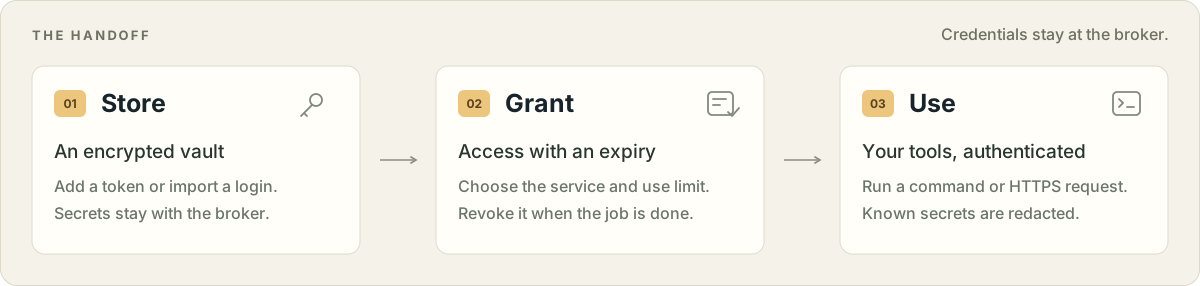
A credential is a saved token, password, or key. A context bundles the credentials for a job. A lease gives an agent temporary access, limited by service, expiry, and use count.
Try it
Requires Python 3.10+ and uv.
uv tool install baton-auth

baton add github                    # prompts privately for your token
baton run github -- gh api /user     # use it through your existing CLI
baton http https://api.github.com/user

baton setup --auto                  # connect detected MCP clients
Already signed in? baton import imports supported local logins, including GitHub, AWS, and npm. Commands run in your working directory with a temporary HOME containing the permitted CLI settings.
Give an agent a short-lived pass
lease=$(baton lease new github --ttl 600 --uses 20)
baton run "$lease" -- gh api /user
Revoke access with baton lease revoke LEASE_ID. See the user guide for contexts, service limits, and credential refresh.
Connect your client
baton setup --auto detects Cursor, Claude Desktop, Windsurf, Zed, VS Code, Muse Code, and Hermes Agent. You can also choose a client:
baton setup --client codex
baton setup --client claude-code
baton setup --client cursor
For another MCP client, baton setup prints portable config JSON. Agents with command access can use baton run and baton http directly. Setup details →
Hand work to another agent
Pair agents on different machines with one broker. Each keeps its own private key; credentials stay at the broker. An agent accepts a grant, uses the permitted HTTPS APIs, and can pass narrower access plus a task summary to another paired agent.
Set up remote pairing and handoffs →
Remote access is for HTTPS APIs. Shell commands and credential administration stay local.
Under the hood
| Purpose | Construction |
|---|---|
| Encrypted credentials | AES-256-GCM-SIV, with a ChaCha20-Poly1305 fallback |
| Key derivation, authentication, and audit chain | BLAKE3 |
| Passphrase-derived vault keys | Argon2id |
| AWS request signing | HMAC-SHA-256 / Signature Version 4 |
The vault stays on the broker machine. A temporary HOME separates CLI settings; it is not a full operating-system sandbox. Redaction covers known values and token patterns, not every possible encoding. Security and limits →
User guide · Security and limits · Remote guide · Releases
Package: baton-auth · Command: baton (or baton-auth) · Python: baton_auth
1 maintainer

Metadata
1 maintainer
Release files for baton-auth 0.1.8
For a detailed explanation of source distributions (sdists) and built distributions (wheels), please see the package formats documentation.
Source distribution (sdist)
| File | Size | Uploaded | Provenance | Actions |
|---|---|---|---|---|
| baton_auth-0.1.8.tar.gz | 195.0 kB | Without provenance | Details for baton_auth-0.1.8.tar.gz |
Built distribution (wheel)
| File | Interpreter | ABI | Platform | Actions Reset |
|---|---|---|---|---|
| baton_auth-0.1.8-py3-none-any.whl | Python 3 | none | any | Details for baton_auth-0.1.8-py3-none-any.whl |
Total release size: 265.3 kB
Release files / baton_auth-0.1.8.tar.gz
| Download URL | baton_auth-0.1.8.tar.gz |
|---|---|
| Size | 195.0 kB |
| Tags | Source |
|
SHA-256 checksum How to use checksums |
1405c8cf5b0e86b042bdefd79fe8e02e16e1562ebcb1c39423af34d5b173442a
|
|
BLAKE2b-256 checksum How to use checksums |
4273cf042243848edfa54c892b7c46fa5f28c2c745806426ac4f765a448d395f
|
| Upload date | |
|
Uploaded using Trusted Publishing? What is trusted publishing? |
Yes |
| Uploaded via |
uv/0.13.5 {"installer":{"name":"uv","version":"0.13.5","subcommand":["publish"]},"python":null,"implementation":{"name":null,"version":null},"distro":{"name":"Ubuntu","version":"26.04","id":"resolute","libc":null},"system":{"name":null,"release":null},"cpu":null,"openssl_version":null,"setuptools_version":null,"rustc_version":null,"ci":true}
|
Release files / baton_auth-0.1.8-py3-none-any.whl
| Download URL | baton_auth-0.1.8-py3-none-any.whl |
|---|---|
| Size | 70.3 kB |
| Tags | Python 3 |
|
SHA-256 checksum How to use checksums |
787aac3e97130e6bd4769acad0efd1244b73169d01303d3c41473b2265e42a43
|
|
BLAKE2b-256 checksum How to use checksums |
30df7fdf6de93dbe7127bae1650bb129675dd2e72e256054bd41f9f65152d159
|
| Upload date | |
|
Uploaded using Trusted Publishing? What is trusted publishing? |
Yes |
| Uploaded via |
uv/0.13.5 {"installer":{"name":"uv","version":"0.13.5","subcommand":["publish"]},"python":null,"implementation":{"name":null,"version":null},"distro":{"name":"Ubuntu","version":"26.04","id":"resolute","libc":null},"system":{"name":null,"release":null},"cpu":null,"openssl_version":null,"setuptools_version":null,"rustc_version":null,"ci":true}
|
Security for baton-auth 0.1.8
Provenance
Provenance describes where a file came from. On PyPI, provenance is shared via attestations, which provide a verifiable record of the build or publishing details. View details, limitations and caveats.
No provenance found
None of the files in this release were uploaded with provenance metadata.
A note on package security
PyPI is a repository for distributing packages, not a service for auditing them. While third-party security researchers and our staff do their best to detect and remove malicious packages, PyPI cannot guarantee the quality, security or suitability of any given package.
To learn more about protecting yourself from malicious actors, visit our package security documentation.














