
Display battle maps for TTRPGs on a secondary tv
Verified details
These details have been verified by PyPIProject links
GitHub Statistics
Maintainers

Project description




Battle Map TV
Display battle maps for TTRPGs on a tv or monitor that lies flat horizontally on your table.
No more features than needed: just show an image the way you want. Optionally add a grid, initiative order and area of effect shapes.
For GM's with little time or who improvise their sessions: much easier to use in-session than a full blown VTT.
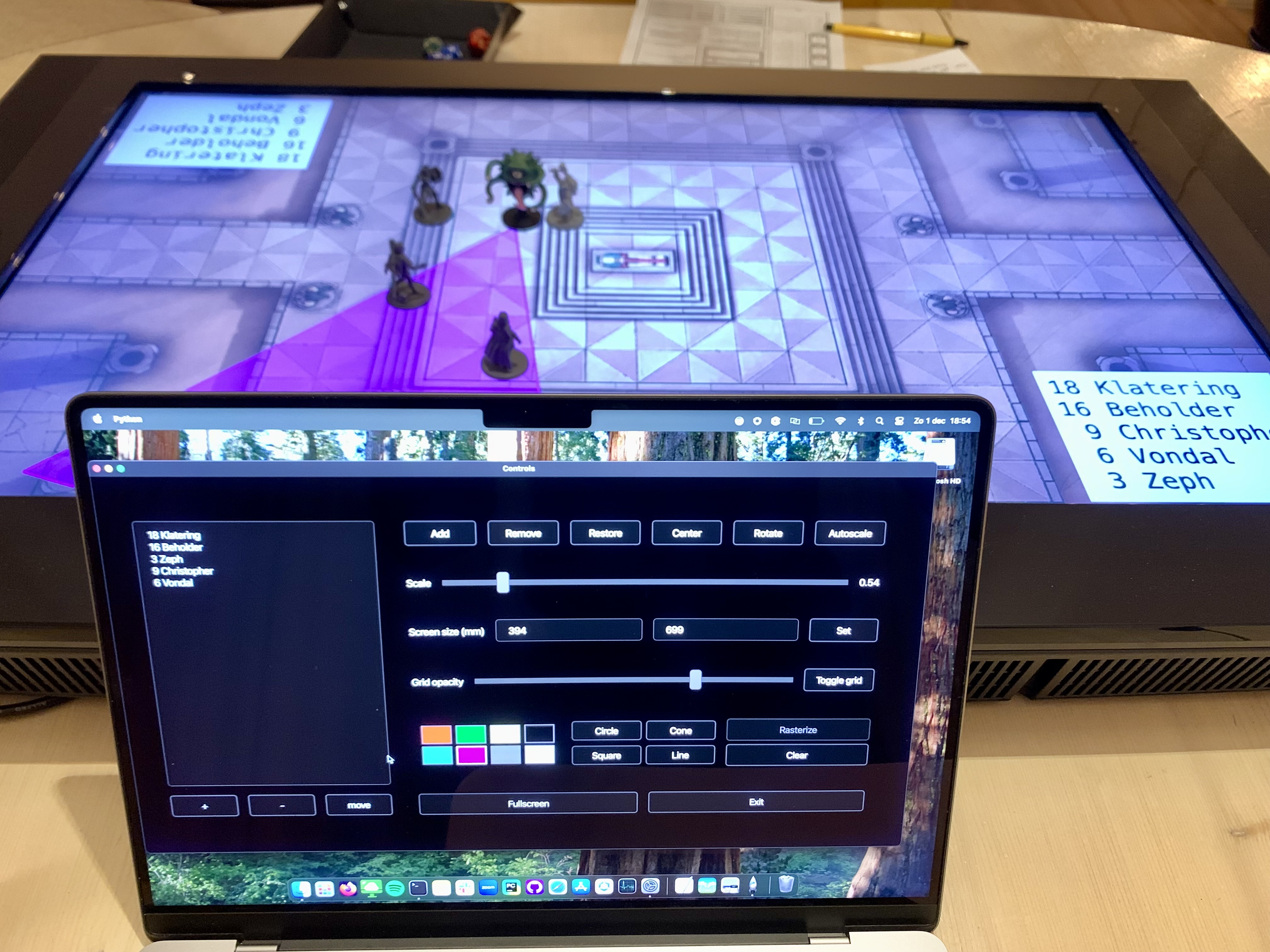
My GM laptop that also runs controls and a TV showing the map. Add minis, tokens or gummibears yourself.
Features
- Works on Linux, macOS and Windows by using Python.
- Doesn't use a browser.
- Free and open source
- Works offline
- Simple UI
- Two windows:
- one on the TV with your map and grid on it
- one on your GM laptop with controls
- Import local image files to display on the tv.
- Scale, pan, center and rotate the image.
- Overlay a grid that you can scale to 1 inch.
- Automatically detect the lines in an image and scale it to the grid overlay.
- Save settings so images load like you had them last time.
- Simple initiative tracker
- Overlay area of effects
- snap to grid
- rasterize to grid
Installation
There are two options: use a fully ready executable or use Python.
Windows executable
If you are on Windows, you can get an executable from the latest release. Look for 'battle-map-tv.exe' under 'Assets' on https://github.com/Conengmo/battle-map-tv/releases.
Using Python
- Open terminal or cmd.
- Check that you have Python installed by running the
python --versioncommand.- If you don't have Python, it's easy to install. See here: https://wiki.python.org/moin/BeginnersGuide/Download
- Optionally, use a virtual environment
- Install Battle Map TV with this command:
python -m pip install battle-map-tv - Then run it with:
python -m battle_map_tv
User guide
- Drag the TV window to your TV and make it fullscreen with the 'fullscreen' button.
- Use the 'add' button to load an image.
- You can drag the image to pan. Zoom with your mouse scroll wheel or use the slider in the controls window.
- Close the application with the 'exit' button.
Initiative tracker
In the controls window, you can add players and their initiative. The list will be sorted automatically. Just put a number and a name on each line, for example "1 barbarians" and "20 heroes".
The '+' and '-' buttons increase and decrease the font size.
The 'move' button moves the lists to different positions and rotations on the screen.
Area of effect
Click on one of the buttons for a shape like 'circle' or 'square'. Then click and drag anywhere in the TV window to create the shape in the size you want.
The default color for shapes is white, but you can also toggle another color with the color buttons.
You can delete a shape by right-clicking on it, or by using the 'Clear' button.
If the grid is enabled, points will automatically snap to the grid.
If you click 'rasterize', the edges of the shapes you make will fit the grid.
When creating a shape, hold 'shift' to freeze the size of the shape, but keep rotating.
Technical
- Uses PySide6 for the graphical user interface.
- Uses OpenCV to detect the grid on battle maps.
- Uses Hatch to build and release the package.
- Uses Nuitka to create executables.
Nuitka guide
Make sure you have a clean virtualenv with only the packages from requirements.txt.
First, install imageio to be able to convert the icon image. Then create a single executable.
This will require additional components that Nuitka will guide you through.
python -m pip install imageio

python -m nuitka battle_map_tv/__main__.py --enable-plugin=pyside6 --onefile `
--windows-console-mode=attach --windows-icon-from-ico=battle_map_tv/icon.png `
--include-data-files="battle_map_tv/icon.png=battle_map_tv/icon.png"
Project details
Verified details
These details have been verified by PyPIProject links
GitHub Statistics
Maintainers
Release history Release notifications | RSS feed


Download files
Download the file for your platform. If you're not sure which to choose, learn more about installing packages.
Source Distribution
Built Distribution
Filter files by name, interpreter, ABI, and platform.
If you're not sure about the file name format, learn more about wheel file names.
Copy a direct link to the current filters
File details
Details for the file battle_map_tv-0.7.1.tar.gz.
File metadata
- Download URL: battle_map_tv-0.7.1.tar.gz
- Upload date:
- Size: 31.1 kB
- Tags: Source
- Uploaded using Trusted Publishing? Yes
- Uploaded via: twine/6.1.0 CPython/3.12.8
File hashes
| Algorithm | Hash digest | |
|---|---|---|
| SHA256 |
39695dd2f75d1c8ca9bbfba4a6ee3853bee07fe996cc2e2d18c9bb4f3d88bf3c
|
|
| MD5 |
1fa484e5874160fbdc2c4968f02add74
|
|
| BLAKE2b-256 |
0aed1f33276907240caaff869505dae16965135fe83583c7a23b7e46ec729eda
|
Provenance
The following attestation bundles were made for battle_map_tv-0.7.1.tar.gz:
Publisher:
publish_to_pypi.yml on Conengmo/battle-map-tv
-
Statement:
-
Statement type:
https://in-toto.io/Statement/v1 -
Predicate type:
https://docs.pypi.org/attestations/publish/v1 -
Subject name:
battle_map_tv-0.7.1.tar.gz -
Subject digest:
39695dd2f75d1c8ca9bbfba4a6ee3853bee07fe996cc2e2d18c9bb4f3d88bf3c - Sigstore transparency entry: 169315160
- Sigstore integration time:
-
Permalink:
Conengmo/battle-map-tv@b607cb5562a6d3eb3265bd4eaae4d61f9065e2b9 -
Branch / Tag:
refs/tags/v0.7.1 - Owner: https://github.com/Conengmo
-
Access:
public
-
Token Issuer:
https://token.actions.githubusercontent.com -
Runner Environment:
github-hosted -
Publication workflow:
publish_to_pypi.yml@b607cb5562a6d3eb3265bd4eaae4d61f9065e2b9 -
Trigger Event:
release
-
Statement type:
File details
Details for the file battle_map_tv-0.7.1-py3-none-any.whl.
File metadata
- Download URL: battle_map_tv-0.7.1-py3-none-any.whl
- Upload date:
- Size: 35.2 kB
- Tags: Python 3
- Uploaded using Trusted Publishing? Yes
- Uploaded via: twine/6.1.0 CPython/3.12.8
File hashes
| Algorithm | Hash digest | |
|---|---|---|
| SHA256 |
64dfd5ea70c1b6826a74b667f256b24e490b03fbae11cc55069c102c63d261f8
|
|
| MD5 |
bca75e671e40391d4dd3768a872bf4a9
|
|
| BLAKE2b-256 |
2890b704c9d33c1e1c9db2601c7358f1413b5018d2ef4a73a00c44766508f05a
|
Provenance
The following attestation bundles were made for battle_map_tv-0.7.1-py3-none-any.whl:
Publisher:
publish_to_pypi.yml on Conengmo/battle-map-tv
-
Statement:
-
Statement type:
https://in-toto.io/Statement/v1 -
Predicate type:
https://docs.pypi.org/attestations/publish/v1 -
Subject name:
battle_map_tv-0.7.1-py3-none-any.whl -
Subject digest:
64dfd5ea70c1b6826a74b667f256b24e490b03fbae11cc55069c102c63d261f8 - Sigstore transparency entry: 169315164
- Sigstore integration time:
-
Permalink:
Conengmo/battle-map-tv@b607cb5562a6d3eb3265bd4eaae4d61f9065e2b9 -
Branch / Tag:
refs/tags/v0.7.1 - Owner: https://github.com/Conengmo
-
Access:
public
-
Token Issuer:
https://token.actions.githubusercontent.com -
Runner Environment:
github-hosted -
Publication workflow:
publish_to_pypi.yml@b607cb5562a6d3eb3265bd4eaae4d61f9065e2b9 -
Trigger Event:
release
-
Statement type:






