






BayesianCortex: Dynamic Agent Routing via Contextual Bayesian Bandits
What is BayesianCortex? 🧠
AI agents are built with rigid utility belts. When you ask them to do a task, they guess which tool or prompt to use based on static logic. They don't learn from their mistakes, and they easily fall apart when things fail silently. BayesianCortex changes that by introducing a dynamic learning loop and treats routing as a Contextual Multi-Armed Bandit using Thompson Sampling with exact conjugate updates.
It manages what AI architects call "The Golden Triad" (and sub-agents) of how an agent interacts with the world, adapting on the fly:
- 🛠️ Tools (The Hands): It learns which specific action (like a SQL database query vs. a web search API) successfully retrieves the data you need without throwing errors.
- 💡 Skills (The Mind): It tracks which specialized prompt or workflow gets the best results, letting the agent ditch underperforming instructions that cause hallucinations.
- 📚 Memory (The Records): It figures out exactly which document vault or retrieval strategy holds the true answer to a user's question, cutting down on token waste.
- 🤖 Sub-agents (The Assistants): It dynamically orchestrates and routes queries to the most capable sub-agent or expert model in a hierarchical supervisor architecture.
In short: It stops your agents from repeating the same mistakes, turning raw AI loops into self-optimizing systems that get smarter with every single run, and adapts in real time to failures, hallucinations, or shifting environment dynamics.
Stop burning tokens and install BayesianCortex today!
Works with OpenAI, Anthropic, Google Gemini, Cohere, FastMCP, and many more! First-party embedders are built-in for all major providers (Gemini, OpenAI, Anthropic/Voyage, Cohere, and local Sentence-Transformers/llama.cpp).
Why BayesianCortex? (The Value Proposition)
At the core of production-grade AI engineering is a fundamental architectural trade-off: should you use a Frontier LLM as a router, or should you use a Contextual Multi-Armed Bandit?
While adding a routing step (like embedding generation) might seem like extra overhead, the engineering and economic benefits of local contextual bandits are massive compared to alternative approaches.
Comparison: Three Ways to Route an Agent
| Routing Approach | How it Works | The Core Problem |
|---|---|---|
| 1. The Cloud LLM Router (Legacy) | Pass the user prompt, system descriptions, and schemas of all tools (e.g., 30+ tools) to Claude or GPT to select the candidate. | Slow and Comically Expensive. High "context tax" on every single turn. If a tool fails, it triggers a costly recursive "self-correction loop" burning frontier tokens. |
| 2. Semantic Vector Search (Naive) | Embed the user prompt and query a vector database for the candidate with the closest cosine similarity. | Blind to Real-World Performance. Measures only if a tool sounds right, not if it works. If a tool is a perfect semantic match but its API is down, it locks the agent into an infinite failure loop. |
| 3. BayesianCortex Router (Optimized) | Embed the user prompt, pass it as context ($x_t$) to a Thompson Sampling / UCB bandit math engine, and compute the candidate with the highest expected success rate. | Decouples routing from LLMs. Adapts dynamically using actual performance feedback, routing around failures instantly. |
Core Pillars of Value
1. Zero-Cost Local Embeddings
By leveraging lightweight, local embedding models (like a 100MB bge-small-en-v1.5 or all-MiniLM-L6-v2 via the local-ml extra package), developers can compute context vectors in under 5 milliseconds for $0 API cost.
The bandit doesn't need a multi-billion-parameter model to understand the deep philosophy of a prompt; it just needs the embedding model to be spatially consistent. As long as similar user requests map to the same neighborhood in vector space, the linear bandit math (LinUCB or LinTS) will cluster and map those neighborhoods to the tools/skills that actually succeed.
2. Eliminating the Multi-Turn "Retry Loop" Tax
When an agent fails in production, it usually costs a fortune due to recursive LLM self-correction loops:
- Turn 1: Call LLM to route to Tool A ($0.01) --> Tool A times out.
- Turn 2: Call LLM to diagnose error and try Tool B ($0.015).
- Turn 3: Call LLM to process Tool B ($0.01) --> Success.
- Total Cost: ~$0.035 for one successful execution.
With BayesianCortex, if Tool A fails, the environment returns a reward of 0. The bandit instantly mutates its internal covariance matrix for that context neighborhood. The next time a similar prompt comes in, it routes directly to Tool B before calling the Cloud LLM, bypassing the retry loop tax.
3. True Runtime Self-Healing
If a specialized prompt template (Skill) starts causing hallucinations because a foundational model updated its weights, or if a specific RAG index gets corrupted, developers usually have to monitor logs and manually redeploy code.
BayesianCortex provides automated, mathematical self-healing. It naturally shifts probability distributions away from underperforming assets based on live feedback data, optimizing itself in production without human intervention.
Executive Value Proposition Summary
- Massive Token & Cost Reduction: Replaces expensive cloud LLM routing calls with ultra-fast, zero-cost local embedding matrix multiplications.
- Deterministic Reliability: Stops agents from getting trapped in infinite error/retry loops by mathematically routing around failures, rate limits, and hallucinations in real time.
- Contextual Optimization: Unlike static vector search which only looks at semantic similarity, it maps context directly to proven execution success.
This turns your routing setup from a static heuristic into an indispensable, money-saving framework for production-grade agent architectures.
Architectural Overview
BayesianCortex is decoupled from your execution layer, acting as a lightweight interceptor/middleware:
                       [ User Prompt ]
                              │
                              ▼
                 [ Vector Index / Embedder ]
                              │ (Retrieve Context Key)
                              ▼
                  [ Bayesian Candidate Router ]
                   ├─ Thompson Sampling / UCB
                   ├─ Fallback Key Hashing
                   └─ Fetch (α, β) or (B_a, f_a)
                              │
            ┌────────────────┴────────────────┐
            ▼                                 ▼
     [ Selected Candidate A ]               [ Selected Candidate B ]
            │                                 │
            └────────────────┬────────────────┘
                             ▼
                     [ Execution Trace ]
                             │ (Success / Fail / Reward)
                             ▼
                 [ Decoupled Telemetry Hook ]
                             │ (Update parameters in DB)
                             ▼
                      [ Storage Cache ] (Redis, SQLite, In-Memory)
Installation
Install using uv or standard pip:
# Minimal core — in-memory routing only (numpy + scipy)
uv pip install bayesian-cortex

# With persistent SQLite storage
uv pip install "bayesian-cortex[sqlite]"

# With SQLite ANN vector search (sqlite-vec)
uv pip install "bayesian-cortex[sqlite-vec]"

# With Redis storage
uv pip install "bayesian-cortex[redis]"

# With MCP server support
uv pip install "bayesian-cortex[mcp]"

# With async Gemini / OpenAI embedders
uv pip install "bayesian-cortex[async-embeddings]"

# With local sentence-transformers embedder
uv pip install "bayesian-cortex[local-ml]"

# Everything at once
uv pip install "bayesian-cortex[all]"
Quick Start
Synchronous API
By supporting both Candidates and Skills, bayesian_cortex manages routing uncertainty under a single unified class:
from bayesian_cortex import BayesianRouter, __version__
from bayesian_cortex.embeddings import GeminiEmbedder

print(f"Using BayesianCortex version: {__version__}")

# 1. Initialize router using auto-configured SQLite backend
embedder = GeminiEmbedder(model_name="models/text-embedding-004")
router = BayesianRouter(
    storage_backend="sqlite",
    storage_path="bayes_cache.db",
    embedder=embedder,
    decay_factor=0.95
)

# Scenario A: Candidate Routing (deterministic, input-output bound)
chosen_candidate = router.route(
    context_key="Fetch user profile from PostgreSQL",
    candidates=["sql_tool", "vector_tool", "graphql_tool"]
)
print(f"Routed to candidate: {chosen_candidate}")

# Provide feedback (optionally set strict=True to raise exceptions if DB write fails)
router.feedback(
    context_key="Fetch user profile from PostgreSQL",
    candidate=chosen_candidate,
    success=True,
    strict=True
)

# Scenario B: Skill / Prompt Routing (heuristic, workflow-bound)
chosen_skill = router.route(
    context_key="Refactor this legacy asyncio network loop",
    candidates=["skills/async-expert", "skills/naive-coder", "skills/strict-defensive"]
)
print(f"Routed to skill prompt: {chosen_skill}")

# Provide feedback (e.g. if generated code compiles/passes unit tests)
router.feedback(
    context_key="Refactor this legacy asyncio network loop",
    candidate=chosen_skill,
    success=True
)

# Scenario C: RAG Routing (Memory: dynamic, context-dependent knowledge retrieval)
chosen_kb = router.route(
    context_key="What is our policy on parental leave rollover?",
    candidates=["rag/hr_handbook", "rag/benefits_v2_draft", "rag/general_faq"]
)
print(f"Routed to RAG index: {chosen_kb}")

# Retrieve text chunks from chosen_kb, run the LLM, and evaluate success:
from bayesian_cortex import evaluate_rag_success
retrieved_chunks = ["Parental leave rollover allows up to 5 days rollover..."]
generated_response = "Our policy allows you to roll over up to 5 days of parental leave."

success = evaluate_rag_success(
    response=generated_response,
    source_chunks=retrieved_chunks,
    faithfulness_threshold=0.5
)
router.feedback(
    context_key="What is our policy on parental leave rollover?",
    candidate=chosen_kb,
    success=success
)
Asynchronous API
For asynchronous, non-blocking workflows in web applications (FastAPI, FastMCP) or multi-agent environments:
import asyncio
from bayesian_cortex import AsyncBayesianRouter
from bayesian_cortex.embeddings import GeminiEmbedder

async def main():
    embedder = GeminiEmbedder(model_name="models/text-embedding-004")
    router = AsyncBayesianRouter(
        storage_backend="sqlite",
        storage_path="bayes_cache.db",
        embedder=embedder,
        decay_factor=0.95
    )

    # Async Route
    chosen_skill = await router.aroute(
        context_key="Refactor this legacy asyncio network loop",
        candidates=["skills/async-expert", "skills/naive-coder", "skills/strict-defensive"]
    )
    print(f"Routed to: {chosen_skill}")

    # Async Feedback
    await router.afeedback(
        context_key="Refactor this legacy asyncio network loop",
        candidate=chosen_skill,
        success=True
    )

    # Async RAG Route
    chosen_kb = await router.aroute(
        context_key="What is our policy on parental leave rollover?",
        candidates=["rag/hr_handbook", "rag/benefits_v2_draft", "rag/general_faq"]
    )
    print(f"Routed to: {chosen_kb}")

    # Async RAG Feedback (using citation check & token overlap)
    from bayesian_cortex import evaluate_rag_success
    success = evaluate_rag_success(
        response="Our policy allows 5 days rollover.",
        source_chunks=["Parental leave rollover allows up to 5 days rollover..."]
    )
    await router.afeedback(
        context_key="What is our policy on parental leave rollover?",
        candidate=chosen_kb,
        success=success
    )

asyncio.run(main())
🧪 Testing with the Interactive Demo
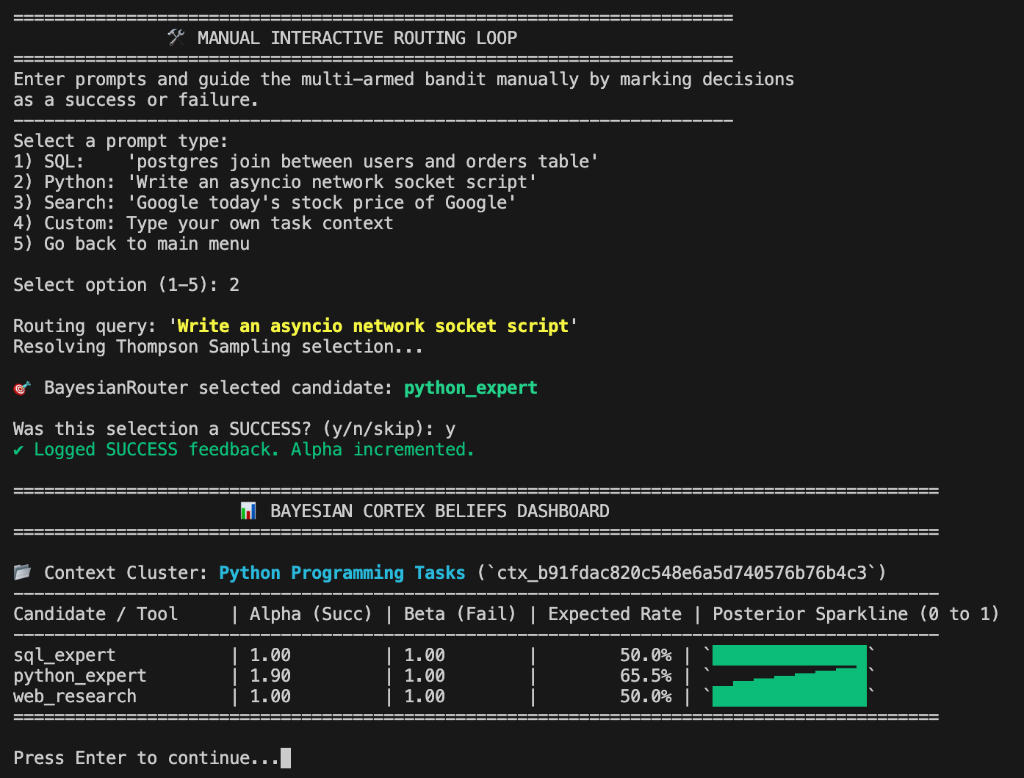
To witness Thompson Sampling adapt to drifting API failure rates in real time, run the built-in simulation script:
uv run python demo.py
This script initializes a local SQLite bandit database, generates simulated query clusters (e.g., coding tasks, web search queries), routes them, simulates execution, updates priors, and prints ASCII sparklines showing the learning process.
💻 Command-Line Interface (CLI)
BayesianCortex features a built-in CLI (bayesian-cortex) to query routing decisions, log feedback, monitor posterior beliefs with ASCII sparklines, and run the FastMCP server.
1. Start the FastMCP Server (For Claude/Cursor Integration)
Running the MCP server with the CLI makes integration with tools like Claude Code or Claude Desktop extremely straightforward, avoiding the need for absolute paths to Python files:
bayesian-cortex mcp --db-path mcp_bandit.db --candidates tool1,tool2
2. Route Context to Candidates
Run Thompson Sampling directly from your shell. Outputs the selected candidate and a signed cryptographic trace ID:
bayesian-cortex route --context "Optimize SQL query index" --candidates sql_expert,python_expert --db-path my_bandit.db
Output:
Selected Candidate: sql_expert
Trace ID: eyJjdHgiOiAiLi4uIiwgImNhbmRpZGF0ZSI6ICJzcWxfZXhwZXJ0In0=.signature
Add --json for structured script output:
bayesian-cortex route --context "Optimize SQL query index" --json
3. Log Outcome Feedback
Submit execution success or failure using the trace ID:
bayesian-cortex feedback --trace-id <trace_id> --success --db-path my_bandit.db
Or submit direct float rewards between 0.0 and 1.0:
bayesian-cortex feedback --trace-id <trace_id> --reward 0.85 --db-path my_bandit.db
4. Inspect Believed Success Rates
Display the current posterior parameter beliefs, expected success rates, and ASCII sparklines:
bayesian-cortex beliefs --db-path my_bandit.db
For a specific context string (resolving nearest clusters using embedders):
bayesian-cortex beliefs --context "SQL DB task" --db-path my_bandit.db
Output:
Candidate            | Alpha  | Beta   | Mean   | Distribution (Beta PDF)
-------------------------------------------------------------------------
sql_expert           | 12.0   | 2.0    | 85.7%  |       ▂▃▄▅▆▇█▇▆
python_expert        | 1.0    | 1.0    | 50.0%  |
5. Reset Beliefs
Clear database states entirely or reset parameters back to cold start:
# Reset everything
bayesian-cortex reset --db-path my_bandit.db

# Reset a specific candidate in all contexts
bayesian-cortex reset --candidate sql_expert --db-path my_bandit.db
The Core Math Engine
To prevent runtime latency, BayesianCortex avoids heavy Markov Chain Monte Carlo (MCMC) sampling (e.g., PyMC or Stan). Instead, it uses exact closed-form updates and supports two main mathematical modes: Context Clustering (Beta-Binomial) and Linear Contextual Bandits (LinTS / LinUCB).
1. Context Clustering Mode (Beta-Binomial Conjugate Pair)
Each candidate $i$ in a context cluster is modeled as a Beta distribution representing the belief of its success probability:
- Belief Representation: $\theta_i \sim \text{Beta}(\alpha_i, \beta_i)$.
- Prior (Initial State): $\alpha_i = 1.0, \beta_i = 1.0$ (Uniform flat prior representing total uncertainty).
- Thompson Sampling: For each candidate candidate, sample a success probability: $$\theta_i \sim \text{Beta}(\alpha_i, \beta_i)$$ Select the candidate with the highest sampled probability: $$i^* = \arg\max_{i} \theta_i$$
- Posterior Update (Telemetry):
- Success: $\alpha_i \leftarrow \alpha_i + \text{reward}$
- Failure: $\beta_i \leftarrow \beta_i + (1 - \text{reward})$
Handling Non-Stationary Environments (Drifting APIs)
If an API starts failing or degrades over time, historical successes should not dominate the routing indefinitely. BayesianCortex applies an exponential decay factor $\gamma \in (0, 1]$ on historical updates prior to adding new rewards: $$\alpha_t = \max(1.0, \gamma \alpha_{t-1} + \text{reward})$$ $$\beta_t = \max(1.0, \gamma \beta_{t-1} + (1 - \text{reward}))$$
Both parameters are strictly clamped to a lower-bound of 1.0 to prevent the distribution from becoming U-shaped/bimodal, which stabilizes Thompson Sampling exploration.
2. Linear Contextual Bandits Mode (LinTS & LinUCB)
Instead of partitioning tasks into discrete clusters, the linear modes learn a linear relationship between the continuous task embedding space and the expected reward. Let the text embedding vector be $x \in \mathbb{R}^d$. We augment it with a bias term $x' = [x, 1.0]$ to learn prior success rates as linear offsets.
- Linear Thompson Sampling (LinTS): Models the success probability parameter $\theta_a$ for candidate $a$ as a linear combination of features, $\theta_a = x'^T w_a$, where weights $w_a$ are sampled from the posterior distribution $\mathcal{N}(\hat{w}_a, v^2 B_a^{-1})$.
- Linear UCB (LinUCB): Selects the candidate maximizing the upper confidence bound of the expected reward: $$a^* = \arg\max_a \left(x'^T \hat{w}_a + \alpha \sqrt{x'^T B_a^{-1} x'}\right)$$ where $\hat{w}_a$ is the ridge regression estimate, $B_a$ is the precision matrix, and $\alpha$ (or $v$) is the exploration weight.
- L2 Regularization ($\lambda$): Performs ridge regression shrinkage on parameters.
- Diagonal Covariance Approximation: Optional diagonal approximation ($O(d)$ runtime/storage) to avoid full matrix inversion ($O(d^3)$) during high-throughput execution.
- Shared-Parameter (Hybrid) Contextual Bandits: Maps the task context $x_c$ and the candidate's embedding $t_a$ into a single joint feature space, $x_{\text{augmented}} = [x_c, t_a, 1.0]$, and maintains a single unified weight vector $w \in \mathbb{R}^{d_{ctx} + d_{candidate} + 1}$ across all candidates. This eliminates disjoint parameter spaces and enables zero-shot generalization.
Core Features & Advanced Operations
🔌 Persistent, Native Vector Storage (sqlite-vec)
To avoid loading all context vectors into memory, BayesianCortex supports native database-level vector indexing and search via the sqlite-vec extension:
- Sync Store: SQLiteVectorStore
- Async Store: AsyncSQLiteVectorStore
from bayesian_cortex.embeddings import SQLiteVectorStore

# Creates a vec0 virtual table for cosine-distance vector matches
vector_store = SQLiteVectorStore(
    db_path="vectors.db",
    dimension=384,
    table_name="vec_context_store"
)

router = BayesianRouter(
    storage=storage,
    embedder=embedder,
    vector_store=vector_store
)
📈 Contextual Bandit Configuration (LinTS / LinUCB)
Switch from discrete clustering to linear regression-based generalization to handle continuous feature spaces:
router = BayesianRouter(
    storage=storage,
    embedder=embedder,
    mode="lints",                 # "clustering", "lints", or "linucb"
    exploration_weight=0.5,       # v in LinTS, alpha in UCB
    lambda_val=1.0,               # L2 regularization parameter
    diagonal_covariance=True,      # O(d) diagonal approximation (highly recommended for performance)
)
🤝 Shared-Parameter (Hybrid) Contextual Bandits
For setups where you want to generalize learning across candidates (e.g., in a cold-start situation where a new candidate is introduced), BayesianCortex implements a Shared-Parameter (Hybrid) Contextual Bandit.
Instead of maintaining disjoint parameter matrices for each individual candidate, the hybrid mode learns a single unified parameter set $w \in \mathbb{R}^{d_{ctx} + d_{candidate} + 1}$ stored under a shared database key (__shared_hybrid__). For each routing decision:
- Task context $x_c$ and candidate candidate embeddings $t_a$ are resolved.
- The router builds an augmented feature vector: $x_{\text{augmented}} = [x_c, t_a, 1.0]$.
- The routing score is computed by taking the dot product of $x_{\text{augmented}}$ with the unified shared weight vector (sampled from the posterior in LinTS, or the ridge regression estimate plus exploration bonus in LinUCB).
Enabling Hybrid Mode:
# Define or resolve embeddings for your candidates
candidate_embeddings = {
    "math_calculator": [1.0, 0.0, 0.1],
    "python_interpreter": [0.9, 0.1, 0.2],
    "web_search": [0.0, 1.0, 0.0]
}

# Or provide string descriptions for dynamic metadata embedding
candidate_metadata = {
    "math_calculator": "Execute mathematical equations and numeric calculations",
    "python_interpreter": "Run custom Python script blocks for data analysis",
    "web_search": "Search the web for real-time information"
}

router = BayesianRouter(
    storage=storage,
    embedder=embedder,
    mode="linucb",
    hybrid=True,                       # Enable hybrid mode
    candidate_embeddings=candidate_embeddings,   # Direct embedding vectors (Optional)
    candidate_metadata=candidate_metadata,       # String descriptions to embed dynamically (Optional)
    diagonal_covariance=True
)
Dynamic Candidate Embedding Resolution
When hybrid=True, candidate embeddings are resolved dynamically in order of preference:
- Direct Vector Lookup: Uses vectors provided in
candidate_embeddings. - Metadata Embedding: Embeds string descriptions provided in
candidate_metadatausing the activeContextEmbedder/AsyncContextEmbedder. - Fallback Embedding: Embeds the candidate's name (
candidate_name) as a fallback via the active embedder.
📦 Batch/Bulk API Support
Avoid the N-roundtrip database/network bottleneck when processing large telemetry bundles or task lists:
contexts = ["Compile source code", "Format file contents"]
candidates = ["compiler_tool", "linter_tool"]

# Batch Routing
chosen_candidates = router.route_batch(contexts, candidates)

# Batch Feedback
feedbacks = [
    {"context_text": "Compile source code", "candidate_name": "compiler_tool", "success": True, "reward": 1.0},
    {"context_text": "Format file contents", "candidate_name": "linter_tool", "success": False, "reward": 0.0}
]
router.feedback_batch(feedbacks)
- Database Optimization: SQLite backends chunk parameters into sizes of 200 and wrap requests in an immediate transaction (
executemany). Redis backends execute Lua scripts inside pipeline blocks.
🛡️ Tamper-Proof Signed Trace IDs
To prevent client-side reward-poisoning and tampering attacks in decoupled or asynchronous setups, BayesianCortex signs trace IDs using an HMAC-SHA256 signature.
router = BayesianRouter(
    storage=storage,
    embedder=embedder,
    secret_key="my-app-secure-hmac-key" # Auto-generates random 32-byte key if omitted
)

chosen_candidate, trace_id = router.route_with_trace(context_text, candidates)
# trace_id is formatted as 'payload_b64..signature_hex'

# Automatically validates signature before updating parameters; raises ValueError if tampered
router.feedback_by_trace(trace_id=trace_id, reward=1.0)
🎯 Context-Specific Priors (Warm Starts)
Developers can override global priors and seed prior beliefs tailored to specific tasks or domains using prompt regexes, reference contexts, or precomputed embedding vectors.
contextual_priors = [
    {
        "pattern": r"(?i)compile|build|code",
        "priors": {"compiler_tool": (10.0, 1.0), "search_tool": (1.0, 5.0)}
    },
    {
        "reference_context": "Retrieve medical and scientific paper abstracts",
        "similarity_threshold": 0.85,
        "priors": {"pubmed_rag": (20.0, 1.0)}
    }
]

router = BayesianRouter(
    storage=storage,
    embedder=embedder,
    contextual_priors=contextual_priors
)
⚡ High-Concurrency & High-Performance SQLite Backend
For production use-cases, the SQLite storage backends (SQLiteStorage and AsyncSQLiteStorage) are built for concurrent, lock-free performance:
- Write-Ahead Logging (WAL): Initialized with
PRAGMA journal_mode=WAL;to dramatically improve read/write concurrency. - Busy Timeout: Initialized with
PRAGMA busy_timeout=5000;to handle transient write contentions. - Connection Pooling (
AsyncSQLiteConnectionPool):AsyncSQLiteStoragemanages an elastic pool of up to 10 concurrent database connections, returning them to the pool after operations finish, and rolling back uncommitted transactions automatically. - Exponential Backoff & Jitter: All database operations in
AsyncSQLiteStorageare wrapped in an_execute_with_retrydecorator. If asqlite3.OperationalError(such as"database is locked") is encountered, the operation retries with a randomized exponential backoff to ensure thread, task, and process safety.
🔏 Robust Hashed Exact Matching Fallbacks
When operating without an embedder, or if API embedder requests fail, the router normalizes the context (stripping whitespace) and hashes the string using SHA-256 (prefixed with hash_). This guarantees a short, fixed-length context key and prevents key matching fragility due to whitespace differences.
🌐 Epistemic Drift & Vector Space Outliers (OOD Guardrails)
When an incoming prompt is embedded, its maximum cosine similarity to any historical cluster is evaluated. If it falls below a configurable outlier_threshold (e.g., 0.4), the router flags it as an out-of-distribution (OOD) outlier.
This provides two critical advantages in production:
- Database Hygiene: Prevents database bloat caused by system noise or junk queries, as OOD prompts bypass database context creation entirely.
- Safe Routing: Bypasses the multi-armed bandit exploration loop (which would otherwise execute random exploration on a newly spawned cluster) and either routes directly to a safe fallback candidate or raises an exception.
from bayesian_cortex import BayesianRouter
from bayesian_cortex.exceptions import OutlierContextError

router = BayesianRouter(
    storage_backend="sqlite",
    embedder=embedder,
    outlier_threshold=0.4,
    fallback_candidate="safe_general_arm",
    outlier_fallback_behavior="route_to_fallback"  # Options: "route_to_fallback" or "raise"
)

try:
    # If the prompt is completely alien to anything the router has indexed:
    choice, trace_id = router.route_with_trace(
        context_text="what is the velocity of an unladen swallow?",
        candidates=["sql_expert", "python_expert", "safe_general_arm"]
    )
    # choice is routed directly to "safe_general_arm"
except OutlierContextError:
    # Triggered if outlier_fallback_behavior="raise"
    pass
🧠 Automated RAG Routing & Feedback Loops (Memory)
RAG routing requires evaluating whether a given knowledge base or retrieval strategy succeeded. Because RAG fails silently (returning irrelevant noise or hallucinations rather than throwing errors), BayesianCortex provides helper utilities to automate feedback loops and handle direct user UI feedback (such as Thumbs Up/Down components).
1. Automated RAG Success Metrics
Combine citation checks (checking if the LLM returned a standard fallback phrase) and token-overlap faithfulness metrics:
from bayesian_cortex import evaluate_rag_success

retrieved_sources = [
    "Employees get 4 weeks of paid vacation yearly.",
    "Unused vacation days do not roll over."
]
llm_response = "Employees receive four weeks of paid vacation annually, but they do not roll over."

# Returns True if the response contains no fallback phrases (e.g., "I don't know")
# and has sufficient unique non-stopword token overlap with the sources (threshold defaults to 0.5)
success = evaluate_rag_success(
    response=llm_response,
    source_chunks=retrieved_sources,
    faithfulness_threshold=0.5
)

# Provide feedback to the router
router.feedback(
    context_key="How much vacation time do we get?",
    candidate="rag/hr_policies",
    success=success
)
2. UI / Human-in-the-Loop Feedback (Thumbs Up / Down)
For scenarios where success is determined by the end user clicking thumbs up/down buttons on a chat UI, you can route the feedback payload directly back to the router using the process_ui_feedback (sync) or aprocess_ui_feedback (async) helpers.
These helpers map diverse UI states ("thumbs_up", "like", "dislike", True, False, 1, 0) to a 1.0 or 0.0 reward and verify the HMAC signature of the trace ID.
from bayesian_cortex import process_ui_feedback

# 1. Route the query and obtain a signed trace ID (safeguards against client-side reward poisoning)
chosen_source, trace_id = router.route_with_trace(
    "How to reset credentials?",
    candidates=["rag/it_support", "rag/security_protocols"]
)

# ... backend delivers LLM response containing trace_id to client UI ...

# 2. Receive thumbs-up click from client-side UI and process it:
process_ui_feedback(
    router=router,
    trace_id=trace_id,       # Signed trace ID from route_with_trace
    feedback_value="thumbs_up"  # Acceptable values: "thumbs_up", "thumbs_down", True, False, etc.
)

### 🔌 First-Party Embedder Support
BayesianCortex comes with first-party wrappers for popular LLM and embedding providers, making it trivial to plug in any vector model:
* **Google Gemini**: `GeminiEmbedder(model_name="models/text-embedding-004")`
* **OpenAI**: `OpenAIEmbedder(model_name="text-embedding-3-small")`
* **Anthropic / Voyage AI**: `AnthropicEmbedder(model_name="voyage-3")` (routes to Voyage AI, Anthropic's official embedding partner)
* **Cohere**: `CohereEmbedder(model_name="embed-english-v3.0")`
* **Local Models**: `LocalSentenceTransformerEmbedder(model_name="all-MiniLM-L6-v2")` or `LlamaCppEmbedder`

All embedders implement the `ContextEmbedder` / `AsyncContextEmbedder` protocol and support synchronous (`embed_query`) and asynchronous (`aembed_query`) operations.

### ⚠️ Typed Exceptions & Robust Error Handling
Rather than raising generic `ValueError` or `RuntimeError` objects, BayesianCortex raises a clean hierarchy of typed exceptions inheriting from `BayesianCortexError`:
* `BayesianCortexError`: The base class for all exceptions raised by the library.
* `TamperDetectedError`: Raised when HMAC signature verification fails or trace ID is tampered.
* `EmbeddingError`: Raised when embedding generation or API communication fails.

In addition, the `feedback`, `afeedback`, `feedback_by_trace`, and `afeedback_by_trace` methods support a `strict` boolean parameter (default: `False`). If set to `True`, the router will propagate underlying storage errors (such as locked SQLite databases) as exceptions to the caller rather than swallowing them.
Integrations & Ecosystem
🔌 FastMCP Server
Optimize candidate/skill selection in Claude Code or other MCP hosts by registering a Meta-Candidate to handle dynamic routing, alongside administrative candidates to manage and monitor bandit beliefs.
You can configure and expose these endpoints using create_mcp_server:
from bayesian_cortex.mcp_server import create_mcp_server

# Build the FastMCP server with dynamic component toggles
mcp = create_mcp_server(
    server_name="BayesianCortex",
    db_path="mcp_bandit.db",
    enable_tools=True,       # Registers execute_adaptive_action
    enable_skills=True,      # Registers get_candidate_beliefs & reset_candidate_beliefs
    enable_rag=False,        # Registers route_knowledge_base (off by default to save tokens)
    sub_tools=["local_pytest", "docker_sandbox", "fallback_api"] # Can also use 'candidates'
)
🧠 Optimizing the MCP "Context Tax"
Under the MCP specification, whenever an AI client (like Claude Code or Cursor) connects to your server, it executes a handshake that lists all tools and resources. The client then injects the full JSON Schema definition of every registered endpoint into the LLM's system prompt on every turn of the conversation.
A well-documented tool schema can consume 300 to 1,500 tokens of system context. By using enable_tools, enable_skills, and enable_rag toggles, you can selectively disable capabilities you aren't using to prevent token bloat, reduce API costs, and minimize model routing confusion.
You can launch the server over stdio by executing:
python -m bayesian_cortex.mcp_server
Registered Candidates, Skills & Resources
| Endpoint | Type | Configuration Toggle | Description |
|---|---|---|---|
execute_adaptive_action |
Tool |
enable_tools=True |
Thompson sampling/UCB routes incoming tasks to the best sub-candidate/skill candidate and automatically applies execution feedback. |
get_candidate_beliefs |
Tool |
enable_skills=True |
Retrieve current posterior $\alpha$ and $\beta$ beliefs for all candidate candidates/skills under a given context (resolving context-specific priors). |
reset_candidate_beliefs |
Tool |
enable_skills=True |
Reset the beliefs back to the default prior for a candidate/skill under a context. |
route_knowledge_base |
Tool |
enable_rag=True |
Selects the highest-yielding RAG index source/strategy for a semantic query. |
cortex://metrics |
Resource |
Always Active | Exposes a Markdown Dashboard with context clusters, expected success rates, and raw telemetry metrics (dynamically filtered based on active flags). |
🛠️ Host Integration Configuration
Configure your agent or host to run the MCP server. Below are standard configuration profiles for popular clients:
💻 Claude Code (CLI Agent)
Claude Code supports MCP dynamically from your shell.
-
CLI Setup (Recommended): If
bayesian-cortexis installed in your python environment, you can register it directly:claude mcp add bayesian-cortex bayesian-cortex mcp --db-path /path/to/bayesian-cortex/mcp_bandit.db
-
Legacy Script Setup:
claude mcp add bayesian-cortex python3 /path/to/bayesian-cortex/src/bayesian_cortex/mcp_server.py
(Make sure to replace
/path/to/bayesian-cortexwith the absolute path to your cloned directory). -
Manual Configuration: Edit your global configuration file (usually located at
~/.claude.json) and add:{ "mcpServers": { "bayesian-cortex": { "command": "bayesian-cortex", "args": ["mcp", "--db-path", "/path/to/bayesian-cortex/mcp_bandit.db"] } } }
👾 Antigravity & VS Code (Cursor / IDE Extensions)
If using Antigravity or a similar IDE-integrated assistant (e.g., Cursor, Roo Code, VS Code MCP settings), add the following server configuration in your extension settings:
- Type / Transport:
command - Name:
bayesian-cortex - Command:
bayesian-cortex - Arguments:
mcp --db-path /path/to/bayesian-cortex/mcp_bandit.db
🖥️ Claude Desktop
On macOS, Claude Desktop configures its MCP servers via ~/Library/Application Support/Claude/claude_desktop_config.json (on Windows: %APPDATA%/Claude/claude_desktop_config.json).
Add the following to your config:
{
  "mcpServers": {
    "bayesian-cortex": {
      "command": "bayesian-cortex",
      "args": [
        "mcp",
        "--db-path",
        "/path/to/bayesian-cortex/mcp_bandit.db"
      ]
    }
  }
}
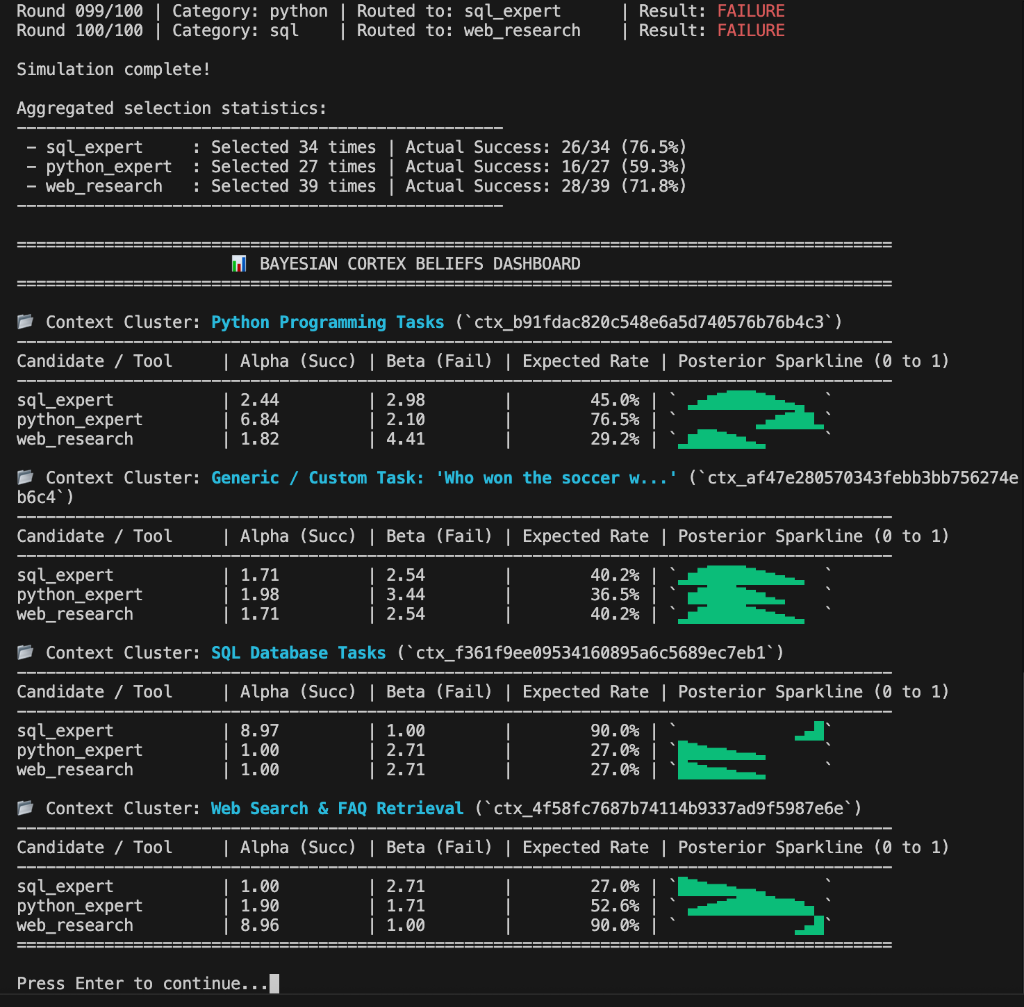
📈 Visual Diagnostics on the Metrics Dashboard (cortex://metrics)
The cortex://metrics dashboard exposes rich, live visuals to monitor routing decisions and distributions in real time:
- ASCII Sparklines: Displays inline unicode block characters (e.g.
▂▃▅▇█▆▄▂) representing the shape of the $\text{Beta}(\alpha, \beta)$ probability distribution next to each candidate/skill in the context clusters table. - Beta PDF SVG Charts: Renders custom inline SVG charts mapping probability density curves for all candidate candidates/skills under each context cluster (utilizing SciPy's Beta stats model), complete with colors, legends, labels, and coordinate grids.
- Recent Executions Log: Lists the 20 most recent routing executions chronologically, detailing the Trace ID, Timestamp, Context Cluster, Selected Candidate/Skill, and Reward feedback outcome.
- History MA10 SVG Line Chart: Renders a chronological line plot tracking the running moving average success rates of candidate candidates/skills over time.
How to open the dashboard:
- Using your Agent: Ask your agent: "Read the resource
cortex://metrics" - Using a GUI Client (e.g., Cursor/Claude Desktop): Look at the Resources pane or icon in the chat interface and click on
cortex://metricsto open the live view.
🦜️🛠️ LangSmith Integration
Because LangSmith is explicitly designed to instrument, monitor, and evaluate complex agent execution hierarchies without forcing you into a specific framework, BayesianCortex fits right into its core paradigms.
When combined, they create a perfect architectural loop: LangSmith provides the macro-observability (tracing exactly what happened), while BayesianCortex handles the micro-optimization (deciding what happens next).
1. Dynamic Trace Enrichment (Bandit State in LangSmith)
When an agent executes a step, you can inject the router's current mathematical beliefs directly into LangSmith’s run tree as custom metadata and tags. This means that when you are reviewing an execution path in the LangSmith UI, you won’t just see which tool was chosen; you will see the exact statistical probability that drove the decision.
You can dynamically record:
- The Selected Arm: The specific tool, skill, or sub-agent chosen.
- The Context Cluster ID: The exact semantic neighborhood hash (
ctx_b91fdac...) computed by your local embedding model. - The Expected Rate & Uncertainty: The Alpha/Beta values or posterior variance at the precise millisecond the decision was made.
2. The Automated Feedback Loop (The Core Synergy)
LangSmith features a native Feedback API used to track user interactions (like a thumbs up/down button in a chat UI) or automated "LLM-as-a-judge" evaluation pipelines.
Instead of treating that data as static logs on a dashboard, you can pipe LangSmith's production feedback scores directly into your feedback_by_trace() loop. When an online evaluator or end-user logs a success (score=1) or a failure (score=0) in LangSmith, BayesianCortex instantly updates its underlying covariance matrices. This closes the circuit, translating abstract observability logs into immediate runtime self-healing.
Technical Integration Blueprint
Here is a clean template demonstrating how cleanly the two libraries sit side-by-side using LangSmith's native @traceable SDK tools:
import langsmith as ls
from langsmith import Client
from bayesian_cortex import BayesianRouter

# Initialize your core engines
ls_client = Client()
router = BayesianRouter(storage_backend="sqlite", db_path="agent_cortex.db")

@ls.traceable(run_type="chain", name="Adaptive Agent Router")
def execute_agent_trajectory(user_prompt: str):
    candidates = ["sql_expert", "python_expert", "web_research"]

    # 1. Route the prompt context using BayesianCortex math, getting a signed trace ID
    chosen_arm, trace_id = router.route_with_trace(context_text=user_prompt, candidates=candidates)

    # 2. Retrieve expected success rate/beliefs and the resolved context cluster
    cluster_id = router._resolve_context_key(user_prompt)
    alpha, beta = router.get_candidate_beliefs(context_text=user_prompt, candidate_name=chosen_arm)
    expected_rate = alpha / (alpha + beta)

    # 3. Dynamically enrich the active LangSmith trace with bandit telemetry
    current_run = ls.get_current_run_tree()
    current_run.metadata.update({
        "bandit_chosen_arm": chosen_arm,
        "bandit_trace_id": trace_id,
        "bandit_context_cluster": cluster_id,
        "bandit_expected_success_rate": expected_rate
    })
    current_run.tags.append(f"arm:{chosen_arm}")

    # 4. Execute the actual tool/sub-agent logic
    output = run_selected_arm(chosen_arm, user_prompt)

    return output, trace_id

# 5. Closing the loop: Processing downstream user or judge feedback
def handle_production_feedback(run_id: str, trace_id: str, feedback_score: float):
    # Log the evaluation score directly to LangSmith for tracking
    ls_client.create_feedback(
        run_id=run_id,
        key="correctness",
        score=feedback_score
    )

    # Simultaneously pass the success flag to update your local bandit weights
    is_success = (feedback_score == 1.0)
    router.feedback_by_trace(trace_id=trace_id, success=is_success)
Hierarchical Routing & Nested Configurations
In complex architectures, sub-agents are often nested within a parent supervisor. For example, a root router might choose between a coder_subagent and a research_subagent, and the coder_subagent might then route among specific coder tools like python_tool or git_tool.
BayesianCortex natively supports this hierarchical layout, allowing you to configure nested routers from a single schema and route through the entire tree automatically.
1. Nested Initialization
You can define nested sub-routers directly inside a parent configuration dictionary using the children key. Child routers automatically inherit the parent's storage, embedder, and secret_key configurations if not explicitly specified.
from bayesian_cortex import BayesianRouter

config = {
    "mode": "clustering",
    "storage_backend": "sqlite",
    "storage_path": "agent_hierarchy.db",
    "candidates": ["coder_subagent", "research_subagent"],
    "children": {
        "coder_subagent": {
            "mode": "clustering",
            "candidates": ["tool_python", "tool_git"],
        },
        "research_subagent": {
            "mode": "clustering",
            "candidates": ["tool_web_search", "tool_database"],
        }
    }
}

# Recursively instantiates the parent and all nested children routers
root_router = BayesianRouter.from_config(config)
2. Fallback Candidate Lists
By providing candidates at initialization time (as shown above), you no longer need to pass the candidates list on every single .route() or .route_batch() call:
# Automatically routes among root candidates ["coder_subagent", "research_subagent"]
chosen_arm = root_router.route(context_text="Write an script to download logs")
3. Traversal via route_hierarchical
To route context down the entire tree of sub-agents and tools at once, use route_hierarchical (or aroute_hierarchical for async routers). This method returns a list of candidate names representing the path taken, and a dictionary of trace IDs corresponding to each level:
# Route the request through the supervisor to the sub-agent and tool level
path, trace_ids = root_router.route_hierarchical(context_text="Optimize my SQLite schema")

print(path)
# Output: ["coder_subagent", "tool_python"]

print(trace_ids)
# Output: {
#   "coder_subagent": "eyJjdHgiOiA... (parent trace ID)",
#   "tool_python": "eyJjdHgiOiA... (child trace ID)"
# }
4. Cascading Feedback Delegation
When logging evaluations or downstream results, you can call feedback_by_trace() directly on the root router, regardless of whether the trace ID belongs to the parent router or a child router. The root router automatically checks child configurations and forwards the feedback request downstream to update the correct sub-bandit.
# Update the root supervisor's performance score for choosing "coder_subagent"
root_router.feedback_by_trace(trace_ids["coder_subagent"], success=True)

# Update the child coder's tool selection score for using "tool_python"
root_router.feedback_by_trace(trace_ids["tool_python"], success=True)
Changelog
See CHANGELOG.md for a full history of releases.
License
MIT
1 maintainer

Metadata
1 maintainer
Release files for bayesian-cortex 0.1.7
For a detailed explanation of source distributions (sdists) and built distributions (wheels), please see the package formats documentation.
Source distribution (sdist)
| File | Size | Uploaded | |
|---|---|---|---|
| bayesian_cortex-0.1.7.tar.gz | 93.9 kB | Details |
Built distribution (wheel)
| File | Interpreter | ABI | Platform | Reset |
|---|---|---|---|---|
| bayesian_cortex-0.1.7-py3-none-any.whl | Python 3 | none | any | Details |
Total release size: 175.6 kB
Release files / bayesian_cortex-0.1.7.tar.gz
| Download URL | bayesian_cortex-0.1.7.tar.gz |
|---|---|
| Size | 93.9 kB |
| Tags | Source |
|
SHA-256 checksum How to use checksums |
f99305bae0ac5be80dd82bfb5ab26616de80fdba58c7273f264f55cf18e206ae
|
|
BLAKE2b-256 checksum How to use checksums |
8e2c5827fb39f5977ad0e5de3419020ba08f1b8f4e14c700c79b8cb84a74db05
|
| Upload date | |
|
Uploaded using Trusted Publishing? What is trusted publishing? |
No |
| Uploaded via |
uv/0.8.17
|
Release files / bayesian_cortex-0.1.7-py3-none-any.whl
| Download URL | bayesian_cortex-0.1.7-py3-none-any.whl |
|---|---|
| Size | 81.7 kB |
| Tags | Python 3 |
|
SHA-256 checksum How to use checksums |
2fa5033ebd50e7d83a2608bf7650bb0f9648811476733e57561771d3a6b2040f
|
|
BLAKE2b-256 checksum How to use checksums |
bc679697da100efa03756bc15e5bffa8d67f82276107751e37c8047e0de1a608
|
| Upload date | |
|
Uploaded using Trusted Publishing? What is trusted publishing? |
No |
| Uploaded via |
uv/0.8.17
|














