
BayeSQP: Bayesian Optimization through Sequential Quadratic Programming

Project description
BayeSQP: Bayesian Optimization though Sequential Quadratic Programming


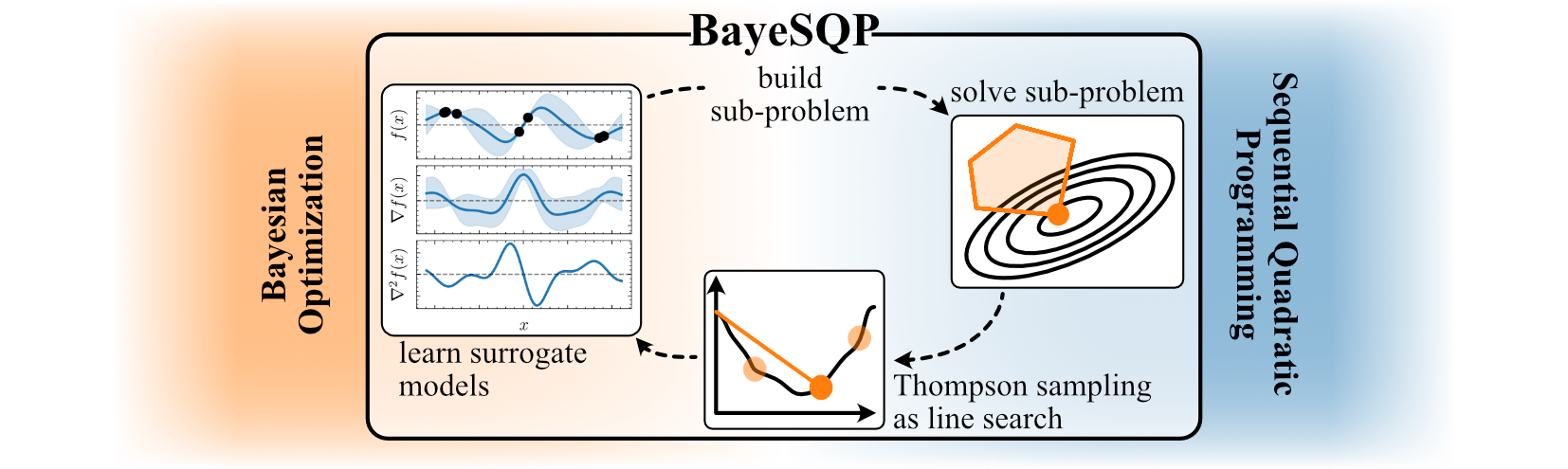
The repository contains a plug-and-play implementation of BayeSQP (NeurIPS 2025). BayeSQP as a framework aims to combine ideas from both Bayesian optimization (BO) and ideas from sequential quadratic optimization to effectively solve potentially constrained black-box optimization problems.
$$ x^* = \arg\min_{x \in \mathcal{X}} f(x) \quad \text{subject to} \quad c_i(x) \geq 0, \quad \forall i \in \mathbb{I}_m := {1, \ldots, m} $$
With this repository and package, we hope to provide practitioners with an easy-to-use tool that seemlessly integrates with the BoTorch API.
Installation
You can install BayeSQP in a few different ways depending on your needs.
📦 From PyPI (recommended)
Once the package is published to PyPI (in progess), simply run:
pip install bayesqp
This will install the core dependencies numpy, scipy, cvxopt, botorch, gpytorch.
🧪 From source (development version)
If you want the latest version from the repository:
git clone https://github.com/brunzema/bayesqp.git
cd bayesqp
pip install .
Or, for editable (developer) installation:
pip install -e .
💡 Optional dependencies
To run the example notebooks, install the optional dependencies:
pip install ".[examples]"
This will further install jupyter and matplotlib.
✅ Verify your installation
You can verify that BayeSQP is installed correctly with:
python -c "import bayesqp; print(bayesqp.__version__)"
Getting Started
To build intuition about BayeSQP, both on behavior and configuration, take a look at the example notebooks in the examples/ folder.
To use BayeSQP in your own project, follow the installation steps mentioned above and then simply:
from bayesqp import BayeSQP

# Define your optimization problem following the BoTorch API
func = MyConstrainedOptimizationProblem()

# Initialize BayeSQP
bayesqp = BayeSQP(objective_function=func)

# Run optimization
result = bayesqp.minimize(x0, max_evals=50)

# Show result
print(result)
There are various ways to configure BayeSQP for your specific problem. We provide a set of default parameters that currently yield the best performance on our use cases and with this they hopefully will also provide a good starting point for your problem.
Formulating the Objective
To make the integration as seamless as possible, we also provide a small wrapper to transfer your objective and constraints formulated in numpy directly into a ConstrainedBaseTestProblem.
from bayesqp import NumpyToConstrainedBoTorchProblem

# Define your Numpy functions
def my_objective(x):
    # Minimize: x[0]^2 + x[1]^2
    return np.sum(x**2)

def constraint_c1(x):
    # Constraint: x[0] + x[1] >= 1
    # -> x[0] + x[1] - 1 >= 0
    return x[0] + x[1] - 1.0

def constraint_c2(x):
    # Constraint: x[0] <= 0.5
    # -> 0.5 - x[0] >= 0
    return 0.5 - x[0]

# Define bounds (e.g., 2D problem between -2 and 2)
bounds = [(-2.0, 2.0), (-2.0, 2.0)]

# Instantiate the wrapper
problem = NumpyToConstrainedBoTorchProblem(
    objective_func=my_objective,
    constraint_funcs=[constraint_c1, constraint_c2],
    bounds=bounds,
    negate=False
)

test_X = torch.tensor([
    [0.0, 0.0],   # Infeasible
    [0.4, 0.8]    # Feasible
], dtype=torch.double)

# Evaluate Objective
obj_vals = problem(test_X)
print(f"Objective Values: {obj_vals}")
# Output: Objective Values: tensor([0.0000, 0.8000], dtype=torch.float64)

# Evaluate Constraints
constraints = problem.evaluate_slack(test_X)
print(f"Constraint Values: {constraints}")
# Output: Constraint Values: tensor([[-1.0000,  0.5000],
#                                    [ 0.2000,  0.1000]], dtype=torch.float64)

is_feasible = problem.is_feasible(test_X)
print(f"Feasible: {is_feasible}")
# Output: Feasible: tensor([False,  True])
Such a wrapper also exists for torch: TorchToConstrainedBoTorchProblem. Here it is however necessary to specify if the functions can handle batches and setting the vectorized-flag accordingly.
# cannot handle batches -> vectorized = False
def objective_simple(x):
    return torch.sin(x[0]) * x[1]

# can handle batches -> vectorized = True
def objective_vec(x):
    return torch.sin(x[..., 0]) * x[..., 1]
Citation
If you find our code or paper useful, please consider citing
@inproceedings{brunzema2025bayesqp,
  title={{BayeSQP}: {Bayesian} Optimization through Sequential Quadratic Programming},
  author={Brunzema, Paul and Trimpe, Sebastian},
  booktitle={Advances in Neural Information Processing Systems (NeurIPS)},
  year={2025}
}
Claude helped beautify the README.md; hence the emojies.
Release history Release notifications | RSS feed


Download files
Download the file for your platform. If you're not sure which to choose, learn more about installing packages.
Source Distribution
Built Distribution
Filter files by name, interpreter, ABI, and platform.
If you're not sure about the file name format, learn more about wheel file names.
Copy a direct link to the current filters
File details
Details for the file bayesqp-0.1.1.tar.gz.
File metadata
- Download URL: bayesqp-0.1.1.tar.gz
- Upload date:
- Size: 1.2 MB
- Tags: Source
- Uploaded using Trusted Publishing? No
- Uploaded via: twine/6.2.0 CPython/3.10.16
File hashes
| Algorithm | Hash digest | |
|---|---|---|
| SHA256 |
7012e86ede2b19150501604a94c3138ced80d1aca8e7fcfa0015981a5a3a08c5
|
|
| MD5 |
7008602a15c33f13689312a1043c0ccb
|
|
| BLAKE2b-256 |
581869b059239e54313804befbbbe2294ff7b4d5d7ac5fd843c6d0500fdf3dd9
|
File details
Details for the file bayesqp-0.1.1-py3-none-any.whl.
File metadata
- Download URL: bayesqp-0.1.1-py3-none-any.whl
- Upload date:
- Size: 29.2 kB
- Tags: Python 3
- Uploaded using Trusted Publishing? No
- Uploaded via: twine/6.2.0 CPython/3.10.16
File hashes
| Algorithm | Hash digest | |
|---|---|---|
| SHA256 |
eddb7d6e237ed1f55a39a75f05b03cf9f9c5a295dec3049dee00f0325bd21ba5
|
|
| MD5 |
83c58950c99c3860265102169ae4cea1
|
|
| BLAKE2b-256 |
645e0b0d2afc390086cae0b43fbbdd3007065fef721756decaf5cfe596af1da1
|






