
Baz
A wrapper for bazel with a GUI for configuring arguments. Running baz -q opens a configuration gui where you can set persistent bazel settings by choosing from detected .bazelrc configs, and other bazel flags.
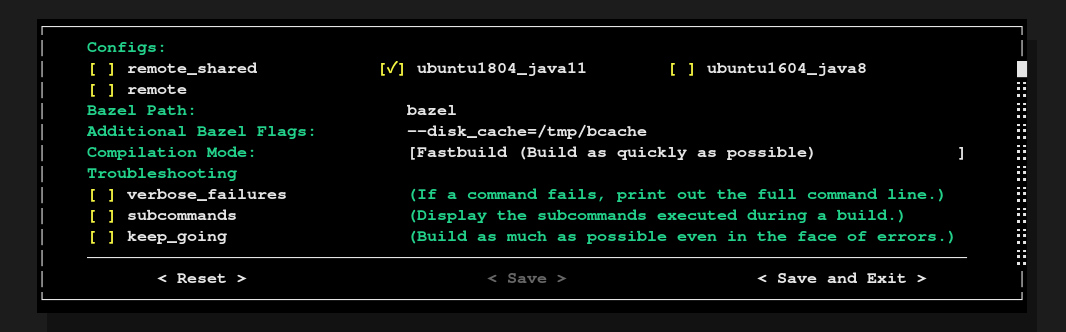
Baz stores persistent information in ~/.config/baz/. A unique config for each directory is generated and separate settings can be configured for multiple repositories. You can delete your configuration and start over at any time with baz -d.
Add baz to your path and use baz as you would use bazel.
Installation
Pypi
python3 -m pip install baz --user
If you haven't already, make sure scripts from your user site are accesible from PATH.
import site
site.USER_BASE # Prints something like `/home/username/.local/`
Take this path, and add to your ~/.bashrc as: export PATH='$PATH:/home/username/.local/bin/
Usage
baz --help
usage: baz.py [-h] [-e] [-p] [-q] [-d]

optional arguments:
  -h, --help            show this help message and exit
  -e, --emit-build-script
                        Emit a shell script to containing the raw Bazel build command, rather than executing it. This is useful for exporting vanilla Bazel build commands to people who do not have baz.
  -p, --print-build-settings
                        Prints the build settings configured for Baz.
  -q, --configure       Run the Baz configuration TUI.
  -d, --delete-configuration
                        Permenently delete the persistent configuration file.
Testing
Unit tests can be run with nosetests.
1 maintainer

Metadata
1 maintainer
Release files for baz 0.2.6
For a detailed explanation of source distributions (sdists) and built distributions (wheels), please see the package formats documentation.
Source distribution (sdist)
| File | Size | Uploaded | Provenance | |
|---|---|---|---|---|
| baz-0.2.6.tar.gz | 8.3 kB | Without provenance | Details |
Built distribution (wheel)
| File | Interpreter | ABI | Platform | Reset |
|---|---|---|---|---|
| baz-0.2.6-py3-none-any.whl | Python 3 | none | any | Details |
Total release size: 20.0 kB
Release files / baz-0.2.6.tar.gz
| Download URL | baz-0.2.6.tar.gz |
|---|---|
| Size | 8.3 kB |
| Tags | Source |
|
SHA-256 checksum How to use checksums |
119603494f27cae26374e3b476872bad5cb09c67967e3878dfd331a49942512d
|
|
BLAKE2b-256 checksum How to use checksums |
20cd48ec1a14ba40ed6ba35d882aafc66cc9d94b0dab39e2a288336787a1535b
|
| Upload date | |
|
Uploaded using Trusted Publishing? What is trusted publishing? |
No |
| Uploaded via |
twine/3.1.1 pkginfo/1.5.0.1 requests/2.22.0 setuptools/45.2.0 requests-toolbelt/0.9.1 tqdm/4.42.1 CPython/3.7.6
|
Release files / baz-0.2.6-py3-none-any.whl
| Download URL | baz-0.2.6-py3-none-any.whl |
|---|---|
| Size | 11.7 kB |
| Tags | Python 3 |
|
SHA-256 checksum How to use checksums |
9c7958b3084b6c3ebc50098ac1d21d4d0cb8a0efd8f35d8c65aac3086a5a7fbd
|
|
BLAKE2b-256 checksum How to use checksums |
8af007a998c2c724b9d3cdbf94f4acbba0f799c64bdfa9d89f2600f2362a983c
|
| Upload date | |
|
Uploaded using Trusted Publishing? What is trusted publishing? |
No |
| Uploaded via |
twine/3.1.1 pkginfo/1.5.0.1 requests/2.22.0 setuptools/45.2.0 requests-toolbelt/0.9.1 tqdm/4.42.1 CPython/3.7.6
|
Security for baz 0.2.6
Provenance
Provenance describes where a file came from. On PyPI, provenance is shared via attestations, which provide a verifiable record of the build or publishing details. View details, limitations and caveats.
No provenance found
None of the files in this release were uploaded with provenance metadata.
A note on package security
PyPI is a repository for distributing packages, not a service for auditing them. While third-party security researchers and our staff do their best to detect and remove malicious packages, PyPI cannot guarantee the quality, security or suitability of any given package.














