
Bilingual Book Maker
中文 | English
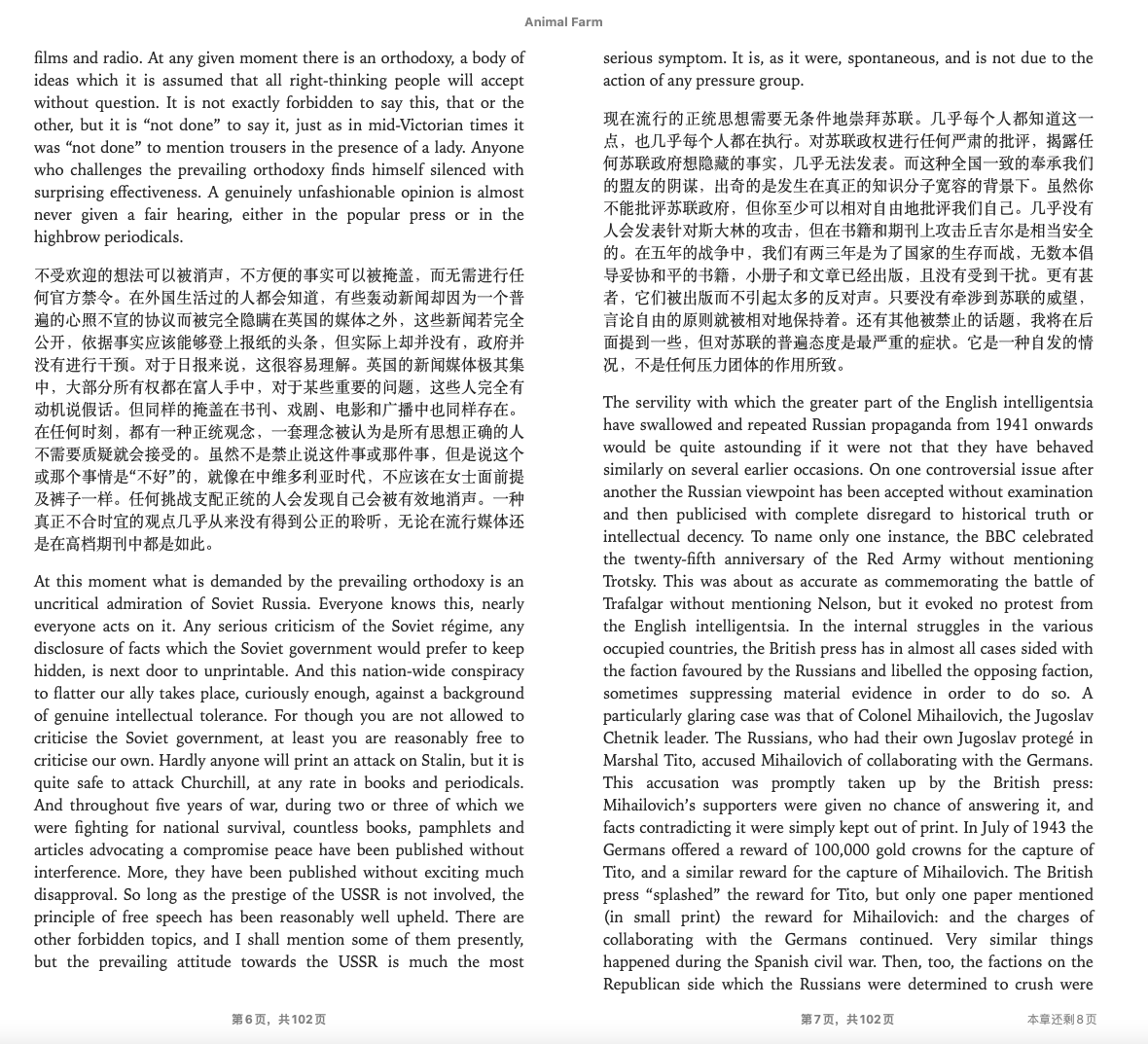
The bilingual_book_maker is an AI translation tool that uses ChatGPT to assist users in creating multi-language versions of epub/txt/md/srt/pdf files and books. Use it only with material you have the right to translate — works for which you hold the necessary rights, suitably licensed or permitted works, public-domain books, or uses otherwise allowed by applicable law. Before using this tool, please review the project's disclaimer.




Supported endpoints
OpenAI and Anthropic format endpoints are supported.
Usually it comes with three fields, two if you are using the official endpoints, such as gpt-5.6-luna (the default)
or claude-sonnet-4-6.
Specify openai, or anthropic at --api_format for API request formats.
This argument also supports selecting some machine-translation engines (google, caiyun, deepl, deeplfree,
tencent, customapi — not an OpenAI format) or codex
if you want to use your Codex quota instead.
--provider is an alternative way to pass credentials, through a JSON config file
bbm_providers.json.
Epub tags classification is auto enabled on JSON-schema endpoints, and on any endpoint that can hold a conversation — the codex route and plain reseller proxies included — where the model is asked for exact skip/translate verdicts instead. Only routes with no conversation at all (the MT engines) fall back to translating p tags only, so some poetry or verse may be omitted there. See plan mode for details.
Older flags (--model gpt4o,
--model gemini, --openai_key, …) still work: see
Models and languages.
Preparation
- ChatGPT or OpenAI token 1
- epub/txt/md/pdf books
- Environment with internet access or proxy
- Python 3.10+
Quick Start
A sample book, test_books/animal_farm.epub, is provided for testing purposes.
--test translates only its first few paragraphs.
pip install -r requirements.txt # or: pip install -U bbook_maker
Then:
cp bbm_providers.example.json bbm_providers.json
# edit base_url, default_models and env_key in ./bbm_providers.json
python3 make_book.py --book_name test_books/animal_farm.epub --provider openai --test --use_context session
You can also pass the key on the command line:
python3 make_book.py --book_name test_books/animal_farm.epub \
  --key sk-... --model gpt-5.6-luna --api_base https://api.openai.com/v1 --test --use_context session
To spend a Codex subscription:
python3 make_book.py --book_name test_books/animal_farm.epub --model gpt-5.6-luna --api_format codex --test
Or hand it to a coding agent
git clone https://github.com/yihong0618/bilingual_book_maker.git
cd bilingual_book_maker
codex "Hi, please use bbm-plan to translate this book: test_books/animal_farm.epub into a bilingual Chinese-English edition, thanks."
Endpoint flags
--api_formatnames the API the endpoint speaks:openai,anthropic,gemini,qwen,groq,xai,litellm,codex, or one of the machine-translation engines (google,caiyun,deepl,deeplfree,tencent,customapi). A format that belongs to one vendor already knows that vendor's address, so the format and a--keyare a whole command.- Any other OpenAI-compatible API:
--api_base(ending in/v1),--keythe API key, and the model id in--model. Omit--api_basefor OpenAI's own API, and--modelforgpt-5.6-luna. - Or translate through
--provider:bbm_providers.example.jsonhas an entry for each vendor below (Gemini, Qwen, xAI, Groq, OrcaRouter, Ollama, LiteLLM, SiliconFlow, OpenRouter). Copy it tobbm_providers.json, set the key in it, and--provider geminiuses the Gemini API from it. --use_context sessiontranslates in session mode; the history compacts at 8k by default (--context-compact-atoverrides). It keeps one cached history for consistency and learns a glossary from its own handoff reports (--glossary-auto), so recurring names stay stable across the book — the recommended mode on OpenAI-compatible endpoints, and what the examples below use.- The old preset names and key flags still work, see Migrating from the old flags.
Supported translation services
-
DeepL Support DeepL model DeepL Translator need pay to get the token
python3 make_book.py --book_name test_books/animal_farm.epub --api_format deepl --key ${deepl_key} -
DeepL free
python3 make_book.py --book_name test_books/animal_farm.epub --api_format deeplfree
-
A
claude-*model id selects the anthropic format on its own.python3 make_book.py --book_name test_books/animal_farm.epub --model claude-sonnet-4-6 --key ${claude_key}
-
Google Translate
python3 make_book.py --book_name test_books/animal_farm.epub --api_format google
-
Caiyun Translate
python3 make_book.py --book_name test_books/animal_farm.epub --api_format caiyun --key ${caiyun_key}
-
Gemini
Google Gemini, over the Gemini API itself. Name any Gemini model id; without
--modelit isgemini-flash-latest.--intervalsets the pause between requests, which is how the free tier's rate limit is stayed under.python3 make_book.py --book_name test_books/animal_farm.epub --api_format gemini --key ${gemini_key} --model gemini-flash-latest
-
Qwen
Qwen-MT on DashScope, a translation model: the request states a source and a target language.
qwen-mt-turbo(the default) andqwen-mt-plusare supported, and--source_langstates the source language when auto-detection is not wanted.python3 make_book.py --book_name test_books/animal_farm.epub --api_format qwen --key ${qwen_key} --model qwen-mt-turbo --language "Simplified Chinese"
-
python3 make_book.py --book_name test_books/animal_farm.epub --api_format tencent
-
python3 make_book.py --book_name test_books/animal_farm.epub --api_format xai --key ${xai_key} --model grok-4.3 --use_context session
-
The OrcaRouter gateway, defaulting to its
orcarouter/autosmart routing. The address comes with the route, so there is no--api_base; the key is--keyorBBM_ORCAROUTER_API_KEY.--provider orcarouterreaches the same place.python3 make_book.py --book_name test_books/animal_farm.epub --model orcarouter --key ${orcarouter_key} --use_context session
To name one model instead:
--provider orcarouter --model <id>. -
Translate with Ollama self-hosted models. If the ollama server is not local, point
--api_base http://x.x.x.x:port/v1at it.python3 make_book.py --book_name test_books/animal_farm.epub --api_base http://localhost:11434/v1 --model ${ollama_model_name} --use_context session
-
--modelis required: GroqCloud's catalogue turns over, so pick a current id from Supported Models.python3 make_book.py --book_name test_books/animal_farm.epub --api_format groq --key [your_key] --model llama-3.3-70b-versatile --use_context session
-
A LiteLLM proxy, which fans out to whatever backends its own config names.
--modelis the name that config gives one of them. The default address is the proxy's own, on this machine; elsewhere it is--api_base.python3 make_book.py --book_name test_books/animal_farm.epub --api_format litellm --model ${name_in_your_litellm_config} --use_context session
-
Spend your ChatGPT/Codex plan. Install the Codex CLI. The default model is
gpt-5.6-luna;--api_format codex --model <id>names another. One session is reused for the whole book and compacted at--context-compact-at; it runs sandboxed, with shell, MCP servers and browsing off, but hooks may still fire.python3 make_book.py --book_name test_books/animal_farm.epub --api_format codex --language zh-hans
Custom API Provider
When the built-in models do not cover your needs, define a provider in a JSON config file. Without a code change, any OpenAI-compatible or Anthropic-format API (SiliconFlow, a local proxy, ...) becomes usable.
Create bbm_providers.json in the current directory (or ~/.bbm/providers.json):
{
  "providers": {
    "siliconflow": {
      "api_style": "openai",
      "base_url": "https://api.siliconflow.cn/v1",
      "default_models": ["Qwen/Qwen2.5-72B-Instruct"],
      "env_key": "BBM_SILICONFLOW_API_KEY"
    },
    "openai": {
      "api_style": "openai",
      "base_url": "https://api.openai.com/v1",
      "default_models": ["gpt-5.6-luna"],
      "env_key": "OPENAI_API_KEY",
      "prices": {
        "gpt-5.6-luna": {"input": 0.20, "output": 1.20, "cached_input": 0.02}
      }
    }
  }
}
Config fields:
| Field | Required | Description |
|---|---|---|
api_style |
Yes | API request format: openai, anthropic, gemini, qwen, groq, xai or litellm |
base_url |
No | The API address. Omitted means the api_style's default address |
default_models |
No | Default model list. Required if --model is not provided |
env_key |
No | Environment variable name for API key. Required if --key is not provided |
prices |
No | Prices per million tokens, per model: {"<model id>": {"input": …, "output": …, "cached_input": …}}. When every model in the run has a price, the progress bar shows money spent (spent=$0.012) instead of token counts, and the closing line shows both. Without cached_input, cache reads are charged at the input price. A model without a price puts the bar back on tokens, and the closing line names it |
currency |
No | Currency code for the prices, default USD. USD, EUR, GBP, CNY and JPY print with their symbol; any other code prints after the amount, as in 0.500 CHF |
The spent amount and the token counts are estimates, accumulated from the usage each request reports — close enough to steer by, but the vendor's bill is the number that counts.
Priority: project-level ./bbm_providers.json overrides global ~/.bbm/providers.json.
--model names a model at that provider; without it the first of default_models is used.
python3 make_book.py --provider siliconflow --key sk-xxx --book_name test_books/animal_farm.epub --use_context session

export BBM_SILICONFLOW_API_KEY=sk-xxx
python3 make_book.py --provider siliconflow --book_name test_books/animal_farm.epub --use_context session
Usage
- Once the translation is complete, a bilingual book named
${book_name}_bilingual.epubwould be generated for EPUB inputs; for TXT/MD/SRT inputs a bilingual text (or subtitle) file named${book_name}_bilingual.txt(or_bilingual.srt) will be generated. For PDF inputs the tool will produce a bilingual.txtfallback and will also attempt to create${book_name}_bilingual.epub— if EPUB creation fails, the TXT fallback remains so you do not need to retranslate. - If there are any errors or you wish to interrupt the translation by pressing
CTRL+C, a temporary bilingual file (for example{book_name}_bilingual_temp.epubor{book_name}_bilingual_temp.txt) would be generated. You can simply rename it to any desired name.
Params
-
--model:The model id, exactly as the endpoint spells it. On the OpenAI format the default is
gpt-5.6-luna. The second column is the--api_formatthe id needs:model --api_formatnotes gpt-5.6-lunaopenaithe default, at OpenAI's own address claude-sonnet-4-6anthropicAnthropic's own address gpt-4o-miniopenaiOpenAI gemini-flash-latestgeminithe default there, at Google's own address qwen-mt-turboqwenthe default there, on DashScope llama-3.3-70b-versatilegroqGroq's own address The old preset values still parse and are rewritten to a real model id with a note; Migrating from the old flags lists them. Anything else is an endpoint:
--api_base <url> --key <key> --model <id>, or a--providerentry (see the Custom API Provider section). -
--key:API key for the endpoint. Without the flag the key is read from
$BBM_API_KEY, then from the format's own variable. Same flag as--api_key. -
--api_format:The API the endpoint speaks. When omitted it is inferred: an
anthropic.comhost, or a model id containingclaudewith no--api_base, meansanthropic; anything else meansopenai. Pass it when the guess is wrong, to reach a vendor without typing its address, or to pick an engine.format key notes openai(default)required: --key, else$BBM_API_KEY,$OPENAI_API_KEY; not for a local address such as Ollamaany OpenAI-compatible endpoint: OpenAI itself, OpenRouter, Ollama and the rest, the address in --api_baseanthropicrequired: --key, else$BBM_API_KEY,$ANTHROPIC_API_KEYAnthropic itself, and gateways that speak the Messages API geminirequired: --key, else$BBM_API_KEY,$BBM_GOOGLE_GEMINI_KEY,$GEMINI_API_KEYthe Gemini API, default gemini-flash-latest; paced by--intervalqwenrequired: --key, else$BBM_API_KEY,$BBM_QWEN_API_KEY,$DASHSCOPE_API_KEYQwen-MT on DashScope, default qwen-mt-turbo; reads--source_langgroqrequired: --key, else$BBM_API_KEY,$BBM_GROQ_API_KEY,$GROQ_API_KEYGroqCloud; --modelrequiredxairequired: --key, else$BBM_API_KEY,$BBM_XAI_API_KEY,$XAI_API_KEYxAI; --modelrequiredlitellmnone for a proxy on this machine, else --keyor$LITELLM_MASTER_KEYa LiteLLM proxy, http://localhost:4000unless--api_basesays otherwise;--modelrequiredcodexnone: codex login(Codex CLI)the local codex app-serversidecar on a ChatGPT/Codex plan, defaultgpt-5.6-lunaorcarouterrequired: --keyor$BBM_ORCAROUTER_API_KEYOrcaRouter googlenone Google Translate, free caiyunrequired: --keyor$BBM_CAIYUN_API_KEYCaiyun deeplrequired: --keyor$BBM_DEEPL_API_KEYDeepL (paid) deeplfreenone DeepL free tier tencentnone Tencent TranSmart, free customapinone a {text, source_lang, target_lang}format API -
--interval:Seconds to wait between requests, e.g.
--interval 0.1for 100ms. Only--api_format geminipaces itself with it; every other route ignores it. Default:0.01. -
--test:Use
--testoption to preview the result if you haven't paid for the service. Note that there is a limit and it may take some time. -
--language:Set the target language: a tag (
--language zh-hant), a name (--language "Traditional Chinese"), or both at once —--language "zh-hant:Traditional Chinese". The tag names the JSON structured-output field; the name is what the model is asked for. Defaultzh-hans. See also available tags. -
--source_lang:Source language. Stated, it appends a prompt line ("Translate from English"), and on
--api_format qwen(whose request names a language pair) and--api_format customapiit rides in the request itself. Default: auto-detect. -
--proxy:Use
--proxyoption to specify proxy server for internet access. Enter a string such ashttp://127.0.0.1:7890. -
--resume:Use
--resumeoption to manually resume the process after an interruption. Mutually exclusive with--parallel-workers.python3 make_book.py --book_name test_books/animal_farm.epub --api_format google --resume
-
--translate-tags:epub is made of html files. By default, we only translate contents in
<p>. Use--translate-tagsto specify tags need for translation. Use comma to separate multiple tags. For example:--translate-tags h1,h2,h3,p,div -
--plan-classify(epub only):Plan mode: classify epub tags with the translating model, or with codex / claude code.
The value decides how is translation decision of each tag made:
-
auto(default): when the book is an epub, ask the LLM what to translate. Only when the route cannot hold a conversation, and when the plan fails, translate the--translate-tagsselection instead. Rows decided over a plain session appear in<book>_plan.jsonwith anunnamed (…)content type naming how the verdict was reached rather than what the content is. -
none: no plan; only the--translate-tagsselection — unselected, that defaults top, most body text. -
all: translate the whole partition, no classification. -
model: the translating LLM judges, then translates.--plan-classify-model Xpicks the model that classifies. -
agent: writes the classification plan for the book and prints instructions to paste into your coding tool for classification. (or you could also do it by hand). Then run the translation with--plan-classify agentagain. -
--plan-dry-run: print the per-signature table, write<book>_plan.json, and exit. Honors--only_filelist/--exclude_filelist. -
<book>_plan.json: the translation plan; delete it to classify again. -
--plan-min-coverage(default 0.5, range 0–1): plan mode aborts if the plan covers less than this fraction of the text.0disables the guard and values above0.9usually abort after classification is already paid for — both warn. -
--max-batch-units: the most units one grouped request may carry. Raise it together with--accumulated_numfor fewer, larger (cheaper) requests; lower them once the run prints degradation warnings such as the misalignment-recovery hint. Content is also bounded by the token budget (--accumulated_num).
# let the model judge which tags need translating
python3 make_book.py --book_name my_book.epub --key ${key} --plan-classify model
# or hand it to an agent: stops, prints instructions, then you give them to your AI
python3 make_book.py --book_name my_book.epub --key ${key} --plan-classify agent
-
-
--exclude-translate-tags:Use
--exclude-translate-tagsto exclude content within specified HTML tags from translation. This is useful for preserving code blocks, preformatted text, or other special content. Use comma to separate multiple tags. Default:sup,code. For example:--exclude-translate-tags code,preTip: Use
--exclude-translate-tags ""to translate all content including code blocks (overrides the default exclusion). -
--api_base:If you want to change api_base like using Cloudflare Workers, use
--api_base <URL>to support it. Note: the api url should be 'https://xxxx/v1'. Quotation marks are required. -
--allow_navigable_strings:If you want to translate strings in an e-book that aren't labeled with any tags, you can use the
--allow_navigable_stringsparameter. This will add the strings to the translation queue. -
--prompt:To tweak the prompt, use the
--promptparameter. The placeholders theusertemplate may use are{text}(required),{language}and{crlf}(a newline, for the shapes — a JSON string, a table cell — that cannot carry one). Anything else in braces is refused before the run starts rather than raising mid-book; write{{and}}for a literal brace. It supports a few ways to configure the prompt:-
If you don't need to set the
systemrole content, you can simply set it up like this:--prompt "Translate {text} to {language}."or--prompt prompt_template_sample.txt -
If you need to set the
systemrole content, you can use the following format:--prompt '{"user":"Translate {text} to {language}", "system": "You are a professional translator."}'or--prompt prompt_template.json. -
A third key,
style, is a standing instruction about how to write — register, tone, vocabulary. It is said once where a window starts, not repeated on every request. -
--promptworks on every LLM route, and on srt books too — there its sections sit on top of the subtitle loader's own prompt, section by section. Replacing theusertemplate on an srt book means saying yourself that the block number and the timeline must come back unchanged; the run warns about it. The fixed machine-translation routes (google, deepl, caiyun, tencent, qwen, customapi) send text and nothing else, so they carry no prompt at all and the run says so at start. -
A
.mdfile is read as the PromptDown block form — the format is theirs, the reader is ours, so no extra package is installed:--prompt prompt_md.prompt.md(example at ./prompt_md.prompt.md).## System Message, an optional## Style, and a## Conversationwhose**User:**turn is the template. The table form of a conversation is refused. Example:# Translation Prompt ## System Message You are a professional translator who specializes in accurate translations. ## Conversation **User:** Please translate the following text into {language}: {text}
-
You can also set the
userandsystemrole prompt by setting environment variables:BBM_CHATGPTAPI_USER_MSG_TEMPLATEandBBM_CHATGPTAPI_SYS_MSG. -
An example JSON file can be found at ./prompt_template.json.
-
-
--batch_size:Use the
--batch_sizeparameter to specify the number of lines for batch translation (default is 10, currently only effective for txt files). -
--accumulated_num:Wait for how many tokens have been accumulated before starting the translation. For example, if you use
--accumulated_num 1600, maybe openai will output 2200 tokens and maybe 200 tokens for other messages in the system messages user messages, 1600+2200+200=4000 — on some local models that is close to the limit. You have to choose your own value, there is no way to know if the limit is reached before sending.In EPUB plan mode this is a per-request token budget: consecutive units of any length share one request up to
Ntokens. Pass1to turn grouping off — every unit is sent on its own. -
--use_context:Translate with context.
-
--context_paragraph_limit:Use
--context_paragraph_limitto set a limit on the number of context paragraphs when using the--use_contextoption. This applies to window mode only. -
--use_context session:Session mode keeps one append-only history and re-reads it at the cache price, so on endpoints that support caching the context can grow to about a chapter. When the history reaches the compact budget, the model writes a short handoff report (the run asks for ~300 tokens and truncates anything runaway), whose summary seeds the next window;
<book>_handoff.mdholds the latest snapshot, overwritten at each compaction. Watch the progress bar'scached=: if it is still zero after a dozen requests, the endpoint may not have a cache; Ctrl+C and switch to window mode.-
--context-compact-at:Session mode only. The estimated-token budget the whole window — the inherited seed included — may reach before it is compacted into a handoff report. Default
8192, minimum1500: a window shorter than that is mostly seed and seams, so below it use window mode instead. -
--no-context-compact:Session mode only. Skip the handoff report. The window still rolls over at the budget, but the next one starts empty instead of inheriting a summary. Cheaper, at the cost of continuity across the seam.
-
-
--glossary/--terminology:A file of
term → translationlines — one per line,#starts a note or a comment, plain text. Read by the openai- and codex-shaped routes for EPUB and Markdown books.A pinned term makes the translation say what you pinned, so pin only renderings you can stand behind.
-
--glossary-auto on|off:Keep the renderings the handoff reports establish, so recurring names stay unified across window seams. Session mode only, and off by default: it relies on the model reporting its own renderings accurately, which takes a capable model — most runs don't need it, since the handoff summary already carries the recurring names.
-
-
--parallel-workers:Use
--parallel-workersto process EPUB chapters or Markdown batches/sections in parallel. Values greater than1spin up multiple workers (recommended:2-4) and automatically fall back to sequential mode when there is only one unit of work. Other input loaders currently accept this shared CLI option but do not parallelize their work. -
--temperature:Sampling temperature for the openai and anthropic formats (the codex format has none). For example:
--temperature 0.7. -
--block_size:Use
--block_sizeto merge multiple paragraphs into one block. This may increase accuracy and speed up the process. For example:--block_size 5. -
--single_translate:Use
--single_translateto output only the translated book without creating a bilingual version. -
--no_disclosure:An epub output adds "Translated by gpt-5.6-luna, 2026." below the book intro; this flag leaves it out. It also turns off the translation metadata (
--translation-metadata: the model, the date and the glossary). -
--translation_style:Apply custom CSS to translated EPUB text, for example
--translation_style "color: #808080; font-style: italic;". -
--translation_color:Shorthand for setting only the translated EPUB text color, for example
--translation_color "#1e90ff". If--translation_styleis also present, the full style takes precedence. -
--pdf_layout {none,top-bottom,side-by-side,all}:Select additional bilingual PDF outputs for PDF inputs. The default
nonecreates no extra PDF;allattempts both top-bottom and side-by-side layouts. The bilingual TXT and EPUB outputs are unaffected. -
--sentence_mode:Translate EPUB text sentence by sentence instead of translating each paragraph as one unit. It is incompatible with EPUB plan mode.
-
--batch/--batch-use:Two-stage translation through the ChatGPT Batch API. Currently refused on EPUB inputs: the queue path is unreachable there, so such a run would translate live at full price and then submit an empty batch job instead of writing the book. Also refused on routes that do not implement the Batch API.
-
--quiet:Suppress EPUB progress bars and per-paragraph source/translation echoes while retaining reports and errors. Recommended for log files and non-interactive agent runs.
-
--retranslate "$translated_filepath" "file_name_in_epub" "start_str" "end_str":Retranslate from start_str to end_str's tag:
python3 "make_book.py" --book_name "test_books/animal_farm.epub" --retranslate 'test_books/animal_farm_bilingual.epub' 'index_split_002.html' 'in spite of the present book shortage which' 'This kind of thing is not a good symptom. Obviously'
To retranslate only the tag containing
start_str, pass an empty fourth argument:python3 "make_book.py" --book_name "test_books/animal_farm.epub" --retranslate 'test_books/animal_farm_bilingual.epub' 'index_split_002.html' 'in spite of the present book shortage which' ''
-
--extra_body:Pass additional JSON parameters on the routes built on the OpenAI request path —
openaiand the OpenAI-format custom providers — and on theanthropicroute. Provide a JSON object with the desired parameters. Example:python3 make_book.py --book_name test_books/animal_farm.epub --key ${openai_key} --extra_body '{"chat_template_kwargs": {"enable_thinking": false}}'
-
--extra_headers:Extra HTTP headers sent with every request, on the same routes. Values must be strings.
python3 make_book.py --book_name test_books/animal_farm.epub --key ${openrouter_key} --api_base https://openrouter.ai/api/v1 --model anthropic/claude-haiku-4.5 --extra_headers '{"HTTP-Referer": "https://example.com", "X-Title": "bilingual_book_maker"}'
Common forms, for reference:
# openai route — disable a local/vLLM chat template's thinking block
--extra_body '{"chat_template_kwargs": {"enable_thinking": false}}'
# openai route (chat completions) — reasoning effort and a token ceiling,
# neither of which has its own flag (both model-dependent)
--extra_body '{"reasoning_effort": "low", "max_completion_tokens": 2000}'
# anthropic route — keep extended thinking off; for translation it mostly
# buys deviation from the source, not quality
--extra_body '{"thinking": {"type": "disabled"}}'

# OpenRouter attribution (shown on its dashboard)
--extra_headers '{"HTTP-Referer": "https://example.com", "X-Title": "bilingual_book_maker"}'
# a gateway's own auth or routing header (the value stays out of the logs)
--extra_headers '{"X-API-Key": "sk-gateway-..."}'
-
--provider:Use a custom provider defined in
bbm_providers.json;--modelpicks a model at it. See the "Custom API Provider" section above. -
--api_key:Same as
--key.
Examples
Note if use pip install bbook_maker all commands can change to bbook_maker args
# Test quickly
python3 make_book.py --book_name test_books/animal_farm.epub --key ${openai_key} --test --language zh-hans --use_context session

# Test quickly for src
python3 make_book.py --book_name test_books/Lex_Fridman_episode_322.srt --key ${openai_key} --test

# Or translate the whole book
python3 make_book.py --book_name test_books/animal_farm.epub --key ${openai_key} --language zh-hans --use_context session

# Gemini
python3 make_book.py --book_name test_books/animal_farm.epub --api_format gemini --key ${gemini_key} --model gemini-flash-latest

# Translate an EPUB with parallel chapter processing
python3 make_book.py --book_name test_books/animal_farm.epub --key ${openai_key} --parallel-workers 4

# Rotate across several models
python3 make_book.py --book_name test_books/animal_farm.epub --key ${openai_key} --model_list gpt-5-mini,gpt-4o-mini

# Set env OPENAI_API_KEY to leave out --key
export OPENAI_API_KEY=${your_api_key}

# Name a model and add context, translating to Japanese
python3 make_book.py --book_name test_books/animal_farm.epub --model gpt-4o --use_context --language ja

# Any OpenAI-compatible endpoint: base URL, key, and the model id it uses
python3 make_book.py --book_name test_books/animal_farm.epub --api_base "https://api.lingyiwanwu.com/v1" --key ${key} --model yi-34b-chat-0205 --use_context session

# DeepL, to Japanese
python3 make_book.py --book_name test_books/animal_farm.epub --api_format deepl --key ${deepl_key} --language ja

# Claude, to Japanese
python3 make_book.py --book_name test_books/animal_farm.epub --model claude-sonnet-4-6 --key ${claude_key} --language ja

# A custom translation API, to Japanese
python3 make_book.py --book_name test_books/animal_farm.epub --api_format customapi --api_base ${custom_api} --language ja

# A provider entry (e.g. SiliconFlow); the key comes from the entry's env_key
python3 make_book.py --book_name test_books/animal_farm.epub --provider siliconflow --language ja --use_context session

# Translate contents in <div> and <p>
python3 make_book.py --book_name test_books/animal_farm.epub --translate-tags div,p

# Plan mode: auto-discover translatable content (poetry, blockquotes, table cells,
# ...) and batch verse lines in stanza windows; preview the plan with --plan-dry-run
python3 make_book.py --book_name test_books/animal_farm.epub --plan-dry-run
python3 make_book.py --book_name test_books/animal_farm.epub --plan-classify all

# Tweaking the prompt
python3 make_book.py --book_name test_books/animal_farm.epub --prompt prompt_template_sample.txt
# or
python3 make_book.py --book_name test_books/animal_farm.epub --prompt prompt_template.json
# or
python3 make_book.py --book_name test_books/animal_farm.epub --prompt "Please translate \`{text}\` to {language}"

# translate txt file
python3 make_book.py --book_name test_books/the_little_prince.txt --test --language zh-hans
# aggregated translation txt file
python3 make_book.py --book_name test_books/the_little_prince.txt --test --batch_size 20

# Using Caiyun model to translate
# (the api currently only support: simplified chinese <-> english, simplified chinese <-> japanese)
# the official Caiyun has provided a test token (3975l6lr5pcbvidl6jl2)
# you can apply your own token by following this tutorial(https://bobtranslate.com/service/translate/caiyun.html)
python3 make_book.py --api_format caiyun --key 3975l6lr5pcbvidl6jl2 --book_name test_books/animal_farm.epub


# Set env BBM_CAIYUN_API_KEY to leave out --key
export BBM_CAIYUN_API_KEY=${your_api_key}
More understandable example
python3 make_book.py --book_name 'animal_farm.epub' --key sk-XXXXX --api_base 'https://xxxxx/v1' --use_context session

# Or python3 is not in your PATH
python make_book.py --book_name 'animal_farm.epub' --key sk-XXXXX --api_base 'https://xxxxx/v1' --use_context session
Microsoft Azure Endpoints
python3 make_book.py --book_name 'animal_farm.epub' --key XXXXX --api_base 'https://example-endpoint.openai.azure.com/openai/v1' --model 'deployment-name' --use_context session

# Or python3 is not in your PATH
python make_book.py --book_name 'animal_farm.epub' --key XXXXX --api_base 'https://example-endpoint.openai.azure.com/openai/v1' --model 'deployment-name' --use_context session
Docker
You can use Docker if you don't want to deal with setting up the environment. Prebuilt images are published to GitHub Container Registry on every merge to main (as latest) and on every release tag:
docker pull ghcr.io/yihong0618/bilingual_book_maker:latest
Mount the folder containing your book at /book and pass the usual flags — the container accepts every make_book.py option, and the translated book is written back into the same folder:
# Linux / macOS
export folder_path=/path/to/your/books
export book_name=animal_farm.epub
export openai_key=sk-XXX
export language=zh-hans   # see the language list in book_maker/utils.py

docker run --rm -v "${folder_path}":/book ghcr.io/yihong0618/bilingual_book_maker:latest --book_name "/book/${book_name}" --key "${openai_key}" --language "${language}"
# Windows PowerShell
$folder_path="C:\Users\user\mybook"
$book_name="animal_farm.epub"
$openai_key="sk-xxx"
$language="zh-hans"

docker run --rm -v ${folder_path}:/book ghcr.io/yihong0618/bilingual_book_maker:latest --book_name "/book/$book_name" --key $openai_key --language $language
For example, a quick test needing no key at all, over the free Google route:
docker run --rm -v /home/user/my_books:/book ghcr.io/yihong0618/bilingual_book_maker:latest --book_name /book/animal_farm.epub --api_format google --test --test_num 1 --language zh-hant
The container runs as a non-root user (uid 1000). On Linux, if the mounted folder is not writable for that uid, add --user $(id -u) (uid only — the image keeps its internal directories group-writable for exactly this case). API keys can also be passed as environment variables (-e OPENAI_API_KEY=sk-XXX) instead of --key.
To build the image yourself instead of pulling:
docker build --tag bilingual_book_maker .
docker run --rm -v /path/to/your/books:/book bilingual_book_maker --book_name /book/animal_farm.epub --key sk-XXX --language zh-hans
Notes
- API token from free trial has limit. If you want to speed up the process, consider paying for the service or use multiple OpenAI tokens
- PR is welcome
Thanks
Contribution
- Any issues or PRs are welcome.
- TODOs in the issue can also be selected.
- Please run
black make_book.py2 before submitting the code.
Others better
- 书译 BookTranslator -> Book Translator
Appreciation
Thank you, that's enough.

1 maintainer

Release files for bbook-maker 1.2.1
For a detailed explanation of source distributions (sdists) and built distributions (wheels), please see the package formats documentation.
Source distribution (sdist)
| File | Size | Uploaded | |
|---|---|---|---|
| bbook_maker-1.2.1.tar.gz | 674.3 kB | Details |
Built distribution (wheel)
| File | Interpreter | ABI | Platform | Reset |
|---|---|---|---|---|
| bbook_maker-1.2.1-py3-none-any.whl | Python 3 | none | any | Details |
Total release size: 1.0 MB
Release files / bbook_maker-1.2.1.tar.gz
| Download URL | bbook_maker-1.2.1.tar.gz |
|---|---|
| Size | 674.3 kB |
| Tags | Source |
|
SHA-256 checksum How to use checksums |
cfbafc6cfeaad0d05c022aefb8e8192acf781c20decda39d93d69d4122d801bc
|
|
BLAKE2b-256 checksum How to use checksums |
9ec6ed0494c574fe344486ecc0a35837a1fde9517976766e5612e6932c066b51
|
| Upload date | |
|
Uploaded using Trusted Publishing? What is trusted publishing? |
No |
| Uploaded via |
twine/7.0.0 CPython/3.13.14
|
Release files / bbook_maker-1.2.1-py3-none-any.whl
| Download URL | bbook_maker-1.2.1-py3-none-any.whl |
|---|---|
| Size | 369.7 kB |
| Tags | Python 3 |
|
SHA-256 checksum How to use checksums |
c6307fe91e59df7c3dc6ef94f9a4f2ac1112c627b5ca7e1f75c7f73c6bf63477
|
|
BLAKE2b-256 checksum How to use checksums |
1c7cc5b9c801ba7fb0b5478fb2e3b70255359beabd08ba230d6b06964b5d1261
|
| Upload date | |
|
Uploaded using Trusted Publishing? What is trusted publishing? |
No |
| Uploaded via |
twine/7.0.0 CPython/3.13.14
|














