bbtui
A terminal UI for Bitbucket Cloud, built with Textual and modelled on jiratui. The goal is to do pull request review, pull request creation and pipeline monitoring without leaving the terminal.
MIT licensed. See the changelog for what's in each release.
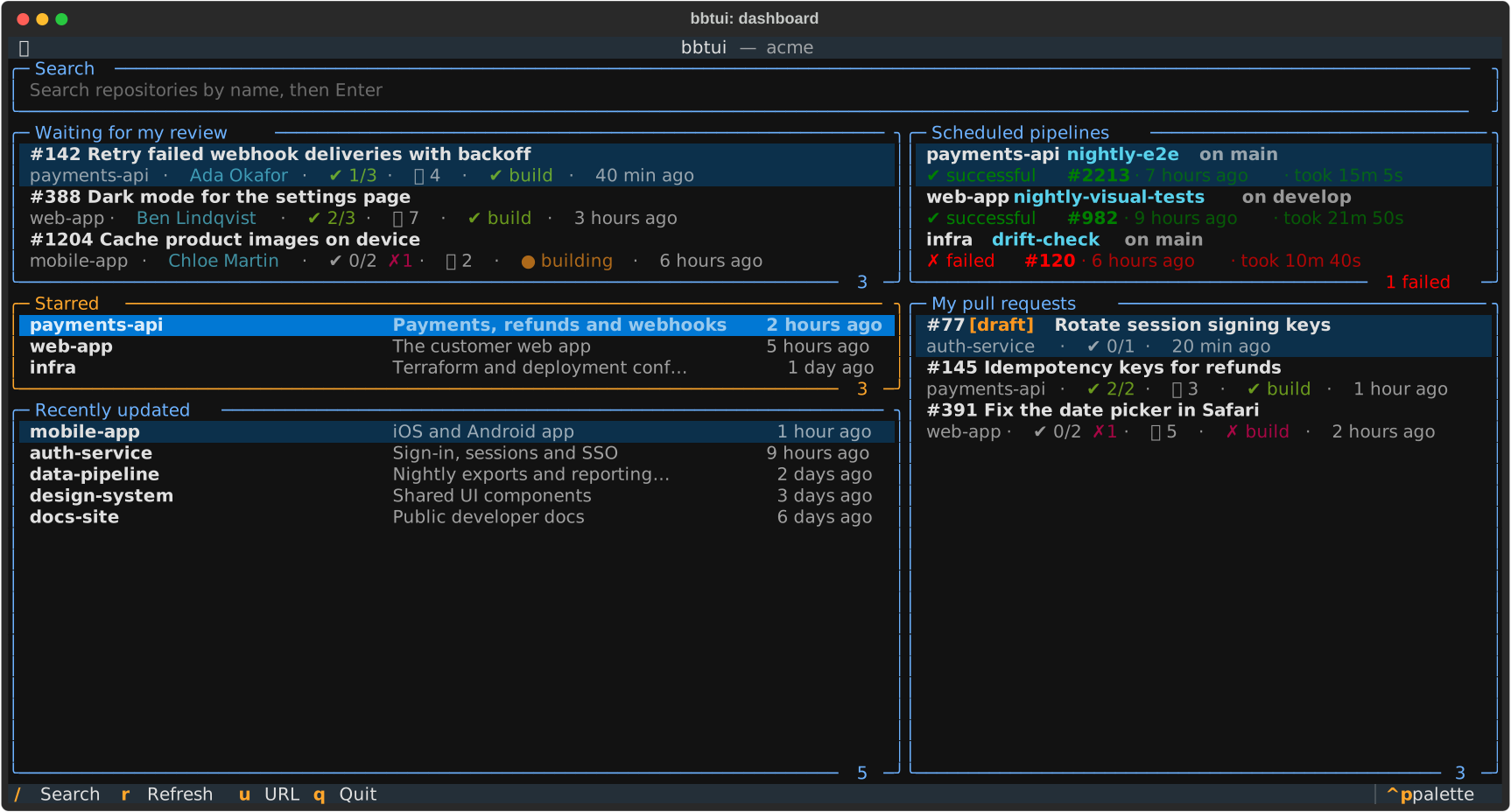
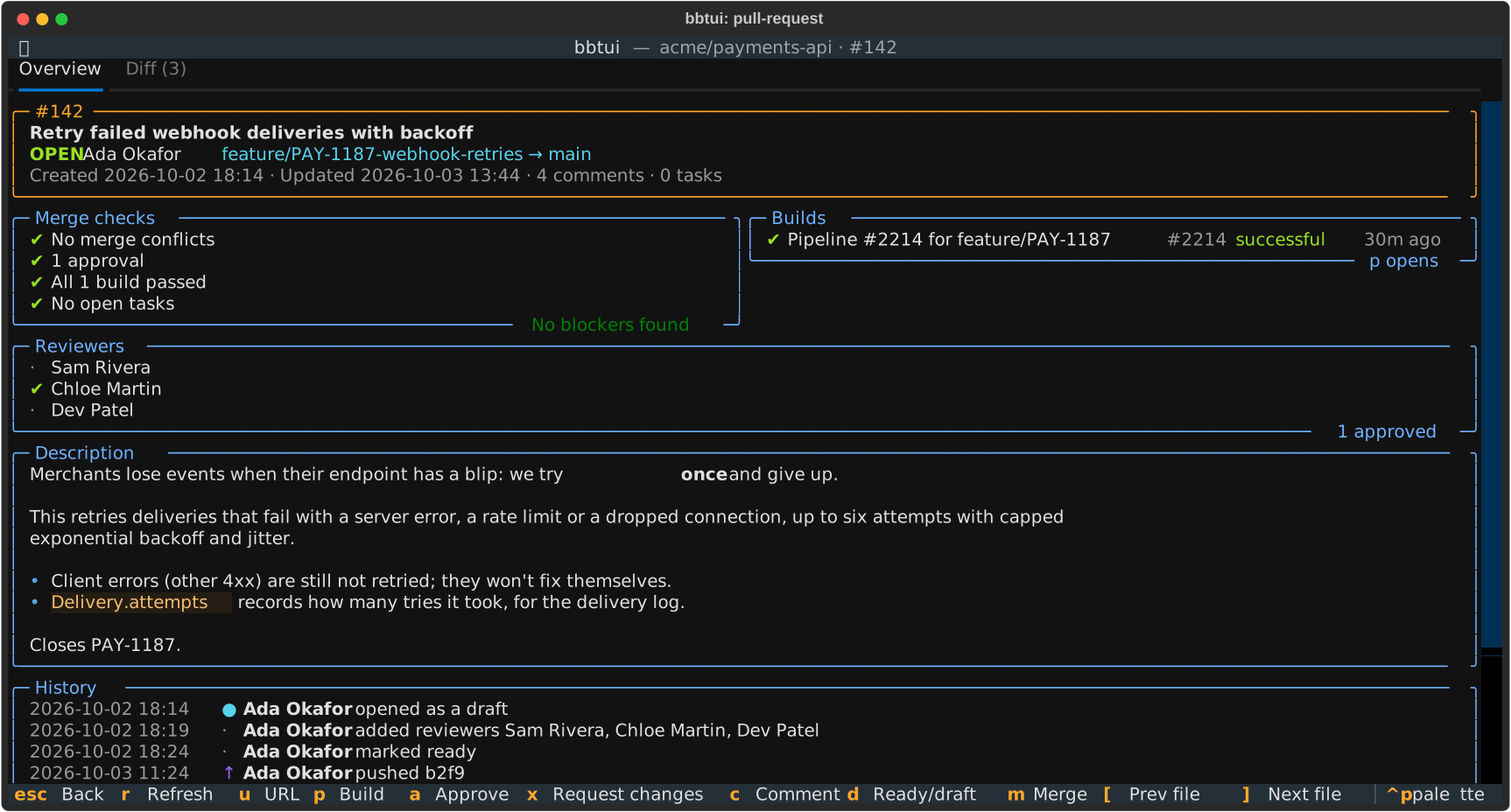
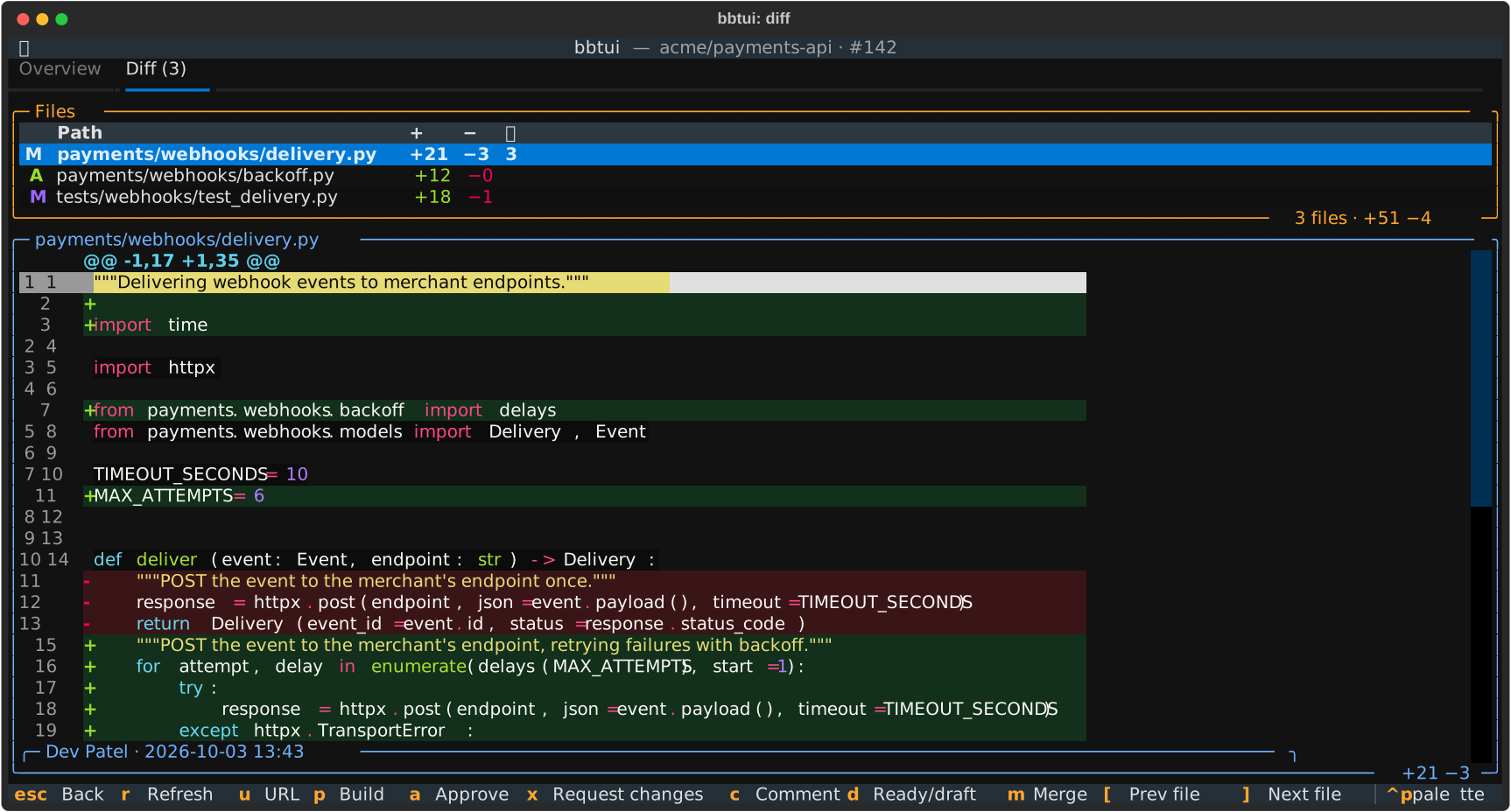
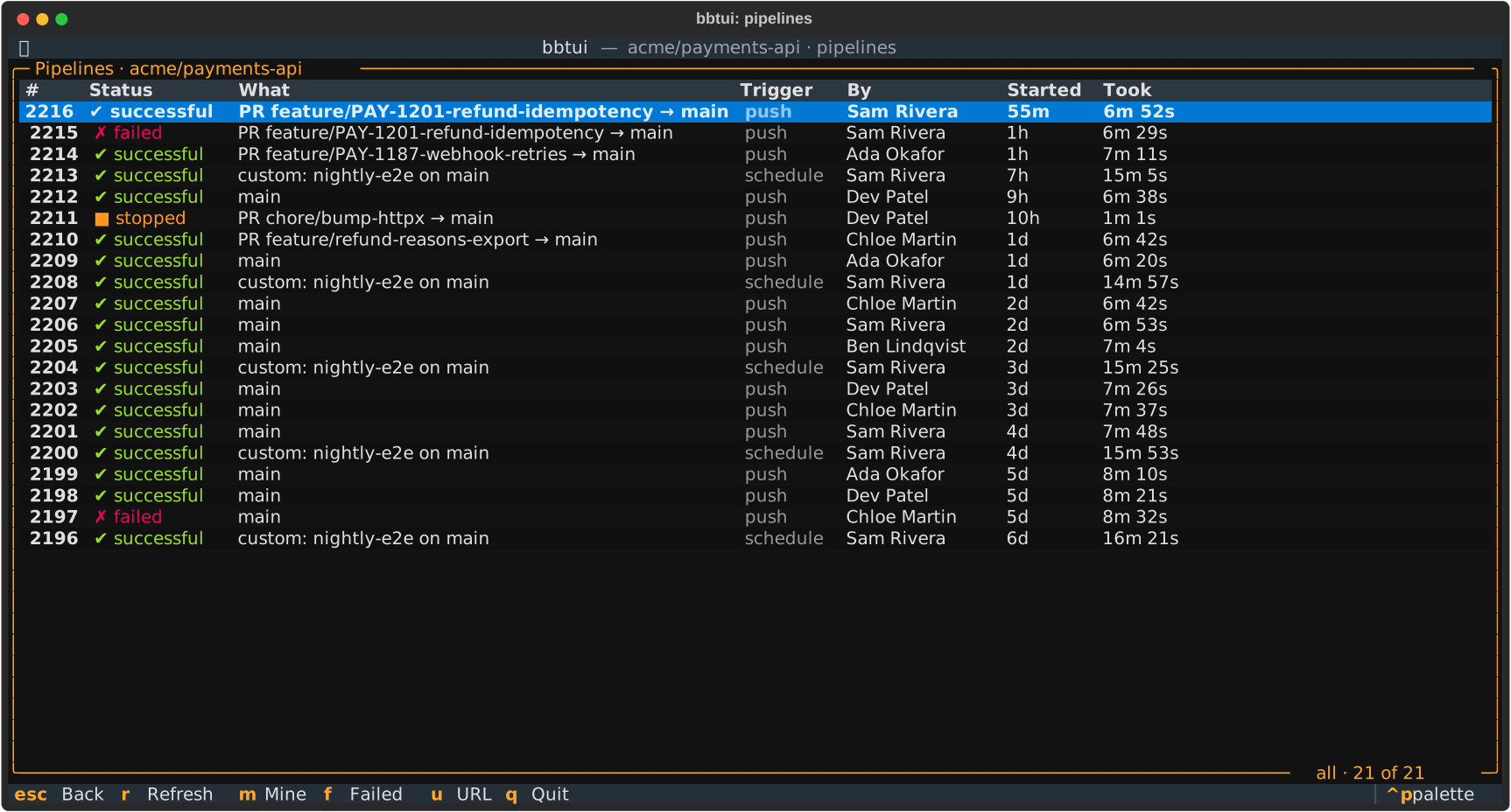
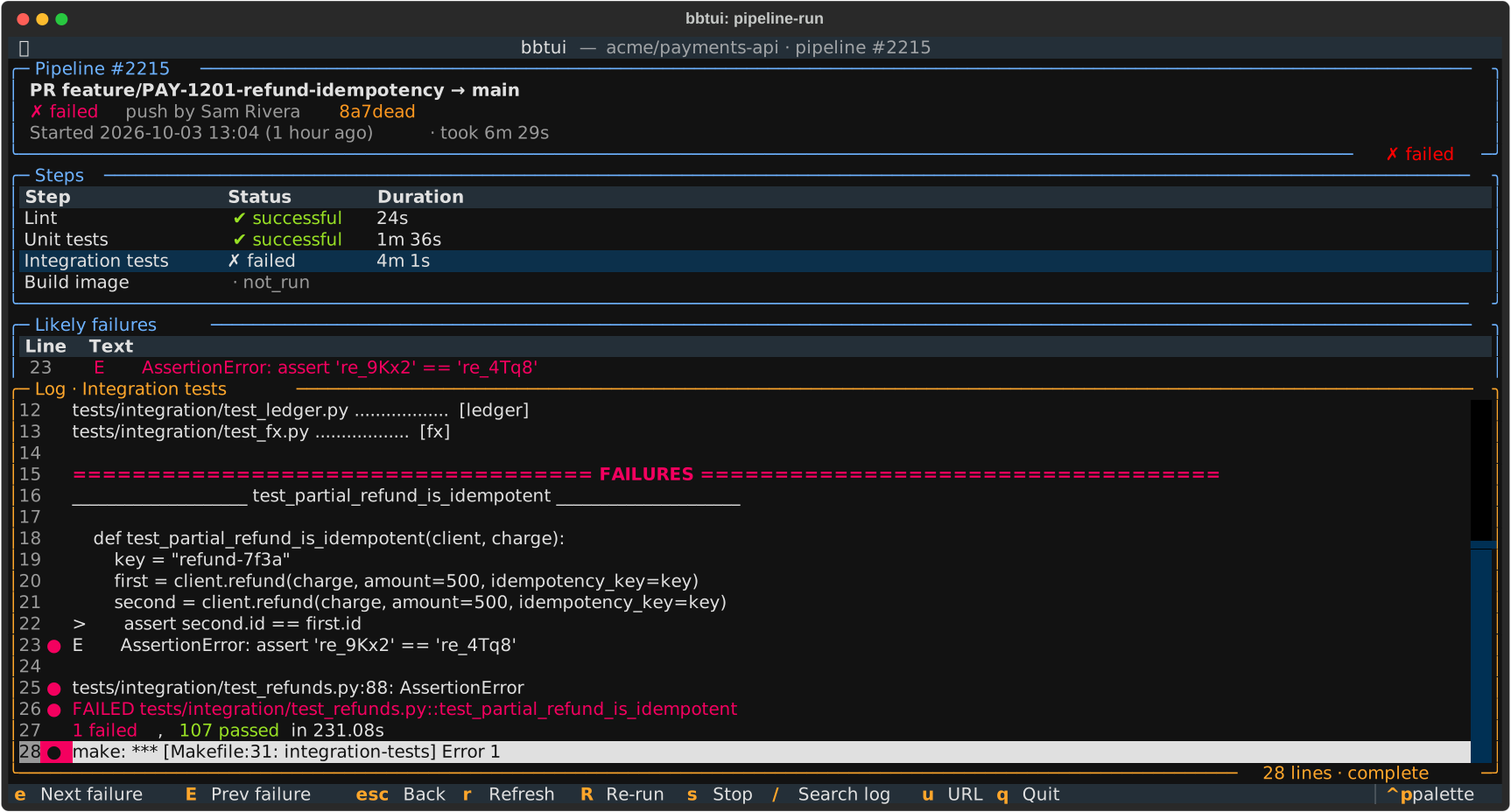
More screenshots: a pull request, its diff with inline comments, a repository's pipelines and a failed run's log. They show made-up demo data (see "Demo and screenshots" below).
Install
bbtui needs Python 3.12 or newer and runs on Linux and macOS. Install it as a standalone tool with uv (which fetches a suitable Python for you if needed) or pipx:
uv tool install bbtui # or: pipx install bbtui
To try the latest code from GitHub instead:
uv tool install git+https://github.com/cullenstone1/bbtui # or: pipx install git+...
Upgrade later with uv tool upgrade bbtui (or pipx upgrade bbtui).
Getting started
bbtui --init    # sign in and write the config file
bbtui
bbtui --init explains how to create the API token, checks it with Bitbucket, lets you pick a
workspace and repositories to pin, and writes ~/.config/bbtui/config.yaml (readable by you
only). bbtui uses a scoped Atlassian API token: at
https://id.atlassian.com/manage-profile/security/api-tokens choose "Create API token with
scopes", pick the Bitbucket app, and select:
read:user:bitbucket,read:workspace:bitbucket,read:repository:bitbucket,read:pullrequest:bitbucket,read:pipeline:bitbucket- to approve, comment and merge:
write:pullrequest:bitbucket - to re-run and stop pipelines:
write:pipeline:bitbucket
Older unscoped tokens (the kind Jira accepts) are rejected by Bitbucket. bbtui --check verifies
the credentials and lists your workspaces; bbtui -w other-workspace opens another workspace.
Features
-
Dashboard: pull requests waiting for your review (open, not yet approved by you, drafts optional; looked for in your starred and 50 most recently updated repositories, since Bitbucket has no workspace-wide reviewer query), starred repositories from the config, recently updated repositories, server-side search by repository name, and your open pull requests across the workspace with their approvals, comments and build status.
-
Pull requests: open, merged or declined pull requests for a repository, with review status.
-
Pull request detail: an overview with merge checks (draft, conflicts, approvals and changes requested, builds, open tasks), build statuses (
popens the pipeline), reviewers, the rendered description, the history (opened, pushes, reviewers, ready, approvals, merge) and general comments; and a diff tab with a file chooser on top and one file's diff below, syntax highlighted with added/removed lines tinted. Inline comment threads appear under the lines they refer to; outdated comments (their line has changed since) are labelled and shown at the top of the file with the code they were made on. Resolved threads start collapsed to their first line, as on the web. Descriptions and comments are rendered as Markdown, with @-mentions shown as names. -
Reviewing: approve or request changes (each key toggles), and comment with a Markdown editor: on the pull request, inline on a diff line, or as a reply to a comment. A cancelled or failed comment is kept as a draft for the same spot. Mark drafts ready (or convert back), and merge with the destination branch's allowed strategies (its default pre-selected), an editable commit message and the close-source-branch option; blockers from the merge checks are shown first.
-
Creating pull requests:
non a repository's pull requests opens a form. The source defaults to your checked-out branch when bbtui runs inside a clone of that repository, and the destination to the repository's development branch. Branches are filtered as you type. The title and description are filled from the commits (one commit: its summary; several: the branch name, with the commits listed) without overwriting your edits. Default reviewers are pre-selected, and the form previews the commits and changed files and warns about an already-open pull request from the same branch. -
Pipelines: a run screen with the run's summary, its steps, a list of likely failure lines (
[FAIL],error:,FAILED,make: ***, tracebacks, ...) and a fast log viewer that keeps colours. A failed run opens on its last likely failure. Running pipelines are polled and their logs tailed. Re-run and stop ask for confirmation. Open a run from a pull request's builds (p), from a repository's pipeline list (Pon its pull requests), or from the dashboard's scheduled pipelines panel, which shows the latest run of each schedule (e.g. a nightly) in your starred repositories. You get a notification when a build on one of your pull requests finishes. -
Commits:
Con a repository's pull requests lists a branch's commits (newest first, more loaded as you scroll), with tagged commits labelled(tag: v1.2).bswitches to another branch or tag, andxlimits the list to commits that aren't on another branch or tag (e.g. what a feature branch adds overmaster, or what changed between two release tags); both search branches and tags as you type. Enter opens a commit: its message, changed files and one file's diff, as for pull requests (read-only). -
Idle timeout (optional): with
idle_timeout_minutesset, bbtui goes back to the dashboard after that many minutes without a key press, click or scroll, but never while you're writing a comment, have an unposted comment draft, or have edited a new pull request.
Configuration
The config file is ~/.config/bbtui/config.yaml ($XDG_CONFIG_HOME/bbtui/config.yaml, or set
BBTUI_CONFIG_FILE). Every setting can also come from a BBTUI_<NAME> environment variable,
e.g. BBTUI_API_TOKEN, which is handy for keeping the token out of the file. The full commented
example is src/bbtui/config.example.yaml.
| Setting | Default | |
|---|---|---|
username |
Your Atlassian account email | |
api_token |
The scoped API token | |
workspace |
The workspace bbtui opens in | |
starred_repos |
[] |
Repositories pinned to the dashboard, as slug or workspace/slug |
recent_repos_limit |
10 |
Recently updated repositories shown on the dashboard |
review_include_drafts |
false |
Show drafts under "Waiting for my review" |
close_source_branch |
false |
Default for "close source branch" on new pull requests |
syntax_theme |
per theme | A Pygments style for diffs, e.g. monokai, github-dark |
theme |
textual-dark |
A Textual theme, e.g. nord, gruvbox, tokyo-night |
idle_timeout_minutes |
0 (off) |
Back to the dashboard after this long without input |
Copying URLs (u, then y) uses wl-copy, xclip, xsel or pbcopy when installed, and
otherwise asks the terminal to copy (OSC 52), which tmux only passes on with set-clipboard on.
Keys
| Screen | Key | Action |
|---|---|---|
| Everywhere | q |
Quit |
h j k l |
Move or scroll the focused panel (not while typing); on the dashboard h / l switch columns |
|
u |
Show the URL of the pull request, run or repository (y copies, o opens) |
|
| Dashboard | / |
Search repositories (Enter to run, Esc to clear) |
Enter |
Open the repository's pull requests, or your pull request | |
c |
Clone links for the highlighted repository (or the pull request's): h copies HTTPS, s SSH |
|
Tab |
Move between panels | |
r |
Refresh | |
| Pull requests | Enter |
Open the pull request |
s |
Cycle open / merged / declined | |
n |
New pull request | |
P |
The repository's pipelines | |
C |
The repository's commits | |
c |
The repository's clone links (h copies HTTPS, s SSH) |
|
Esc |
Back | |
| New pull request | Ctrl+S |
Create |
↓ (in a branch filter) |
Move into the branch list | |
Esc |
Cancel (asks again if you edited the title or description) | |
| Pull request | 1 / 2 |
Overview / Diff |
[ / ] |
Previous / next file | |
Enter (file list) |
Move into the diff; Esc goes back to the file list |
|
a |
Approve, or remove your approval | |
x |
Request changes, or withdraw the request | |
d |
Mark a draft ready for review, or convert back to a draft (asks first) | |
m |
Merge (not drafts) | |
c |
Comment: on the PR (Overview), on the cursor line (diff), or reply to the focused comment | |
Tab / click |
Focus a comment, to reply to it | |
Enter |
On a resolved thread's first comment: expand / collapse it | |
p |
Open the build (failing, else running, else latest) in bbtui | |
r |
Refresh | |
Esc |
Back | |
| Pipelines | m / f |
Only mine / only failed (toggles) |
u |
The highlighted run's URL | |
Enter |
Open the run | |
| Commits | b |
Choose the branch or tag |
x |
Only commits not on another branch or tag (Enter on an empty filter shows all) | |
Enter |
Open the commit (files and diff; [ / ] previous / next file) |
|
u |
The highlighted commit's URL | |
| Pipeline run | e / E |
Next / previous likely failure |
/, then n / N |
Search the log, next / previous match | |
R / s |
Re-run / stop (asks first) | |
Enter (steps, failures) |
Show that step's log / jump to that line | |
| Diff | ↑/↓, j/k, PgUp/PgDn, g/G |
Move the line cursor |
| Comment editor | Ctrl+S / Esc |
Post / cancel (keeps the draft) |
| Merge dialog | Ctrl+S / Esc |
Merge / cancel |
Colours
bbtui needs a terminal that advertises 256 colours or more; with only 16 (e.g. tmux's default
TERM=screen), diff tints and theme colours collapse to greys, and bbtui falls back to plain
green/red diffs and says so at startup. For tmux, add to ~/.tmux.conf:
set -g default-terminal "tmux-256color"
set -as terminal-features ",*:RGB"
and make sure the outer terminal exports COLORTERM=truecolor (most modern terminals do).
When tmux can't pass 24-bit colour through (no RGB feature), bbtui notices and draws with 256
colours itself, which keeps diff tints green and red rather than letting tmux turn them grey.
Set TEXTUAL_COLOR_SYSTEM (truecolor, 256, standard) to override.
Development
git clone git@github.com:cullenstone1/bbtui.git && cd bbtui
python3 -m venv .venv
.venv/bin/pip install -U pip
.venv/bin/pip install -e . --group dev --group lint --group test
.venv/bin/bbtui
(uv sync --all-groups works too.) Then:
.venv/bin/pytest
.venv/bin/ruff check . && .venv/bin/ruff format --check .
.venv/bin/textual run --dev bbtui.app:BBTUI   # with `textual console` in another terminal
Demo and screenshots
python scripts/demo.py runs bbtui against a made-up acme workspace: the real app, with its
HTTP client answered from canned data instead of Bitbucket. It needs no account and ignores your
config file, BBTUI_* variables and git checkout, so it's safe to record or show.
python scripts/screenshots.py saves SVG screenshots of the demo to docs/screenshots/ (rerun
it after UI changes). It refuses to write anything if the app asked for data the demo doesn't
have; tests/test_demo.py checks the same, so CI notices when the demo falls behind the app.
Layout
src/bbtui/
  cli.py            entry point (`bbtui`, `--init`, `--check`)
  init_config.py    `bbtui --init`: guided setup
  config.example.yaml   the commented config template
  config.py         settings from YAML + BBTUI_* environment variables
  models.py         typed views of Bitbucket REST v2 resources
  merge.py          merge readiness checks
  history.py        pull request history from the activity feed
  logs.py           pipeline log decoding, sanitising, failure detection
  highlight.py      syntax highlighting for diffs (per hunk, old and new sides)
  git.py            reading the local checkout (default source branch)
  pull_request_defaults.py   default title and description for new pull requests
  diff.py           unified diff parsing (per file, with old/new line numbers)
  text.py           sanitising remote text, time formatting
  api/client.py     httpx transport: auth, error mapping, pagination
  api/api.py        endpoints returning models
  app.py            the Textual app
  screens/          dashboard, pull requests, commits, pipelines, dialogs
  widgets/          comment cards, the single-file diff view
  bbtui.tcss        styles
Remote text is always rendered as rich.text.Text rather than markup, and control characters are
stripped, so titles, descriptions and comments can't restyle the UI or move the terminal cursor.
Releasing
- Update the version in
src/bbtui/__init__.pyand move the changelog's "Unreleased" entries under a heading for the new version. - Commit, then tag and push:
git tag v0.2.0 && git push origin main v0.2.0.
The release workflow runs the tests, checks the tag matches the
version, builds, publishes to PyPI and creates a GitHub release with the changelog section as
notes. It uses PyPI trusted publishing, so no token is stored. One-time setup: on PyPI, add a
trusted publisher for the bbtui project (owner cullenstone1, repository bbtui, workflow
release.yml, environment pypi), and create a pypi environment in the GitHub repository's
settings.
Roadmap and limitations
Read-only browsing- Reviewing:
approve, request changes, comment (top-level, inline, replies), mark ready, merge, edit and delete your comments, tasks, decline Creating pull requests(adding reviewers beyond the defaults, and PRs from forks, to come)Pipelines: runs per repository, step status, step logs (tailing while running), rerun; running custom pipelines with variables, test reports
Merge checks report what the API shows to non-admins. The repository's own merge rules (for example "2 approvals required") are branch restrictions, which need repository admin access to read, so "No blockers found" doesn't guarantee Bitbucket will allow the merge.
Known gaps: changed words within a line aren't highlighted yet, and @-mentions of people who
aren't on the pull request stay as raw @{account_id}.
1 maintainer

Metadata
1 maintainer
Release files for bbtui 0.1.0
For a detailed explanation of source distributions (sdists) and built distributions (wheels), please see the package formats documentation.
Source distribution (sdist)
| File | Size | Uploaded | |
|---|---|---|---|
| bbtui-0.1.0.tar.gz | 105.1 kB | Details |
Built distribution (wheel)
| File | Interpreter | ABI | Platform | Reset |
|---|---|---|---|---|
| bbtui-0.1.0-py3-none-any.whl | Python 3 | none | any | Details |
Total release size: 193.8 kB
Release files / bbtui-0.1.0.tar.gz
| Download URL | bbtui-0.1.0.tar.gz |
|---|---|
| Size | 105.1 kB |
| Tags | Source |
|
SHA-256 checksum How to use checksums |
05b51317bb4175a23c9f47513daab86ed0c607c050bb964f1b7a5226821c8a9a
|
|
BLAKE2b-256 checksum How to use checksums |
cd500f5408341302c1e45e48bf63670006328ff50eb1b64e2ca3fdc6b92f767c
|
| Upload date | |
|
Uploaded using Trusted Publishing? What is trusted publishing? |
Yes |
| Uploaded via |
twine/7.0.0 CPython/3.13.14
|
Provenance
Provenance describes where a file came from. On PyPI, provenance is shared via attestations, which provide a verifiable record of the build or publishing details. View details, limitations and caveats.


PyPI Publish Attestation
PyPI verified that this artifact, at this checksum, originated from the publisher listed below.
Signed by GitHub Actions, verified by PyPI on Oct 3, 2026.
Transparency logRelease files / bbtui-0.1.0-py3-none-any.whl
| Download URL | bbtui-0.1.0-py3-none-any.whl |
|---|---|
| Size | 88.6 kB |
| Tags | Python 3 |
|
SHA-256 checksum How to use checksums |
377eafd8e64519af3d44d05a3d8379266ed308127c8e24f80fd5630767b3a690
|
|
BLAKE2b-256 checksum How to use checksums |
af8ba3a198a88440d7f103c531037915e993340540d2109f71892695aa06f5f5
|
| Upload date | |
|
Uploaded using Trusted Publishing? What is trusted publishing? |
Yes |
| Uploaded via |
twine/7.0.0 CPython/3.13.14
|
Provenance
Provenance describes where a file came from. On PyPI, provenance is shared via attestations, which provide a verifiable record of the build or publishing details. View details, limitations and caveats.
PyPI Publish Attestation
PyPI verified that this artifact, at this checksum, originated from the publisher listed below.
Signed by GitHub Actions, verified by PyPI on Oct 3, 2026.
Transparency log