
build123d development with live preview and interactive parameters.
Verified details
These details have been verified by PyPIProject links
GitHub Statistics
Maintainers

Project description
bdbox
build123d development with live preview and interactive parameters







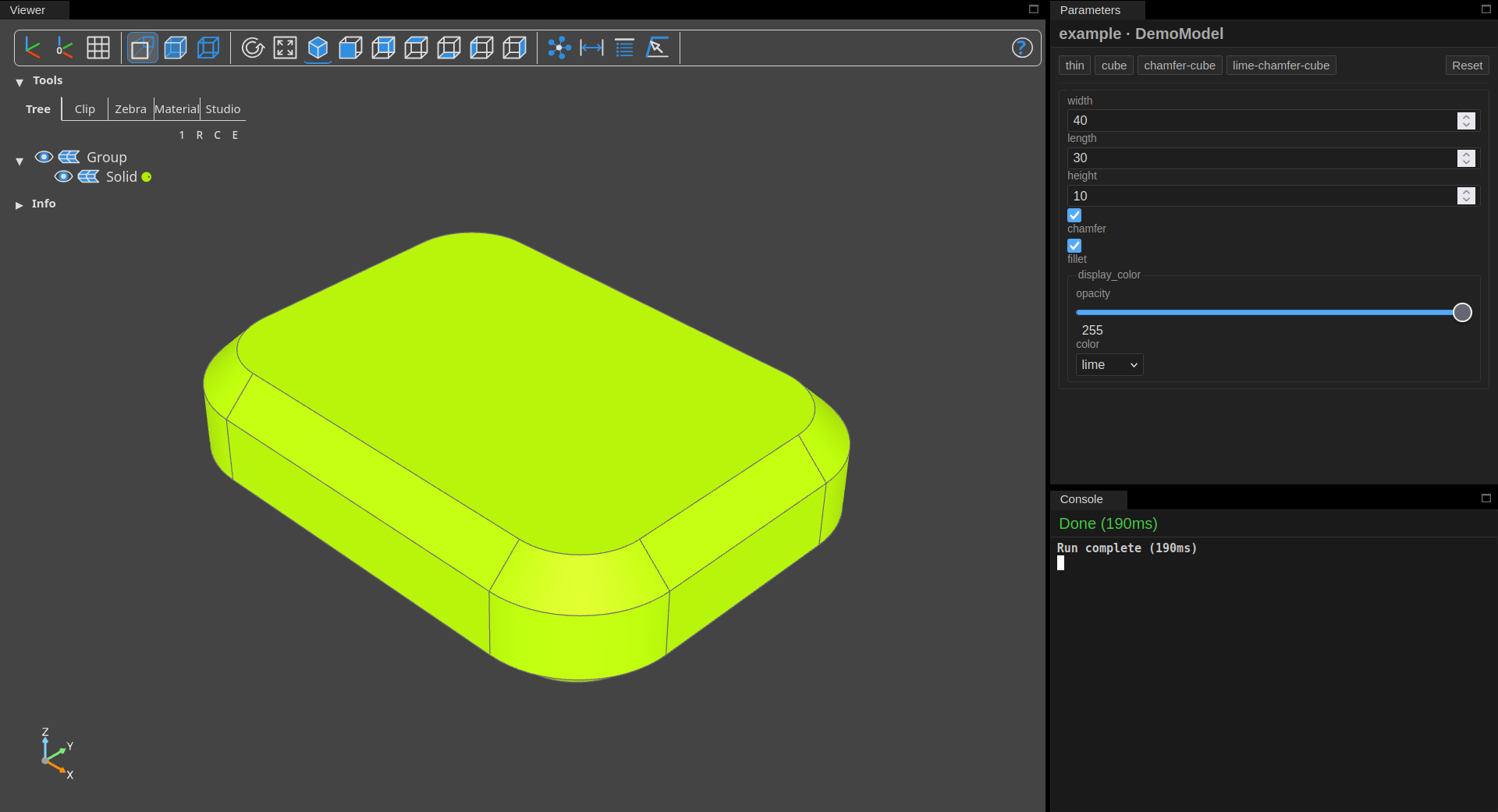
See the documentation site for full project details!
Why?
I discovered build123d after modeling with OpenSCAD. build123d has some great advantages over OpenSCAD:
- Better geometry (STEP file export) than OpenSCAD's mesh of vertexes
- Common CAD operations like
chamferandfilletare simple - build123d models are Python programs, whereas OpenSCAD uses its own modeling language
Comparatively, build123d's development experience was lacking. OpenSCAD previews a model on save or hotkey, makes exporting a model render simple, and even provides a GUI for setting toplevel variables! I started with some self-made tooling to work around these drawbacks, but having to remember how to use and maintain it resulted in me working on models less.
I built bdbox to be the missing tool I wanted: Let models just define
their geometry plus optional parameters, and let bdbox handle everything
else!
See more background info in the documentation!
Installation
Install user-wide with uv or pipx for use across all
projects:
uv tool install bdbox
pipx install bdbox
Install in any environment where pip is available:
pip install bdbox
Installation in projects
Install in a project, such as with uv or poetry:
uv add bdbox
poetry add bdbox
bdbox detects and automatically uses virtual environments also containing
bdbox.
This enables running via bdbox model.py instead of uv run bdbox model.py,
for example.
Works with any build123d model
Use bdbox with any existing build123d script:
# mymodel.py
from build123d import Box

result = Box(10, 10, 10)
Export geometry files:
bdbox mymodel.py export           # Export STEP files to current directory
bdbox mymodel.py export output/   # Export STEP files to output/
bdbox mymodel.py export -f stl    # Export STL files to current directory
View your model using the web UI, which includes OCP CAD Viewer and an interactive parameters panel:
bdbox mymodel.py view
Module paths work too:
bdbox mypackage.mymodule view
bdbox mypackage.mymodule export
See more about actions in the documentation!
Add parameters
Declare typed parameters with defaults and constraints:
from bdbox import Float, Int, Params, Preset, show
from build123d import Box

class P(Params):
    width = Float(10.0, min=5, max=100)
    length = Float(20.0, min=5, max=100)
    thickness = Int(2, min=1, max=10)
    presets = (
        Preset("small", width=5.0, length=8.0),
        Preset("large", width=80.0, length=40.0, thickness=5),
    )

result = Box(P.width, P.length, P.thickness)
show(result)
Or inherit from Model for reusable, importable models:
from bdbox import Float, Int, Model, Preset
from build123d import Box

class MyModel(Model):
    width = Float(10.0, min=5, max=100)
    length = Float(20.0, min=5, max=100)
    thickness = Int(2, min=1, max=10)
    presets = (
        Preset("small", width=5.0, length=8.0),
        Preset("large", width=80.0, length=40.0, thickness=5),
    )

    def build(self):
        return Box(self.width, self.length, self.thickness)
Parameters become CLI flags automatically:
python mymodel.py                 # Run with default values
python mymodel.py view            # View with live reload and parameter panel
python mymodel.py --width 50      # Override a field value
python mymodel.py --preset large  # Apply a named preset
python mymodel.py --help          # Usage info with all parameters
Export geometry files using the built-in export action:
python mymodel.py export          # Export STEP files to current directory
python mymodel.py export -f stl   # Export STL files to current directory
See more about parameters in the documentation!
Project template
This project is generated and maintained with copier-python.
Project details
Verified details
These details have been verified by PyPIProject links
GitHub Statistics
Maintainers
Release history Release notifications | RSS feed


Download files
Download the file for your platform. If you're not sure which to choose, learn more about installing packages.
Source Distribution
Built Distribution
Filter files by name, interpreter, ABI, and platform.
If you're not sure about the file name format, learn more about wheel file names.
Copy a direct link to the current filters
File details
Details for the file bdbox-0.13.0.tar.gz.
File metadata
- Download URL: bdbox-0.13.0.tar.gz
- Upload date:
- Size: 276.9 kB
- Tags: Source
- Uploaded using Trusted Publishing? Yes
- Uploaded via: twine/6.1.0 CPython/3.13.12
File hashes
| Algorithm | Hash digest | |
|---|---|---|
| SHA256 |
8766b08c049f2b71ac99082204c383f3fc1e1b66227c55fdf945dcf1ad116ee1
|
|
| MD5 |
efaeec5a677433709005abc3a96275af
|
|
| BLAKE2b-256 |
1d8e7c528fd887bb8434c76c0a3d57ce7c80e7a20bfb48e183173fb499a6ab55
|
Provenance
The following attestation bundles were made for bdbox-0.13.0.tar.gz:
Publisher:
release.yaml on smkent/bdbox
-
Statement:
-
Statement type:
https://in-toto.io/Statement/v1 -
Predicate type:
https://docs.pypi.org/attestations/publish/v1 -
Subject name:
bdbox-0.13.0.tar.gz -
Subject digest:
8766b08c049f2b71ac99082204c383f3fc1e1b66227c55fdf945dcf1ad116ee1 - Sigstore transparency entry: 1531567506
- Sigstore integration time:
-
Permalink:
smkent/bdbox@7db2d908c6c6b4515b56e58fc71c29b9aee431cd -
Branch / Tag:
refs/tags/v0.13.0 - Owner: https://github.com/smkent
-
Access:
public
-
Token Issuer:
https://token.actions.githubusercontent.com -
Runner Environment:
github-hosted -
Publication workflow:
release.yaml@7db2d908c6c6b4515b56e58fc71c29b9aee431cd -
Trigger Event:
push
-
Statement type:
File details
Details for the file bdbox-0.13.0-py3-none-any.whl.
File metadata
- Download URL: bdbox-0.13.0-py3-none-any.whl
- Upload date:
- Size: 230.3 kB
- Tags: Python 3
- Uploaded using Trusted Publishing? Yes
- Uploaded via: twine/6.1.0 CPython/3.13.12
File hashes
| Algorithm | Hash digest | |
|---|---|---|
| SHA256 |
8c3d2be8d2e1aa22cd45b06a591187ee2bf3a4b1dd764e181b4e09378c6c9a70
|
|
| MD5 |
a0cb109d1b4d5ca4d7b7dc7dacbba204
|
|
| BLAKE2b-256 |
326fc28114beb95e8e8a201e350571785a0f3aa32548333688f5308b81b5831d
|
Provenance
The following attestation bundles were made for bdbox-0.13.0-py3-none-any.whl:
Publisher:
release.yaml on smkent/bdbox
-
Statement:
-
Statement type:
https://in-toto.io/Statement/v1 -
Predicate type:
https://docs.pypi.org/attestations/publish/v1 -
Subject name:
bdbox-0.13.0-py3-none-any.whl -
Subject digest:
8c3d2be8d2e1aa22cd45b06a591187ee2bf3a4b1dd764e181b4e09378c6c9a70 - Sigstore transparency entry: 1531567700
- Sigstore integration time:
-
Permalink:
smkent/bdbox@7db2d908c6c6b4515b56e58fc71c29b9aee431cd -
Branch / Tag:
refs/tags/v0.13.0 - Owner: https://github.com/smkent
-
Access:
public
-
Token Issuer:
https://token.actions.githubusercontent.com -
Runner Environment:
github-hosted -
Publication workflow:
release.yaml@7db2d908c6c6b4515b56e58fc71c29b9aee431cd -
Trigger Event:
push
-
Statement type:






