
This release is a pre-release and may not be stable for production use.

Beautiful, local-first coverage reports for Python.
beautiful-cov is a command-line tool that turns
Coverage.py data into compact, browsable
HTML reports.
Coverage.py remains the source of truth. beautiful-cov focuses on the
presentation layer: clear summaries, useful visual hierarchy, and static output
that stays on your machine.
[!IMPORTANT]
beautiful-covis in public beta. The report format and command-line interface may change before the first stable release.
Why beautiful-cov?
Python already has excellent coverage measurement. What is missing is a modern local report that feels as good to use as hosted dashboards without requiring an account, an upload, or a service.
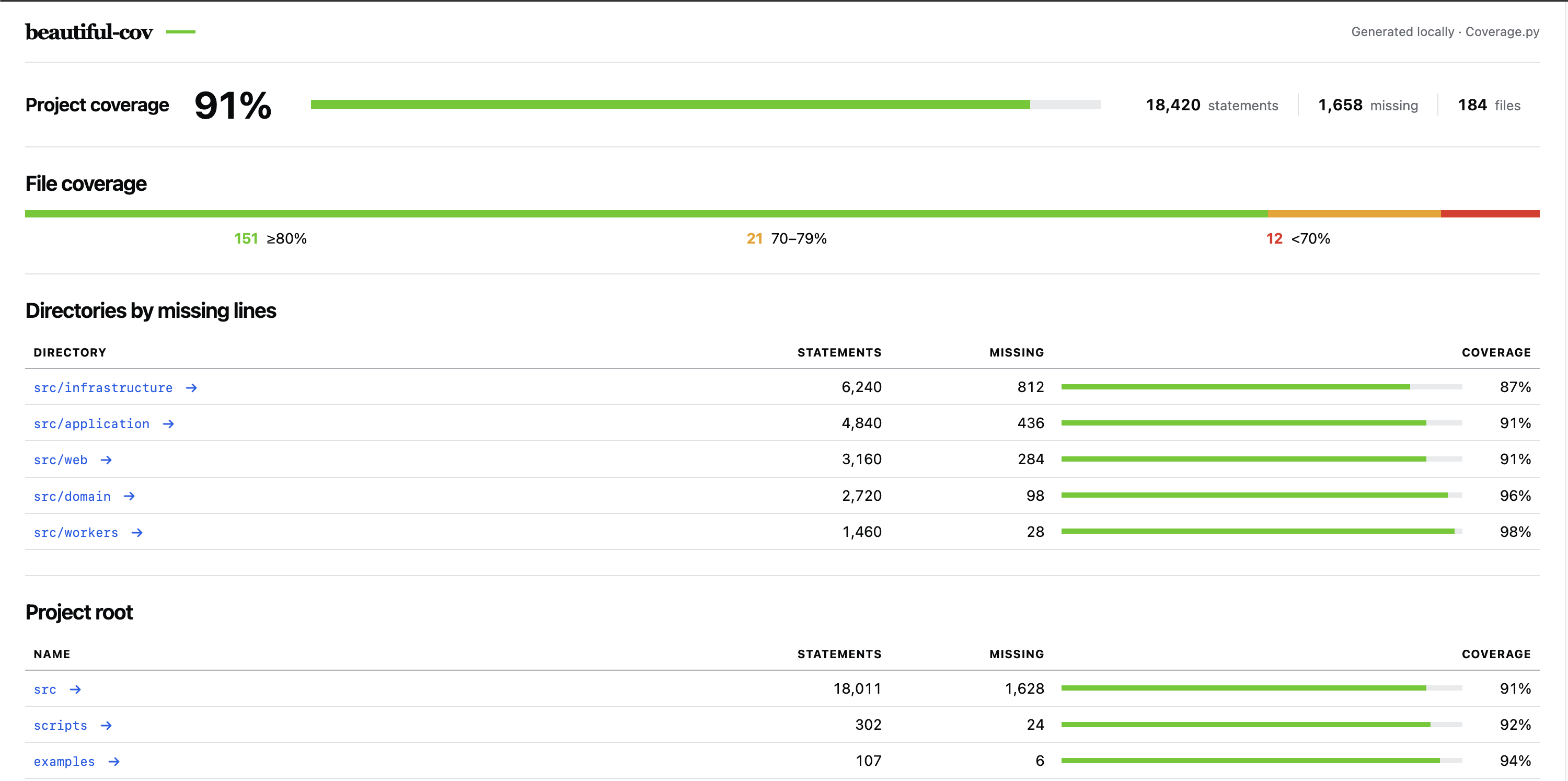
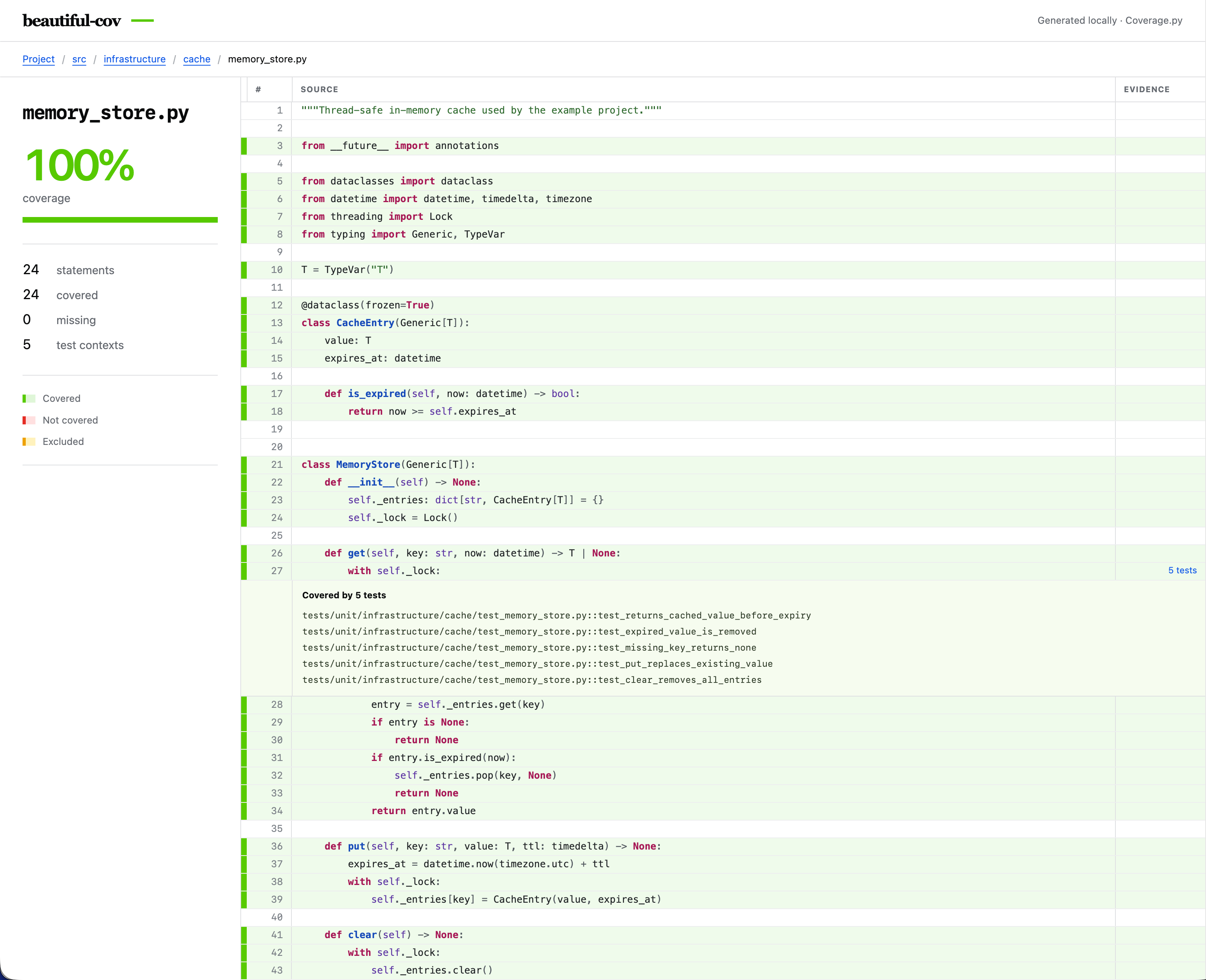
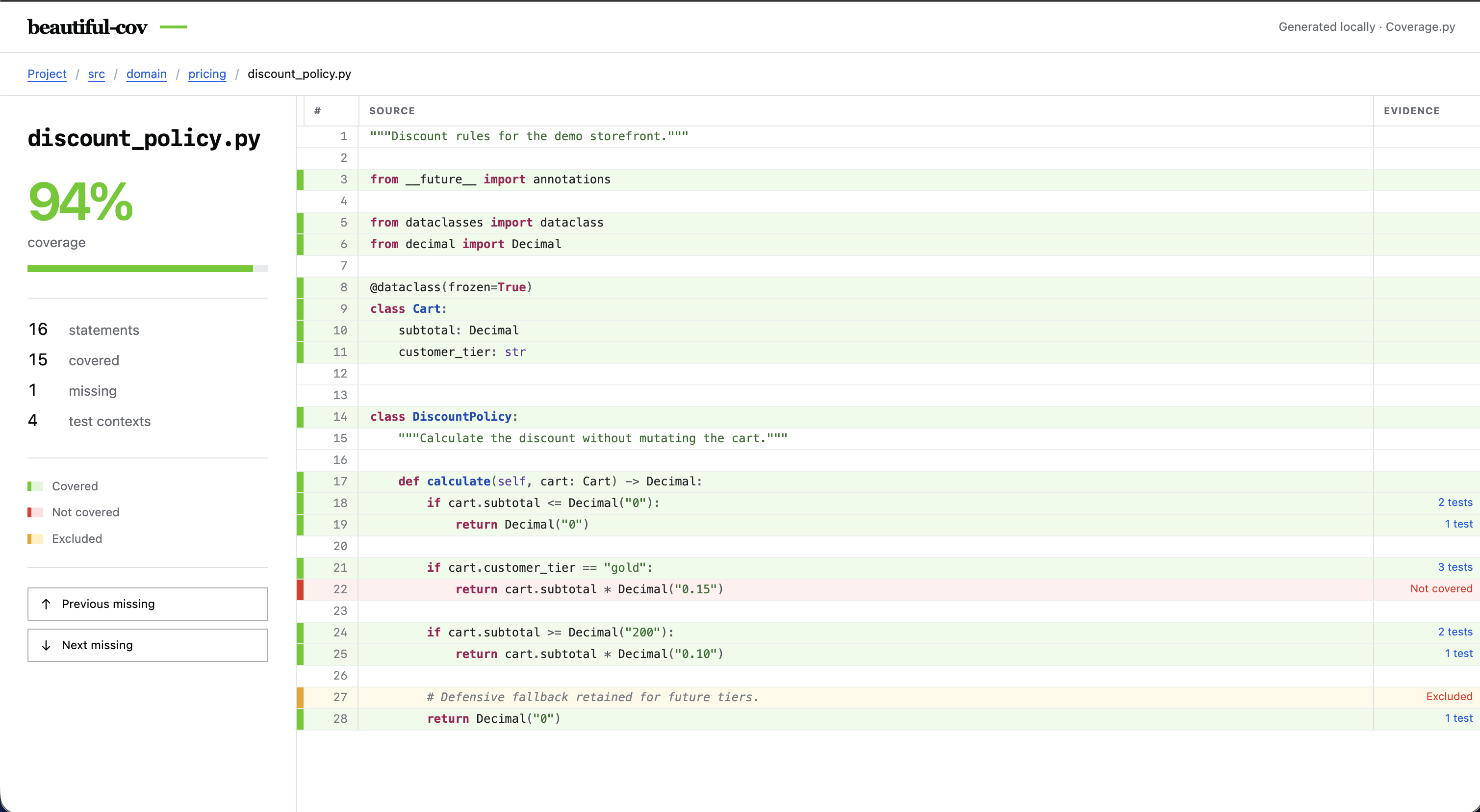
Screenshots
|
|
|
|
The project is guided by four principles:
- Local by default. Coverage data and source code never need to leave your machine.
- Coverage.py underneath. Measurement stays with the established Python coverage engine.
- Static and portable. Reports should open in a browser and be easy to archive or share.
- Useful before decorative. Visual polish should make uncovered code easier to understand, not hide it.
Installation
beautiful-cov requires Python 3.10 or newer.
python -m pip install --pre beautiful-cov
Usage
First, collect coverage data. With pytest-cov, enable test contexts so the report can show exactly which tests executed each covered line:
pytest --cov --cov-context=test
Then generate the local HTML report:
beautiful-cov
Coverage: 87.2%
Report: /path/to/project/beautiful-cov-report/index.html
By default, the report is written to beautiful-cov-report/. Choose another
directory with --output:
beautiful-cov --output coverage-report
Run the command from the directory containing your .coverage data file. The
generated report is a portable static directory: it has no hosted assets,
account, telemetry, or network dependency.
The beta report includes:
- A compact project dashboard with coverage totals and distribution
- Statement, missing-line, and file totals
- Aggregated directory coverage
- Breadcrumb navigation through the project tree
- Filtering within directory contents
- Per-directory and per-file coverage bars
- A two-column source inspector with covered, missing, and excluded states
- Exact pytest node IDs for covered lines when contexts are present
- Previous and next missing-line navigation
- A responsive layout for smaller screens
Showing which tests covered a line
Coverage.py only records test names when context collection is enabled. With pytest-cov, the complete workflow is:
pytest --cov --cov-context=test
beautiful-cov --output coverage-report
Covered source lines will show the recorded pytest node IDs. Plain Coverage.py
collection, such as coverage run -m pytest, is also supported, but it does
not identify the tests responsible for each covered line unless contexts are
configured separately. Reports generated without named contexts still show
covered and missing lines, with a clear collection hint instead of invented
test information.
Architecture
The code follows a small domain-driven design. Each layer has one clear job:
- Domain defines a valid coverage report. It has no dependency on Coverage.py or the command line.
- Application owns the report-generation use case and the input/output ports it needs.
- Infrastructure reads Coverage.py data, writes the static HTML report, and
translates third-party failures into errors owned by
beautiful-cov. - Jinja templates own report markup; Python prepares typed view data and filesystem-safe navigation.
- CLI is the composition root. It parses input, connects the use case to the infrastructure adapters, and presents the result.
The boundaries are deliberately small. Coverage input and HTML presentation can change independently, so they use separate ports. Command-line parsing remains at the edge and the domain has no dependency on Coverage.py or HTML.
Planned capabilities
- Sorting and threshold filters
- Branch coverage and partial-branch annotations
- Optional Git diff coverage
- Light and dark themes
- Fully local static output
The roadmap is intentionally small. beautiful-cov will render coverage data;
it will not replace Coverage.py, run a hosted service, or collect telemetry.
Development
Clone the repository and create an isolated environment:
python -m venv venv
source venv/bin/activate
python -m pip install --upgrade pip
python -m pip install --editable .
python -m pip install --group dev
Run the local command:
beautiful-cov
Run the test suite:
python -m unittest discover -s tests -v
Generate a report for beautiful-cov itself:
pytest --cov=beautiful_cov --cov-context=test
beautiful-cov --output beautiful-cov-report
Contributing
Focused bug reports, design feedback, and small pull requests are welcome during the beta.
License
beautiful-cov is licensed under the
Apache License 2.0.
Project status
Version 0.1.0b1 is the first public beta. It includes the command-line
interface, compact project and directory views, line-by-line source coverage,
and optional per-line pytest attribution generated from existing Coverage.py
data.
1 maintainer

Download files
Download the file for your platform. If you're not sure which to choose, learn more about installing packages.
Source Distribution
Built Distribution
Filter files by name, interpreter, ABI, and platform.
If you're not sure about the file name format, learn more about wheel file names.
Copy a direct link to the current filters
File details
Details for the file beautiful_cov-0.1.0b2.tar.gz.
File metadata
- Download URL: beautiful_cov-0.1.0b2.tar.gz
- Upload date:
- Size: 28.5 kB
- Tags: Source
- Uploaded using Trusted Publishing? No
- Uploaded via: twine/6.2.0 CPython/3.12.3
File hashes
| Algorithm | Hash digest | |
|---|---|---|
| SHA256 |
439afdedcff00b992685e2fc1abf9127b7946dd45c46ad47e3819f5f64def9b5
|
|
| MD5 |
aa53109b0bff05e998bfc6ee3c599e27
|
|
| BLAKE2b-256 |
cc0fa548628b08d365e07ea7b2b656eb71d0264e9d4389b15d3ddf0a47518590
|
File details
Details for the file beautiful_cov-0.1.0b2-py3-none-any.whl.
File metadata
- Download URL: beautiful_cov-0.1.0b2-py3-none-any.whl
- Upload date:
- Size: 29.8 kB
- Tags: Python 3
- Uploaded using Trusted Publishing? No
- Uploaded via: twine/6.2.0 CPython/3.12.3
File hashes
| Algorithm | Hash digest | |
|---|---|---|
| SHA256 |
b9323f0c10b5b20f5d0d494fcb073240461566d4aae07217aac0ad2dbb9d58b4
|
|
| MD5 |
1c3dea0e439c065a9204e0e5839e5c1b
|
|
| BLAKE2b-256 |
ebf91d3ba532f2b1570708b1f479d3af52999927b14f745a545fc7e802334b3b
|







