
BeautifulEmail
⚠️🏗️️ Note: This is only the first version - actively working on additional features!
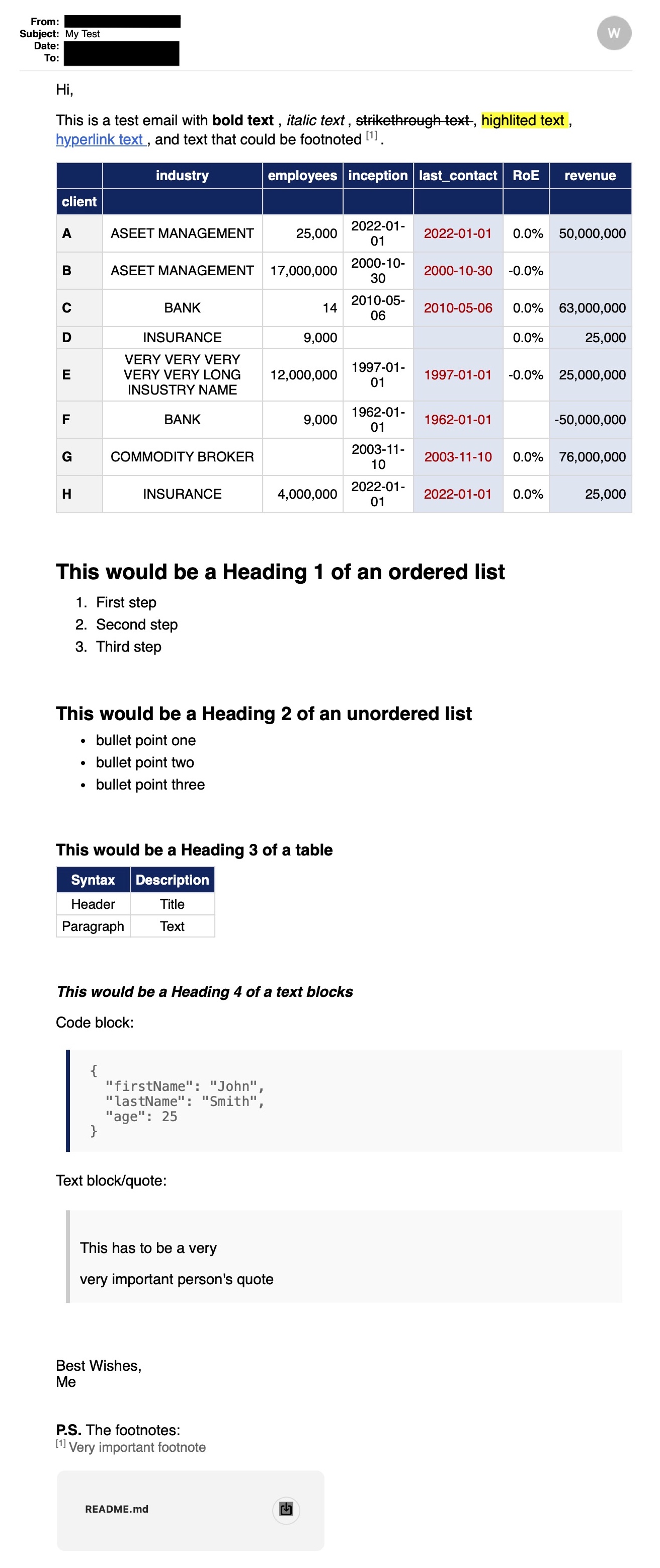
BeautifulEmail is a python package that makes it easy and quick to send beautifully formatted emails with beuatiful tables/dataframes. BeautifulEmail is for Data Scientists with a deadline.
Email Example:
Getting it
$ pip install beautifulemail
Update Package: (execute regularly to get the latest features)
$ pip install beautifulemail --upgrade
How to use:
from beautifulemail import Connection, DataFrameToHTML

df_styled = ...

df_html = DataFrameToHTML(df=df_styled)

# format numbers automatically
df_html.col_num_fmt_auto()

# add background styling to columns
df_html.col_styles(column=['last_contact', 'revenue'], classes=['bg_light_blue'])
df_html.col_styles(column=['last_contact'], classes=['text_color_amber'])

# use markdown to write email - more infoss here: www.markdownguide.org/cheat-sheet/
email_body_markdown = f"""
Hi,

This is a test email with **bold text**, *italic text*, ~~strikethrough text~~, <mark>highlited text</mark>, [hyperlink text](https://www.google.com), and text that could be footnoted<note>[1]</note>.

# This would be a Heading 1 of an ordered list

1. First step
2. Second step
3. Third step

{df_html}

Embedded image:
<img src="cid:image1" style="width: 100px;">

Best wishes,
Me
    """

    # connect to email server
    with Connection(host='smtp.gmail.com', port=465, ssl=True, user='myemai@gmail.com', password='my_password') as conn:
        # send email
        status = conn.send_email(
            from_='my_emai@gmail.com',
            to_=['your_emai@gmail.com', 'second_emai@gmail.com'],
            subject='Email Subject',
            body_markdown=email_body_markdown,
            attachments=['./README.md'],
            embedded_imgs=['./email_preview.jpg'],
            dry_run=False
            )

        # status contains all the email information including the html body
        print('Email sent:', status)

        # save sent email documntation/summary as excel
        conn.save_sent_email_summary('sent_emails.xlsx')
1 maintainer

Metadata
1 maintainer
Release files for beautifulemail 0.1.2
For a detailed explanation of source distributions (sdists) and built distributions (wheels), please see the package formats documentation.
Source distribution (sdist)
| File | Size | Uploaded | |
|---|---|---|---|
| beautifulemail-0.1.2.tar.gz | 11.7 kB | Details |
Built distribution (wheel)
| File | Interpreter | ABI | Platform | Reset |
|---|---|---|---|---|
| beautifulemail-0.1.2-py3-none-any.whl | Python 3 | none | any | Details |
Total release size: 22.0 kB
Release files / beautifulemail-0.1.2.tar.gz
| Download URL | beautifulemail-0.1.2.tar.gz |
|---|---|
| Size | 11.7 kB |
| Tags | Source |
|
SHA-256 checksum How to use checksums |
20f0b065efa6e27792d3ad83ec69650fac3f7b0bc4e25959c1d2d77722cc1ca3
|
|
BLAKE2b-256 checksum How to use checksums |
90bfad32ad5390f82ed9db7743adb9953f08b01f1aaa8a66db4be7b819da9dc6
|
| Upload date | |
|
Uploaded using Trusted Publishing? What is trusted publishing? |
Yes |
| Uploaded via |
twine/5.1.1 CPython/3.12.7
|
Release files / beautifulemail-0.1.2-py3-none-any.whl
| Download URL | beautifulemail-0.1.2-py3-none-any.whl |
|---|---|
| Size | 10.3 kB |
| Tags | Python 3 |
|
SHA-256 checksum How to use checksums |
29ac4045b105506efff8d26d279b5be4616bcd2a8a483809246e28ba32d8bf0e
|
|
BLAKE2b-256 checksum How to use checksums |
b3315d09a9df655bdd8081aa53aadee16688e1ad3d96669583a71fe51d5e5290
|
| Upload date | |
|
Uploaded using Trusted Publishing? What is trusted publishing? |
Yes |
| Uploaded via |
twine/5.1.1 CPython/3.12.7
|














