
BeautifulExcel
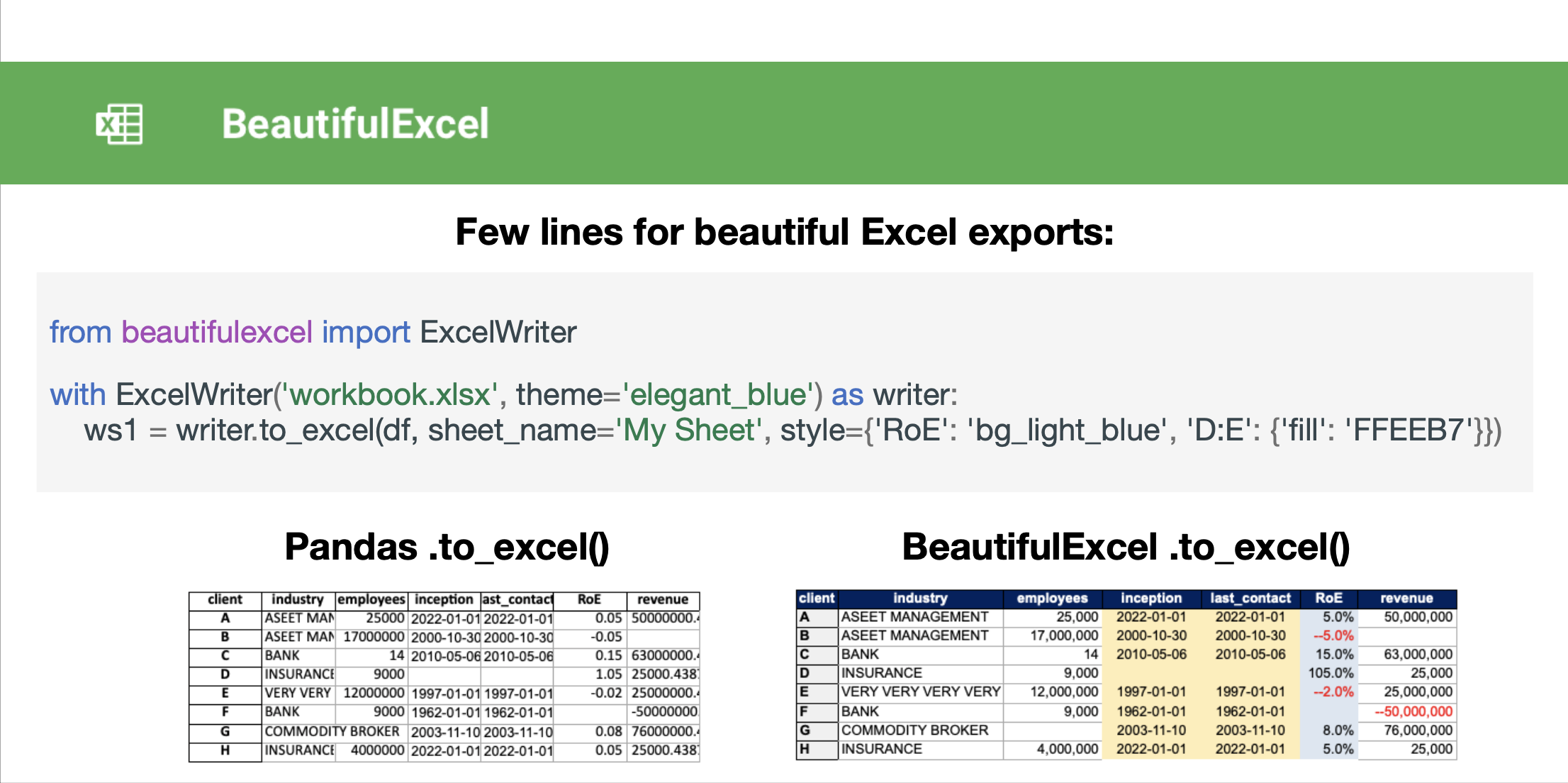
⚠️🏗️️ Note: This is only the first version - actively working on additional features!
BeautifulExcel is a python package that makes it easy and quick to save pandas dataframes in beautifully formatted excel files. BeautifulExcel is the Openpyxl for Data Scientists with a deadline.
Getting it
$ pip install beautifulexcel
Update Package: (execute regularly to get the latest features)
$ pip install beautifulexcel --upgrade
How to use:
from beautifulexcel import ExcelWriter

with ExcelWriter('workbook.xlsx', mode='r', theme='elegant_blue') as writer:
    ws1 = writer.to_excel(
        df,
        sheet_name='My Sheet',
        startrow=0,
        startcol=0,
        index=True,
        header=True,
        col_autofit=True,  # automatically change column width to fit content best
        col_widths={'A': 20, 'RoE': 40},  # define column width manually
        auto_number_formatting=True,  # automatically detect number format and change excel format
        style={'RoE': 'bg_light_blue', 'D:E': {'fill': 'FFEEB7'}},  # apply custom styling to this dataframe export
        use_theme_style=True,  # apply the excel workbook "theme" set in ExcelWriter()
    )
Further details in the Documentation
A feature is missing? Feel free to contribute!
- Please submit new features as Pull Request to the "dev" branch
- Please make sure the code is nicely formatted and has doc strings by executing
$ pre-commit installbefore your git commit
1 maintainer

Metadata
1 maintainer
Release files for beautifulexcel 0.3.6
For a detailed explanation of source distributions (sdists) and built distributions (wheels), please see the package formats documentation.
Source distribution (sdist)
| File | Size | Uploaded | |
|---|---|---|---|
| beautifulexcel-0.3.6.tar.gz | 17.8 kB | Details |
Built distribution (wheel)
| File | Interpreter | ABI | Platform | Reset |
|---|---|---|---|---|
| beautifulexcel-0.3.6-py3-none-any.whl | Python 3 | none | any | Details |
Total release size: 36.0 kB
Release files / beautifulexcel-0.3.6.tar.gz
| Download URL | beautifulexcel-0.3.6.tar.gz |
|---|---|
| Size | 17.8 kB |
| Tags | Source |
|
SHA-256 checksum How to use checksums |
be6008736e90cb27ebf52eff86b72b8bee12f21e016c87217ea311289b618ec7
|
|
BLAKE2b-256 checksum How to use checksums |
6d9776031a37fdc228e61e0cbb21a38b47cc8d1e175fb92974655a040a71c86f
|
| Upload date | |
|
Uploaded using Trusted Publishing? What is trusted publishing? |
Yes |
| Uploaded via |
twine/5.1.1 CPython/3.12.7
|
Release files / beautifulexcel-0.3.6-py3-none-any.whl
| Download URL | beautifulexcel-0.3.6-py3-none-any.whl |
|---|---|
| Size | 18.2 kB |
| Tags | Python 3 |
|
SHA-256 checksum How to use checksums |
2abacbc1db9013c2c1a5ae372002bedac3052a6488cc63bd365805d43b06abfc
|
|
BLAKE2b-256 checksum How to use checksums |
3550cd27a3ca040f4014e6106fedfdf46e093af21458943172ed05acd239edf0
|
| Upload date | |
|
Uploaded using Trusted Publishing? What is trusted publishing? |
Yes |
| Uploaded via |
twine/5.1.1 CPython/3.12.7
|














