
Professional macro recorder and automation tool for Windows

Project description
BEBE Task Recorder



A powerful, user-friendly macro recorder and automation tool for Windows
Record mouse movements, clicks, keyboard input, and key combinations with precision. Playback your recorded tasks with customizable speed.
Features • Installation • Usage • Building • Contributing
🎯 Overview
BEBE Task Recorder is a professional-grade macro recording and playback application designed for Windows. Unlike basic macro tools like TinyTask, BEBE offers:
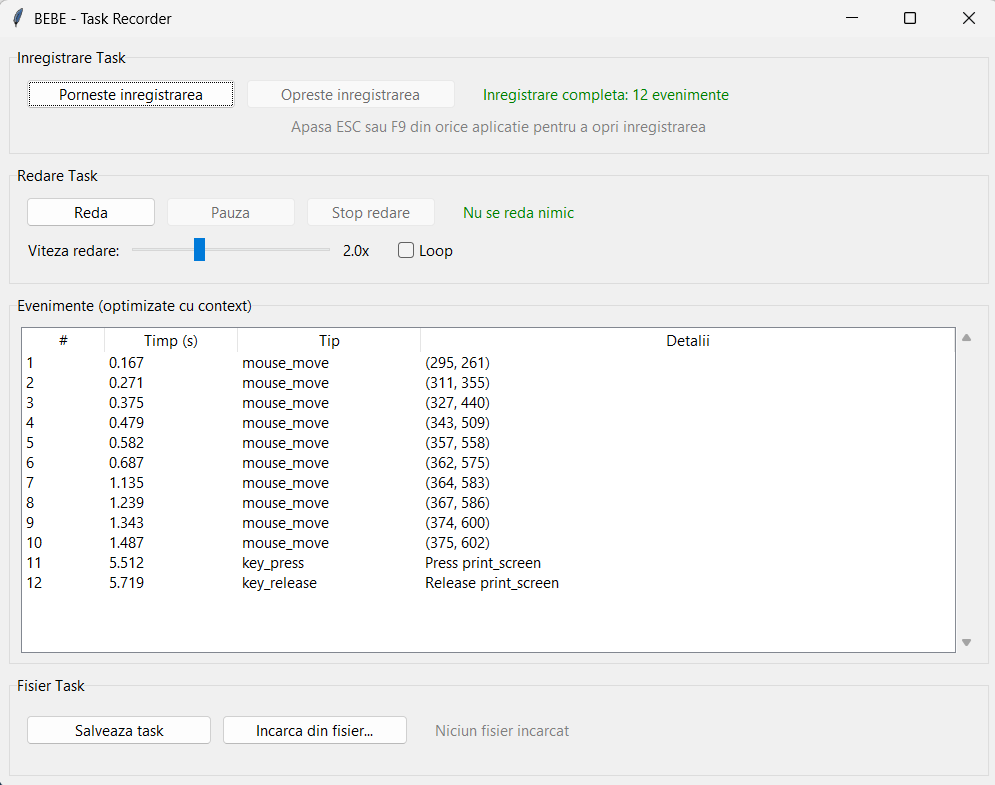
BEBE Task Recorder - Professional GUI Interface
- ✅ Full GUI interface with real-time event monitoring
- ✅ Advanced key combination support (Ctrl+A, Alt+F4, Ctrl+Shift+B, etc.)
- ✅ Precise mouse tracking (movements, clicks, scrolls)
- ✅ Task management (save, load, organize your macros)
- ✅ Detailed logging (human-readable event logs)
- ✅ Administrator privilege handling (automatic UAC elevation)
- ✅ Executable build (standalone .exe with admin rights)
Perfect for automating repetitive tasks, testing workflows, or creating complex automation sequences.
✨ Features
Recording Capabilities
- Mouse Events: Track all mouse movements, clicks (left/right/middle), and scroll actions
- Keyboard Input: Record individual keys, characters, and special keys (Enter, Tab, F1-F12, Arrow keys, etc.)
- Key Combinations: Properly handles Ctrl, Alt, Shift combinations:
Ctrl+A(Select All)Ctrl+Shift+A(Complex combinations)Alt+F4(Close window)Ctrl+C,Ctrl+V(Copy/Paste)- And many more...
Playback Features
- Precise Timing: Maintains original timing between events
- Adjustable Speed: Customizable playback speed (default optimized)
- Error Handling: Robust error handling during playback
User Interface
- Real-time Monitoring: See events as they're recorded in a detailed table
- Task Management: Save and load tasks with descriptive names
- Quick Load: Dropdown list of saved tasks for easy access
- Resizable Window: Adjust interface to your preference
- Event Details: View timestamp, event type, and detailed information
Technical Features
- Administrator Mode: Automatically requests admin privileges for global event capture
- Thread-safe GUI: Smooth UI updates during recording/playback
- JSON Storage: Human-readable task files
- Log Files: Detailed
.logfiles alongside.jsontask files
📋 Requirements
- Operating System: Windows 7/8/10/11
- Python: 3.7 or higher (if running from source)
- Dependencies:
pyautogui- GUI automationpynput- Mouse and keyboard event capturetkinter- GUI framework (usually included with Python)
🚀 Installation
Option 1: Using Pre-built Executable (Recommended)
- Download
BEBE_Task_Recorder.exefrom the Releases page - Run the executable (it will automatically request administrator privileges)
- Start recording!
Option 2: Running from Source
-
Clone the repository:
git clone https://github.com/me-suzy/BEBE-Task-Recorder.git
cd BEBE-Task-Recorder
-
Install dependencies:
pip install -r requirements.txt
-
Run the application:
python bebe_gui.pyNote: On Windows, run with administrator privileges for global event capture:
# Right-click PowerShell/CMD and select "Run as Administrator", then:
python bebe_gui.py
Or use the provided batch script:
RUN_GUI.bat
📖 Usage
Basic Workflow
-
Start Recording:
- Click "Start Inregistrare"
- Perform your actions (mouse movements, clicks, keyboard input)
- Press
ESCorF9to stop recording
-
Review Events:
- View all recorded events in the "Evenimente (optimizate cu context)" table
- Check timestamps and event details
-
Save Task:
- Click "Salveaza task"
- Enter a descriptive name
- Task is saved in the
tasks/folder
-
Load Task:
- Select from dropdown list, or
- Click "Incarca din fisier..." to browse
- Click "Incarca task selectat" to load
-
Playback:
- Click "Start Redare"
- Watch your recorded actions replay automatically
Recording Tips
-
Position Matters: The recorder captures absolute screen coordinates. If you move windows or icons before playback, positions may not match. This is expected behavior for precise automation.
-
Key Combinations: All standard Windows shortcuts work:
Ctrl+A,Ctrl+C,Ctrl+V(Select All, Copy, Paste)Alt+Tab(Switch windows)Alt+F4(Close window)Ctrl+Shift+Esc(Task Manager)- And more...
-
Stop Recording: Press
ESCorF9at any time to stop recording
File Structure
BEBE/
├── bebe_gui.py              # Main application
├── tasks/                   # Saved task files
│   ├── task1.json          # Task data (JSON)
│   └── task1.log            # Human-readable log
├── requirements.txt         # Python dependencies
├── BUILD.bat                # Build executable script
└── README.md               # This file
🔨 Building Executable
To create a standalone .exe file with automatic administrator privileges:
-
Install build dependencies:
pip install -r requirements_build.txt
-
Run build script:
BUILD.bat
-
Find executable:
- Output:
dist/BEBE_Task_Recorder.exe - The executable automatically requests admin privileges on launch
- Output:
Build Requirements
pyinstaller- For creating executablespyautogui,pynput- Runtime dependencies
🎨 Screenshots
Main interface showing real-time event monitoring, task management, and playback controls
🔧 Technical Details
Architecture
- GUI Framework: Tkinter (native Python GUI)
- Event Capture:
pynputlibrary for global mouse/keyboard hooks - Automation:
pyautoguifor precise mouse/keyboard control - Storage: JSON format for task files
- Threading: Separate threads for recording/playback to keep GUI responsive
Key Features Implementation
- Key Combination Detection: Properly handles control characters (e.g.,
\x01= Ctrl+A) - Modifier Tracking: Maintains state of Ctrl/Alt/Shift keys during recording
- Event Serialization: Efficient JSON storage with timestamps
- Admin Privileges: Windows UAC manifest embedded in executable
⚠️ Important Notes
Administrator Privileges
Why admin rights are needed: Global keyboard and mouse hooks require elevated privileges on Windows. Without admin rights, the application can only capture events from its own window.
Security: The application only requests admin rights for event capture. It does not modify system files or settings.
Position-Based Recording
Important: BEBE records absolute screen coordinates. This means:
- ✅ Perfect for fixed workflows (same window positions)
- ⚠️ If you move windows/icons before playback, coordinates won't match
- 💡 Tip: Keep your desktop layout consistent, or use relative positioning for future versions
This is intentional design for precise automation - similar to professional macro tools.
🤝 Contributing
Contributions are welcome! Please feel free to submit a Pull Request.
Development Setup
- Fork the repository
- Create a feature branch (
git checkout -b feature/amazing-feature) - Commit your changes (
git commit -m 'Add amazing feature') - Push to the branch (
git push origin feature/amazing-feature) - Open a Pull Request
📝 License
This project is licensed under the MIT License - see the LICENSE file for details.
🙏 Acknowledgments
- Built with Python and open-source libraries
- Inspired by the need for better macro recording tools
- Thanks to all contributors and users
📧 Support
- Issues: GitHub Issues
- Discussions: GitHub Discussions
🚀 Roadmap
- Relative positioning mode (for flexible window positions)
- Variable speed playback controls
- Task scheduling (run at specific times)
- Multiple task chaining
- Export/Import task collections
- Cross-platform support (Linux, macOS)
Made with ❤️ for automation enthusiasts
⭐ Star this repo if you find it useful!
Release history Release notifications | RSS feed


Download files
Download the file for your platform. If you're not sure which to choose, learn more about installing packages.
Source Distribution
Built Distribution
Filter files by name, interpreter, ABI, and platform.
If you're not sure about the file name format, learn more about wheel file names.
Copy a direct link to the current filters
File details
Details for the file bebe_task_recorder-1.0.1.tar.gz.
File metadata
- Download URL: bebe_task_recorder-1.0.1.tar.gz
- Upload date:
- Size: 19.2 kB
- Tags: Source
- Uploaded using Trusted Publishing? No
- Uploaded via: twine/6.2.0 CPython/3.12.6
File hashes
| Algorithm | Hash digest | |
|---|---|---|
| SHA256 |
824b2f6922bd43b85fe805f20dbf4cb8f778e68480d0b3a2054cce276aabc706
|
|
| MD5 |
86c564df5ae7e966f2507fb18d18fe40
|
|
| BLAKE2b-256 |
384e5c455ec098e0802c1a6d3feae7f522cc5392d88d9c1c53addacd37416eb1
|
File details
Details for the file bebe_task_recorder-1.0.1-py3-none-any.whl.
File metadata
- Download URL: bebe_task_recorder-1.0.1-py3-none-any.whl
- Upload date:
- Size: 15.4 kB
- Tags: Python 3
- Uploaded using Trusted Publishing? No
- Uploaded via: twine/6.2.0 CPython/3.12.6
File hashes
| Algorithm | Hash digest | |
|---|---|---|
| SHA256 |
2a20da0782439f195b7e40bec663ef93432ca9e461495e58c7ff213eba1784f3
|
|
| MD5 |
fae3eb706ac830991d3bf5d14c65962f
|
|
| BLAKE2b-256 |
24333fa9bdf24122425e97366ff7c2b0cf09abdebd3b906d72e54259d0a41d36
|






