
beetsplug-covergrid


What Is This
A very (very) basic cover art browser for the beets music tagger.
It shows your album art in an attractive grid in a web browser:
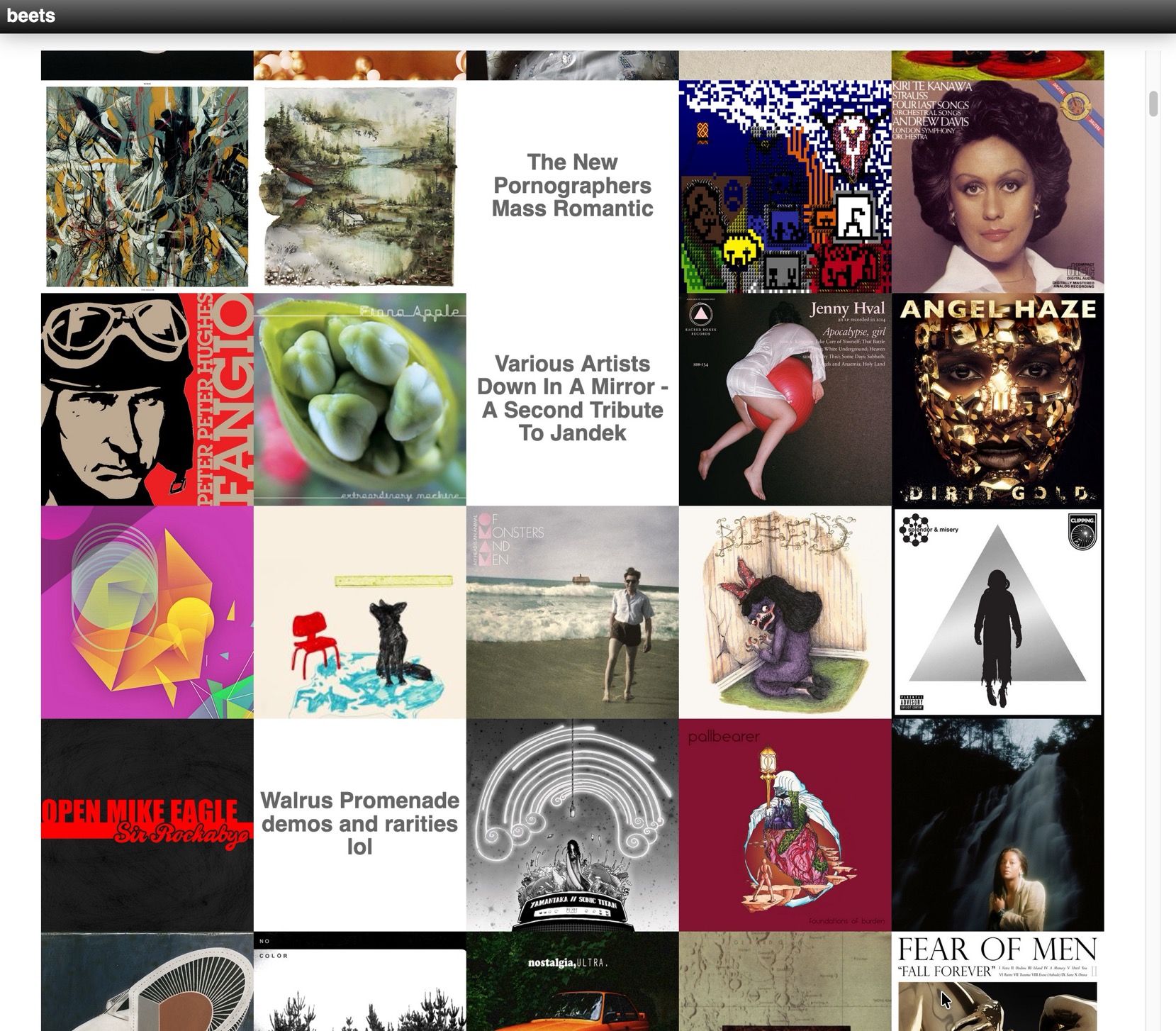
Table of Contents
Installation
with uv
If you installed beets with uv like the
instructions used to recommend:
uv tool install --force --with beetsplug-covergrid beets
with pipx
If you installed beets with pipx like the
instructions used to recommend:
pipx inject beets beetsplug-covergrid
with pip
If you installed beets with pip, I think you can just do:
pip install beetsplug-covergrid
If not: I'm not sure! There are about as many ways to install things in Python as there are people using Python.
Usage
Add covergrid to the plugins section of your beets config.
If needed, configure it with the options described in the docs
for the beets web plugin.
Then start the server with
beet covergrid
and navigate to the URL it gives you in a web browser.
When you're done, terminate the server with ctrl-c.
Currently this is in "MVP" (minimum viable product) state, as follows:
- There is no interactivity besides scrolling.
- Albums are shown in random order and this cannot be changed.
This is a personal project and I've done the minimum to meet my needs at this time, but I may expand the feature set as I get the urge. See the Issues tab for things I'm thinking about doing, if any.
Other Things
If you enjoy beetsplug-covergrid and are on a Mac,
you may find my other weird music tool
alfred-mpd
interesting.
I also make music, under the name "walrus promenade." Find it on bandcamp.
Development
With uv, from this dir:
uv tool install --force --with . beets
Make changes to stuff in src/ and re-run the above command.
License
beetsplug-covergrid is distributed under the terms of the MIT license.
This plugin is based on the web plugin included with beets.
1 maintainer

Metadata
1 maintainer
Release files for beetsplug-covergrid 0.0.8
For a detailed explanation of source distributions (sdists) and built distributions (wheels), please see the package formats documentation.
Source distribution (sdist)
| File | Size | Uploaded | Provenance | Actions |
|---|---|---|---|---|
| beetsplug_covergrid-0.0.8.tar.gz | 753.6 kB | Without provenance | Details for beetsplug_covergrid-0.0.8.tar.gz |
Built distribution (wheel)
| File | Interpreter | ABI | Platform | Actions Reset |
|---|---|---|---|---|
| beetsplug_covergrid-0.0.8-py3-none-any.whl | Python 3 | none | any | Details for beetsplug_covergrid-0.0.8-py3-none-any.whl |
Total release size: 883.9 kB
Release files / beetsplug_covergrid-0.0.8.tar.gz
| Download URL | beetsplug_covergrid-0.0.8.tar.gz |
|---|---|
| Size | 753.6 kB |
| Tags | Source |
|
SHA-256 checksum How to use checksums |
6852dfc88c5f8f89afced4b08bf9aa4a2a3302782b95f7f6499cf93672c00bd8
|
|
BLAKE2b-256 checksum How to use checksums |
226109c1b5cb97d8b5a8f37ddfc227ab191d9a335130a8253bfff6a58529dc25
|
| Upload date | |
|
Uploaded using Trusted Publishing? What is trusted publishing? |
No |
| Uploaded via |
Hatch/1.16.5 cpython/3.13.13 HTTPX/0.28.1
|
Release files / beetsplug_covergrid-0.0.8-py3-none-any.whl
| Download URL | beetsplug_covergrid-0.0.8-py3-none-any.whl |
|---|---|
| Size | 130.3 kB |
| Tags | Python 3 |
|
SHA-256 checksum How to use checksums |
881c05a44e4f9c7da414e28bcde14f8ae1e84334daf1588ad69038b19af1407e
|
|
BLAKE2b-256 checksum How to use checksums |
74438e203b021ba0c2e84310967e8b833af713572ac90c685a6959ee7ce984ea
|
| Upload date | |
|
Uploaded using Trusted Publishing? What is trusted publishing? |
No |
| Uploaded via |
Hatch/1.16.5 cpython/3.13.13 HTTPX/0.28.1
|
Security for beetsplug-covergrid 0.0.8
Provenance
Provenance describes where a file came from. On PyPI, provenance is shared via attestations, which provide a verifiable record of the build or publishing details. View details, limitations and caveats.
No provenance found
None of the files in this release were uploaded with provenance metadata.
A note on package security
PyPI is a repository for distributing packages, not a service for auditing them. While third-party security researchers and our staff do their best to detect and remove malicious packages, PyPI cannot guarantee the quality, security or suitability of any given package.
To learn more about protecting yourself from malicious actors, visit our package security documentation.














