
beko-translate

beko-translate は、Mac の Apple Silicon で動く mlx フレームワークを用いて、翻訳を行う cli アプリケーションです。推論には mlx-lm で最適化しています。
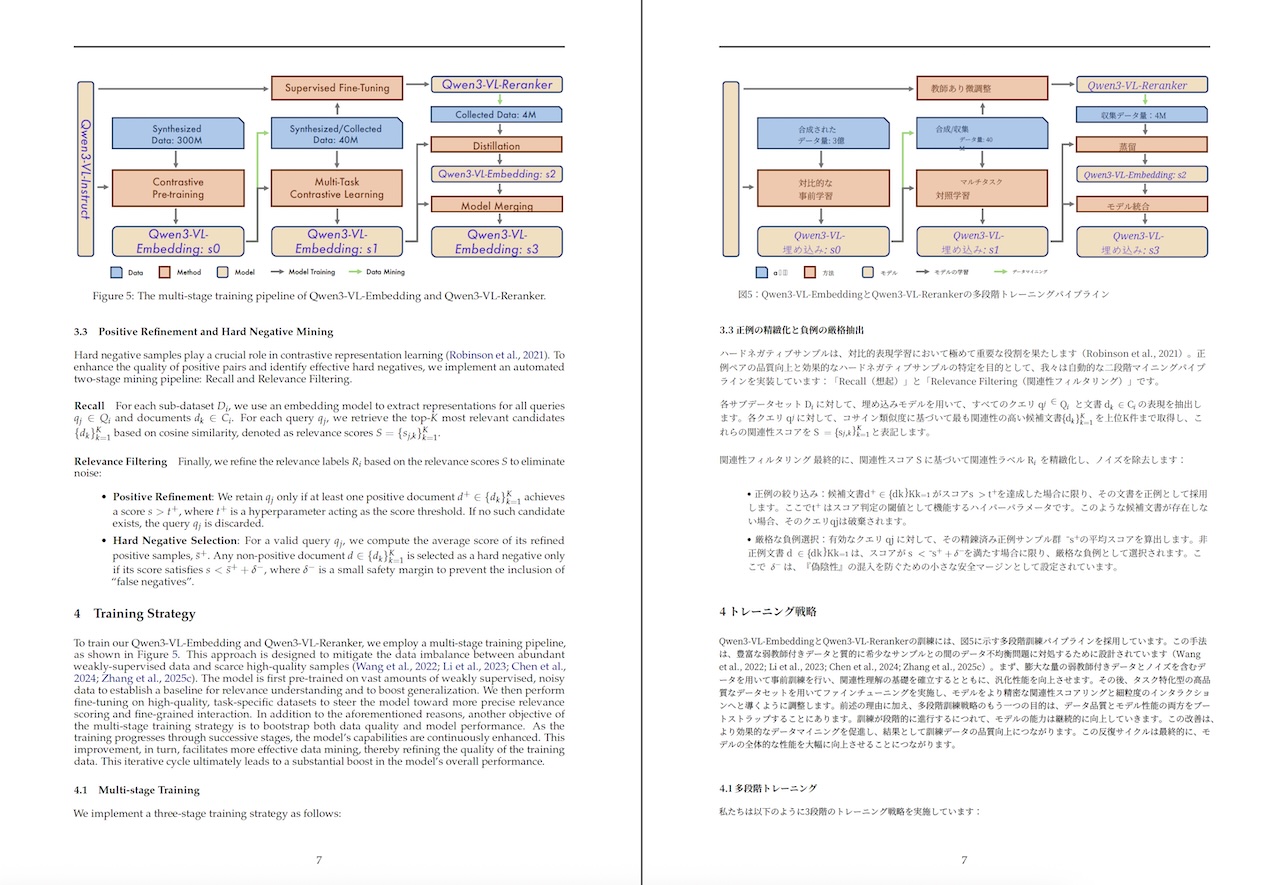
PDF の見開き翻訳コマンドも同梱されており、たとえば論文のページを原文・訳文と交互に読み進めるのに便利です。
できること
- 日英翻訳
- モデルによっては多言語翻訳にも対応
- サーバーモードで常駐可能・起動コストを削減
- 対話モード翻訳
- ストリーミング出力 (対話モードはデフォルト ON )
- レイアウトを維持した PDF 翻訳 (見開き翻訳対応)
インストール
uv tool(おすすめ)
まず python パッケージマネージャの uv のインストールが必要です。
その後
uv tool install beko-translate
でインストールすると、 beko-translate と beko-translate-pdf コマンドが使えます。
更新方法
uv tool upgrade beko-translate
使い方
1) cli からの翻訳
beko-translate --text "こんにちは"
# Hello.
なお、初回はモデルのダウンロードが行われるため、時間がかかるでしょう。言語を明示したい場合
beko-translate --text "Hello" --input-lang en --output-lang ja
# こんにちは。
なお、標準入力で文章が渡されると、その翻訳文を出力します。
2) 対話モード
引数なしで起動すると対話モードになります。
beko-translate
>> こんにちは
Hello.
>> exit
3) ストリーミング出力
beko-translate --stream --server never --text "こんにちは"
ストリーミングはサーバー経由では使えません。--stream を付けると直起動に切り替わります。
4) サーバーモード
起動コストが気になる場合はサーバーとして立ち上げることで、モデルのロードを省略することができます。
beko-translate server start
beko-translate --text "こんにちは"
beko-translate server stop
サーバーは ~/.config/beko-translate/ に通信用の socket とログを出力します。
- socket:
~/.config/beko-translate/beko-translate.sock - log:
~/.config/beko-translate/server.log
任意の場所を使いたい場合:
beko-translate server start \
  --socket ~/.config/beko-translate/test.sock \
  --log-file ~/.config/beko-translate/test.log
状態確認:
beko-translate server status
5) PDF 翻訳
PDF を丸ごと翻訳します。翻訳は beko-translate サーバー経由でできるだけ高速に行います。なお内部ではPDFMathTranslate-nextを利用しています。
beko-translate-pdf paper.pdf
# 見開き翻訳しない場合
beko-translate-pdf paper.pdf --no-dual
デフォルト言語は --input en --output ja です。なお、出力ファイル/ディレクトリを指定も可能です。
beko-translate-pdf paper.pdf --output-pdf translated.pdf
beko-translate-pdf paper.pdf --output-dir ./out/
高品質な PLaMo 翻訳モデルも利用可能です。なお PLaMo モデルの利用には、PLaMo Community License への同意が必要です。
uv run beko-translate-pdf paper.pdf \
    --output-dir ./out \
    --model plamo
なお、PDF 翻訳には時間がかかります。mlx-community/plamo-2-translate を使って、論文を翻訳する場合、ページ数にもよりますが M4 Max で5分〜20分ほどかかります。
自動でダウンロードフォルダの pdf を翻訳
scripts/auto_pdf_translate.py に、ブラウザのダウンロードフォルダの pdf で未翻訳のものがあれば、自動で翻訳するスクリプトがあります。
このコマンドに、auto_pdf_translate.py --arxiv と --arxiv オプションをつけると、arxiv の PDF のようなファイル名だけを翻訳します。そのため、ブラウザで論文をダウンロード、コマンド一発で複数の論文を自動翻訳、のような用途で便利に活用できます。なお、このコマンドの標準の利用モデルは plamo となるので、plamo のライセンスが適用されます。
翻訳モデルの選択
何も指定しない場合、デフォルトは小型高速な以下のCAT-Translateモデルです。
hotchpotch/CAT-Translate-0.8b-mlx-q4
短いエイリアスも用意しています(例: cat)。
おすすめモデル
- PLaMo 2 Translate(おすすめ)
- 論文や技術文書の翻訳が特に良いです。
- 利用には PLaMo Community License への同意が必要です(なお条件付きで商用利用も可能)。
- ライセンス: PLaMo Community License
- CAT-Translate
- MIT ライセンスのため、商用利用でも扱いやすいです。
- なお q8 が 8bit, q4 が 4bit モデルです。
なおこのプロジェクト(beko-translate)のソースコードは MIT ですが、利用する翻訳モデルのライセンスはモデルごとに異なります。利用の際は、必ず各モデルのライセンスを確認してください。
動作確認済みの MLX 翻訳モデル
| Model | Hugging Face | License |
|---|---|---|
| CAT-Translate | hotchpotch/CAT-Translate-0.8b-mlx-q4 / hotchpotch/CAT-Translate-0.8b-mlx-q8 / hotchpotch/CAT-Translate-1.4b-mlx-q4 / hotchpotch/CAT-Translate-1.4b-mlx-q8 |
MIT |
| PLaMo 2 Translate | mlx-community/plamo-2-translate / mlx-community/plamo-2-translate-8bit / mlx-community/plamo-2-translate-bf16 |
PLaMo Community License |
| HY-MT 1.5 | mlx-community/HY-MT1.5-1.8B-4bit / mlx-community/HY-MT1.5-1.8B-8bit / mlx-community/HY-MT1.5-7B-4bit / mlx-community/HY-MT1.5-7B-8bit |
HY-MT License |
開発
uv run tox
tox は pytest / ruff / ty をまとめて実行します。MLX 統合テストも走ります。
注意点
- Apple Silicon (macOS) での使用を想定しています。他の OS は想定しておりません。
- 初回はモデルのダウンロードが走ります。
uv run --no-sync beko-translate --text "こんにちは"
FAQ
- なんで server は mcp じゃないの?
- mcp 使わないので、つけることはないと思います
ライセンス
- ソースコード: MIT
謝辞
小型で使いやすそうな MIT ライセンスの翻訳モデル、CAT Translateモデルを mac からサクッと使ってみたくて作成しました。プロジェクト名もインスパイアされています。CAT Translate プロジェクトの関係者の方々、ありがとうございます。
また cli は plamo-translate-cli が便利だったので、同じように起動しっぱなしで翻訳できる実装を作ってみました。PLaMo は翻訳も cli も大変便利です、PLaMo 関連の方々、ありがとうございます。
Author
- Yuichi Tateno (@hotchpotch)
1 maintainer

Metadata
1 maintainer
Release files for beko-translate 0.0.4
For a detailed explanation of source distributions (sdists) and built distributions (wheels), please see the package formats documentation.
Source distribution (sdist)
| File | Size | Uploaded | Provenance | Actions |
|---|---|---|---|---|
| beko_translate-0.0.4.tar.gz | 30.5 kB | Without provenance | Details for beko_translate-0.0.4.tar.gz |
Built distribution (wheel)
| File | Interpreter | ABI | Platform | Actions Reset |
|---|---|---|---|---|
| beko_translate-0.0.4-py3-none-any.whl | Python 3 | none | any | Details for beko_translate-0.0.4-py3-none-any.whl |
Total release size: 57.9 kB
Release files / beko_translate-0.0.4.tar.gz
| Download URL | beko_translate-0.0.4.tar.gz |
|---|---|
| Size | 30.5 kB |
| Tags | Source |
|
SHA-256 checksum How to use checksums |
15d16d74217a7aed5fd6dc2c136a36b74f13cb514fb71a85088ea97db5a69754
|
|
BLAKE2b-256 checksum How to use checksums |
043c7259405c7d1dee0de40ad579ed0d21eb426785be7d8a06f1aa0cb999835b
|
| Upload date | |
|
Uploaded using Trusted Publishing? What is trusted publishing? |
No |
| Uploaded via |
uv/0.9.28 {"installer":{"name":"uv","version":"0.9.28","subcommand":["publish"]},"python":null,"implementation":{"name":null,"version":null},"distro":{"name":"macOS","version":null,"id":null,"libc":null},"system":{"name":null,"release":null},"cpu":null,"openssl_version":null,"setuptools_version":null,"rustc_version":null,"ci":null}
|
Release files / beko_translate-0.0.4-py3-none-any.whl
| Download URL | beko_translate-0.0.4-py3-none-any.whl |
|---|---|
| Size | 27.4 kB |
| Tags | Python 3 |
|
SHA-256 checksum How to use checksums |
7453eba176235f0972b3f99cfa1efb2b060a3adf8fc3fe7ae4a7e3340a442619
|
|
BLAKE2b-256 checksum How to use checksums |
1c4d7c0086e87e884f8d9e23c70036c69891f5ef73ab1190571dd3ad63289269
|
| Upload date | |
|
Uploaded using Trusted Publishing? What is trusted publishing? |
No |
| Uploaded via |
uv/0.9.28 {"installer":{"name":"uv","version":"0.9.28","subcommand":["publish"]},"python":null,"implementation":{"name":null,"version":null},"distro":{"name":"macOS","version":null,"id":null,"libc":null},"system":{"name":null,"release":null},"cpu":null,"openssl_version":null,"setuptools_version":null,"rustc_version":null,"ci":null}
|
Security for beko-translate 0.0.4
Provenance
Provenance describes where a file came from. On PyPI, provenance is shared via attestations, which provide a verifiable record of the build or publishing details. View details, limitations and caveats.
No provenance found
None of the files in this release were uploaded with provenance metadata.
A note on package security
PyPI is a repository for distributing packages, not a service for auditing them. While third-party security researchers and our staff do their best to detect and remove malicious packages, PyPI cannot guarantee the quality, security or suitability of any given package.
To learn more about protecting yourself from malicious actors, visit our package security documentation.














