


BenchCaddy
BenchCaddy is a lightweight Python benchmarking toolkit for repeatable performance measurements across code changes, configurations, and environments.
It runs parameter sweeps in isolated worker processes, stores raw samples and environment metadata in SQLite, and keeps the recorded results easy to inspect from the CLI, as JSON for scripts, or via MCP for agents.
It fits the space between heavyweight profilers and a directory full of timings_final_v4_really.csv: use it when the real question is not just how long something took once, but whether a change is materially faster, slower, or noisier across configurations and environments.
Why BenchCaddy
- Run repeatable benchmark sweeps across parameter grids
- Persist raw samples, observations, and machine metadata in
benchcaddy.db - Compare runs with median-based summaries, confidence intervals, and noise diagnostics
- Pin suite baselines and reuse them for local checks or CI gates
- Capture supported return values to validate correctness alongside runtime
- Make the same recorded data easy to inspect from the CLI, as JSON for scripts, or via MCP for agents
BenchCaddy is intentionally lean: it helps you answer whether a change is actually faster, slower, or noisier, and under what environment. It is not a profiler, tracer, or distributed observability system.
Installation
Install with uv or pip.
uv add benchcaddy
pip install benchcaddy
Quick Start
Most BenchCaddy workflows have two steps:
- Run a benchmark sweep over one or more configurations.
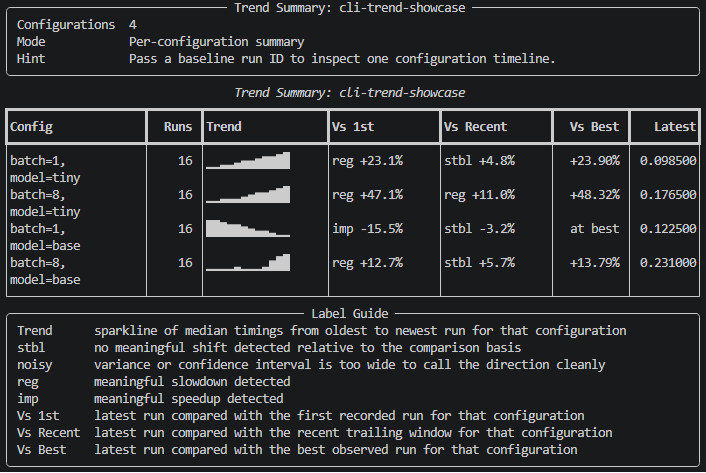
- Inspect, compare, or trend the recorded results from the database.
This example benchmarks a nonlinear transform with two variants and two input sizes.
import math

from benchcaddy import Sweep, observe


def initial_signal(size: int) -> list[float]:
    return [
        math.sin(index * 0.013) + 0.5 * math.cos(index * 0.007)
        for index in range(size)
    ]


@observe("time")
def nonlinear_iteration(values: list[float], variant: str) -> list[float]:
    next_values: list[float] = []
    for value in values:
        transformed = math.tanh(value * 1.4) + math.sin(value * 0.8)
        if variant == "stabilized":
            transformed += 0.05 * value * value
        else:
            transformed += 0.03 * math.exp(-(value * value))
        next_values.append(transformed)
    return next_values


@observe("time")
def benchmark_case(size: int, variant: str) -> float:
    values = initial_signal(size)
    for _ in range(8):
        values = nonlinear_iteration(values, variant)
    return sum(abs(value) for value in values)


Sweep(
    target=benchmark_case,
    params={
        "size": [512, 2048],
        "variant": ["baseline", "stabilized"],
    },
    suite_name="nonlinear-transform",
    samples=5,
    warmup_iterations=1,
    verbose=True,
).run()
BenchCaddy writes results to ./benchcaddy.db relative to the directory where you run the example. Those stored raw samples support later inspection, including bootstrap confidence intervals, outlier diagnostics, noise warnings, and regression classification.
The full runnable example lives at examples/benchmark_nonlinear_transform.py.
Core Concepts
Sweep
Sweep(...) is the main entry point for benchmark execution.
Common options:
samples: measured samples per configurationwarmup_iterations: warmup runs before samplingdatabase_path: store results in a specific SQLite file instead of./benchcaddy.dblock_cpu_affinity: preserve the current CPU affinity set before benchmarkingreporter: custom reporter implementing theSweepReporterprotocolverbose=True: use the built-in Rich reporter during executionstore_target_return_value=True: persist one supported return value per runreturn_value_postprocessor: convert complex return values before storage
Supported stored return values are bool, int, float, str, and 1D numeric vectors from list, tuple, or NumPy arrays.
observe(...)
The public observe(...) decorator records isolated observations:
@observe("time"): record call duration@observe("return"): record a normalized return value when supported@observe("time", "return"): record both
Observation labels come from the decorated function name or qualname.
Benchmark target contract
Sweep executes targets in a fresh worker process. Your target must therefore be importable by the child process: use a module-level function, static method, or class method.
BenchCaddy executes the benchmark code you point it at and is not a sandbox for untrusted repositories. The worker boots from the same BenchCaddy codebase the parent is using, replays the parent-validated import roots for the target, and verifies it resolved the same source file the parent validated before execution.
Unsupported targets include lambdas, nested or local functions, bound instance methods, arbitrary callable instances, and script-defined targets that cannot be mapped back to an importable module path.
BenchCaddy measures synchronous completion from its point of view. If your workload schedules asynchronous device or background work, the benchmarked function must wait for completion before returning.
CLI Workflow
Run a sweep from the CLI
If the target is importable, you can launch a sweep without writing a separate driver script.
benchcaddy sweep examples.benchmark_nonlinear_transform:benchmark_case \
    --suite-name nonlinear-transform \
    --param 'size=[512, 1024]' \
    --param 'variant=["baseline", "stabilized"]' \
    --samples 20 \
    --warmup-iterations 5 \
    --store-target-return-value \
    --verbose
Use repeated --param flags for parameter grids. Each flag accepts either a JSON array such as size=[512, 2048] or a compact scalar list such as variant=baseline,stabilized.
For one exact configuration value, pass scalars directly instead of one-element arrays:
benchcaddy sweep examples.benchmark_nonlinear_transform:benchmark_case \
    --suite-name nonlinear-transform-single \
    --param size=512 \
    --param variant=baseline \
    --verbose
For machine-readable output:
benchcaddy sweep examples.benchmark_nonlinear_transform:benchmark_case \
    --suite-name nonlinear-transform \
    --param 'size=[512, 1024]' \
    --param 'variant=["baseline", "stabilized"]' \
    --json
--json and --verbose cannot be combined.
Inspect recorded results
List recorded suites:
benchcaddy list
Show recent runs across the database:
benchcaddy show
benchcaddy show --numitems 10
Show runs for a suite:
benchcaddy show nonlinear-transform
benchcaddy show nonlinear-transform --numitems 5
Show one or more specific runs:
benchcaddy show 12
benchcaddy show 2.3
benchcaddy show 4 2.3 1.2
Composite run IDs use SWEEP_ID.RUN_INDEX, so 2.3 means the third run in the second recorded sweep.
Compare, baseline, and trend
Compare configurations within a suite by median runtime:
benchcaddy compare nonlinear-transform
benchcaddy compare nonlinear-transform 2.4
Restrict a suite comparison to runs matching selected configuration keys from the reference run:
benchcaddy compare nonlinear-transform 2.4 --strict size
benchcaddy compare nonlinear-transform 2.4 --strict size variant
Compare two specific runs directly:
benchcaddy compare 12 15
benchcaddy compare 2.3 3
Pin a suite baseline and reuse it later:
benchcaddy baseline nonlinear-transform --pin 2.4 --note "post-optimization"
benchcaddy baseline nonlinear-transform
benchcaddy compare nonlinear-transform --baseline
benchcaddy trend nonlinear-transform --baseline
Trend a suite or a specific configuration over time:
benchcaddy trend nonlinear-transform
benchcaddy trend nonlinear-transform 2.4
benchcaddy trend nonlinear-transform --limit 8 --window 4
Direct run comparisons include return-value validation when values were stored:
- numbers: relative error percentage
- 1D numeric vectors: relative error percentage based on Euclidean distance
- strings and booleans: equality (
equalordifferent)
For more detail in inspection output, add --verbose:
Verbose mode
benchcaddy --verbose show nonlinear-transform
benchcaddy --verbose compare nonlinear-transform
benchcaddy --verbose trend nonlinear-transform
Check environment stability
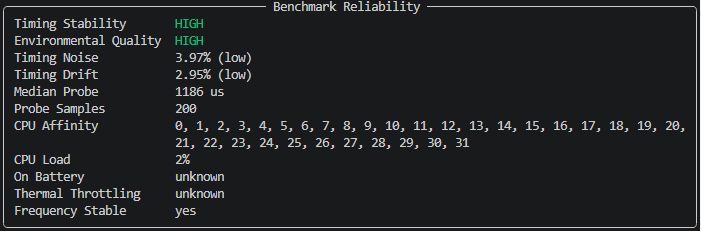
Inspect current machine reliability signals before recording or comparing runs:
benchcaddy env
benchcaddy env --json
env reports timing noise, drift, affinity, CPU load, battery state, thermal throttling, and frequency stability signals when available.
How To Read The Output
Mean +- Std (s): arithmetic mean and sample standard deviation across benchmark samples- suite comparisons are ranked by median runtime, not by the mean column
Best Median (s),Delta vs Best, and direct-run median deltas use median runtimeMedian CI (s): bootstrap confidence interval around the median runtimeMAD (s): median absolute deviation, a robust spread estimateCV: coefficient of variation (std / mean), used as one noise signalWarnings: low sample counts, wide confidence intervals, high variance, and detected outliers
These signals are heuristics, not proof. Treat regressing as a prompt to investigate and noisy as a sign to collect more samples or stabilize the environment.
Recorded Environment Metadata
Each recorded run stores environment details alongside timing data, including:
- Python version and operating system string
- CPU model and total system memory
- GPU model when detectable
- Git branch, commit hash, and dirty state when run inside a Git repository
- process metadata such as PID, priority, affinity, and RSS memory
JSON output for automation and agent wrappers
All top-level CLI commands support -j / --json: env, baseline, compare, list, show, sweep, and trend.
The JSON envelope is intentionally consistent so shell automation, notebooks, and simple agent wrappers can branch on outcome before they inspect command-specific payloads.
It is also intentionally compact: for agent workflows, these payloads are usually much cheaper to pass around than raw profiler traces or the full text output of many benchmarking tools.
Each JSON response uses the same top-level envelope:
{
    "schema_version": "1.0",
    "command": "compare",
    "status": "pass|fail|inconclusive",
    "reason": "machine_readable_reason",
    "error_code": null,
    "suggested_action": "next step for the caller",
    "confidence": "high|medium|low|null",
    "exit_code": 0,
    "result": {
        "...": "command-specific payload"
    }
}
Use status as the primary control signal:
pass: the command completed and the result is actionable as-isfail: the command found a blocking problem, regression, or invalid requestinconclusive: the command completed, but the result needs more data, a narrower scope, or a cleaner environment before automation should treat it as decisive
reason is a stable snake_case classifier that adds more detail without replacing status. Typical values include runs_recorded, suite_details_available, regression_detected, noisy_samples, environment_warnings_detected, and suite_not_found.
For automation, branch on status first, then use reason, error_code, and suggested_action to decide the next step. Treat result as the command-specific payload and keep callers tolerant of additional keys in future schema versions.
BenchCaddy MCP
BenchCaddy also ships an MCP server for cases where an agent should call named tools instead of constructing CLI commands and parsing JSON. The MCP server exposes the same stored benchmark data and analysis in a form that is easier for tool-calling clients to use directly, with compact default summaries that are typically more token-efficient than feeding an agent raw traces or verbose benchmark logs. For MCP setup, client configuration examples, available tools, and sample chat workflows, see README_MCP.md.
CI And Automation
Use compare --json for machine-readable output:
benchcaddy compare nonlinear-transform --json
benchcaddy compare nonlinear-transform 2.4 --json
benchcaddy compare 2.3 3 --json
benchcaddy trend nonlinear-transform --json
Use --fail-if-regression PERCENT to turn the existing regression classification into a CI gate.
benchcaddy compare nonlinear-transform --baseline --fail-if-regression 5%
benchcaddy compare 2.3 3 --json --fail-if-regression 5
Exit codes for gated compares:
0: comparison completed and the regression gate passed1: requested suite or run could not be resolved2: CLI usage error3: comparison completed and the regression gate failed
Example GitHub Actions job:
jobs:
  benchmark-gate:
    runs-on: ubuntu-latest
    steps:
      - uses: actions/checkout@v4
      - uses: actions/setup-python@v5
        with:
          python-version: '3.12'
      - name: Install BenchCaddy
        run: python -m pip install -e .
      - name: Record benchmark run
        run: python examples/benchmark_nonlinear_transform.py --database benchcaddy.db
      - name: Enforce regression gate
        run: benchcaddy compare nonlinear-transform --json --fail-if-regression 5% --database benchcaddy.db
Feedback
BenchCaddy is intentionally lean. If a workflow is missing, open an issue with the benchmark shape you are trying to support. The goal is to make performance tracking less chaotic, not to create another excuse for results_new_final_fixed.csv.
1 maintainer

Metadata
1 maintainer
Release files for benchcaddy 0.1.16
For a detailed explanation of source distributions (sdists) and built distributions (wheels), please see the package formats documentation.
Source distribution (sdist)
| File | Size | Uploaded | |
|---|---|---|---|
| benchcaddy-0.1.16.tar.gz | 2.0 MB | Details |
Built distribution (wheel)
| File | Interpreter | ABI | Platform | Reset |
|---|---|---|---|---|
| benchcaddy-0.1.16-py3-none-any.whl | Python 3 | none | any | Details |
Total release size: 2.1 MB
Release files / benchcaddy-0.1.16.tar.gz
| Download URL | benchcaddy-0.1.16.tar.gz |
|---|---|
| Size | 2.0 MB |
| Tags | Source |
|
SHA-256 checksum How to use checksums |
63fcefb2e8818341638daab1251052110323968d1fa8297395a89af3e6b66d5b
|
|
BLAKE2b-256 checksum How to use checksums |
454013a0fef78a02da82f0f38826d1365a52e7dcbc4a0fe7ea2589f1727b9357
|
| Upload date | |
|
Uploaded using Trusted Publishing? What is trusted publishing? |
No |
| Uploaded via |
uv/0.8.15
|
Release files / benchcaddy-0.1.16-py3-none-any.whl
| Download URL | benchcaddy-0.1.16-py3-none-any.whl |
|---|---|
| Size | 111.5 kB |
| Tags | Python 3 |
|
SHA-256 checksum How to use checksums |
e738753607d880334a34b38ba81641e276f1a3eaf8a146f23a1002eae6c642e7
|
|
BLAKE2b-256 checksum How to use checksums |
92afd3ca2e0504a9b1a9f34e1bd02edd51dc31fee4f05297a346cf07a0091e3a
|
| Upload date | |
|
Uploaded using Trusted Publishing? What is trusted publishing? |
No |
| Uploaded via |
uv/0.8.15
|














