
 Mailbox Client














Beta, version 0.11.0. Usable with real accounts. A breaking change of the API or the configuration is announced in the changelog. Stored data is carried forward by migrations.
The Python client of the REST API of
mailbox-service,
on PyPI as benethos-mailbox-client. It covers the whole REST API: it
reads, searches, sorts, drafts and sends mail of the accounts the
service holds, and administers the service: accounts, users, roles,
tokens, second factors, webhooks, the audit and the state of the
service, as far as its token allows. Every operation of the API is a
method of both clients, named like its operationId. The MCP server of the project,
mailbox-mcp,
is built on it, and so are the agents,
mailbox-agents.
It knows the service through its REST API alone, and needs nothing but httpx. The REST API follows the status above. This package's Python interface has no stability promise yet.
Mailbox is self-hosted and has five packages. The client needs a running service: Install and First start in its README.
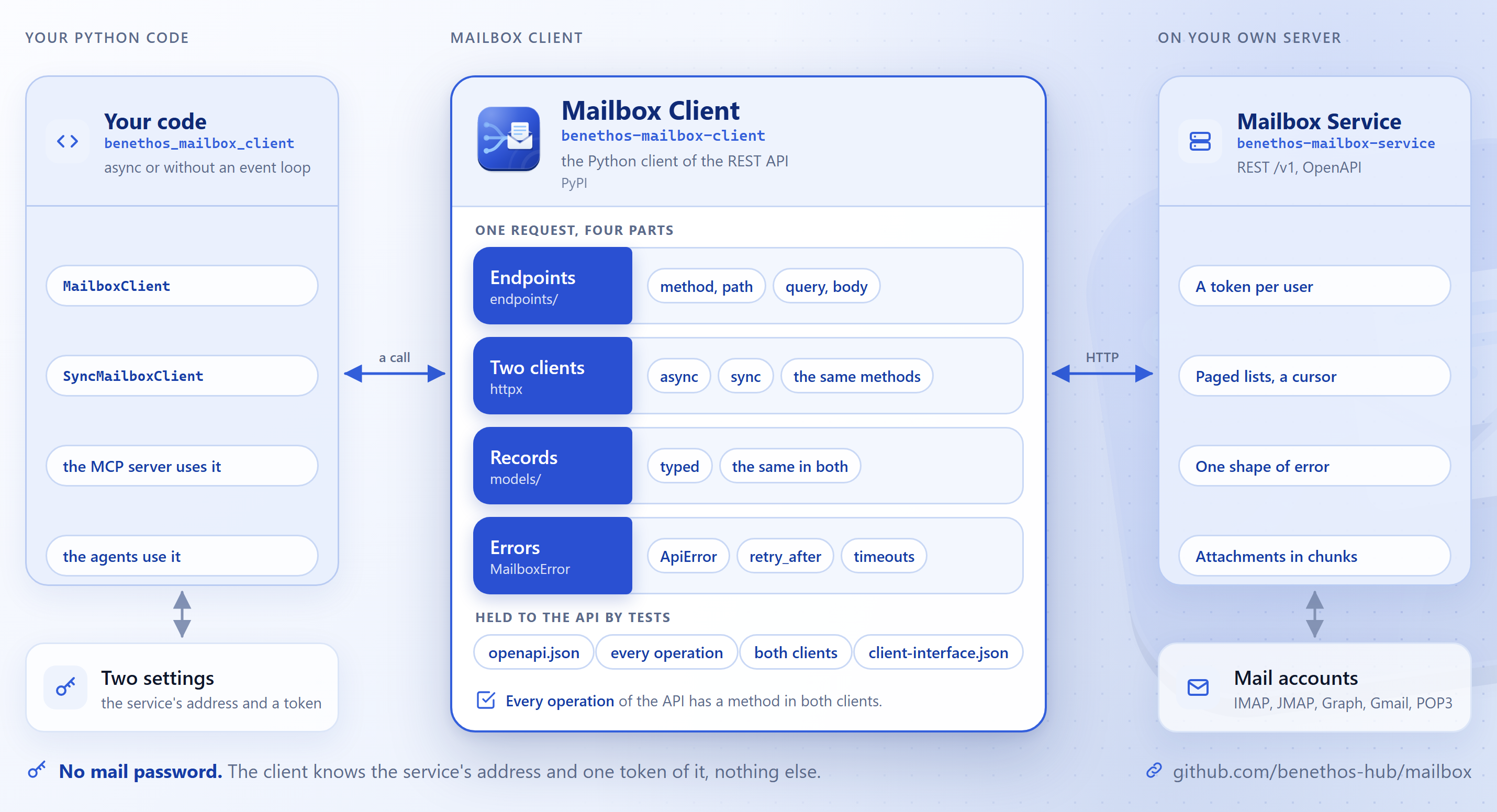
A request goes from your code with the client over REST to the service, and from the service to the provider of the account. In the client it has four parts: its endpoint, one of the two clients, the records of the answer and the errors (Inside).
| Package | Its part | How you get it |
|---|---|---|
mailbox-service |
It holds the connections to your mail accounts and their credentials, encrypted. It offers one REST API for every provider and decides what a token may do. It has to be running. | Getting started, before this package |
mailbox-client |
This package. The Python client of that REST API, async and sync, for your own scripts and apps. | Install |
mailbox-mcp |
The MCP server. It turns the REST API into tools for an AI assistant, on top of this client. | Getting started |
mailbox-common |
What the service, the MCP server and the agents share. The client does not use it. | not needed here |
mailbox-agents |
Small AI agents that sort and mark mail, on top of this client. Alpha. | Install |
What the project is for: the repository's README.
Contents
Install
uv add benethos-mailbox-client # or: pip install benethos-mailbox-client
Use
Make a token on your user's page in the service's UI. The client reads
it from MAILBOX_SERVICE_TOKEN, and the address of the service from
MAILBOX_SERVICE_URL (default http://127.0.0.1:8080). Both can be
passed as arguments instead. The address carries no user or password:
it is named in the errors of the client.
For async code:
from benethos_mailbox_client import MailboxClient

async with MailboxClient() as mailbox:
    me = await mailbox.get_me()
    for account in me.accounts:
        page = await mailbox.list_messages(account.id, folder="inbox", limit=10)
        for summary in page.items:
            print(account.email, summary.sender, summary.subject)
For code without an event loop, SyncMailboxClient has the same
methods (close() for aclose()) and answers the same records:
from benethos_mailbox_client import Address, SyncMailboxClient, message_body

with SyncMailboxClient() as mailbox:
    body = message_body(
        to=[Address("someone@example.org")],
        cc=[],
        bcc=[],
        subject="Hello",
        text="Hi there",
        html=None,
        reference=None,
    )
    mailbox.send_message("acc_...", body, idempotency_key="hello-1")
Administering the service works the same way. A user with a grant and a token for it:
from benethos_mailbox_client import Grant, SyncMailboxClient

with SyncMailboxClient() as mailbox:
    user = mailbox.create_user(
        "desktop",
        grants=[Grant(accounts=("acc_...",), allow=("mail.read", "drafts"))],
    )
    made = mailbox.create_token(user.id, "laptop")
    print(made.secret.get_secret_value())  # shown this once
A message comes as a Message, a message in a page, a changed one
and a written draft as a MessageSummary, its sender and recipients
as Address records.
A secret the service shows once, a new token, a one-time password, a
webhook's signing secret or the address of a link to an attachment,
comes as a Secret: repr and str show
stars, so it reaches no log by accident, and get_secret_value() reads
it. A list of messages or drafts answers a Page of summaries, with
next_cursor for the next page and, across accounts, not_answering
for those that did not answer, as text, and incomplete, the same
accounts as NotAnswering records with the error's code and
message. The other lists that page, of accounts,
threads, users, sends and the audit, answer Paged, with next_cursor
as well.
Beside the operations, update_messages and trash_messages are
batch_messages for one kind of change, and message_body builds the
body of a send or a draft, as in the example above.
request(method, path, ...) sends any request and answers its JSON as
it comes, e.g. for a field a record leaves out. The routes and their
fields:
docs/mailbox-service/openapi.json.
The token travels in a header. Over http the client talks only to this
machine. To another machine it needs https, or
MAILBOX_SERVICE_ALLOW_HTTP=1 (allow_http=True) for a network you
trust, such as between containers. Over http the client takes no proxy
from the environment, so the token cannot reach one in clear. Over
https it follows HTTPS_PROXY and the like.
A client made without an address or a token reads the environment when
it is made. A program that makes clients for a long time can read it
once, with from_environment():
from benethos_mailbox_client import MailboxClient, from_environment

found = from_environment()
client = MailboxClient(found.url, found.token, allow_http=found.allow_http)
Errors
Everything the client raises is a MailboxError:
| Error | When |
|---|---|
ConfigurationError |
no token, or an address it refuses |
ServiceUnavailableError |
the service cannot be reached |
ServiceTimeoutError |
the service took the request but did not answer in time |
ApiError |
the API answered with an error: status, code, message, and retry_after, the seconds a limit asks to wait, else None. An answer of another shape has the code unexpected_response. So has one that cannot be read, with the status 502 |
Inside
Each endpoint is described once, in endpoints/, one module per
resource of the API: its method, path, query, body and how its answer
becomes a record of models/. That package sends nothing.
MailboxClient sends those requests with httpx.AsyncClient,
SyncMailboxClient with httpx.Client, and a method of either is one
line made from its endpoint, with the endpoint's name, docstring and
signature, get_attachment, which streams, a few more. A test holds
every operation of the API to a method of both clients, except the
route of a link to an attachment, whose URL another service fetches
without a token. What both share stands
beside them: the address and the token (environment.py), the shape
of a request (calls.py), how an answer or a failure is read
(answers.py) and an attachment read in chunks (attachments.py).
Licence
MIT, see LICENSE.
1 maintainer

Metadata
1 maintainer
Release files for benethos-mailbox-client 0.11.0
For a detailed explanation of source distributions (sdists) and built distributions (wheels), please see the package formats documentation.
Source distribution (sdist)
| File | Size | Uploaded | Provenance | Actions |
|---|---|---|---|---|
| benethos_mailbox_client-0.11.0.tar.gz | 58.5 kB | Without provenance | Details for benethos_mailbox_client-0.11.0.tar.gz |
Built distribution (wheel)
| File | Interpreter | ABI | Platform | Actions Reset |
|---|---|---|---|---|
| benethos_mailbox_client-0.11.0-py3-none-any.whl | Python 3 | none | any | Details for benethos_mailbox_client-0.11.0-py3-none-any.whl |
Total release size: 117.4 kB
Release files / benethos_mailbox_client-0.11.0.tar.gz
| Download URL | benethos_mailbox_client-0.11.0.tar.gz |
|---|---|
| Size | 58.5 kB |
| Tags | Source |
|
SHA-256 checksum How to use checksums |
3434b2b073be64a165ba5d8e9ce69fc8bdde73fd0b5a8d31909d38da6e20e63e
|
|
BLAKE2b-256 checksum How to use checksums |
ac3228dd6823df125c1107d4de6bbb790e44939b2a62c1f10b7c1fd1ef42200a
|
| Upload date | |
|
Uploaded using Trusted Publishing? What is trusted publishing? |
Yes |
| Uploaded via |
uv/0.13.9 {"installer":{"name":"uv","version":"0.13.9","subcommand":["publish"]},"python":null,"implementation":{"name":null,"version":null},"distro":{"name":"Ubuntu","version":"26.04","id":"resolute","libc":null},"system":{"name":null,"release":null},"cpu":null,"openssl_version":null,"setuptools_version":null,"rustc_version":null,"ci":true}
|
Release files / benethos_mailbox_client-0.11.0-py3-none-any.whl
| Download URL | benethos_mailbox_client-0.11.0-py3-none-any.whl |
|---|---|
| Size | 58.9 kB |
| Tags | Python 3 |
|
SHA-256 checksum How to use checksums |
542c382131b1c65ebc5387d63753a79833e14fa4a25e90ac2eaac1cb0959358d
|
|
BLAKE2b-256 checksum How to use checksums |
bb7ae80315586b57c724396614734b883345acacf0f8aef26b4633d9a175509d
|
| Upload date | |
|
Uploaded using Trusted Publishing? What is trusted publishing? |
Yes |
| Uploaded via |
uv/0.13.9 {"installer":{"name":"uv","version":"0.13.9","subcommand":["publish"]},"python":null,"implementation":{"name":null,"version":null},"distro":{"name":"Ubuntu","version":"26.04","id":"resolute","libc":null},"system":{"name":null,"release":null},"cpu":null,"openssl_version":null,"setuptools_version":null,"rustc_version":null,"ci":true}
|
Security for benethos-mailbox-client 0.11.0
Provenance
Provenance describes where a file came from. On PyPI, provenance is shared via attestations, which provide a verifiable record of the build or publishing details. View details, limitations and caveats.
No provenance found
None of the files in this release were uploaded with provenance metadata.
A note on package security
PyPI is a repository for distributing packages, not a service for auditing them. While third-party security researchers and our staff do their best to detect and remove malicious packages, PyPI cannot guarantee the quality, security or suitability of any given package.
To learn more about protecting yourself from malicious actors, visit our package security documentation.














