
 Unofficial Yahoo Finance MCP Server






An MCP server that exposes Yahoo Finance
data to MCP clients (such as Claude Desktop). It runs over stdio (default,
for local clients) or an HTTP transport (for standalone / containerized
hosting). Market data is sourced through the
yfinance library, which uses
Yahoo's unofficial endpoints.
Disclaimer
- This project is not affiliated with, endorsed by, or sponsored by Yahoo. "Yahoo" and "Yahoo Finance" are trademarks of their respective owners.
- It relies on unofficial Yahoo Finance endpoints via
yfinance. Those endpoints can change or break at any time, and Yahoo may rate limit or block requests. Review Yahoo's Terms of Service before use.- Data may be delayed, incomplete, or inaccurate. Nothing here is financial advice. Do not rely on it for trading or investment decisions.
- Provided "as is", without warranty. Intended for personal and educational use. You use it at your own risk. See LICENSE.
- For commercial use, review Yahoo's Terms of Service and consider a properly licensed market-data provider instead of the unofficial endpoints.
Contents
- What it is for · Example prompts
- Tools · Symbol resolution
- Compatible clients · Requirements
- Installation
- Running as a standalone server: Docker, Docker Compose, Manual (uv or venv)
- Caching · Development · Trademarks
What it is for
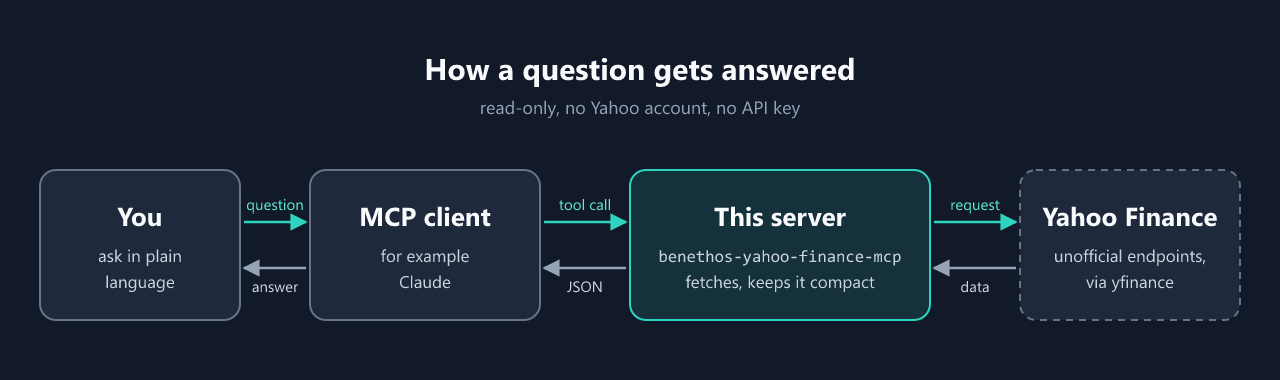
The server lets an MCP client such as Claude Desktop answer questions about markets from live Yahoo Finance data: the price of a share and how it moved, what a company earns, what analysts expect, who owns it, what an ETF holds, and how a sector or a market is doing. You ask in plain language, the client picks the tools, and the answer rests on what Yahoo returns rather than on what the model remembers.
Typical uses:
- Quick lookups in a chat. A quote, the 52-week range, the next earnings date or the dividend history, without opening a browser.
- Research on one company. Profile, financial statements, estimates, rating changes, holders and insider trades in one conversation, summarised by the model.
- Comparisons. Several tickers side by side, the top companies of a sector or an industry, the holdings and weightings of an ETF.
- Calculations on raw data. Six months of daily closes for an RSI, a MACD or a drawdown, which the model works out from the series.
- A shared service. Run over HTTP, in Docker, for a team's web front end or an automation such as n8n, with an optional result cache in front of Yahoo.
Everything is read-only. The server places no orders, holds no portfolio and signs in nowhere. The data comes from unofficial endpoints, may be delayed and is no basis for a trading decision, see the disclaimer above.
Example prompts
Once the server is connected, ask the client in plain language and it will pick the tools. Replace the bracketed placeholders with concrete values.
Price & quote
- "What's the current price of [Ticker], and how far is it from its 52-week high?"
- "Is [Ticker] trading above or below its 50- and 200-day moving averages?"
- "Get the daily closes of [Ticker] for the last 6 months and compute RSI and MACD."
- "What was the deepest drawdown of [Ticker] in the last 12 months?"
- "Compare [Ticker A] and [Ticker B] over the last 3 months and show which held up better."
- "Get current quotes for [Ticker A], [Ticker B] and [Ticker C] and compare them in a table."
Company & valuation
- "Give me P/E, beta, market cap and dividend yield for [Ticker]."
- "What does [Company name] actually do, and which sector and industry is it in?"
- "Show the last three annual income statements for [Ticker] and how revenue developed."
- "How has [Ticker]'s share count changed over the past years, and does that mean buybacks or dilution?"
Analysts & news
- "What's the analyst consensus for [Ticker], and how far is the average price target from the current price?"
- "Any upgrades or downgrades for [Ticker] in the last few weeks?"
- "What are the forward revenue and EPS estimates for [Ticker], and how were they revised recently?"
- "Summarize the recent news on [Ticker]."
Earnings & calendar
- "When does [Ticker] report next, and what EPS is expected?"
- "How did [Ticker] do against estimates in the last few quarters?"
- "When are [Ticker]'s next earnings and ex-dividend dates?"
Dividends
- "Show [Ticker]'s dividends over the last ten years and the current yield."
- "Has [Ticker] cut its dividend in the last 20 years, and did it split the stock?"
Ownership & insiders
- "Who are the largest institutional holders of [Ticker]?"
- "What share of [Ticker] is held by insiders versus institutions?"
- "Has there been notable insider buying or selling in [Ticker] recently?"
Funds & ETFs
- "What are the top holdings and sector weightings of the ETF [Ticker]?"
- "What's the asset-class split of [ETF Ticker], and which fund family runs it?"
Filings
- "Show the most recent SEC filings for [US Ticker] with links."
Options
- "Which option expiration dates are available for [US Ticker]?"
- "Show the calls and puts for [US Ticker] expiring [Date]."
Sectors & markets
- "What are the top companies and industries in the technology sector?"
- "Show the top-performing companies in the semiconductors industry."
- "Is the US market open right now, and when does it open next?"
- "How did the major indices in Europe and Asia close?"
Screening
- "Find US stocks with a dividend yield above 4 % and a P/E below 15."
- "Which companies have raised their dividend for at least 25 years in a row?"
- "List the largest German-listed technology stocks with a positive P/E under 20."
Finding a symbol
- "Which Yahoo ticker belongs to [Company name] on [Exchange]?"
- "Resolve the ISIN [ISIN] to a Yahoo ticker."
A daily round-up
- "For [Ticker A], [Ticker B] and [Ticker C]: pull quote, six months of history, company info and analyst recommendations, then give me a short picture of each."
The server computes nothing itself. It passes through what Yahoo returns, which already includes derived figures such as moving averages, P/E, beta and dividend yield. Anything Yahoo does not carry — RSI, MACD, drawdown, sentiment, total return — the model works out from the raw series.
Tools
Every tool only reads, and each one says so to the client with the MCP
annotations readOnlyHint and openWorldHint. A client that honours them may
run the tools without asking for confirmation each time. Each tool also has a
short title, such as "Stock screener", that a client may show in place of its
name.
| Tool | Description |
|---|---|
search |
Find instruments by name, ticker, or ISIN, returning Yahoo symbols. |
get_quote |
Current price and key intraday figures for a symbol. |
get_quotes |
Compact current quotes for several symbols at once (per-symbol not-found list). |
get_history |
Historical OHLCV data (period/interval or explicit date range). |
get_company_info |
Company profile and key statistics (sector, market cap, P/E, …). |
get_financials |
Income statement, balance sheet, or cash flow (annual/quarterly/ttm). |
get_dividends |
Dividend and stock-split history. |
get_news |
Recent news headlines (title, summary, publisher, URL), up to the 10 Yahoo serves. |
get_recommendations |
Analyst recommendation trend and price targets. |
get_options |
Option expiration dates and the calls/puts chain for a date, centred on the money. |
get_earnings |
Upcoming and historical earnings (EPS estimate/actual, surprise). |
get_estimates |
Forward analyst estimates (earnings, revenue, EPS trend/revisions, growth). |
get_upgrades_downgrades |
Recent analyst rating changes (upgrades/downgrades). |
get_holders |
Ownership breakdown (insider/institutional %, top institutional and mutual-fund holders). |
get_insider_activity |
Insider transactions, 6-month purchases/sales summary, and current roster. |
get_sec_filings |
Recent SEC filings (type, date, title, EDGAR/exhibit links). |
get_calendar |
Upcoming earnings and dividend / ex-dividend dates with estimate ranges. |
get_shares |
Shares-outstanding history (date → shares), the last 18 months unless a start date is given. |
get_fund_data |
Fund/ETF profile: overview, asset-class & sector weightings, top holdings. |
get_sector |
Browse a market sector by key: overview, top companies/ETFs/funds, industries. |
get_industry |
Browse an industry by key: overview, parent sector, top/top-performing/top-growth companies. |
get_market |
Trading status and headline index summary for a market (US, EUROPE, ASIA, …). |
screen |
Find stocks by criteria (dividend yield, P/E, market cap, region, sector, …), ranked, with the total number of matches. |
Most get_* tools take a Yahoo Finance symbol — either a ticker (AAPL,
SAP.DE) or a plain ISIN. Use search to turn a company name into one. Four
tools are exceptions: get_sector and get_industry take a sector or industry
key (e.g. technology, semiconductors), get_market takes a market
key (e.g. US), and screen takes filters such as
{"field": "dividend_yield", "op": "gt", "value": 3} and finds the symbols
itself.
📊 Sector & industry keys — click to expand (11 sectors, 145 industries, generated)
basic-materials (14)
agricultural-inputs, aluminum, building-materials, chemicals, coking-coal, copper, gold, lumber-wood-production, other-industrial-metals-mining, other-precious-metals-mining, paper-paper-products, silver, specialty-chemicals, steel
communication-services (7)
advertising-agencies, broadcasting, electronic-gaming-multimedia, entertainment, internet-content-information, publishing, telecom-services
consumer-cyclical (23)
apparel-manufacturing, apparel-retail, auto-manufacturers, auto-parts, auto-truck-dealerships, department-stores, footwear-accessories, furnishings-fixtures-appliances, gambling, home-improvement-retail, internet-retail, leisure, lodging, luxury-goods, packaging-containers, personal-services, recreational-vehicles, residential-construction, resorts-casinos, restaurants, specialty-retail, textile-manufacturing, travel-services
consumer-defensive (12)
beverages—brewers, beverages—non-alcoholic, beverages—wineries-distilleries, confectioners, discount-stores, education-training-services, farm-products, food-distribution, grocery-stores, household-personal-products, packaged-foods, tobacco
energy (8)
oil-gas-drilling, oil-gas-e&p, oil-gas-equipment-services, oil-gas-integrated, oil-gas-midstream, oil-gas-refining-marketing, thermal-coal, uranium
financial-services (15)
asset-management, banks—diversified, banks—regional, capital-markets, credit-services, financial-conglomerates, financial-data-stock-exchanges, insurance-brokers, insurance—diversified, insurance—life, insurance—property-casualty, insurance—reinsurance, insurance—specialty, mortgage-finance, shell-companies
healthcare (11)
biotechnology, diagnostics-research, drug-manufacturers—general, drug-manufacturers—specialty-generic, health-information-services, healthcare-plans, medical-care-facilities, medical-devices, medical-distribution, medical-instruments-supplies, pharmaceutical-retailers
industrials (25)
aerospace-defense, airlines, airports-air-services, building-products-equipment, business-equipment-supplies, conglomerates, consulting-services, electrical-equipment-parts, engineering-construction, farm-heavy-construction-machinery, industrial-distribution, infrastructure-operations, integrated-freight-logistics, marine-shipping, metal-fabrication, pollution-treatment-controls, railroads, rental-leasing-services, security-protection-services, specialty-business-services, specialty-industrial-machinery, staffing-employment-services, tools-accessories, trucking, waste-management
real-estate (12)
real-estate-services, real-estate—development, real-estate—diversified, reit—diversified, reit—healthcare-facilities, reit—hotel-motel, reit—industrial, reit—mortgage, reit—office, reit—residential, reit—retail, reit—specialty
technology (12)
communication-equipment, computer-hardware, consumer-electronics, electronic-components, electronics-computer-distribution, information-technology-services, scientific-technical-instruments, semiconductor-equipment-materials, semiconductors, software—application, software—infrastructure, solar
utilities (6)
utilities—diversified, utilities—independent-power-producers, utilities—regulated-electric, utilities—regulated-gas, utilities—regulated-water, utilities—renewable
Symbol resolution
All get_* tools expect a Yahoo Finance symbol. Both a ticker (AAPL,
SAP.DE) and a plain ISIN (US0378331005) work. An ISIN is resolved by
yfinance itself: anything shaped like one is looked up through Yahoo's search
the moment the ticker object is created, and the ticker found stands in for it
from then on. The server passes the symbol through unchanged apart from
trimming and uppercasing, and echoes what it was given. A symbol has at most
32 characters and the shape Yahoo uses, letters, digits and . - ^ = &, as in
^GSPC, EURUSD=X or BRK-B. Anything else, and an ISIN-shaped string that
Yahoo cannot resolve, answers as an unknown symbol.
To turn a company name into a symbol, call search first — the same Yahoo
search endpoint handles free text, tickers, and ISINs. A ticker is preferable to
an ISIN in any case, because the symbol reported back then stays consistent
across tools.
Two caveats. That ISINs work is observed behaviour of an unofficial endpoint,
not a guarantee: it did not work in earlier versions and it may stop again.
And German WKNs resolve nowhere, not through the tools and not through
search — Yahoo has no lookup for them, so ask for a ticker, an ISIN or the
company name instead.
Compatible clients
MCP is an open protocol, so this server is not tied to one application. Every MCP client can use it. What differs is only which transport the client speaks, and that decides how you start the server.
Locally, over stdio. The client launches the server as a subprocess and talks to it over stdin and stdout. This is the default transport and needs no network. Claude Desktop, Claude Code, Cursor, VS Code (Copilot agent mode), Zed, Windsurf, the JetBrains AI assistants, Cline, Roo Code, Continue and Goose all work this way. Claude Desktop also takes the server as an extension, a single file to open, see Quick start. The configuration file differs per client, but the command is always the one shown under Claude Desktop with uv:
{ "command": "uvx", "args": ["benethos-yahoo-finance-mcp"] }
Over the network, streamable-HTTP. The server runs once and clients connect
to http://<host>:8000/mcp, or to https://<domain>/mcp with a bearer token
behind the Caddy profile of the production compose file. Start it with
--transport streamable-http, or use
the Docker image, which serves this transport by default. Browser-based and
multi-user front ends need it — Open WebUI supports MCP natively over
streamable-HTTP and over no other transport, because a shared web front end
cannot hold one stdio process per user. LibreChat and Windsurf accept it
alongside stdio.
Over the network, SSE. The older HTTP transport, still expected by some
clients. Start it with --transport sse and point the client at
http://<host>:8000/sse. The MCP Client Tool node in n8n connects this way.
Both HTTP transports are open by default, guarded by a
Hostallow-list and an optional bearer token. Read the notes under Running as a standalone server before exposing either one.
Not listed? Client support moves quickly. Check which transport yours speaks, then use the matching command above — the transports are stable even when the list of names is not.
Requirements
- uv (recommended) — manages Python, the virtual environment, and dependencies in one tool.
- Or, without uv: Python 3.11+ with
pip/venv. gitis only needed for the optional install-from-source method.
Installation
Quick start: Claude Desktop extension
The simplest way for Claude Desktop. Nothing needs to be installed first, no uv, no Python and no configuration file: Claude Desktop brings what the extension needs.
- Download
benethos-yahoo-finance-mcp.mcpb, the extension of the newest release. Every release also carries it under its version, on the releases page. - Open it with a double click, or drag it onto Claude Desktop → Settings → Extensions. Claude Desktop shows the tools and asks to install.
- Ask something that needs market data, in a new chat. The first start installs the dependencies and takes a few seconds, later starts are quick.
If the server is also listed in claude_desktop_config.json, remove that
entry, or every tool shows up twice. The extension is for Claude Desktop only.
Other clients use the command below.
Claude Desktop with uv (manual config)
No clone, no manual virtual environment, no git. uvx fetches and runs it
on demand from
PyPI (published as
benethos-yahoo-finance-mcp).
-
Install uv, if you have not already — the uv installation page covers every platform. It brings
uvx, and that is the only thing needed here. -
Add the server to
claude_desktop_config.json(Claude Desktop → Settings → Developer → Edit Config):{ "mcpServers": { "benethos-yahoo-finance-mcp": { "command": "uvx", "args": ["benethos-yahoo-finance-mcp"] } } }
Pin a version for stability with
benethos-yahoo-finance-mcp==0.8.4. To enable the optional result cache, add anenvblock, e.g."env": { "YF_MCP_CACHE": "1" }(see Caching). -
Restart Claude Desktop (quit from the tray, not just close the window). The tools then appear in the client.
Installing from source instead? You can run the unreleased
mainbranch withuvx --from "git+https://github.com/benethos-hub/yahoo-finance-mcp.git" benethos-yahoo-finance-mcp. That path needsgiton thePATHof the process the client spawns — some GUI clients don't pass a fullPATH, so prefer the PyPI install above.
uvxmust be on thePATHthe client uses. After installing uv, fully restart the app — or use the absolute path touvxascommand. The first launch downloads the package and its dependencies, so it takes a moment. Later launches use the cache.
Other ways to install
From the MCP Registry. Every release from 0.8.2 on is listed in the
official MCP Registry as
io.github.benethos-hub/benethos-yahoo-finance-mcp, with the PyPI package and
the container image, and since 0.8.4 with the Claude Desktop bundle too
(entry).
A client that installs from the registry starts it with uvx, or with
docker run -i --rm and --transport stdio, and needs no settings. Since
0.8.3 the container entry also runs read-only, without capabilities and
without the HTTP health check, as in the hardened docker run example under
Docker. The MCP
list in VS Code's extension view (@mcp) is GitHub's own selection, and a
listing in the registry does not put a server there.
From PyPI with pip (no uv, no clone). Install the published package into a
virtual environment and run it as a module. The only platform difference is the
venv interpreter path: Windows uses .venv\Scripts\python.exe, Linux/macOS use
.venv/bin/python.
# Windows (PowerShell)
py -m venv .venv
.\.venv\Scripts\python.exe -m pip install benethos-yahoo-finance-mcp
# Linux / macOS (bash)
python3 -m venv .venv
.venv/bin/python -m pip install benethos-yahoo-finance-mcp
Point Claude Desktop at the absolute path of the venv interpreter and run the module (no generated console script involved):
{
  "mcpServers": {
    "benethos-yahoo-finance-mcp": {
      "command": "/abs/path/to/.venv/bin/python",
      "args": ["-m", "benethos_yahoo_finance_mcp"]
    }
  }
}
(On Windows use C:\\abs\\path\\to\\.venv\\Scripts\\python.exe as command.)
From source with uv (for development or local changes):
git clone https://github.com/benethos-hub/yahoo-finance-mcp.git
cd yahoo-finance-mcp
uv sync --extra dev          # creates .venv + installs deps from uv.lock
uv run benethos-yahoo-finance-mcp     # run over stdio
Point Claude Desktop at the checkout:
{
  "mcpServers": {
    "benethos-yahoo-finance-mcp": {
      "command": "uv",
      "args": ["run", "--project", "/abs/path/to/yahoo-finance-mcp", "benethos-yahoo-finance-mcp"]
    }
  }
}
From source with venv + pip (no uv). The only platform difference is the
venv interpreter path: Windows uses .venv\Scripts\python.exe, Linux/macOS use
.venv/bin/python.
# Windows (PowerShell)
py -m venv .venv
.\.venv\Scripts\python.exe -m pip install -e .
# Linux / macOS (bash)
python3 -m venv .venv
.venv/bin/python -m pip install -e .
Claude Desktop config uses the absolute path to the venv interpreter:
{
  "mcpServers": {
    "benethos-yahoo-finance-mcp": {
      "command": "/abs/path/to/.venv/bin/python",
      "args": ["-m", "benethos_yahoo_finance_mcp"]
    }
  }
}
(On Windows use C:\\abs\\path\\to\\.venv\\Scripts\\python.exe as command.)
Running as a standalone server
For use outside Claude Desktop — a network-reachable HTTP service — run an HTTP
transport (streamable-http or sse). Docker is the simplest way.
Every option has both a CLI flag and an environment variable (handy for
containers), with one deliberate exception noted below. Precedence is
CLI > environment > default (--help lists the flags):
| Flag | Env var | Default | Description |
|---|---|---|---|
--version |
— | — | Print the version and exit. Same value the server reports in the MCP handshake. |
--transport |
YF_MCP_TRANSPORT |
stdio |
stdio, streamable-http, or sse. |
--host |
YF_MCP_HOST |
127.0.0.1 |
Bind host for HTTP transports (0.0.0.0 for remote). |
--port |
YF_MCP_PORT |
8000 |
Port for HTTP transports (1 to 65535). |
--path |
YF_MCP_PATH |
/mcp (/sse for sse) |
URL path for HTTP transports. |
| (none) | YF_MCP_BEARER_TOKEN |
unset | Require this bearer token on every HTTP request. Environment only, deliberately: an argument is visible in the process list. |
--allowed-hosts |
YF_MCP_ALLOWED_HOSTS |
see below, or derived from origins | Comma-separated Host header allow-list for the DNS-rebinding guard. |
--allowed-origins |
YF_MCP_ALLOWED_ORIGINS |
derived from hosts | Comma-separated Origin header allow-list. |
--log-level |
YF_MCP_LOG_LEVEL |
INFO |
DEBUG/INFO/WARNING/ERROR/CRITICAL. |
--cache / --no-cache |
YF_MCP_CACHE |
off | Enable/disable the persistent result cache. |
--cache-dir |
YF_MCP_CACHE_DIR |
OS cache dir | Directory for the cache file. |
--cache-max-entries <N> |
YF_MCP_CACHE_MAX_ENTRIES |
10000 |
Most entries the cache keeps, the oldest go first. |
--cache-ttl <NAME>=<SECONDS> |
YF_MCP_CACHE_TTL_<NAME> |
per-tool defaults | Override one tool's TTL. |
Logging always goes to stderr, so under stdio stdout stays reserved for the
JSON-RPC protocol. At INFO every tool call leaves one line with its symbol,
the size of the answer, the time it took and whether the result cache
answered, for example get_history SAP.DE 250 rows, truncated, 412 ms. A
failed call is a WARNING naming the error's class, and so is a Yahoo rate
limit. Over HTTP a refused request (status 400 and up, 401 and 421 included)
is logged with the address that tried. DEBUG adds every answered request.
The log never contains the bearer token, a search query, a URL's query
string, the data Yahoo returned or the text of an error message.
Every line names its source short: server, tools, yahoo, cache,
uvicorn for uvicorn's server log and http for requests, and the time as
ISO 8601 to the millisecond with its offset, for example
2026-09-30T13:19:02.840+02:00 INFO tools: get_quote AAPL 312 ms. The
time is the machine's local time. A container's is UTC (+00:00) unless you
set TZ, e.g. TZ=Europe/Berlin. At a terminal the lines come in colour,
set NO_COLOR to turn that off. Anywhere else, in a container log say, each
line is plain text.
Bearer token (optional). Set
YF_MCP_BEARER_TOKENand every HTTP request must carryAuthorization: Bearer <token>. Anything else gets HTTP 401. It is off by default, because the ordinary case is a server on the loopback address of the machine that uses it, where a token guards against nothing. It is a single shared secret compared in constant time, not an OAuth flow — the question is only whether the caller is expected. stdio ignores it: the client owns that process and nothing else can reach it.A token does not make a port safe to publish. The data here is public and read-only, so the realistic damage is somebody spending your Yahoo rate limit, not reading something private. Beyond a trusted network, put a reverse proxy with real authentication in front.
Hostheader / DNS-rebinding guard. The MCP HTTP transport validates theHostheader. A localhost bind keeps a protective allow-list (localhost/127.0.0.1). An exposed bind (0.0.0.0) accepts anyHostby default, so containers and other hosts can reach it out of the box. To lock it down again, set--allowed-hosts(e.g.benethos-yahoo-finance-mcp:8000) — clients whoseHostis not on the list then get HTTP 421.--allowed-originsworks on its own as well, and either list is derived from the other when only one is given. Both compose files incontainers/set the list for you:localhost:*,127.0.0.1:*,[::1]:*,benethos-yahoo-finance-mcp:*. Without it a web page whose domain an attacker points at 127.0.0.1 could call every tool from a browser on the host. Add the name a proxy in front uses.
Docker
The published image is the shortest path to a running server — no Python, no
clone, no build. Every release is pushed to the GitHub Container Registry for
linux/amd64 and linux/arm64:
docker run --rm -p 8000:8000 ghcr.io/benethos-hub/benethos-yahoo-finance-mcp:latest
# Server is now reachable at http://localhost:8000/mcp
Pin a version for anything you depend on — :0.8.4 for an exact release, :0.8
to follow its patch releases. :latest moves with every release, and :edge is
built from main on demand and is not a release at all.
The image carries the name of the PyPI distribution, and every release from
0.4.0 on is available under it. Up to 0.7.1 it was published as
ghcr.io/benethos-hub/yahoo-finance-mcp, and those releases were copied over
with the same digest. The 0.7 line was pushed under the old name as well, the
same image again. Since 0.8.0 only the new name gets releases.
The image hosts the server over the streamable-HTTP transport. The stdio
transport is for local subprocess use and is not what you containerize.
Dependencies are installed reproducibly from uv.lock via uv, and the base
images are pinned by digest, so a rebuild of the same commit gets the same
bytes.
The image is configured entirely through environment variables (see the
options table above) — it carries no default command arguments, so overriding a
single setting with -e does not disturb the others.
# Build it yourself instead of pulling (e.g. to run an unreleased main),
# from the repository root
docker build -f containers/images/yahoo-finance-mcp/Dockerfile -t benethos-yahoo-finance-mcp .

# Run with the built-in defaults (streamable-HTTP on 0.0.0.0:8000)
docker run --rm -p 8000:8000 benethos-yahoo-finance-mcp
# Server is now reachable at http://localhost:8000/mcp

# Override settings via -e, opt into the cache and persist it in a named volume
docker run --rm -p 9000:9000 \
    -e YF_MCP_PORT=9000 \
    -e YF_MCP_LOG_LEVEL=DEBUG \
    -e YF_MCP_CACHE=1 \
    -v benethos-yahoo-finance-mcp-cache:/cache \
    benethos-yahoo-finance-mcp
The image runs as a non-root user and includes a healthcheck on the configured
HTTP port. The healthcheck reads that port from YF_MCP_PORT, so change it with
-e YF_MCP_PORT=9000, not with an appended --port 9000, or the container
stays unhealthy. The cache is off by default. Enable it with -e YF_MCP_CACHE=1, in
which case it is written to /cache (declared as a volume) — mount a named
volume there to keep it across container restarts. To require a bearer token
on every request, put YF_MCP_BEARER_TOKEN=... in a .env (see
containers/production/.env.example) and pass --env-file .env. -e YF_MCP_BEARER_TOKEN=... works
as well, but leaves the secret in your shell history. Beyond a trusted network,
front it with a reverse proxy that authenticates. Docker keeps the
container's log without a cap unless told otherwise, so add
--log-opt max-size=10m --log-opt max-file=5 to a docker run that is meant
to stay up, or set the same in the daemon's log-opts once for every
container.
The container runs with a read-only root file system, as the compose files do,
when it gets a writable /tmp and a writable cache for yfinance in the home
directory. Without the second, yfinance silently does without its cookie and
time zone cache and asks Yahoo again each time:
docker run --rm -p 8000:8000 --read-only --tmpfs /tmp \
    --tmpfs /home/appuser/.cache:uid=10001,gid=10001,mode=0700 \
    --cap-drop ALL --security-opt no-new-privileges:true \
    ghcr.io/benethos-hub/benethos-yahoo-finance-mcp:latest
The server needs a home directory it can resolve, because yfinance keeps a
small cache of its own there and looks the location up as soon as it is
imported. The image's user has one, and Docker and Kubernetes give any other
UID HOME=/, so nothing needs doing in the usual setups. If you run as a UID
with no passwd entry and remove HOME, which a hardened pod spec or a
systemd unit can do, the server stops at startup with
could not determine the home directory. Set HOME or an absolute
XDG_CACHE_HOME and it starts.
Docker Compose
Two compose files, each in a folder of its own under
containers/:
| Folder | For | Image | Port |
|---|---|---|---|
containers/production/ |
running the released server, no clone needed | ghcr.io/benethos-hub/benethos-yahoo-finance-mcp at the version in .env |
127.0.0.1:8000, with the profile https Caddy on 80 and 443 |
containers/development/ |
trying a change, the only way to run an unreleased main |
built from this checkout | 127.0.0.1:8001 |
To operate the server, fetch the production folder's three files into an empty folder and start it there:
mkdir yahoo-finance-mcp && cd yahoo-finance-mcp
for file in compose.yaml Caddyfile .env.example; do
  curl -fsSL -o "$file" "https://raw.githubusercontent.com/benethos-hub/yahoo-finance-mcp/main/containers/production/$file"
done
cp .env.example .env      # names the version, set the token here too
docker compose up -d      # pull (if needed) and start in the background
docker compose logs -f    # follow logs
docker compose down       # stop and remove
The server is then reachable at http://localhost:8000/mcp.
YAHOO_FINANCE_MCP_VERSION in .env names the image version and has no
default, so nothing changes under you on a pull. To update, set the new
version there, then docker compose pull && docker compose up -d. From a
checkout, docker compose up -d --build in containers/development/ builds
and starts the server on port 8001. Their project names differ, so both can
run side by side, each with a cache volume of its own. This requires Docker
Compose 2.24 or newer.
The port is published on 127.0.0.1 only, so the service is reachable from
the host but not from the rest of the network. That is deliberate, since the
server is unauthenticated unless YF_MCP_BEARER_TOKEN is set. To expose it,
remove the 127.0.0.1: prefix from the ports: entry, set the token at the
very least, and put a reverse proxy with authentication in front of it. Set
YAHOO_FINANCE_MCP_PORT in .env if the host port is taken.
For clients on other machines, the production folder brings such a proxy
along. With COMPOSE_PROFILES=https, YAHOO_FINANCE_MCP_DOMAIN and
YF_MCP_BEARER_TOKEN in .env, Caddy starts in front of the server on
ports 80 and 443, gets a certificate for the domain from Let's Encrypt, from
its own CA or from files you provide (YAHOO_FINANCE_MCP_TLS), and turns
away a request without an Authorization header before it reaches the
server. The server's port stays on 127.0.0.1. The
containers README
has the details.
Both files run the container with a read-only root file system, no Linux
capabilities and no-new-privileges, with a tmpfs for /tmp and for
yfinance's cache. They cap the log Docker keeps of the container at 5 files
of 10 MB, the oldest dropped first (x-logging). To keep more, raise
max-size or max-file. To keep the log elsewhere, replace the driver, for
example with journald, and read it with
journalctl CONTAINER_NAME=benethos-yahoo-finance-mcp.
Secrets go in the .env beside the compose file, which Compose reads through
env_file and git and the Docker build context both ignore. Set
YF_MCP_BEARER_TOKEN there, not in compose.yaml. Compose takes
YAHOO_FINANCE_MCP_VERSION, YAHOO_FINANCE_MCP_PORT and COMPOSE_PROFILES
for itself, hands YAHOO_FINANCE_MCP_DOMAIN and YAHOO_FINANCE_MCP_TLS to
Caddy, and everything else to the server. A name set under environment: in
compose.yaml wins over the same name in .env. Only Compose reads the file.
The server itself never loads it, so for a plain docker run pass
--env-file .env, and for a local or Claude Desktop setup keep using the
environment.
A setup from the compose file that used to sit at the repository root moves to
containers/production/. Its project name is the same, so the cache volume
stays.
Manual (uv or venv)
With uv (any OS):
# Streamable HTTP on http://127.0.0.1:8000/mcp
uv run benethos-yahoo-finance-mcp --transport streamable-http

# Bind all interfaces on a custom port / path
uv run benethos-yahoo-finance-mcp \
    --transport streamable-http --host 0.0.0.0 --port 9000 --path /yf
With the venv interpreter directly (Windows: .venv\Scripts\python.exe):
.venv/bin/python -m benethos_yahoo_finance_mcp --transport streamable-http
Caching
An opt-in persistent cache. When enabled, successful tool results are cached in a small SQLite file with a per-tool time-to-live (TTL) to reduce load on Yahoo's endpoints and survive restarts. Fast-moving data has a short TTL, stable data a long one.
Every call asks Yahoo anew, and the cache is what makes a repeat cheap, across restarts and as rate-limit protection. It is off by default because the ordinary case is an interactive session over stdio, where a repeat is rare and fresh data counts for more, and because a file on disk is the operator's choice.
Cache names (used for --cache-ttl <NAME>=<SECONDS> and
YF_MCP_CACHE_TTL_<NAME>) and their default TTLs:
| Name | Tool | Default TTL |
|---|---|---|
quote |
get_quote |
30 s |
quotes |
get_quotes |
30 s |
history |
get_history |
10 min |
news |
get_news |
10 min |
options |
get_options |
10 min |
screen |
screen |
10 min |
search |
search |
1 h |
company_info |
get_company_info |
6 h |
dividends |
get_dividends |
6 h |
recommendations |
get_recommendations |
6 h |
earnings |
get_earnings |
6 h |
estimates |
get_estimates |
6 h |
upgrades_downgrades |
get_upgrades_downgrades |
6 h |
insider_activity |
get_insider_activity |
6 h |
sec_filings |
get_sec_filings |
6 h |
calendar |
get_calendar |
6 h |
financials |
get_financials |
24 h |
holders |
get_holders |
24 h |
shares |
get_shares |
24 h |
fund_data |
get_fund_data |
24 h |
sector |
get_sector |
24 h |
industry |
get_industry |
24 h |
market |
get_market |
60 s |
- Off by default. Enable with
--cacheorYF_MCP_CACHE=1. - Location: the OS user cache directory, or
--cache-dir/YF_MCP_CACHE_DIR. The file grows with what it holds and shrinks again after expired entries are swept. A file made by an earlier version is rewritten once at start. - Size: at most 10 000 entries, the most recently written kept, set with
--cache-max-entries/YF_MCP_CACHE_MAX_ENTRIES. - Override a TTL:
--cache-ttl quote=15(repeatable) or theYF_MCP_CACHE_TTL_<NAME>env var (e.g.YF_MCP_CACHE_TTL_QUOTE=15). Set a TTL to0to bypass caching for that tool.
Precedence is CLI > environment > default. Errors are never cached, and a failing cache never fails a call: a locked or damaged cache file is logged and the data is fetched as if caching were off.
When to enable it
Enable the cache (--cache / YF_MCP_CACHE=1) if you:
- run the server as a long-running or containerized HTTP service that restarts periodically (the cache survives restarts → instant repeat results).
- hit Yahoo rate limits or make many repeated identical requests over time.
- mostly query slow-changing data (search, company info, financials), where staleness is irrelevant.
Leave it off (the default) if you:
- run it locally over stdio for interactive sessions — a repeat of the same question within minutes is rare there, and fresh data counts for more.
- need the freshest possible data.
- use it only occasionally.
Development
How the code is laid out, module by module, is in SPECS.md.
Install the dev extras, then run the test, lint, and type-check steps (the same ones CI runs).
With uv (any OS):
uv sync --extra dev

uv run pytest -q                 # unit tests (offline)
uv run ruff check .              # lint
uv run ruff format .             # format
uv run mypy                      # type check
uv run pytest --cov=benethos_yahoo_finance_mcp   # coverage
With the venv interpreter directly (replace .venv/bin/python with
.venv\Scripts\python.exe on Windows):
.venv/bin/python -m pip install -e ".[dev]"

.venv/bin/python -m pytest -q                 # unit tests (offline)
.venv/bin/python -m ruff check .              # lint
.venv/bin/python -m ruff format .             # format
.venv/bin/python -m mypy                      # type check
.venv/bin/python -m pytest --cov=benethos_yahoo_finance_mcp   # coverage
The unit tests mock yfinance and run fully offline. tests/smoke.py performs
an ad-hoc check against live Yahoo Finance and is not part of the unit suite.
CI also runs across Python 3.11–3.15 and enforces an 80% coverage floor,
measured on 3.15. Two
more jobs install without the lockfile: fresh-install with the newest
versions pyproject.toml allows, lowest-versions with the oldest.
Trademarks
"Yahoo" and "Yahoo Finance" are trademarks of Yahoo Inc. This project is not affiliated with, endorsed by, or sponsored by Yahoo, and it is not an official Yahoo product.
The names are used here only to describe what the software does, namely read
market data from Yahoo Finance through the yfinance library. That is the only
accurate way to say it. All trademarks remain the property of their respective
owners.
The project itself is published as benethos-yahoo-finance-mcp and is
maintained independently under the MIT licence.
1 maintainer

Metadata
1 maintainer
Release files for benethos-yahoo-finance-mcp 0.8.4
For a detailed explanation of source distributions (sdists) and built distributions (wheels), please see the package formats documentation.
Source distribution (sdist)
| File | Size | Uploaded | |
|---|---|---|---|
| benethos_yahoo_finance_mcp-0.8.4.tar.gz | 611.5 kB | Details |
Built distribution (wheel)
| File | Interpreter | ABI | Platform | Reset |
|---|---|---|---|---|
| benethos_yahoo_finance_mcp-0.8.4-py3-none-any.whl | Python 3 | none | any | Details |
Total release size: 705.1 kB
Release files / benethos_yahoo_finance_mcp-0.8.4.tar.gz
| Download URL | benethos_yahoo_finance_mcp-0.8.4.tar.gz |
|---|---|
| Size | 611.5 kB |
| Tags | Source |
|
SHA-256 checksum How to use checksums |
d8a44bc5dd3fe43d86c61c304ce19f999552fb7b1648a6eb9692b53448d59c28
|
|
BLAKE2b-256 checksum How to use checksums |
672a016cb9b3cfd563565cdd5305e63c427dd5d60710e06d8346be17bbf96b0c
|
| Upload date | |
|
Uploaded using Trusted Publishing? What is trusted publishing? |
Yes |
| Uploaded via |
uv/0.13.0 {"installer":{"name":"uv","version":"0.13.0","subcommand":["publish"]},"python":null,"implementation":{"name":null,"version":null},"distro":{"name":"Ubuntu","version":"24.04","id":"noble","libc":null},"system":{"name":null,"release":null},"cpu":null,"openssl_version":null,"setuptools_version":null,"rustc_version":null,"ci":true}
|
Release files / benethos_yahoo_finance_mcp-0.8.4-py3-none-any.whl
| Download URL | benethos_yahoo_finance_mcp-0.8.4-py3-none-any.whl |
|---|---|
| Size | 93.7 kB |
| Tags | Python 3 |
|
SHA-256 checksum How to use checksums |
621f6429adeea359dcd589d381eace5b24d157e6207fa7fd4c707814da37e459
|
|
BLAKE2b-256 checksum How to use checksums |
5f57ad6c70f509d5ae7b79c4fa30b933bebee9b481f61be00ed9eeb770373480
|
| Upload date | |
|
Uploaded using Trusted Publishing? What is trusted publishing? |
Yes |
| Uploaded via |
uv/0.13.0 {"installer":{"name":"uv","version":"0.13.0","subcommand":["publish"]},"python":null,"implementation":{"name":null,"version":null},"distro":{"name":"Ubuntu","version":"24.04","id":"noble","libc":null},"system":{"name":null,"release":null},"cpu":null,"openssl_version":null,"setuptools_version":null,"rustc_version":null,"ci":true}
|














