
This release has been yanked by its maintainers, and will be ignored by installers, except when explicitly specified.
Consider using release 0.1.2 instead.
Bengali CAPTCHA
Generate Bengali (Bangla) CAPTCHA images in Python, with bundled fonts and backgrounds.
bengali-captcha is a Pillow-based library for creating image CAPTCHAs with
Bengali letters and digits. Adapted from the captchaWeb research application,
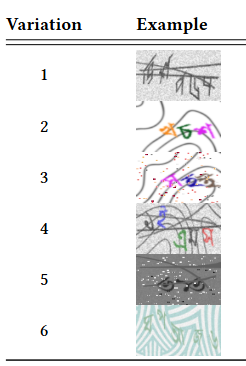
it provides seven rendering variants through a simple Python API and supports
Pillow images, in-memory streams, and image files.
The PyPI package includes the original Bengali fonts and background images.
Installing it with pip installs those assets too. All seven CAPTCHA variants
select their bundled assets automatically: no font path, background path,
separate download, or configuration is required.
The project is associated with the research paper A Usable and Secure Bengali CAPTCHA. If you use this library in your research, please cite the paper using the BibTeX entry in the Citation section below.
Sample CAPTCHA
Sample CAPTCHA
Features
- Seven rendering variants with automatically selected fonts and backgrounds.
- Bundled assets for offline generation after installation.
- Random Bengali challenge text generated using Python's
secretsmodule. - Custom challenge text, text-source callables, and configurable random-text length.
- Adjustable image size, margins, noise, and output format.
- Optional custom fonts, backgrounds, and supported text colors.
- Pillow image, in-memory stream, and file output.
- Command-line interface and a Django integration example.
Installation
Requires Python 3.10 or newer.
python -m pip install bengali-captcha
Quick start
The original Bengali fonts and background images are included. Generate a CAPTCHA immediately, with no font downloads or custom image paths:
from bengali_captcha import BengaliCaptcha

captcha = BengaliCaptcha()
answer, image = captcha.image
image.save("captcha.png")
All seven variants work out of the box:
for variant in range(1, 8):
    answer, path = BengaliCaptcha(variant=variant).write(f"captcha-{variant}.png")
By default, the answer contains four characters from the original project's
Bengali alphabet and digit selection. Challenge text uses secrets randomness.
Pass length=5 to change the length, or supply a string or callable as source.
To generate a longer random challenge:
captcha = BengaliCaptcha(length=5)
answer, image = captcha.image
image.save("captcha.png")
Output options
| API | Returns |
|---|---|
captcha.image |
(answer, image), where image is a Pillow image |
captcha.bytes |
(answer, stream), where stream is a BytesIO object positioned at the beginning |
captcha.write("captcha.png") |
(answer, path), after writing a newly generated image to disk |
Generate image bytes using the included assets:
captcha = BengaliCaptcha(variant=2, source="কখ১২")
answer, stream = captcha.bytes  # BytesIO, positioned at the beginning
png_data = stream.getvalue()
To generate and save directly to a file:
answer, path = captcha.write("captcha.png")
Each access to .image, .bytes, or .write() creates a new image and calls
the text source again. Keep the answer returned by the same call as the image
you display. To save that exact image, use its .save() method as shown in the
quick start.
Command-line usage
bengali-captcha captcha.png
bengali-captcha captcha.png --variant 1 --length 4
python -m bengali_captcha captcha.png --variant 7
These commands use the included fonts and images. The only filename required is where to save the generated PNG. The command prints its answer in UTF-8.
Django integration
Generate bytes for each request and keep the corresponding answer in the user's session. For example, inside a Django view:
from django.http import HttpResponse
from bengali_captcha import BengaliCaptcha


def captcha_image(request):
    answer, stream = BengaliCaptcha().bytes
    request.session["captcha_answer"] = answer
    response = HttpResponse(stream.getvalue(), content_type="image/png")
    response["Cache-Control"] = "no-store"
    return response
Your form-processing view must validate the submitted answer against the stored value and enforce challenge expiration, one-time use, and rate limiting. Keep the answer on the server; the image response should contain only the image.
The original Django site remains in this repository. The distribution includes
bengali_captcha and its original fonts/backgrounds; it does not install the
site or its settings.
The separate gen_captcha_6/7/8 functions in main/views.py remain part of that
site and are not exposed by this library release.
Optional: use your own font or background
Skip this section to use the original CAPTCHA styles. Supply font or
background only when you want to replace a bundled asset; each override is
independent, so the asset you do not override keeps its bundled default.
from bengali_captcha import BengaliCaptcha

# Optional custom font; the background still comes from the package.
captcha = BengaliCaptcha(variant=2, font="my-bengali-font.ttf")

# Optional custom background; the font still comes from the package.
captcha = BengaliCaptcha(variant=2, background="my-background.png")

# Optional: replace both assets.
captcha = BengaliCaptcha(
    variant=2,
    font="my-bengali-font.ttf",
    background="my-background.png",
)
answer, image = captcha.image
Custom fonts must support Bengali characters. A custom font path or Pillow
font object works with every variant. Custom backgrounds apply to variants
2, 3, 5, 6 and 7. Omitting either argument or passing None uses its bundled
default; background=False selects a white canvas.
The command line also accepts optional overrides:
bengali-captcha captcha.png --variant 2 --font my-bengali-font.ttf --background my-background.png
Scope and limitations
- Character rendering: The renderers distort individual characters. The default alphabet uses standalone Bengali letters and digits. Arbitrary Bengali words containing combining marks or conjuncts are not supported as shaped text.
- Application integration: This package generates CAPTCHA images. Answer validation, expiration, one-time use, and rate limiting belong to the integrating application.
- Research scope: The paper evaluates six CAPTCHA variants in its research implementation. This package exposes seven renderer APIs; their numbering should not be assumed to correspond directly to the paper's evaluated variants. The standalone package's resistance to automated solving has not been separately evaluated.
Citation
If you use Bengali CAPTCHA in your research, experiments, or academic publications, please cite the following paper:
Md Neyamul Islam Shibbir, Md Hasibur Rahman, Farida Chowdhury, and Md Sadek Ferdous. A Usable and Secure Bengali CAPTCHA. arXiv preprint arXiv:2606.29077, 2026.
@article{shibbir2026usable,
  title={A Usable and Secure Bengali CAPTCHA},
  author={Shibbir, Md Neyamul Islam and Rahman, Md Hasibur and Chowdhury, Farida and Ferdous, Md Sadek},
  journal={arXiv preprint arXiv:2606.29077},
  year={2026}
}
Development and publishing
From the repository root, install the package in editable mode:
python -m pip install -e .
Install the release tools, run the tests, build the distributions, and check the package metadata:
python -m pip install -e ".[release]"
python -m unittest discover -s tests -v
python -m build
python -m twine check --strict dist/*
Acknowledgements
The generators are loosely derived from
Claptcha by Piotr Kuszaj.
Bengali-specific variant changes originate in the captchaWeb research application.
License and credits
MIT License
Copyright (c) 2026 Md Neyamul Islam Shibbir, Md Hasibur Rahman, Md Sadek Ferdous, Farida Chowdhury
Permission is hereby granted, free of charge, to any person obtaining a copy of this software and associated documentation files (the "Software"), to deal in the Software without restriction, including without limitation the rights to use, copy, modify, merge, publish, distribute, sublicense, and/or sell copies of the Software, and to permit persons to whom the Software is furnished to do so, subject to the following conditions:
The above copyright notice and this permission notice shall be included in all copies or substantial portions of the Software.
THE SOFTWARE IS PROVIDED "AS IS", WITHOUT WARRANTY OF ANY KIND, EXPRESS OR IMPLIED, INCLUDING BUT NOT LIMITED TO THE WARRANTIES OF MERCHANTABILITY, FITNESS FOR A PARTICULAR PURPOSE AND NONINFRINGEMENT. IN NO EVENT SHALL THE AUTHORS OR COPYRIGHT HOLDERS BE LIABLE FOR ANY CLAIM, DAMAGES OR OTHER LIABILITY, WHETHER IN AN ACTION OF CONTRACT, TORT OR OTHERWISE, ARISING FROM, OUT OF OR IN CONNECTION WITH THE SOFTWARE OR THE USE OR OTHER DEALINGS IN THE SOFTWARE.
2 maintainers


Metadata
2 maintainers
Release files for bengali-captcha 0.1.0
For a detailed explanation of source distributions (sdists) and built distributions (wheels), please see the package formats documentation.
Source distribution (sdist)
| File | Size | Uploaded | Provenance | Actions |
|---|---|---|---|---|
| bengali_captcha-0.1.0.tar.gz | 538.7 kB | Without provenance | Details for bengali_captcha-0.1.0.tar.gz |
Built distribution (wheel)
| File | Interpreter | ABI | Platform | Actions Reset |
|---|---|---|---|---|
| bengali_captcha-0.1.0-py3-none-any.whl | Python 3 | none | any | Details for bengali_captcha-0.1.0-py3-none-any.whl |
Total release size: 1.1 MB
Release files / bengali_captcha-0.1.0.tar.gz
| Download URL | bengali_captcha-0.1.0.tar.gz |
|---|---|
| Size | 538.7 kB |
| Tags | Source |
|
SHA-256 checksum How to use checksums |
22b48751fe7be4600600ea9ad25861a99e5cc7763fa43fb9c12079f07bc50bf9
|
|
BLAKE2b-256 checksum How to use checksums |
d7435f6e11d6c54ebc7c8d71bec145fbcf5c4cffb8fcc74da141c4989eb74e21
|
| Upload date | |
|
Uploaded using Trusted Publishing? What is trusted publishing? |
No |
| Uploaded via |
twine/7.0.0 CPython/3.13.3
|
Release files / bengali_captcha-0.1.0-py3-none-any.whl
| Download URL | bengali_captcha-0.1.0-py3-none-any.whl |
|---|---|
| Size | 558.2 kB |
| Tags | Python 3 |
|
SHA-256 checksum How to use checksums |
95616b380571c9dd922940667e0e36b1117dbd05b0205deb3db9dbdf44be22eb
|
|
BLAKE2b-256 checksum How to use checksums |
33d7843158aa88b14789423e10259eb062ac7e26cb78506fd56a345177b6af16
|
| Upload date | |
|
Uploaded using Trusted Publishing? What is trusted publishing? |
No |
| Uploaded via |
twine/7.0.0 CPython/3.13.3
|
Security for bengali-captcha 0.1.0
Provenance
Provenance describes where a file came from. On PyPI, provenance is shared via attestations, which provide a verifiable record of the build or publishing details. View details, limitations and caveats.
No provenance found
None of the files in this release were uploaded with provenance metadata.
A note on package security
PyPI is a repository for distributing packages, not a service for auditing them. While third-party security researchers and our staff do their best to detect and remove malicious packages, PyPI cannot guarantee the quality, security or suitability of any given package.
To learn more about protecting yourself from malicious actors, visit our package security documentation.














