
CWL language server developed by Seven Bridges


Project description
Benten
This is a language server for Common Workflow Language documents.
Features
(Click for feature screenshot gallery)
- Syntax highlighting (CWL and JS)
- Evaluate expression on hover
- File path autocomplete for linked files in
runfield - Port completion for workflow
- Navigate to linked sub-workflows and includes (Jump to definition)
- Outline view (Symbols) + Step symbols
- Type validations
- Port validations
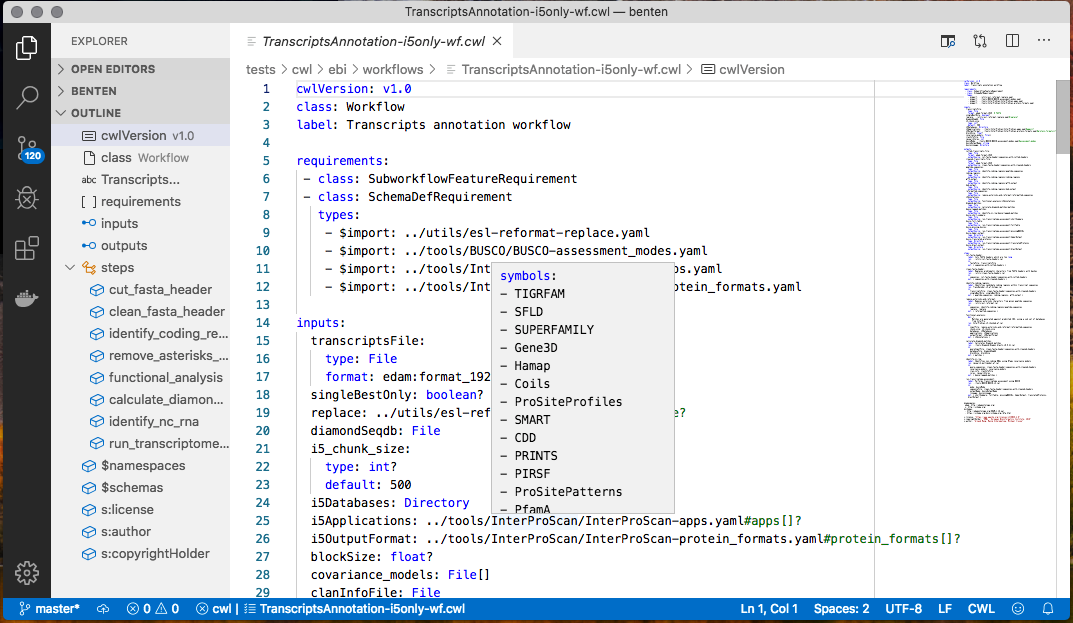




Benten is written using Python3 and developed against VS Code. The language server component will work with any editor/IDE that offers language server support. Syntax highlighting is currently only available for the VS Code extension. The VS Code extension is written in Typescript.
Server installation
Benten requires Python 3.7 or later
If you will be installing from source you will need git on your system
Using pipx
A neat way to install benten in a virtual env (isolating it from your
system python) and still be able to call it as a regular executable is
to use pipx
pip3 install pipx  # in case you don't have pipx
pipx ensurepath # ensures CLI application directory is on your $PATH
pipx install benten
Notes:
pipxinstalls the executables in$HOME/.local/bin(%HOMEPATH%\.local\binfor Windows). This needs to be added to your PATH env variable.pipx ensurepathdoes this for youpipx installcan be done from within another virtual environment. This is helpful when you have an incompatible global version of Python which you wish to keep but still want to install Benten. You can create a virtual env with Python > 3.7 and invoke the installation commands from there.
Special instructions for Ubuntu Linux
sudo apt install python3-pip python3-venv
Note for Windows
If you are trying to reinstall or updating the server on windows with the server running (e.g. because you have VS Code running), you will have to shutdown the server (e.g. by exiting VS Code) before updating.
Installing versions directly from github
To install from the master branch
pipx install --spec git+https://github.com/rabix/benten.git benten
To install from develop branch (or some other branch):
pipx install --spec git+https://github.com/rabix/benten.git@develop benten
Or, if you have cloned the repository and want to play with the server code itself:
pipx install -e benten
Install VS Code extension
Search for "Benten" in the marketplace. The name of the client extension is Rabix/benten. Follow the usual method to install the extension.
Using with VI/Vim
See this page please.
Expression evaluations on hover
Hovering over an expression will display the result of the evaluation or any errors that are encountered. Benten auto-generates sample process inputs, outputs and intermediate outputs (if the process is a workflow). Note that these are all randomly generated sample data meant for quick sanity checking of expressions.
Over-riding auto-generated sample data
The sample data is auto-generated on demand when an evaluation is requested. The generated sample data is also stored in a scratch file. This scratch file can be accessed by clicking "go to definition" when over any expression. Normally this file is just overwritten each time with fresh, randomly generated data.
If you wish to customize some of the sample data (for example you have specific test cases you want to check as you code the workflow) if you add the string (exactly)
#custom
to the first line of the sample data file, Benten will stop overwriting the file and use the contents of this customized file instead.
Once you add this line to the sample data file, Benten will no longer overwrite this file. If you want the test data to be regenerated (e.g. you've changed the input schema of the CWL) you need to remove this first sentinel line and Benten will regenerate the input.
Other tips and Tricks
Benten attaches onto your regular text editor and offers help by way of auto-completions and document validations, so most of its functionality is exposed naturally via the editor's regular UI, and a specialized tutorial is not necessary, but some helpful tips and tricks are listed in this page.
For developers
See the development documentation
License
Acknowledgments
The low level client-server communication code is taken from Sourcegraph's (now defunct) Python Language Server as is the VS Code client code (which was based originally off Microsoft's example code). The CWL preview uses vis.js
What's in a name?
Saraswati is the Hindu goddess of learning and knowledge and a long time ago she visited Japan, where she is known as Benzaiten (Benten for short) and her sitar has morphed into a Japanese biwa but she has kept some of her many arms.
Benzaiten is the goddess of everything that flows: water, time, words, speech, eloquence, music and by extension, knowledge. Therefore Benten is an appropriate goddess for scientific workflow developers.
References
- Wikipedia page
- Benzaiten (Benten): Japan’s Goddess of Reason - a much more detailed history
Release history Release notifications | RSS feed


Download files
Download the file for your platform. If you're not sure which to choose, learn more about installing packages.
Source Distribution
Built Distribution
Filter files by name, interpreter, ABI, and platform.
If you're not sure about the file name format, learn more about wheel file names.
Copy a direct link to the current filters
File details
Details for the file benten-2019.11.27.tar.gz.
File metadata
- Download URL: benten-2019.11.27.tar.gz
- Upload date:
- Size: 127.2 kB
- Tags: Source
- Uploaded using Trusted Publishing? No
- Uploaded via: twine/2.0.0 pkginfo/1.5.0.1 requests/2.21.0 setuptools/41.0.1 requests-toolbelt/0.9.1 tqdm/4.29.1 CPython/3.7.1
File hashes
| Algorithm | Hash digest | |
|---|---|---|
| SHA256 |
e5f09eb5279e8a638b7386c034fc6f68d91d63084b37a13a08ad87315aa1c6c4
|
|
| MD5 |
d07c72bd8ebdbc27b68363e891dcc84f
|
|
| BLAKE2b-256 |
052ef8e2c9bea3756c90bc498f8061ad7862cf736feeb7f59314becea32d68c1
|
File details
Details for the file benten-2019.11.27-py3-none-any.whl.
File metadata
- Download URL: benten-2019.11.27-py3-none-any.whl
- Upload date:
- Size: 149.9 kB
- Tags: Python 3
- Uploaded using Trusted Publishing? No
- Uploaded via: twine/2.0.0 pkginfo/1.5.0.1 requests/2.21.0 setuptools/41.0.1 requests-toolbelt/0.9.1 tqdm/4.29.1 CPython/3.7.1
File hashes
| Algorithm | Hash digest | |
|---|---|---|
| SHA256 |
8c795120fd221a140638949d7c5fa56fdd6c82c51f1402402b8d32c6e301e119
|
|
| MD5 |
3ccbd756375e7b0d2659bdfdcc465762
|
|
| BLAKE2b-256 |
b4084c7120c86cac9d708603facd66bfaf9db40918bafcfc1a81d7eab0beb400
|






