
Improvised CLI - BEPT 
Bept - Beginner friendly Electrostatics for Protein analysis Tool, is built by IISc-Software Team and future juniors iGEMers from Indian Institute of Science, Bengaluru India, for iGEM 2024.
Bept is a beginner-friendly tool for analysis proteins which uses functionalities of pdb2pqr and apbs command line tools, but making them more beginner friendly, making it for you to learn their usages without undergoing the pain of reading the documentation. The tool is meant to target growing scientists interested in protein electrostatics but scared of using Terminal command line tool.
Bept is cross-platform and can be installed on MacOS, Linux and Windows. It is built using Python, managed by uv package manager.
Features
- Interactively generate pdb2pqr command line and APBS
.ininput files without looking into deep documentation. - Generate the PQR, Potential DX and BEPT special
.beptfile containing all the information you need for a protein. - Automate the process of running PDB2PQR and APBS with optional interactive modes.
- Generate data on surface residues along with calculating SASA values.
- Bept provides PyMol python pre-made template codes for various functionalities.
- Save your
.infiles in cache for future references. - Save your PDB2PQR commands in history so you no need to generate it again.
- If you feel understanding how to write the command itself, don't worry, Bept has a friendly UI for that too.
- Read the docs of the tool directly from the CLI in an interactive way.
- Experience bept's extreme user-friendliness, color-coded outputs and error handling and make Electrostatics analysis a breeze!
Preview
Here is series of examples of how to use the tool:
Interactive mode for generating PDB2PQR and APBS input files
Here is how you can generate PQR files with BEPT -
https://github.com/user-attachments/assets/64ee9e6f-20e1-4898-878c-c6203a4c4b38
Here is how you can edit APBS Input files -
https://github.com/user-attachments/assets/3b82c678-ae24-4d9f-a797-1c2a062230db
Generating PQR, Potential DX and BEPT files
https://github.com/user-attachments/assets/df7178af-494c-43dd-bb27-14e45764e523
Automating the process of running PDB2PQR and APBS
https://github.com/user-attachments/assets/93476c8b-df43-45d0-a7fe-79aa359f2f09
Generating Template Python codes for Pymol
https://github.com/user-attachments/assets/49268543-65f3-49b4-92dc-d724886e9df5
Installation
Bept is a cross-platform tool and can be installed on MacOS, Linux and Windows through below-mentioned ways -
Using pip
You can download bept from PyPI using pip. Run the below command to install -
pip install bept
If you want to use it once without installing, you can use the below command -
pipx bept --help
If you are using uv, you can use-
uvx bept --help
Homebrew
You can download bept from Homebrew by running the below command -
brew install anirudhg07/anirudhg07/bept
Building from source
bept has been made using uv python package manager. You can install uv and run the below commands to install bept -
git clone https://github.com/IISc-Software-iGEM/bept.git
cd bept
pip install .
Check if the tool is successfully installed by running bept --help and you are good to go!
APBS and PDB2PQR
bept focusses on the automation of the process of running PDB2PQR and APBS. pdb2pqr is installed along with bept so you need not worry. To install APBS, you can follow the below steps -
- MacOS
sudo port install apbs
- Linux
sudo apt-get install apbs
- Windows require manual installation. Please check APBS official website for detailed information.
Dependencies
Apart from APBS and PDB2PQR commands, Bept uses python libraries like rich, rich-click, textual, beaupy, etc. for the interactive and colorful setup provided. These dependencies are present in the requirements.txt which are automatically installed when you install via Pypi and Homebrew. You can download these dependencies by the following command -
pip install -r requirements.txt
For windows, you might need to set the PATH variable where the tool is downloaded.
Bept generated the files, now what?
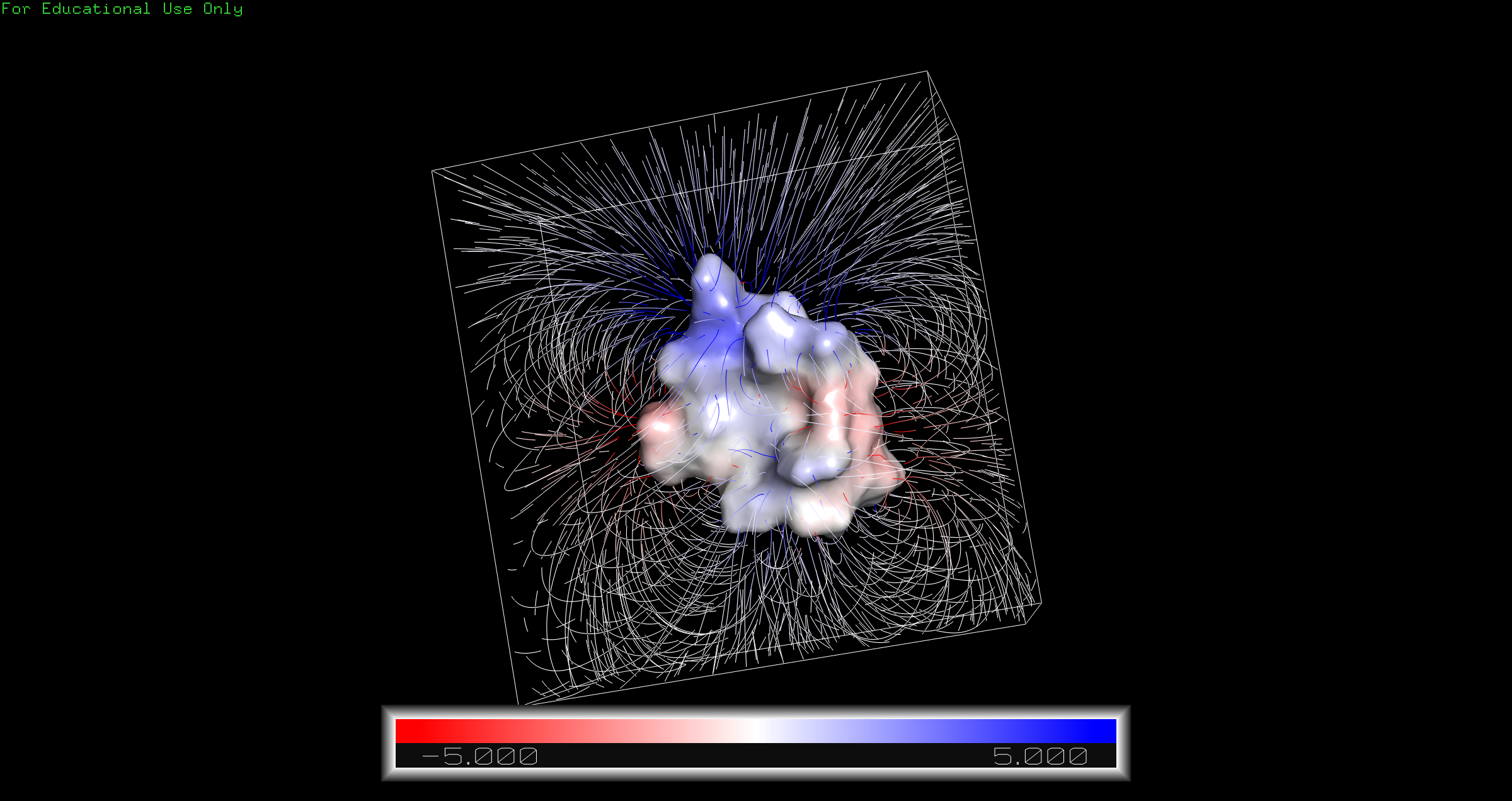
After generating pqr, dx or cube files, you can open them in Pymol to visualise the proteins, their electrostatic gradient maps and much more.
Here is an example of visualisation of 1l2y protein after opening the cube and pqr file generated in Pymol -
Too hard to understand even Bept?
We've got you covered, Bept has a very nice UI for generating the commands for you, powered by trogon. You can just write the file paths and choose the options and the command will be generated for you. You can use it by running bept ui.
https://github.com/user-attachments/assets/6058a9fc-2642-4ef0-80f1-2972f0c9218b
Documentation
Bept provides a very nice UI for reading documentation offline in your terminal anytime. You can read it with bept docs. These documentations are also present as it is in docs.
https://github.com/user-attachments/assets/86d8e34a-f898-46f0-891c-f3c47b5acfcb
You can also read the docs online at ReadTheDocs.
For any queries or issues, feel free to raise an issue in the repository.
Our Team
The project was made by members of IISc-Software Team along with the upcoming iGEMers among undergraduates from IISc Bengaluru.
- Anirudh Gupta(Maintainer, Project Leader) - Analysis, History management, Integration of features with CLI.
- Aditya Thakkar - APBS interactive generation
- Kishan Gowda - APBS interactive generation
- Akshita Sunsugu Palaniswami - PDB2PQR interactive generation
- G Hasini - Software Testing
- Deeptam Bhar - Interactive documentation
- Aditey Nandan - Biological Backend and Documentation
- Ritabrata Saha - Biological Backend and Documentation
- Shreyan Priyadarshi - Biological Backend and Documentation
- Soham Paul - Biological Backend and Documentation
Citations and Acknowledgements
PDB2PQR -
Jurrus E, Engel D, Star K, Monson K, Brandi J, Felberg LE, Brookes DH, Wilson L, Chen J, Liles K, Chun M, Li P, Gohara DW, Dolinsky T, Konecny R, Koes DR, Nielsen JE, Head-Gordon T, Geng W, Krasny R, Wei G-W, Holst MJ, McCammon JA, Baker NA. Improvements to the APBS biomolecular solvation software suite. Protein Sci, 27 (1), 112-128, 2018. https://doi.org/10.1002/pro.3280
APBS -
Jurrus E, Engel D, Star K, Monson K, Brandi J, Felberg LE, Brookes DH, Wilson L, Chen J, Liles K, Chun M, Li P, Gohara DW, Dolinsky T, Konecny R, Koes DR, Nielsen JE, Head-Gordon T, Geng W, Krasny R, Wei G-W, Holst MJ, McCammon JA, Baker NA. Improvements to the APBS biomolecular solvation software suite. Protein Sci, 27 (1), 112-128, 2018. https://doi.org/10.1002/pro.3280
License
BEPT is under MIT License and you can use it for free. If you like the tool, please share with others.
If you have any issues or want to contribute, please raise an issue in the repository.
1 maintainer

Metadata
1 maintainer
Release files for bept 0.1.0
For a detailed explanation of source distributions (sdists) and built distributions (wheels), please see the package formats documentation.
Source distribution (sdist)
| File | Size | Uploaded | |
|---|---|---|---|
| bept-0.1.0.tar.gz | 5.0 MB | Details |
Built distribution (wheel)
| File | Interpreter | ABI | Platform | Reset |
|---|---|---|---|---|
| bept-0.1.0-py3-none-any.whl | Python 3 | none | any | Details |
Total release size: 5.1 MB
Release files / bept-0.1.0.tar.gz
| Download URL | bept-0.1.0.tar.gz |
|---|---|
| Size | 5.0 MB |
| Tags | Source |
|
SHA-256 checksum How to use checksums |
1963bb90d4844f43f343b1639b151c9b3aa38c97ed1e64f213efc1b04fcef213
|
|
BLAKE2b-256 checksum How to use checksums |
30a5870c54b99df0cfc75a9e59e0a613aec872517c7ea1c83485919962e95f6b
|
| Upload date | |
|
Uploaded using Trusted Publishing? What is trusted publishing? |
No |
| Uploaded via |
twine/5.1.1 CPython/3.12.4
|
Release files / bept-0.1.0-py3-none-any.whl
| Download URL | bept-0.1.0-py3-none-any.whl |
|---|---|
| Size | 70.2 kB |
| Tags | Python 3 |
|
SHA-256 checksum How to use checksums |
3ee58974d1a4cabdc9510c8ded6105e75731b705f37aa10c81692b31af6ecd6b
|
|
BLAKE2b-256 checksum How to use checksums |
ea0961799db9efdeee491d9290f9ccf19098c6d69de337529ca8c858afe1a63e
|
| Upload date | |
|
Uploaded using Trusted Publishing? What is trusted publishing? |
No |
| Uploaded via |
twine/5.1.1 CPython/3.12.4
|













