
best-cad-mcp




A local, handle-first MCP server for agents that work with real AutoCAD drawings.
Inspect a DWG, reason over structured geometry, plan guarded edits, validate the result, and export visual evidence without hiding agent state inside the drawing.
简体中文 · Install · Workflow · Tool profiles · Safety

A feature-rich orthographic sample: front and top projections, a sectioned side view, hidden geometry, centerlines, dimensions, feature callouts, and a controlled title block.
[!IMPORTANT] best-cad-mcp is beta software. It is designed for controlled local workflows where an operator can review plans and evidence, not unattended changes to valuable production drawings.
Why best-cad-mcp
Most CAD automation stops at drawing primitives. Useful agent workflows also need to know exactly what they are changing, why a target was selected, and whether the result is correct.
| Handle-first control | Drawing understanding | Evidence before trust |
|---|---|---|
| Scan real AutoCAD handles, query exact entities, and edit those handles instead of guessing from labels or pixels. | Build CAD-IR, semantic objects and graphs, dimension bindings, constraints, and validation reports in a local workspace. | Validate and dry-run CADPlans, execute explicitly, rescan, and compare structured and visual results. |
The server runs on the same Windows account as AutoCAD and communicates over MCP stdio. It runs natively on the official MCP Python SDK 2.x, negotiates the 2026-07-28 protocol, and retains legacy client negotiation. AutoCAD remains the source of truth; SQLite stores model-private context, scan results, and review artifacts alongside the workspace. AutoCAD-facing tool calls are intentionally serialized on one event-loop thread to preserve COM apartment safety.
Quick start
Requirements
- Windows
- AutoCAD 2020 or newer recommended, installed and licensed
- AutoCAD and the MCP client running as the same Windows user
- Python 3.11 or newer
- An MCP-compatible local client
Install the package
python -m pip install --upgrade best-cad-mcp
cad-mcp-doctor --check-autocad
For rendered overlays and visual-review helpers:
python -m pip install --upgrade "best-cad-mcp[visual]"
cad-mcp-doctor --check-autocad --require-visual-export
Keep AutoCAD open, then configure your MCP client to launch cad-mcp.
Codex
Codex supports both global ~/.codex/config.toml and trusted,
project-scoped .codex/config.toml files. This minimal installed-package
configuration uses the curated core tool profile:
[mcp_servers.best-cad-mcp]
command = "cad-mcp"
cwd = 'C:\CAD\your-project'
enabled = true
startup_timeout_sec = 30
tool_timeout_sec = 120
default_tools_approval_mode = "writes"

[mcp_servers.best-cad-mcp.env]
CAD_MCP_TOOL_PROFILE = "core"
CAD_MCP_WORKSPACE_ROOT = 'C:\CAD\your-project'
Restart Codex after editing the file, then inspect the connected server with
/mcp. See the
official Codex MCP configuration guide
for configuration scopes and current options.
Claude Code and other JSON-configured clients
{
  "mcpServers": {
    "best-cad-mcp": {
      "command": "cad-mcp",
      "env": {
        "CAD_MCP_TOOL_PROFILE": "core",
        "CAD_MCP_WORKSPACE_ROOT": "C:\\CAD\\your-project"
      }
    }
  }
}
Save this as .mcp.json in the CAD project root and start the client from that
project. CAD_MCP_WORKSPACE_ROOT should point to the CAD project being worked
on, not to this repository. With an installed package, setting both the process
cwd and workspace root to the project keeps runtime files together.
Install from source
git clone https://github.com/LokmenoWer/best-cad-mcp.git
cd best-cad-mcp
python -m venv .venv
.\.venv\Scripts\Activate.ps1
python -m pip install --upgrade pip
python -m pip install -e ".[visual]"
.\.venv\Scripts\python.exe -m src.doctor --check-autocad
For a source checkout, start python -m src.server from the repository or
set the MCP server cwd to the repository. Keep
CAD_MCP_WORKSPACE_ROOT pointed at the separate CAD project you want to
index.
The guarded workflow
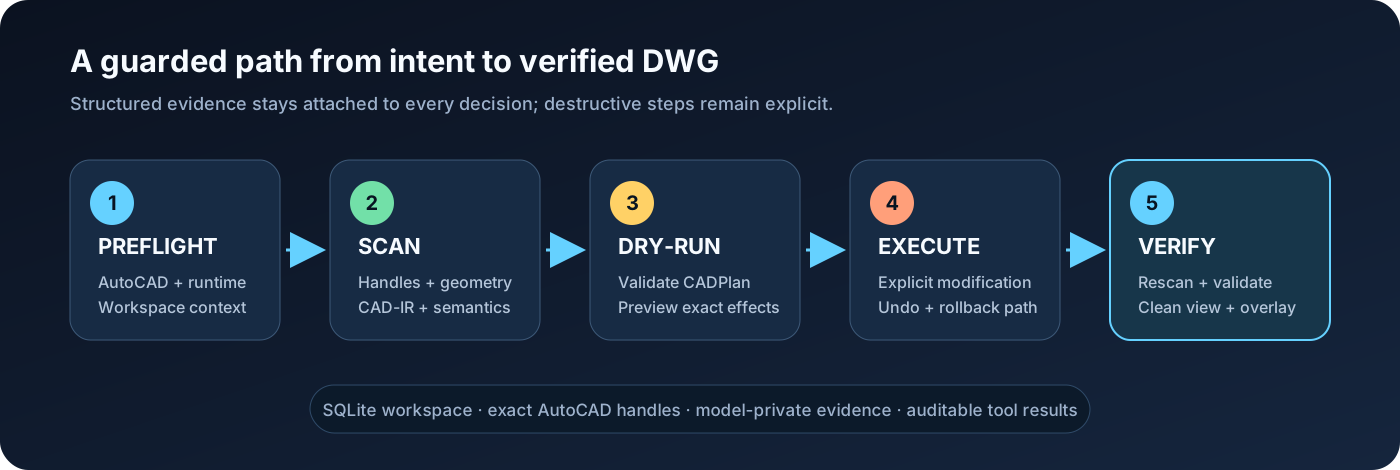
- Preflight — run
check_runtime_environment(check_autocad=true)orcad-mcp-doctor --check-autocad; stop when the result reportsok=false. - Scan — run
scan_all_entitiesbefore reasoning about an existing DWG. Usetopology_detail="full"for primitive grounding or cross-entity profiles. - Understand — build CAD-IR, summarize the drawing, query semantics, and
confirm important targets with
explain_entity. - Plan — express multi-step changes as a CADPlan, then call
validate_cad_plananddry_run_cad_plan. - Execute explicitly — only after authorization and an acceptable dry-run,
call
execute_cad_plan(..., allow_modify=true, transactional=true). - Verify — rescan, run geometric validation, export a clean view and overlay, and save only when the operator intends to persist the DWG.
For precise edits, prefer handles returned by AutoCAD over names inferred from screenshots. For visual findings, treat grounding as evidence: confirm the candidate entity and its geometry before changing it.
What it can do
| Area | Representative capabilities |
|---|---|
| 2D drafting | Lines, polylines, curves, circles, regions, hatches, text, dimensions, leaders, tables, layers, blocks, and attributes |
| Editing | Move, copy, rotate, scale, mirror, offset, trim, extend, fillet, chamfer, arrays, properties, selections, and handle-targeted changes |
| Drawing understanding | SQLite scan, CAD-IR v2, summaries, semantic objects/graphs, constraints, dimension binding, validation, and repair proposals |
| Guarded automation | CADPlan variables, dependencies, captured handles, preconditions, postconditions, dry-runs, transactional execution, undo, and rollback attempts |
| Visual grounding | Clean exports, adaptive numeric overlays, pixel/world mapping, path and polygon grounding, tile crops, and VLM finding reconciliation |
| Image-to-CAD | ImageDrawingSpec tracing, calibration, fidelity checks, staged execution, and visual comparison against the source image |
| Mechanical drawings | Orthographic views, sections, hatches, centerlines, dimensions, BOMs, balloons, layouts, and assembly-oriented prompt/skill assets |
| 3D and output | 3D solids and operations, layouts, plotting, PDF/DXF/DWF/image export, and direct in-result image content |
Tool profiles
The shipped client configs and examples recommend core because it keeps tool
selection reliable while covering normal guarded workflows. When the profile
environment variable is omitted, the Python server falls back to full for
backward compatibility.
| Profile | Tools | Intended use |
|---|---|---|
lean |
113 | Smallest dependable surface for common drawing and inspection tasks |
core |
210 | Recommended default for full guarded CAD workflows |
full |
321 | Every registered tool, including specialized and legacy operations |
Select a profile with CAD_MCP_TOOL_PROFILE=lean|core|full. Fine-grained
allow/deny controls are also available through
CAD_MCP_TOOLS_INCLUDE and CAD_MCP_TOOLS_EXCLUDE.
From visual understanding to grounded CAD evidence
The hero drawing is a standards-aware README illustration of a flanged bearing housing. It deliberately combines the kinds of information a useful mechanical workflow must preserve: projected views, a section, holes and slots, hidden geometry, centerlines, real dimension intent, and drawing metadata. In a live session, AutoCAD remains the source of truth and exported views provide the visual evidence.
A VLM review should return more than a caption. The structured result can carry observed features, pixel evidence, dimensions, annotations, relations, confidence, and unresolved uncertainty. Grounding then resolves those claims to semantic objects and exact AutoCAD handle candidates before an edit is planned.

The diagram shows an abridged ImageDrawingSpec/v1 payload. A complete payload
also preserves calibration candidates, geometry, annotations, tables, and
source evidence required by the schema. Low-confidence observations stay in
uncertainties; they are not silently converted into CAD geometry.
Copy a mechanical drawing from one image
The full path separates non-mutating understanding from the one explicitly authorized DWG modification stage, then closes with a rescan and visual diff.

A typical tracing loop is:
- call
prepare_image_trace(image_path, domain="mechanical"); - use
prepare_visual_semantic_contextandget_trace_source_imageto inspect global and tiled source images; - produce
ImageDrawingSpec/v1, echoing each observed image'ssource_ref_templatefor measured coordinates; - call
validate_image_drawing_spec, thensubmit_image_drawing_spec; - call
compile_image_spec_to_cad_plan; - call
validate_image_fidelity_contract(spec, cad_plan); - call
validate_cad_plan, thendry_run_cad_plan; - only after authorization, call
execute_cad_plan(..., allow_modify=true, transactional=true); - rescan, validate, and compare the final AutoCAD export with the source.
Do not execute a trace just because its JSON is valid. Check view count, symmetry, dimensions, centerlines, hole placement, and source/render fidelity first.
Visual grounding in v1.6
Version 1.6 adds drawing-level topology for boundaries assembled across
multiple entities, including line-line and supported line-curve intersections
plus closed-loop profiles. Use scan_all_entities(topology_detail="full") when
primitive relations are required. Grounding now carries real path/polygon
geometry, multiple-handle candidates, adaptive overlays, and tile-aware
pixel/world contracts.
This improves selection quality on mechanical profiles, but it does not make vision infallible. Important edits should still follow:
visual finding -> grounding candidates -> explain_entity -> handle-targeted edit
The default VLM review prompt is vlm_review_drawing/v3. Snapshot schema
versions are returned in tool results; overlay schema versions are stored in
the referenced sidecars so strict consumers can detect contract changes.
Safety model
- Read and scan before editing an existing drawing.
- Keep raw command execution, deletion, purge, audit, save, close, and
execute_cad_planbehind explicit client approval. - Validate and dry-run plans before modification.
- Use returned handles and structured geometry for exact targets.
- Rescan after modifications; do not rely on stale SQLite rows.
- Keep model-private notes and spatial annotations in
.cad_mcp/, not in visible DWG geometry, XData, or hidden layers. - Treat saving and closing as separate operator decisions.
- Treat top/plan model-space views as the strongest grounding case. View twist, custom UCS, 3D geometry, and complex layout viewports can reduce confidence.
Transaction and rollback support reduce risk but cannot guarantee recovery from every AutoCAD or COM failure. Work on copies when the drawing is valuable.
Workspace and data
CAD_MCP_WORKSPACE_ROOT controls
<workspace>/.cad_mcp/workspace.db. The default log, visual exports, and image
trace assets are written relative to the MCP process cwd as cad_mcp.log,
cad_visual_exports/, and cad_image_traces/.
External CAD projects are not ignored automatically. Add these entries to the
project's .gitignore when it is a Git repository:
.cad_mcp/
cad_mcp.log
cad_visual_exports/
cad_image_traces/
The database helps connect turns and tools, but AutoCAD remains authoritative.
If a drawing changes outside the server, scan it again before using stored
entities. A warning about a legacy root autocad_data.db means an older
database exists; verify migration, then archive it separately.
Troubleshooting
| Symptom | Check |
|---|---|
| Server fails to import after upgrading | Run cad-mcp-doctor --json with the same Python environment used by the client. best-cad-mcp 1.7+ requires MCP Python SDK >=2,<3; upgrade the package/environment and restart the client if mcp_sdk_version is blocked. |
| AutoCAD is open but unavailable | Run cad-mcp-doctor --check-autocad; make sure both processes use the same Windows account and privilege level. |
| Server starts with too many tools | Set CAD_MCP_TOOL_PROFILE=core or lean, then restart the client. |
| Visual export is unavailable | The [visual] extra provides Pillow/CairoSVG for raster and SVG work. AutoCAD WMF-to-PNG usually still needs ImageMagick/Wand, Inkscape, or LibreOffice. Check get_vision_capabilities() and its wmf_to_png_available result; PDF can also be rasterized externally. |
| Queries return stale entities | Activate the intended drawing and rerun scan_all_entities. |
| MCP server starts in the wrong folder | Set server cwd to the source checkout only when developing; set CAD_MCP_WORKSPACE_ROOT to the CAD project. |
| A plan is rejected | Run validate_cad_plan, inspect the exact failing step, and dry-run again after correcting it. |
For machine-readable diagnostics:
cad-mcp-doctor --json
Development
git clone https://github.com/LokmenoWer/best-cad-mcp.git
cd best-cad-mcp
python -m venv .venv
.\.venv\Scripts\Activate.ps1
python -m pip install -e ".[dev,visual]"
python -m pytest -q -m "not autocad_com"
Release publication validates the version, runs the non-COM suite (reserving
the autocad_com marker for local live-CAD checks), verifies native modern and
legacy MCP stdio, builds and clean-installs the wheel, checks it with Twine,
publishes to PyPI, and then publishes the MCP server metadata. Live AutoCAD
preflight and CADPlan checks must be run locally because hosted runners do not
have AutoCAD.
Contributions are welcome. Please keep changes scoped, add regression tests for behavior changes, and preserve the scan → plan → validate → verify safety model.
Acknowledgements
The model-private annotation and pointer-style CAD context design was informed by the public Pointer-CAD project and paper. No Pointer-CAD source code is copied into this repository.
License
MIT. See LICENSE.
1 maintainer

Download files
Download the file for your platform. If you're not sure which to choose, learn more about installing packages.
Source Distribution
Built Distribution
Filter files by name, interpreter, ABI, and platform.
If you're not sure about the file name format, learn more about wheel file names.
Copy a direct link to the current filters
File details
Details for the file best_cad_mcp-1.7.0.tar.gz.
File metadata
- Download URL: best_cad_mcp-1.7.0.tar.gz
- Upload date:
- Size: 470.0 kB
- Tags: Source
- Uploaded using Trusted Publishing? Yes
- Uploaded via:
twine/7.0.0 CPython/3.13.14
File hashes
| Algorithm | Hash digest | |
|---|---|---|
| SHA256 |
ba21328a326a54ca1fad2f2713f30ba85cbe951448dedf79513f59dc146956f5
|
|
| MD5 |
1b909a3fafe85bc0c7222a312049ad58
|
|
| BLAKE2b-256 |
98b5cb6bc8b83a54823d1c64fc98faf1984a76f61d0281a44e550e9b4b2880dd
|
Provenance
The following attestation bundles were made for best_cad_mcp-1.7.0.tar.gz:
Publisher:
release.yml on LokmenoWer/best-cad-mcp
-
Statement:
-
Statement type:
https://in-toto.io/Statement/v1 -
Predicate type:
https://docs.pypi.org/attestations/publish/v1 -
Subject name:
best_cad_mcp-1.7.0.tar.gz -
Subject digest:
ba21328a326a54ca1fad2f2713f30ba85cbe951448dedf79513f59dc146956f5 - Sigstore transparency entry: 2377017068
- Sigstore integration time:
-
Permalink:
LokmenoWer/best-cad-mcp@2d1a36093361a438b40c1d868b61bcba2b2b81ab -
Branch / Tag:
refs/tags/v1.7.0 - Owner: https://github.com/LokmenoWer
-
Access:
public
-
Token Issuer:
https://token.actions.githubusercontent.com -
Runner Environment:
github-hosted -
Publication workflow:
release.yml@2d1a36093361a438b40c1d868b61bcba2b2b81ab -
Trigger Event:
release
-
Statement type:
File details
Details for the file best_cad_mcp-1.7.0-py3-none-any.whl.
File metadata
- Download URL: best_cad_mcp-1.7.0-py3-none-any.whl
- Upload date:
- Size: 516.1 kB
- Tags: Python 3
- Uploaded using Trusted Publishing? Yes
- Uploaded via:
twine/7.0.0 CPython/3.13.14
File hashes
| Algorithm | Hash digest | |
|---|---|---|
| SHA256 |
606c53f7127953a44f7780e1e575b1ceaa20dd11f7ee371d0f194ff219b08c6c
|
|
| MD5 |
e61c5533bd98d90e41d9afeb26df83e1
|
|
| BLAKE2b-256 |
ea35add21d9c06e32662b9cfe60dad1a203ef521fb6829fc0a7752d798bed890
|
Provenance
The following attestation bundles were made for best_cad_mcp-1.7.0-py3-none-any.whl:
Publisher:
release.yml on LokmenoWer/best-cad-mcp
-
Statement:
-
Statement type:
https://in-toto.io/Statement/v1 -
Predicate type:
https://docs.pypi.org/attestations/publish/v1 -
Subject name:
best_cad_mcp-1.7.0-py3-none-any.whl -
Subject digest:
606c53f7127953a44f7780e1e575b1ceaa20dd11f7ee371d0f194ff219b08c6c - Sigstore transparency entry: 2377017233
- Sigstore integration time:
-
Permalink:
LokmenoWer/best-cad-mcp@2d1a36093361a438b40c1d868b61bcba2b2b81ab -
Branch / Tag:
refs/tags/v1.7.0 - Owner: https://github.com/LokmenoWer
-
Access:
public
-
Token Issuer:
https://token.actions.githubusercontent.com -
Runner Environment:
github-hosted -
Publication workflow:
release.yml@2d1a36093361a438b40c1d868b61bcba2b2b81ab -
Trigger Event:
release
-
Statement type:














