
Pick and pull the best local LLM/VLM for the current hardware.

Project description
best-engine-ai-helper
Pick and pull the best local large language model (LLM) or vision-language model (VLM) for the hardware in the current machine.
The tool detects available memory (Apple Silicon unified pool, NVIDIA VRAM, or system RAM), consults a bundled model catalog, and selects the highest-scoring model that fits within a configurable safety headroom. After selection, it pulls the model via Ollama, runs two quality gates (the Ralph Loop for prose and the Ralph Eyeball Loop for vision), and writes an environment file that downstream projects source to find the chosen model.
A minimal browser GUI (best-engine-ai-helper gui) covers the read-only half of this (the hardware snapshot, and the task-to-engine recommendation) without the CLI. See GUI.md.
Requirements
- Python 3.10 or later
- Ollama (needed for
pull,validate,env; not fordetect,recommend, orreport) - psutil, PyYAML, click, requests (installed automatically)
- Optional:
fastapi+uvicornfor the browser GUI (pip install 'best-engine-ai-helper[api]')
Install
The package is pure Python (Python 3.10+). The only platform-specific pieces
are Python itself and the optional Ollama runtime (needed only for
pull / validate / env, not for detect, recommend, report, or the
GUI). Pick your OS below.
Everywhere, [api] pulls in the browser-GUI extra (fastapi + uvicorn).
Drop it (pip install best-engine-ai-helper) if you only want the CLI.
🍎 macOS
# 1. Python 3.10+ (skip if you already have it: python3 --version)
brew install python

# 2. Install into an isolated virtual environment (recommended)
python3 -m venv .venv
source .venv/bin/activate
pip install --upgrade pip
pip install 'best-engine-ai-helper[api]'

# 3. Optional: Ollama, only if you'll run `pull`
brew install ollama          # then: ollama serve
Hardware detection uses the built-in system_profiler (Apple Silicon unified
memory), so nothing extra is needed.
🐧 Ubuntu / Debian
# 1. Python 3.10+ with venv support
sudo apt update
sudo apt install -y python3 python3-venv python3-pip

# 2. Install into an isolated virtual environment (recommended)
python3 -m venv .venv
source .venv/bin/activate
pip install --upgrade pip
pip install 'best-engine-ai-helper[api]'

# 3. Optional: Ollama, only if you'll run `pull`
curl -fsSL https://ollama.com/install.sh | sh   # then: ollama serve
GPU detection is automatic when the vendor tools are on PATH: nvidia-smi
(ships with the NVIDIA driver) for NVIDIA VRAM, rocm-smi (ROCm stack) for
AMD. With no GPU it falls back to system RAM.
🪟 Windows (PowerShell)
# 1. Python 3.10+ (skip if you already have it: py --version)
winget install Python.Python.3.12

# 2. Install into an isolated virtual environment (recommended)
py -m venv .venv
.\.venv\Scripts\Activate.ps1
python -m pip install --upgrade pip
pip install "best-engine-ai-helper[api]"

# 3. Optional: Ollama, only if you'll run `pull`
winget install Ollama.Ollama
NVIDIA VRAM is detected via nvidia-smi (installed with the driver). Note the
double quotes around "...[api]": PowerShell needs them, single quotes won't
expand the same way.
From source (any OS)
git clone https://github.com/warith-harchaoui/best-engine-ai-helper
cd best-engine-ai-helper
pip install -e '.[api]'          # Windows PowerShell: pip install -e ".[api]"
Verify the install
best-engine-ai-helper --version
best-engine-ai-helper detect     # prints this machine's hardware as JSON
Quick start
# See what hardware this machine has
best-engine-ai-helper detect

# See which models would be selected (no download)
best-engine-ai-helper recommend

# Recommend the best engine(s) for a task, as a report (Markdown + JSON)
best-engine-ai-helper report --task "product descriptions and image-quality checks" --out engine

# Browse the full catalog
best-engine-ai-helper catalog show

# Browse the hardware chip table
best-engine-ai-helper hardware show

# Launch the browser GUI (requires the [api] extra)
best-engine-ai-helper gui
See EXAMPLES.md for runnable recipes with expected output, and GUI.md for the browser GUI.
GUI
best-engine-ai-helper gui serves a single-page browser GUI (FastAPI +
vanilla JS, no build step) at http://127.0.0.1:8000/gui: the same hardware
snapshot as detect, and a task-description box that returns the same
recommendation as report, with no terminal needed. The page is bilingual
(French by default, English at /gui?lang=en), with a header link to switch.
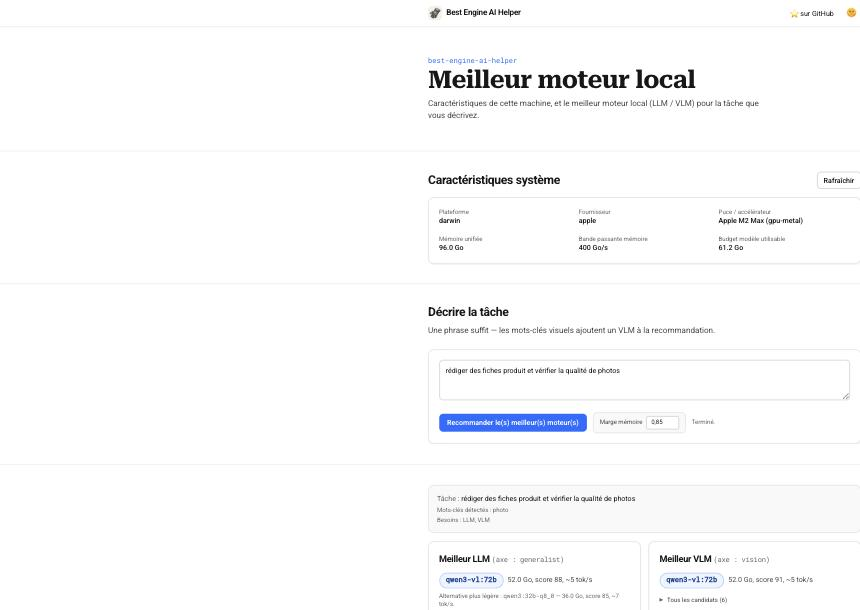
See GUI.md for the full write-up, the JSON API it's built on, and
how the favicon / touch-icon set is generated from assets/logo.png.
How selection works
Selection weighs four factors, each made explicit in the report output so the
recommendation is reproducible and can be argued with.
1. Structured-output capability (can it be driven by a schema?)
The AI-Helpers suite routes every task through a JSON schema (intent parsing,
edit proposals, visual critique). Some open-weight models cannot honour Ollama's
grammar-constrained structured output and return an empty response under it (the
Qwen3-VL family does this, verified on qwen3-vl:8b). A model marked
structured_output: false in the catalog is never auto-selected, however high
its raw benchmark, and it still appears lower in the ranked list so an explicit
non-schema task can find it. Entries with no such marker are assumed capable.
2. Memory fit (will it run on the accelerator?)
Available memory comes from the highest-priority probe that succeeds: Apple
Silicon unified memory (system_profiler), NVIDIA VRAM (nvidia-smi), AMD VRAM
(rocm-smi), else half of system RAM as a conservative CPU-only estimate.
The usable budget is not the whole pool. On Apple Silicon, Metal caps GPU
allocations at about 66% of unified memory at or below 36 GB and about
75% above it (recommendedMaxWorkingSetSize); past that, work spills to the
CPU and slows sharply. An extra safety headroom (default 0.85) is applied
on top, reserving room for the OS, your own application, and KV-cache growth as
context fills. A catalog entry's ram_gb is already a peak-inference estimate
(weights plus a moderate KV cache; roughly weights ÷ 0.7, since weights are only
about 70% of runtime memory and can approach 2× at long context). A model fits
when that ram_gb is at most the budget.
3. Task fit (is it good at the job?)
A task, even a vague phrase like "retail descriptions and image-quality
checks", maps to a benchmark axis (generalist, code, math, ocr,
vision) and to the model kinds it needs (text implies an LLM, anything visual
implies a VLM).
Among fitting models, the highest benchmark on that axis wins.
4. Throughput (how fast will it generate?)
Token generation is memory-bandwidth bound: each token reads the active
model from memory once, so the ceiling is bandwidth ÷ model-size, derated to
about 65% for KV-cache reads and overhead. report estimates tokens/s per
candidate from the chip's memory bandwidth, and offers a lighter, faster
alternative when one is nearly as strong. Bigger is not automatically better: a
72B model that technically fits may run at a few tokens/s, while an 8-14B model
leaves headroom and runs several times faster.
When nothing fits, the tool falls back to the smallest model and says so.
Sources. Apple Metal working-set cap (Apple developer docs / apple-specs);
inference-memory breakdown weights + KV (15-20%) + overhead (5-10%) (local-LLM
sizing guides); bandwidth-bound decode tok/s ≈ bandwidth ÷ active-bytes × 0.5-0.8
(llama.cpp / MLX community benchmarks). The exact ratios live as documented
constants in score.py.
Model catalog
The bundled seed catalog (models.yaml) covers 13 models from the Qwen 3, Qwen 2.5, and Gemma 3 families, from 3B to 72B parameters, across Q4_K_M and Q8_0 quantizations. The catalog tracks on-disk size, estimated peak RAM, and benchmark scores from the Open LLM Leaderboard v2 and the OpenVLM Leaderboard.
catalog update refreshes the cache from the ApXML LLM directory (open-weight models with their per-quant VRAM needs, consulted regularly). It fetches the specs, normalizes them to catalog entries, and merges them into ~/.best-engine-ai-helper/catalog_cache.yaml by id (the bundled seed is never modified). Use --limit N for a quick partial refresh. ApXML's static pages carry specs but no numeric leaderboard scores, so refreshed entries keep null benchmarks (and rank low) until a scored source, such as the Open LLM Leaderboard v2 or the OpenVLM Leaderboard, fills them.
Hardware table
hardware.yaml lists known GPU and Apple Silicon chip configurations with their usable memory (physical pool minus OS and driver overhead). There is no public specs API spanning every chip, so hardware update records ground truth for the machine it runs on instead: it detects this machine's chip, memory pool, and Ollama-usable share, and upserts that row into ~/.best-engine-ai-helper/hardware_cache.yaml (keyed on chip + memory tier).
Downstream integration
After best-engine-ai-helper pull completes, it writes ~/.best-engine-ai-helper/env.sh. pull picks one model that clears both quality gates and points the text and vision slots at it, so both tags match (the exact tag depends on your hardware):
export BEST_LLM_TEXT=gemma3:12b
export BEST_LLM_VISION=gemma3:12b
export BEST_LLM_BACKEND=ollama
export BEST_LLM_BASE_URL=http://localhost:11434
Projects that consume the selected model source this file or read the companion config.json.
License
BSD-3-Clause. Copyright 2026 Warith Harchaoui.


Download files
Download the file for your platform. If you're not sure which to choose, learn more about installing packages.
Source Distribution
Built Distribution
Filter files by name, interpreter, ABI, and platform.
If you're not sure about the file name format, learn more about wheel file names.
Copy a direct link to the current filters
File details
Details for the file best_engine_ai_helper-0.5.0.tar.gz.
File metadata
- Download URL: best_engine_ai_helper-0.5.0.tar.gz
- Upload date:
- Size: 418.5 kB
- Tags: Source
- Uploaded using Trusted Publishing? No
- Uploaded via: twine/7.0.0 CPython/3.13.13
File hashes
| Algorithm | Hash digest | |
|---|---|---|
| SHA256 |
f7a0c522ee402661d458f317066a003517ee0310e657b4266219caa4e98518d1
|
|
| MD5 |
f257b436e4bc7b6cdd48453d277da140
|
|
| BLAKE2b-256 |
84371620d02743ee95462adbdfc91fe6442cda4a1fafae092343324619442f20
|
File details
Details for the file best_engine_ai_helper-0.5.0-py3-none-any.whl.
File metadata
- Download URL: best_engine_ai_helper-0.5.0-py3-none-any.whl
- Upload date:
- Size: 402.7 kB
- Tags: Python 3
- Uploaded using Trusted Publishing? No
- Uploaded via: twine/7.0.0 CPython/3.13.13
File hashes
| Algorithm | Hash digest | |
|---|---|---|
| SHA256 |
89614e9d147b604275b6c97b644550335869a71793e3a28e967bd94d104727fd
|
|
| MD5 |
8a04e973d852a3277822e82acda4b6ad
|
|
| BLAKE2b-256 |
32e48b234d04fb216d49ac4cc4c79c1a0f517d43d87e9231832a002b82339397
|






