
This python tools helps managing DBMS benchmarking experiments in a Kubernetes-based HPC cluster environment. It enables users to configure hardware / software setups for easily repeating tests over varying configurations.

Project description





Benchmark Experiment Host Manager (Bexhoma)
Orchestrating cloud-native DBMS benchmarking experiments on Kubernetes.
Bexhoma manages benchmark experiments of Database Management Systems (DBMS) in a Kubernetes-based cluster environment. It lets you configure hardware and software setups and repeat tests across varying configurations — all with a single command.

Benchmarks: YCSB · TPC-H · TPC-DS · TPC-C (HammerDB and Benchbase)
Tested DBMSs: Citus (Hyperscale), Clickhouse, CockroachDB, Dragonfly, Exasol, IBM DB2, MariaDB, MariaDB Columnstore, MemSQL (SingleStore), MonetDB, MySQL, OmniSci (HEAVY.AI), Oracle DB, PostgreSQL, SQL Server, SAP HANA, TiDB, TimescaleDB, Vertica, YugabyteDB
Tested cloud platforms: Amazon Web Services · Google Cloud · Microsoft Azure · IBM Cloud · Oracle Cloud · Minikube
Bexhoma acts as the orchestrator [2] for distributed parallel benchmarking experiments. The basic workflow is: start a containerised DBMS, deploy monitoring, import data, run benchmarks, and shut everything down — with a single command. A more advanced workflow plans a sequence of such experiments, runs them as a batch, and joins results for comparison.
Bexhoma also supports scaling out data-loading and benchmarking drivers to simulate cloud-native environments, as described in [4]. See example results from A Cloud-Native Adoption of Classical DBMS Performance Benchmarks and Tools.
Installation
-
Install the package:
pip install bexhomaThis requires Java and build tools.
-
Ensure
kubectlis installed and configured for a running Kubernetes cluster (e.g. Minikube) with dynamic PVC provisioning. -
Copy and adjust the cluster configuration:
cp k8s-cluster.config cluster.configSet the context name, namespace, and cluster name. Ensure
resultfolderpoints to an existing directory on your local filesystem. See the full configuration guide. -
Optionally adjust the shared volume manifests before the first run:
k8s/pvc-bexhoma-results.yml— setstorageClassName(ReadWriteMany) andstoragesizek8s/pvc-bexhoma-data.yml— same
All other components (monitoring, message queue, evaluator) are deployed automatically on first use.
Optional: Install a conda environment:
conda create -n "bexhoma" python=3.14.2 ipython
Optional: Install Jupyter for notebooks:
conda install -c conda-forge jupyter
Quickstart
Each command below installs PostgreSQL, loads data, runs the benchmark, and prints a summary.
Monitor progress with bexperiments status while running.
YCSB
bexhoma ycsb run -ms 1 -tr -sf 1 --workload a -dbms PostgreSQL \
  -tb 16384 -nlp 1 -nlt 64 -nlf 4 -nbp 1,8 -nbt 64 -nbf 2,3
Loads 1 million rows, then runs workload A (50% reads / 50% updates, 1 million operations) targeting 32,768 ops/s (16,384 × 2) and 49,152 ops/s (16,384 × 3). Each target is tested with 64 driver threads as a single pod and again split across 8 pods.
See more details at https://bexhoma.readthedocs.io/en/latest/Example-YCSB.html
TPC-C (HammerDB)
bexhoma hammerdb run -ms 1 -tr -sf 16 -sd 5 -dbms PostgreSQL \
  -nlt 16 -nbp 1,2 -nbt 16
Loads a TPC-C schema with 16 warehouses using 16 loader threads, then benchmarks for 5 minutes with 16 virtual users — first in a single pod, then split across 2 pods.
See more details at https://bexhoma.readthedocs.io/en/latest/Example-HammerDB.html
TPC-C (Benchbase)
bexhoma benchbase run -ms 1 -tr -sf 16 -sd 5 -dbms PostgreSQL \
  -nbp 1,2 -nbt 16 -nbf 16 -tb 1024
Loads a TPC-C schema with 16 warehouses, then benchmarks for 5 minutes targeting 16,384 ops/s (1,024 × 16) with 16 threads — first in a single pod, then split across 2 pods.
See more details at https://bexhoma.readthedocs.io/en/latest/Example-Benchbase.html
TPC-H
bexhoma tpch run -ms 1 -dbms PostgreSQL
Loads 1 GB of TPC-H data (scale factor 1) and runs all 22 decision-support queries with a single client.
See more details at https://bexhoma.readthedocs.io/en/latest/Example-TPC-H.html
TPC-DS
bexhoma tpcds run -ms 1 -dbms PostgreSQL
Loads 1 GB of TPC-DS data (scale factor 1) and runs all 99 decision-support queries with a single client.
See more details at https://bexhoma.readthedocs.io/en/latest/Example-TPC-DS.html
Architecture
Bexhoma deploys Prometheus for monitoring and cAdvisor for resource metrics alongside every DBMS container. For analytical benchmarks the dbmsbenchmarker package [3] is used as query executor and evaluator [1,2]. For transactional workloads, HammerDB, Benchbase, and YCSB act as drivers [4].
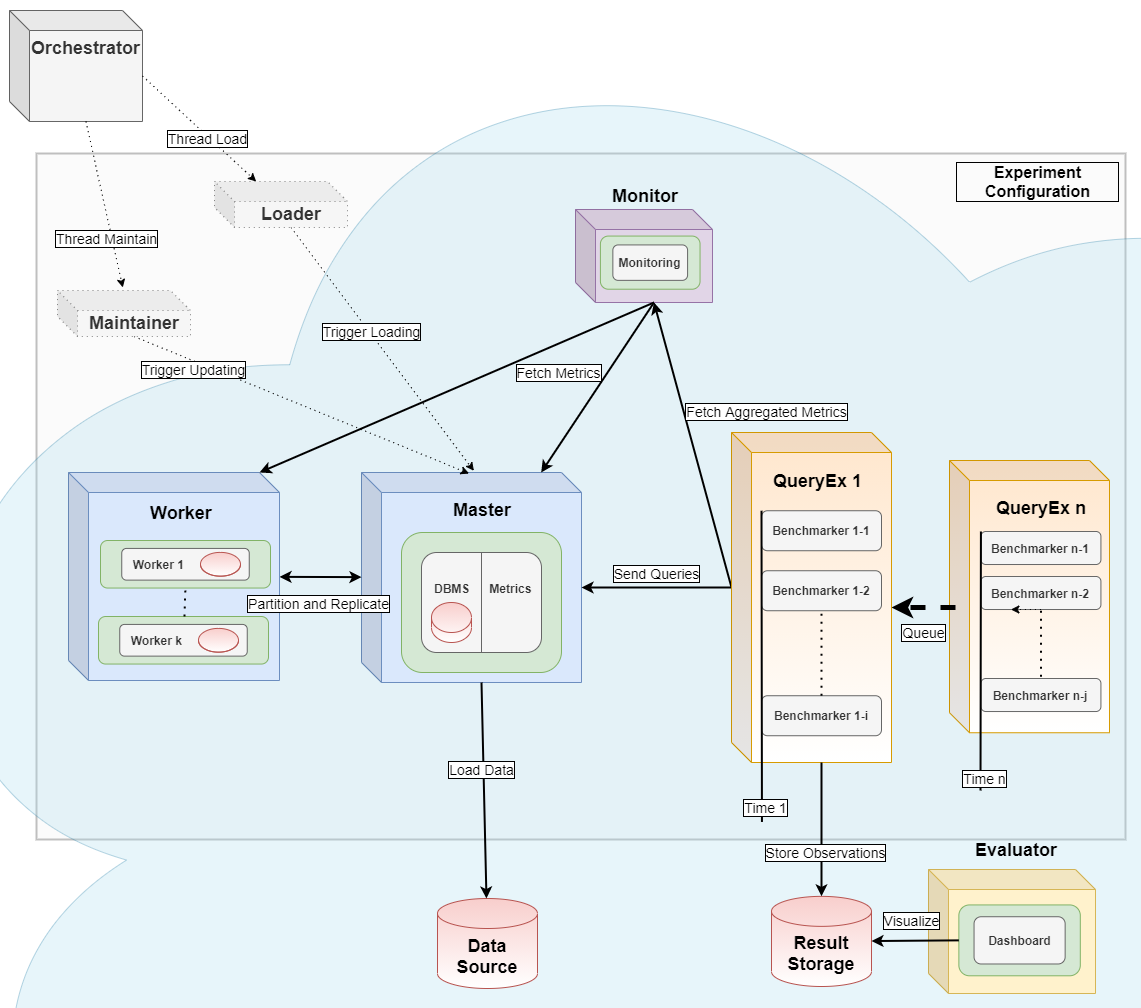
See the images/ folder for more details.
Contributing
We welcome contributions of all kinds — code, documentation, bug reports, and more. Please first read the contribution guide.
If you find a bug, please open an issue on the issue tracker and include:
- Operating system and architecture
- Python version
- Bexhoma version (or git commit / date)
- Full traceback
References
If you use Bexhoma in work contributing to a scientific publication, please cite [2] or [1]:
[1] Erdelt P.K. (2021). A Framework for Supporting Repetition and Evaluation in the Process of Cloud-Based DBMS Performance Benchmarking. TPCTC 2020, LNCS 12752, Springer.
https://doi.org/10.1007/978-3-030-84924-5_6
[2] Erdelt P.K. (2022). Orchestrating DBMS Benchmarking in the Cloud with Kubernetes. TPCTC 2021, LNCS 13169, Springer.
https://doi.org/10.1007/978-3-030-94437-7_6
[3] Erdelt P.K., Jestel J. (2022). DBMS-Benchmarker: Benchmark and Evaluate DBMS in Python. JOSS 7(79), 4628.
https://doi.org/10.21105/joss.04628
[4] Erdelt P.K. (2024). A Cloud-Native Adoption of Classical DBMS Performance Benchmarks and Tools. TPCTC 2023, LNCS 14247, Springer.
https://doi.org/10.1007/978-3-031-68031-1_9
[5] Erdelt P.K., Rabl T. (2026). Benchmarking Multi-Tenant Architectures in PostgreSQL. EDBT 2026.
https://doi.org/10.48786/edbt.2026.46
Release history Release notifications | RSS feed


Download files
Download the file for your platform. If you're not sure which to choose, learn more about installing packages.
Source Distribution
Built Distribution
Filter files by name, interpreter, ABI, and platform.
If you're not sure about the file name format, learn more about wheel file names.
Copy a direct link to the current filters
File details
Details for the file bexhoma-0.9.7.tar.gz.
File metadata
- Download URL: bexhoma-0.9.7.tar.gz
- Upload date:
- Size: 171.6 kB
- Tags: Source
- Uploaded using Trusted Publishing? No
- Uploaded via: twine/6.1.0 CPython/3.13.12
File hashes
| Algorithm | Hash digest | |
|---|---|---|
| SHA256 |
5dd97a3c9ba05f17c45fbf774e3e9e95dc69e786f5d9e3874d855b4da4e1e750
|
|
| MD5 |
e565283333881ffd403c98fc97096583
|
|
| BLAKE2b-256 |
9faf644c8565fd79c47d6a408e6728a864018463c8fa5c35732afdd647990e84
|
File details
Details for the file bexhoma-0.9.7-py3-none-any.whl.
File metadata
- Download URL: bexhoma-0.9.7-py3-none-any.whl
- Upload date:
- Size: 197.4 kB
- Tags: Python 3
- Uploaded using Trusted Publishing? No
- Uploaded via: twine/6.1.0 CPython/3.13.12
File hashes
| Algorithm | Hash digest | |
|---|---|---|
| SHA256 |
7a218145b480ccbdd30087ceb3e654aa5013c1756151d558c98ae00e47e9b6a2
|
|
| MD5 |
bc9d65035c92ace61a2f45728c6f01fe
|
|
| BLAKE2b-256 |
22faab283a3f14c90ab06a02dc8d589e1b336860d568e83f9d0b0b8d82fb3cc5
|






