
BeyondTray
BeyondTray is an app for displaying a custom menu in the system tray, for example to have a bunch of easily accessed launchers.
Example menu
BeyondTray shows a system tray icon with a dynamic, customizable menu.
For example, when running beyondtray sample1.menu, BeyondTray will show this menu:
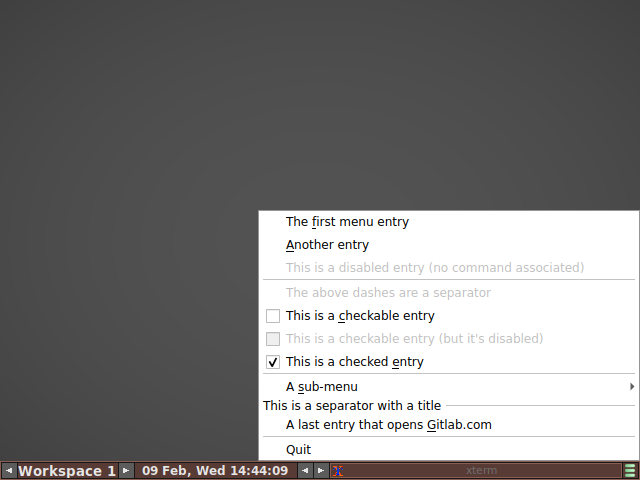
given this menu description in file sample1.menu:
title = "Sample"

[[e]]
title = "The &first menu entry"
command = 'xmessage "the first entry was selected"'

[[e]]
title = "&Another entry"
command = 'echo "the second entry was selected" >> ~/foobar.txt'

[[e]]
title = "This is a disabled entry (no command associated)"

[[e]]
separator = true

[[e]]
title = "The above dashes are a separator"

[[e]]
title = "This is a &checkable entry"
command = 'echo "the checkbox was checked" >> ~/foobar.txt'
checkable = true

[[e]]
checked = false
title = "This is a checkable entry (but it's disabled)"

[[e]]
checked = true
title = "This is a checked &entry"
command = 'echo "the checkbox was unchecked" >> ~/foobar.txt'

[[e]]
separator = true

[[e]]
title = "A &sub-menu"

[[e.e]]
title = "an entry in the sub-menu"
command = 'xmessage "submenu was selected"'

[[e]]
separator = true
title = "This is a separator with a title"

[[e]]
title = "A last entry that opens &Gitlab.com"
command = "firefox https://gitlab.com"
The entries that are not disabled (grayed out) can be clicked on, and the associated command will be run when clicked.
Dynamic
The menu content is dynamic because the menu description is read just when the context menu is about to be shown. The menu description can be read from:
- a static file (that can be edited by an external program)
- a custom command that dynamically generates the menu description on stdout
- a template file, containing static entries and conditions
Furthermore, the menu description is re-read/re-generated every time the user right-clicks on the tray icon.
Optionally, the menu can also be re-generated when a watched file is modified, periodically, or when receiving SIGUSR1. This can be useful to change the tray icon depending on some external event.
Syntax
The menu description follows the TOML syntax.
Simple entries
A simple menu entry is just (e is for "entry"):
[[e]]
title = "Run xclock"
but the entry will be disabled because there is no command associated yet. Setting one is just specifying the command below:
[[e]]
title = "Run xclock"
command = "xclock"
Clicking the entry will run the associated command.
& can be used before any letter of an entry title. The letter will be underlined in the menu, and that letter will be the shortcut key to trigger the menu entry.
[[e]]
title = "Run &xclock"
command = "xclock"
In this example, pressing x while the menu is shown will run xclock.
Icons
A menu entry can have an icon:
[[e]]
title = "this will have the gimp icon"
icon = "gimp"
# the icon will typically be found at /usr/share/icons/hicolor/<something>/apps/gimp.png

[[e]]
title = "and a custom icon"
icon = "~/my-icon.png"
An icon can be "colorized" differently:
[[e]]
title = "this will have a red gimp icon"
icon = "gimp"
colorize_icon = "red"
The tray icon can also be set, by having before all [[e]] entries:
icon = "gimp"
# also supports colorize_icon
Checkboxes
Menu entries can be checkable (purely for display, its state is not stored), like this:
[[e]]
title = "entry is unchecked"
checked = false

[[e]]
title = "entry is checked"
checked = true
Separators
A simple separator can be added in a menu:
[[e]]
separator = true
A title can be added to the separator to make a menu section:
[[e]]
separator = true
title = "Separator title"
Submenus
Making submenus is very similar except the depth is indicated by multiple dot-separated es:
[[e]]
title = "a submenu"

[[e.e]]
title = "a sub-entry"
command = "a command"

[[e.e]]
title = "a checkbox"
checked = false
command = "another command"
Comments, quotes
Being TOML, the menu description can contain comments, supports different quote styles:
[[e]]
# this is a comment
title = """This entry contains "double quotes" and 'single quotes'"""
icon = 'vlc'
command = "vlc"
Using templating for dynamic content
Templating is useful for dynamic content, for example changing the label of an entry, or making a checkbox really dynamic. The syntax uses Jinja.
File: dynamic.menu.jinja
[[e]]
title = "date is now: {{ read("date '+%Y-%m-%d %T'") }}"

[[e]]
separator = true

[[e]]
{% if sh("pgrep xscreensaver | grep -q .") %}
title = "XScreenSaver is running"
checked = true
{% else %}
title = "XScreenSaver is not running!"
checked = false
command = "xscreensaver"
{% endif %}
Run with beyondtray --template dynamic.menu.jinja.
See the jinja manual for complete description of templating.
Using a command for dynamic content
File: dynamic.sh
#!/bin/sh -e

cat << EOF
[[e]]
title = "date is now: $(date '+%Y-%m-%d %T')"
[[e]]
separator = true
EOF

echo '[[e]]'
if pgrep xscreensaver | grep -q .
then
    echo 'title = "XScreenSaver is running"'
    echo checked = true
else
    echo "title = 'XScreenSaver is not running!'"
    echo checked = false
    echo "command = 'xscreensaver'"
fi
Run with beyondtray --command dynamic.sh.
1 maintainer

Download files
Download the file for your platform. If you're not sure which to choose, learn more about installing packages.
Source Distribution
Built Distribution
Filter files by name, interpreter, ABI, and platform.
If you're not sure about the file name format, learn more about wheel file names.
Copy a direct link to the current filters
File details
Details for the file beyondtray-0.3.0.tar.gz.
File metadata
- Download URL: beyondtray-0.3.0.tar.gz
- Upload date:
- Size: 8.2 kB
- Tags: Source
- Uploaded using Trusted Publishing? Yes
- Uploaded via:
twine/7.0.0 CPython/3.14.7
File hashes
| Algorithm | Hash digest | |
|---|---|---|
| SHA256 |
d3d5835fd60c248b62f98c952f6d65980270ef476f075ce9c3e21cf3ac441741
|
|
| MD5 |
3be8064a2b8b441217fb1bf168245084
|
|
| BLAKE2b-256 |
33920e8f8a155dddfed8d713cd1240ebfa141f395ffa9b3cc69697599c289c1a
|
File details
Details for the file beyondtray-0.3.0-py3-none-any.whl.
File metadata
- Download URL: beyondtray-0.3.0-py3-none-any.whl
- Upload date:
- Size: 8.9 kB
- Tags: Python 3
- Uploaded using Trusted Publishing? Yes
- Uploaded via:
twine/7.0.0 CPython/3.14.7
File hashes
| Algorithm | Hash digest | |
|---|---|---|
| SHA256 |
01519d5906970237c30e0fbb5db58ae6e35cd0e56d40044b07d3443773b0af1a
|
|
| MD5 |
57df5c8f33d5291a074e0202417e07dc
|
|
| BLAKE2b-256 |
d9375e639cd39958d462ec224df18803bbfbb0a1326b0bb819701bb125a6b419
|














