
Interactive Bezier Curve Editor with Streamlit

Project description
Bezier Curve Editor
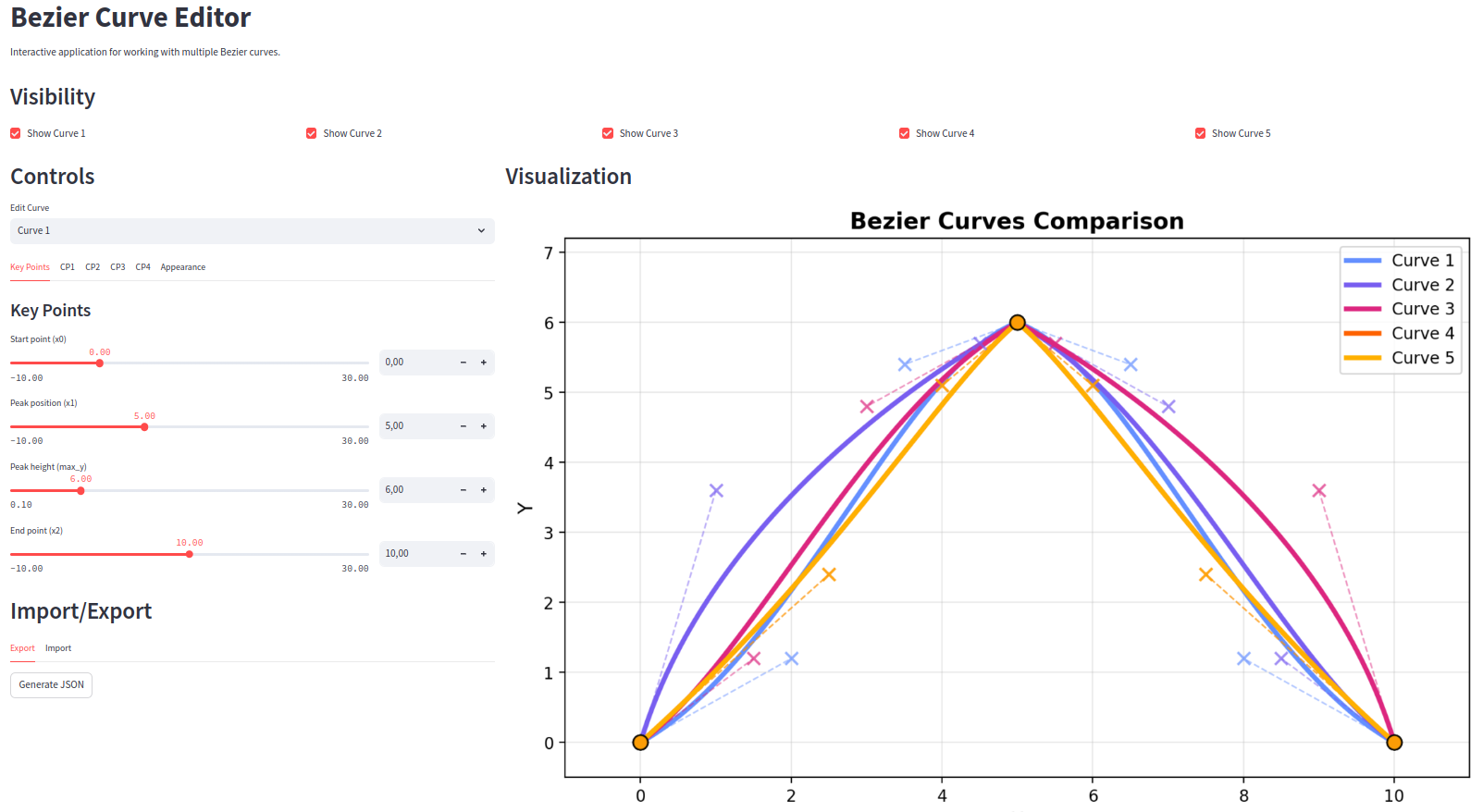
An interactive application for creating, manipulating, and comparing multiple Bezier curves.
Features
- Display multiple predefined curves simultaneously
- Fine adjustment of curve parameters with small steps
- Color selection for each curve
- JSON import/export functionality
- CSV data export for all visible curves
- Organized UI with intuitive tab structure
Installation
From PyPI (recommended)
pip install bezier-editor
From Source
- Clone the repository
git clone https://github.com/yourusername/bezier-editor.git
cd bezier-editor
- Install the package
pip install -e .
Usage
Launch the application
bezier-editor
Or if installed from source:
streamlit run bezier_editor/app.py
Basic UI Overview
The application is divided into two main sections:
-
Control Panel (Left): Adjust parameters for each curve
- Key Points: Set the start, peak, and end positions
- Control Points: Fine-tune the curve shape
- Appearance: Change colors and visualization options
-
Visualization (Right): Interactive graph showing all curves
- Display multiple curves simultaneously
- Show/hide control points and handles
- Export data as CSV
Working with Curves
- Select a curve to edit from the dropdown menu
- Use slider controls for quick adjustments or number inputs for precise values
- Toggle visibility of individual curves using the checkboxes
- Export your creations to JSON for future use or sharing
Using as a Library
The bezier-editor package can also be used as a library in your own Python scripts. Here's how to import and use its main functionalities:
# Import core mathematical functions
from bezier_editor.core.bezier import cubic_bezier, generate_controlled_curve, create_simple_bezier_curve

# Get predefined configurations
from bezier_editor.core.presets import get_presets, ensure_float

# Use input/output functions
from bezier_editor.io.file_operations import prepare_curves_for_csv_export

# Example: create and calculate a curve
presets = get_presets()
curve_config = presets['Curve 1']

# Create a simple Bezier curve
key_points, control_points = create_simple_bezier_curve(
    curve_config['x0'],
    curve_config['x1'],
    curve_config['x2'],
    curve_config['max_y'],
    curve_config['control_config']
)

# Generate points on the curve
x_points, y_points = generate_controlled_curve(key_points, control_points, num_points=500)

# Use the points for visualization, analysis, or export
import matplotlib.pyplot as plt
plt.plot(x_points, y_points)
plt.show()
Development
Project Structure
bezier-editor/
├── bezier_editor/
│   ├── core/         # Mathematical functions
│   ├── io/           # File operations
│   ├── ui/           # User interface components
│   └── app.py        # Main application
├── tests/            # Unit tests
└── examples/         # Example configurations
Running Tests
pytest
Contributing
Contributions are welcome! Please feel free to submit a Pull Request.
License
This project is licensed under the MIT License - see the LICENSE file for details.
Release history Release notifications | RSS feed


Download files
Download the file for your platform. If you're not sure which to choose, learn more about installing packages.
Source Distribution
Built Distribution
Filter files by name, interpreter, ABI, and platform.
If you're not sure about the file name format, learn more about wheel file names.
Copy a direct link to the current filters
File details
Details for the file bezier_editor-0.1.1.tar.gz.
File metadata
- Download URL: bezier_editor-0.1.1.tar.gz
- Upload date:
- Size: 13.5 kB
- Tags: Source
- Uploaded using Trusted Publishing? No
- Uploaded via: twine/6.1.0 CPython/3.10.7
File hashes
| Algorithm | Hash digest | |
|---|---|---|
| SHA256 |
7c2867c63e95f69df1d36fb8365b18705af448dd2f1483b4b4e4425123711d7a
|
|
| MD5 |
8088f2b13ae603ac0fa7a2b4362e501b
|
|
| BLAKE2b-256 |
eafcccfd0b127212187927b55123156f47025ea164b658feae9641fe4bae5b34
|
File details
Details for the file bezier_editor-0.1.1-py3-none-any.whl.
File metadata
- Download URL: bezier_editor-0.1.1-py3-none-any.whl
- Upload date:
- Size: 16.2 kB
- Tags: Python 3
- Uploaded using Trusted Publishing? No
- Uploaded via: twine/6.1.0 CPython/3.10.7
File hashes
| Algorithm | Hash digest | |
|---|---|---|
| SHA256 |
b951c23a612d3ca16bf86bc71f09afbf8ab2979db44a71a8e505e96f3b8bc51d
|
|
| MD5 |
a126df5996f4cc59318c82e0676f2807
|
|
| BLAKE2b-256 |
40ec0419abf8f132c8ff3e67465f9d877c8f0dcf204fcc04b7d0d021fff6db39
|






