
Berkeley Function Calling Leaderboard (BFCL)
Verified details
These details have been verified by PyPIProject links
GitHub Statistics
Maintainers

Project description
Berkeley Function Calling Leaderboard (BFCL)
Table of Contents
- Berkeley Function Calling Leaderboard (BFCL)
Introduction
We introduce the Berkeley Function Calling Leaderboard (BFCL), the first comprehensive and executable function call evaluation dedicated to assessing Large Language Models' (LLMs) ability to invoke functions. Unlike previous evaluations, BFCL accounts for various forms of function calls, diverse scenarios, and executability.
💡 Read more in our blog posts:
🦍 See the live leaderboard at Berkeley Function Calling Leaderboard
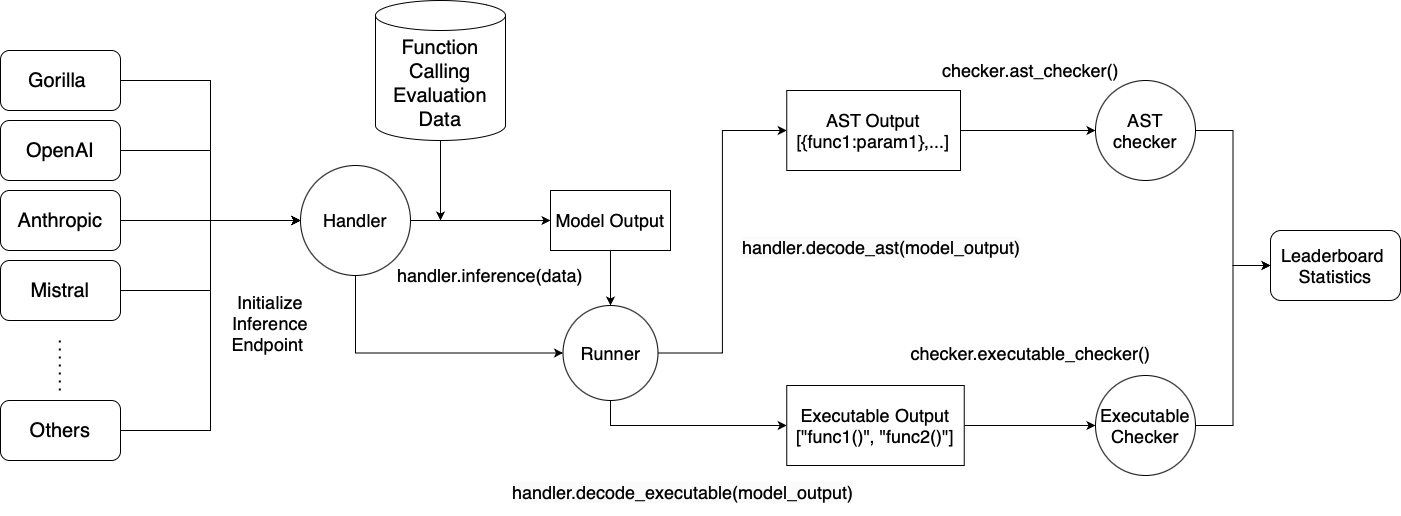
Installation & Setup
Basic Installation
# Create a new Conda environment with Python 3.10
conda create -n BFCL python=3.10
conda activate BFCL

# Clone the Gorilla repository
git clone https://github.com/ShishirPatil/gorilla.git

# Change directory to the `berkeley-function-call-leaderboard`
cd gorilla/berkeley-function-call-leaderboard

# Install the package in editable mode
pip install -e .
Installing from PyPI
If you simply want to run the evaluation without making code changes, you can
install the prebuilt wheel instead. Be careful not to confuse our package with
the unrelated bfcl project on PyPI—make sure you install bfcl-eval:
pip install bfcl-eval # Be careful not to confuse with the unrelated `bfcl` project on PyPI!
Extra Dependencies for Self-Hosted Models
For locally hosted models, choose one of the following backends, ensuring you have the right GPU and OS setup:
sglang is much faster than vllm but only supports newer GPUs with SM 80+ (Ampere etc).
If you are using an older GPU (T4/V100), you should use vllm instead as it supports a much wider range of GPUs.
Using vllm:
pip install -e .[oss_eval_vllm]
Using sglang:
pip install -e .[oss_eval_sglang]
Optional: If using sglang, we recommend installing flashinfer for speedups. Find instructions here.
Configuring Project Root Directory
Important: If you installed the package from PyPI (using pip install bfcl-eval), you must set the BFCL_PROJECT_ROOT environment variable to specify where the evaluation results and score files should be stored.
Otherwise, you'll need to navigate deep into the Python package's source code folder to access the evaluation results and configuration files.
For editable installations (using pip install -e .), setting BFCL_PROJECT_ROOT is optional--it defaults to the berkeley-function-call-leaderboard directory.
Set BFCL_PROJECT_ROOT as an environment variable in your shell environment:
# In your shell environment
export BFCL_PROJECT_ROOT=/path/to/your/desired/project/directory
When BFCL_PROJECT_ROOT is set:
- The
result/folder (containing model responses) will be created at$BFCL_PROJECT_ROOT/result/ - The
score/folder (containing evaluation results) will be created at$BFCL_PROJECT_ROOT/score/ - The library will look for the
.envconfiguration file at$BFCL_PROJECT_ROOT/.env(see Setting up Environment Variables)
Setting up Environment Variables
We store API keys and other configuration variables (separate from the BFCL_PROJECT_ROOT variable mentioned above) in a .env file. A sample .env.example file is distributed with the package.
For editable installations:
cp bfcl_eval/.env.example .env
# Fill in necessary values in `.env`
For PyPI installations (using pip install bfcl-eval):
cp $(python -c "import bfcl_eval; print(bfcl_eval.__path__[0])")/.env.example $BFCL_PROJECT_ROOT/.env
# Fill in necessary values in `.env`
If you are running any proprietary models, make sure the model API keys are included in your .env file. Models like GPT, Claude, Mistral, Gemini, Nova, will require them.
The library looks for the .env file in the project root, i.e. $BFCL_PROJECT_ROOT/.env.
Running Evaluations
Generating LLM Responses
Selecting Models and Test Categories
MODEL_NAME: For available models, please refer to SUPPORTED_MODELS.md. If not specified, the default modelgorilla-openfunctions-v2is used.TEST_CATEGORY: For available test categories, please refer to TEST_CATEGORIES.md. If not specified, all categories are included by default.
You can provide multiple models or test categories by separating them with commas. For example:
bfcl generate --model claude-3-5-sonnet-20241022-FC,gpt-4o-2024-11-20-FC --test-category simple,parallel,multiple,multi_turn
Selecting Specific Test Cases with --run-ids
Sometimes you may only need to regenerate a handful of test entries—for instance when iterating on a new model or after fixing an inference bug. Passing the --run-ids flag lets you target exact test IDs rather than an entire category:
bfcl generate --model MODEL_NAME --run-ids # --test-category will be ignored
When this flag is set the generation pipeline reads a JSON file named
test_case_ids_to_generate.json located in the project root (the same
place where .env lives). The file should map each test category to a list of
IDs to run:
{
  "simple": ["simple_101", "simple_202"],
  "multi_turn_base": ["multi_turn_base_14"]
}
Note: When using
--run-ids, the--test-categoryflag is ignored.
A sample file is provided at bfcl_eval/test_case_ids_to_generate.json.example; copy it to your project root so the CLI can pick it up regardless of your working directory:
For editable installations:
cp bfcl_eval/test_case_ids_to_generate.json.example ./test_case_ids_to_generate.json
For PyPI installations:
cp $(python -c "import bfcl_eval, pathlib; print(pathlib.Path(bfcl_eval.__path__[0]) / 'test_case_ids_to_generate.json.example')") $BFCL_PROJECT_ROOT/test_case_ids_to_generate.json
Once --run-ids is provided only the IDs listed in the JSON will be evaluated.
Output and Logging
- By default, generated model responses are stored in a
result/folder under the project root (which defaults to the package directory):result/MODEL_NAME/BFCL_v3_TEST_CATEGORY_result.json. - You can customise the location by setting the
BFCL_PROJECT_ROOTenvironment variable or passing the--result-diroption.
An inference log is included with the model responses to help analyze/debug the model's performance, and to better understand the model behavior. For more verbose logging, use the --include-input-log flag. Refer to LOG_GUIDE.md for details on how to interpret the inference logs.
For API-based Models
bfcl generate --model MODEL_NAME --test-category TEST_CATEGORY --num-threads 1
- Use
--num-threadsto control the level of parallel inference. The default (1) means no parallelization. - The maximum allowable threads depends on your API's rate limits.
For Locally-hosted OSS Models
bfcl generate \
  --model MODEL_NAME \
  --test-category TEST_CATEGORY \
  --backend {vllm|sglang} \
  --num-gpus 1 \
  --gpu-memory-utilization 0.9 \
  --local-model-path /path/to/local/model   # ← optional
- Choose your backend using
--backend vllmor--backend sglang. The default backend isvllm. - Control GPU usage by adjusting
--num-gpus(default1, relevant for multi-GPU tensor parallelism) and--gpu-memory-utilization(default0.9), which can help avoid out-of-memory errors. --local-model-path(optional): Point this flag at a directory that already contains the model's files (config.json, tokenizer, weights, etc.). Use it only when you've pre‑downloaded the model and the weights live somewhere other than the default$HF_HOMEcache.
For Pre-existing OpenAI-compatible Endpoints
If you have a server already running (e.g., vLLM in a SLURM cluster), you can bypass the vLLM/sglang setup phase and directly generate responses by using the --skip-server-setup flag:
bfcl generate --model MODEL_NAME --test-category TEST_CATEGORY --skip-server-setup
In addition, you should specify the endpoint and port used by the server. By default, the endpoint is localhost and the port is 1053. These can be overridden by the VLLM_ENDPOINT and VLLM_PORT environment variables in the .env file:
VLLM_ENDPOINT=localhost
VLLM_PORT=1053
(Alternate) Script Execution for Generation
For those who prefer using script execution instead of the CLI, you can run the following command:
python -m bfcl_eval.openfunctions_evaluation --model MODEL_NAME --test-category TEST_CATEGORY
When specifying multiple models or test categories, separate them with spaces, not commas. All other flags mentioned earlier are compatible with the script execution method as well.
Evaluating Generated Responses
Important: You must have generated the model responses before running the evaluation.
Once you have the results, run:
bfcl evaluate --model MODEL_NAME --test-category TEST_CATEGORY
The MODEL_NAME and TEST_CATEGORY options are the same as those used in the Generating LLM Responses section. For details, refer to SUPPORTED_MODELS.md and TEST_CATEGORIES.md.
If in the previous step you stored the model responses in a custom directory, specify it using the --result-dir flag or set BFCL_PROJECT_ROOT so the evaluator can locate the files.
Note: For unevaluated test categories, they will be marked as
N/Ain the evaluation result csv files. For summary columns (e.g.,Overall Acc,Non_Live Overall Acc,Live Overall Acc, andMulti Turn Overall Acc), the score reported will treat all unevaluated categories as 0 during calculation.
Output Structure
Evaluation scores are stored in a score/ directory under the project root (defaults to the package directory), mirroring the structure of result/: score/MODEL_NAME/BFCL_v3_TEST_CATEGORY_score.json.
- To use a custom directory for the score file, set the
BFCL_PROJECT_ROOTenvironment variable or specify--score-dir.
Additionally, four CSV files are generated in ./score/:
data_overall.csv– Overall scores for each model. This is used for updating the leaderboard.data_live.csv– Detailed breakdown of scores for each Live (single-turn) test category.data_non_live.csv– Detailed breakdown of scores for each Non-Live (single-turn) test category.data_multi_turn.csv– Detailed breakdown of scores for each Multi-Turn test category.
(Optional) WandB Evaluation Logging
If you'd like to log evaluation results to WandB artifacts:
pip install -e.[wandb]
Mkae sure you also set WANDB_BFCL_PROJECT=ENTITY:PROJECT in .env.
(Alternate) Script Execution for Evaluation
For those who prefer using script execution instead of the CLI, you can run the following command:
python -m bfcl_eval.eval_checker.eval_runner --model MODEL_NAME --test-category TEST_CATEGORY
When specifying multiple models or test categories, separate them with spaces, not commas. All other flags mentioned earlier are compatible with the script execution method as well.
Contributing & How to Add New Models
We welcome contributions! To add a new model:
- Review
bfcl_eval/model_handler/base_handler.pyand/orbfcl_eval/model_handler/local_inference/base_oss_handler.py(if your model is hosted locally). - Implement a new handler class for your model.
- Update
bfcl_eval/constants/model_config.py. - Submit a Pull Request.
For detailed steps, please see the Contributing Guide.
Additional Resources
- Gorilla Discord (
#leaderboardchannel) - Project Website
All the leaderboard statistics, and data used to train the models are released under Apache 2.0. Gorilla is an open source effort from UC Berkeley and we welcome contributors. Please email us your comments, criticisms, and questions. More information about the project can be found at https://gorilla.cs.berkeley.edu/
Project details
Verified details
These details have been verified by PyPIProject links
GitHub Statistics
Maintainers
Release history Release notifications | RSS feed


Download files
Download the file for your platform. If you're not sure which to choose, learn more about installing packages.
Source Distribution
Built Distribution
Filter files by name, interpreter, ABI, and platform.
If you're not sure about the file name format, learn more about wheel file names.
Copy a direct link to the current filters
File details
Details for the file bfcl_eval-2025.7.2.3.tar.gz.
File metadata
- Download URL: bfcl_eval-2025.7.2.3.tar.gz
- Upload date:
- Size: 1.7 MB
- Tags: Source
- Uploaded using Trusted Publishing? Yes
- Uploaded via: twine/6.1.0 CPython/3.12.9
File hashes
| Algorithm | Hash digest | |
|---|---|---|
| SHA256 |
acb48819f4fb96a0386699e7e734bbfd7a5169cb8c2b05049ffd0d6d73e906de
|
|
| MD5 |
c20458c13e041eed50226b24c9bf3c62
|
|
| BLAKE2b-256 |
53564d6d971aa69e136ff31d47cbcb2b772c908214b8d625bf1ca3886cc17273
|
Provenance
The following attestation bundles were made for bfcl_eval-2025.7.2.3.tar.gz:
Publisher:
bfcl-pipy-release.yml on ShishirPatil/gorilla
-
Statement:
-
Statement type:
https://in-toto.io/Statement/v1 -
Predicate type:
https://docs.pypi.org/attestations/publish/v1 -
Subject name:
bfcl_eval-2025.7.2.3.tar.gz -
Subject digest:
acb48819f4fb96a0386699e7e734bbfd7a5169cb8c2b05049ffd0d6d73e906de - Sigstore transparency entry: 260752155
- Sigstore integration time:
-
Permalink:
ShishirPatil/gorilla@e6feee6efa18bddd5f8d776d7644ffb340e11c18 -
Branch / Tag:
refs/heads/main - Owner: https://github.com/ShishirPatil
-
Access:
public
-
Token Issuer:
https://token.actions.githubusercontent.com -
Runner Environment:
github-hosted -
Publication workflow:
bfcl-pipy-release.yml@e6feee6efa18bddd5f8d776d7644ffb340e11c18 -
Trigger Event:
push
-
Statement type:
File details
Details for the file bfcl_eval-2025.7.2.3-py3-none-any.whl.
File metadata
- Download URL: bfcl_eval-2025.7.2.3-py3-none-any.whl
- Upload date:
- Size: 1.7 MB
- Tags: Python 3
- Uploaded using Trusted Publishing? Yes
- Uploaded via: twine/6.1.0 CPython/3.12.9
File hashes
| Algorithm | Hash digest | |
|---|---|---|
| SHA256 |
dd90ec4941db29cc9a8ff91d74efc2f6ce5de10a6bddd2cc3d7e234b3c1561de
|
|
| MD5 |
a6d6961489b25dd4f1ed6cbab849fa74
|
|
| BLAKE2b-256 |
a4a5f48f8284e38cdaa98e22fb9f9066d8df96a79e71a40373f701cd7a646f36
|
Provenance
The following attestation bundles were made for bfcl_eval-2025.7.2.3-py3-none-any.whl:
Publisher:
bfcl-pipy-release.yml on ShishirPatil/gorilla
-
Statement:
-
Statement type:
https://in-toto.io/Statement/v1 -
Predicate type:
https://docs.pypi.org/attestations/publish/v1 -
Subject name:
bfcl_eval-2025.7.2.3-py3-none-any.whl -
Subject digest:
dd90ec4941db29cc9a8ff91d74efc2f6ce5de10a6bddd2cc3d7e234b3c1561de - Sigstore transparency entry: 260752162
- Sigstore integration time:
-
Permalink:
ShishirPatil/gorilla@e6feee6efa18bddd5f8d776d7644ffb340e11c18 -
Branch / Tag:
refs/heads/main - Owner: https://github.com/ShishirPatil
-
Access:
public
-
Token Issuer:
https://token.actions.githubusercontent.com -
Runner Environment:
github-hosted -
Publication workflow:
bfcl-pipy-release.yml@e6feee6efa18bddd5f8d776d7644ffb340e11c18 -
Trigger Event:
push
-
Statement type:






