
BFPlot
Basically I was tired of saving matplotlib outputs as non-interactive static files. I also hate jupyter notebooks! bfplot lets you save matplotlib figures:
import matplotlib.pyplot as plt
import bfplot

fig, ax = plt.subplots()
ax.plot([1, 2, 3, 4], [1, 4, 9, 16], marker="o")

bfplot.savefig("my_plot.bfplot", fig)
in a format that you can open up and interact with later using an integrated viewer app:
$ bfplot view my_plot.bfplot
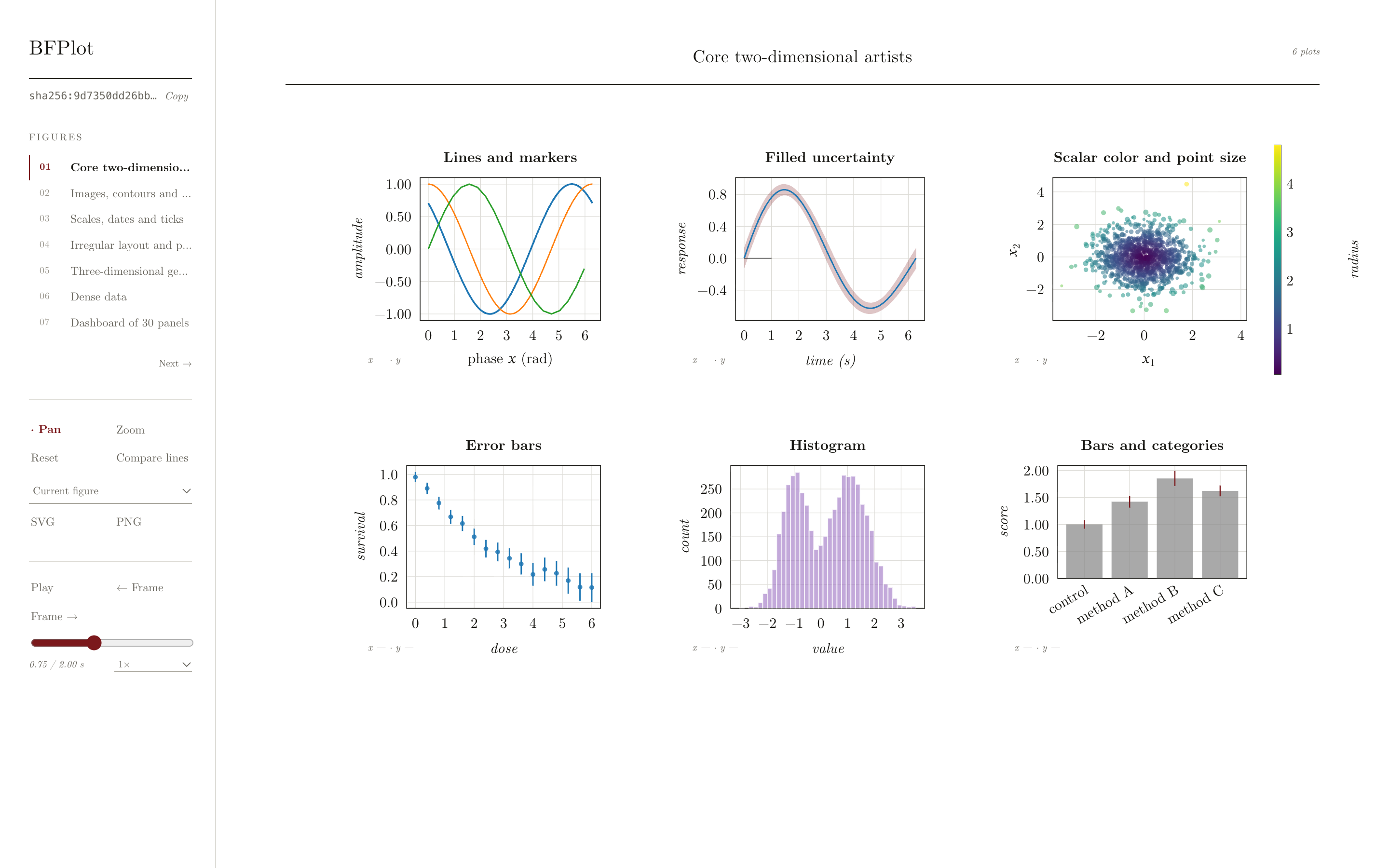
Here's what the viewer looks like:
Installation
Install the bfplot app, which has the viewer built in, on macOS or Linux:
$ curl -LsSf https://github.com/bfichera/bfplot/releases/latest/download/install.sh | sh
Then install the Python interface (Python 3.10+):
$ python -m pip install bfplot
See Installation for uninstalling and other options.
Building from source
On other platforms, or to build everything yourself, you need:
- Python 3.10+ (pip 25.1+ if you want the development dependency groups)
- Rust 1.88+ (install with rustup)
- Node.js, only if you change the viewer
Clone the repository and install both parts into a virtual environment:
$ git clone https://github.com/bfichera/bfplot.git
$ cd bfplot
$ python -m venv .venv
$ . .venv/bin/activate
$ python -m pip install --upgrade pip
$ python -m pip install ./crates/bfplot-cli -e .
./crates/bfplot-cli compiles the bfplot app with Cargo (through maturin) and installs it into the same environment as the Python library, where bfplot.show() finds it even if the environment is not activated. -e . installs the Python library in editable mode. Check both parts:
$ python -c "import bfplot; print(bfplot.__version__)"
$ bfplot --version
To build only the app, without Python:
$ cargo build --release --locked -p bfplot-cli
The binary is written to target/release/bfplot; copy it anywhere on your PATH.
For the development setup, tests and linters, see Contributing.
Results
The code here:
with bfplot.result("results/fit.bfplot") as result:
    result.add(fig_spectrum, name="spectrum")
    result.add(fig_residuals, name="residuals")
produces a directory called results/fit.bfplot with the following structure:
results/fit.bfplot/
├── manifest.toml
├── .gitignore
└── objects/
The .gitignore file keeps the data (in objects/) out of version control.
By default, manifest.toml ends with a rough ASCII/Braille drawing of each figure, written as # comments. It lets you see the plot in a diff or commit without opening the viewer. Pass preview=False to leave it out.
# Preview (approximate; regenerated on every save)
#
# ── calibration · Detector calibration ──────────────────────────────────
#  1.1┌──────────────── Response ─────────────────┐
#   s │⠐⠲⣄⡴⠒⠲⡄                         ⣠⠖⠂        │
#   i │ ⢠⠟⣆  ⠙⣆                      ⣰⠃          │
#   g │⢀⠏ ⠘⣆  ⠘⡆                   ⣰⠃            │
# -1.1└───────────────────────────────────────────┘
#     0                                         6.3
Animations
with bfplot.animation("wave.bfplot", fig, fps=30) as recording:
    for phase in np.linspace(0, 2 * np.pi, 180, endpoint=False):
        line.set_ydata(np.sin(x + phase))
        recording.capture()
Hashes
Every result has one hash, recorded in its manifest. Two results have the same hash exactly when everything in them is identical.
bfplot.hash("results/fit.bfplot")         # 'sha256:769fe097...'
bfplot.hash(fig)                           # the same figure, hashed without writing
bfplot.same("old/fit.bfplot", "new/fit.bfplot")
bfplot.verify("results/fit.bfplot")        # check every object, return the hash
$ bfplot hash results/fit.bfplot
sha256:769fe0976cfeecf73414d7b467013c6cde561405bce6c5af5828836e03016e37
$ bfplot compare old/fit.bfplot new/fit.bfplot
different
  sha256:769fe097...  old/fit.bfplot
  sha256:45a78207...  new/fit.bfplot
figures[0].axes[0].title: "Tent" -> "Tall tent"
Serving
bfplot view serves a result and opens it in your browser. bfplot serve does the same without opening a browser. By default the server listens on 127.0.0.1:8080; use --port to change the port.
To serve remotely, bind to another address explicitly:
$ bfplot serve my_plot.bfplot --bind 0.0.0.0 --port 9000
Example: Using BFPlot with psana (SLAC S3DF)
On S3DF (ssh <username>@s3df.slac.stanford.edu, then to your psana node), start the server without a browser:
$ bfplot serve /path/to/my_plot.bfplot --port 9000
On your own machine, forward the port through S3DF to the node running the server:
$ ssh -L 9000:<psana-node>:9000 <username>@s3df.slac.stanford.edu
Then open http://127.0.0.1:9000 in your local browser. If you run the server on the login node itself, use localhost in place of <psana-node>.
Supported plots
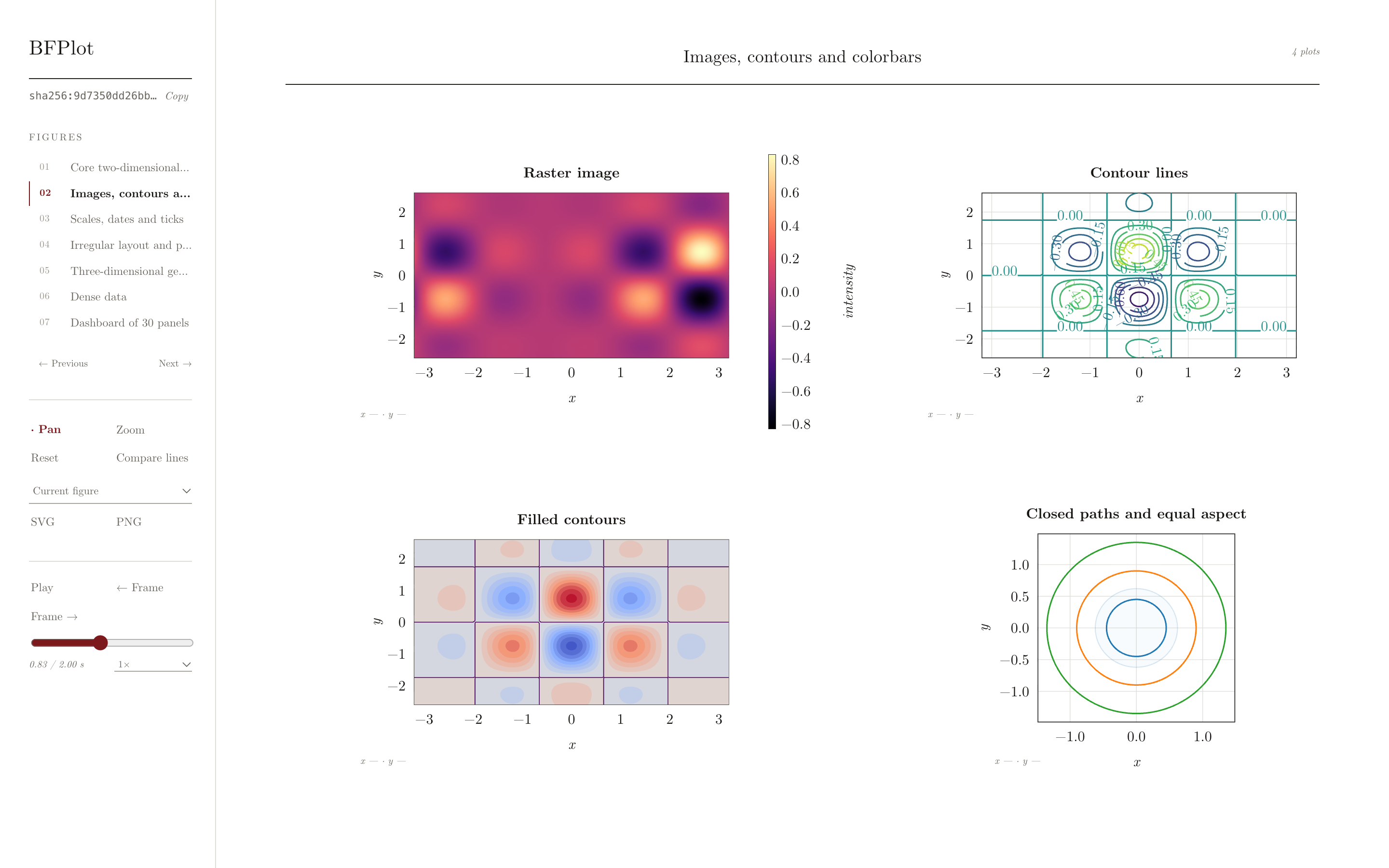
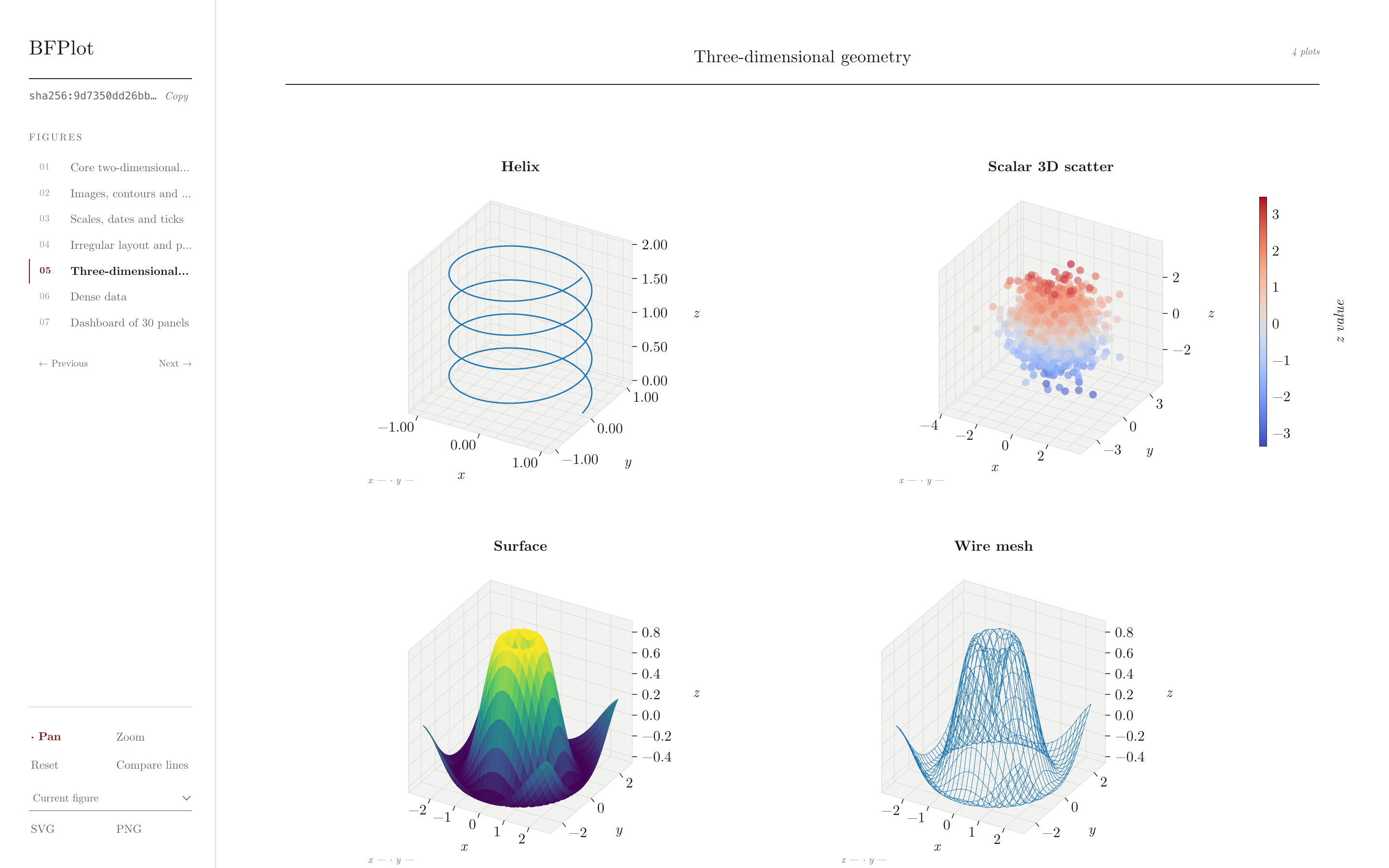
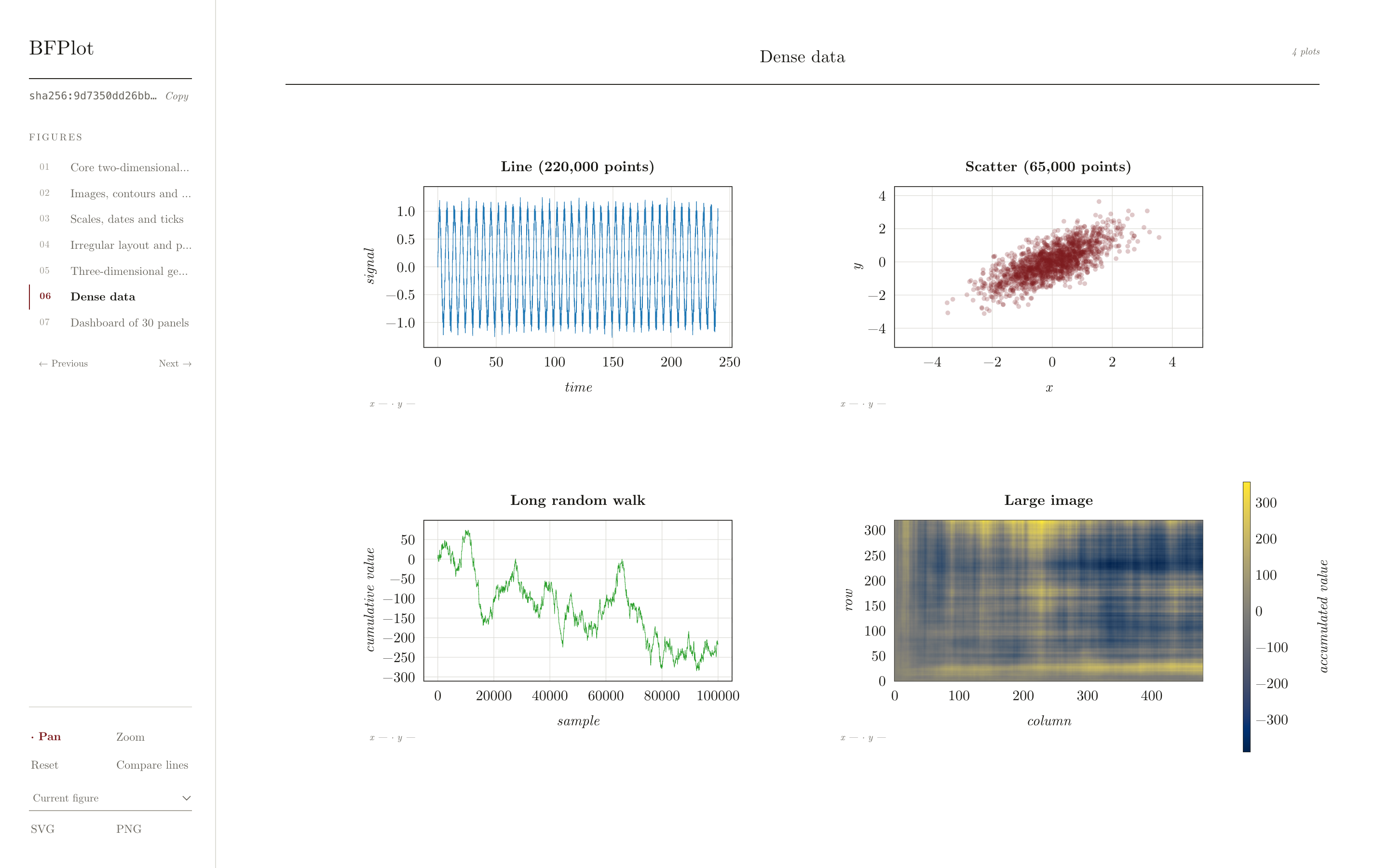
Lines, scatter plots, images, error bars, filled regions, histograms, contours, text, patches and common 3D plots. Anything else is shown as a visible placeholder, never silently dropped.
To see them all, run the example gallery: python examples/gallery.py, then bfplot view gallery.bfplot.
| Images, contours and colorbars | Three-dimensional geometry |
|---|---|
 |
 |
| Dense data |
|---|
 |
The first two gallery figures are independent animations: each has its own play button, timeline slider and frame rate, shown in the left rail while that figure is on screen.
Security
Only open bfplot results from sources you trust.
More
License
MIT License: LICENSE.
1 maintainer

Metadata
1 maintainer
Release files for bfplot 1.0.0
For a detailed explanation of source distributions (sdists) and built distributions (wheels), please see the package formats documentation.
Source distribution (sdist)
| File | Size | Uploaded | Provenance | Actions |
|---|---|---|---|---|
| bfplot-1.0.0.tar.gz | 45.3 kB | With provenance | Details for bfplot-1.0.0.tar.gz |
Built distribution (wheel)
| File | Interpreter | ABI | Platform | Actions Reset |
|---|---|---|---|---|
| bfplot-1.0.0-py3-none-any.whl | Python 3 | none | any | Details for bfplot-1.0.0-py3-none-any.whl |
Total release size: 79.6 kB
Release files / bfplot-1.0.0.tar.gz
| Download URL | bfplot-1.0.0.tar.gz |
|---|---|
| Size | 45.3 kB |
| Tags | Source |
|
SHA-256 checksum How to use checksums |
6cc04d35b263287a1f95a4da490593f7a9f90807fadb9cef84657908fe7d8dae
|
|
BLAKE2b-256 checksum How to use checksums |
d65d78447b7d4f594b2f781cd353adba0cff3d3c785e28e8582bb41b002020f5
|
| Upload date | |
|
Uploaded using Trusted Publishing? What is trusted publishing? |
Yes |
| Uploaded via |
twine/7.0.0 CPython/3.13.16
|
Provenance
Provenance describes where a file came from. On PyPI, provenance is shared via attestations, which provide a verifiable record of the build or publishing details. View details, limitations and caveats.


PyPI Publish Attestation
PyPI verified that this artifact, at this checksum, originated from the publisher listed below.
Signed by GitHub Actions, verified by PyPI on Nov 5, 2026.
Transparency logRelease files / bfplot-1.0.0-py3-none-any.whl
| Download URL | bfplot-1.0.0-py3-none-any.whl |
|---|---|
| Size | 34.3 kB |
| Tags | Python 3 |
|
SHA-256 checksum How to use checksums |
7894ba6cad15f9147fd181a491c11c224b07bdf7d29b03d6eb7f96f4a9d8a7a5
|
|
BLAKE2b-256 checksum How to use checksums |
b607e74becaf73b162c382a8b45a81b2f8186e541714b7aac5bd2700cc58866b
|
| Upload date | |
|
Uploaded using Trusted Publishing? What is trusted publishing? |
Yes |
| Uploaded via |
twine/7.0.0 CPython/3.13.16
|
Provenance
Provenance describes where a file came from. On PyPI, provenance is shared via attestations, which provide a verifiable record of the build or publishing details. View details, limitations and caveats.
PyPI Publish Attestation
PyPI verified that this artifact, at this checksum, originated from the publisher listed below.
Signed by GitHub Actions, verified by PyPI on Nov 5, 2026.
Transparency logSecurity for bfplot 1.0.0
Provenance
Provenance describes where a file came from. On PyPI, provenance is shared via attestations, which provide a verifiable record of the build or publishing details. View details, limitations and caveats.
Full provenance
Both files in this release have been uploaded with provenance metadata.
Attestation for bfplot-1.0.0.tar.gz
PyPI Publish Attestation
PyPI verified that this artifact, at this checksum, originated from the publisher listed below.
Signed by GitHub Actions, verified by PyPI on Nov 5, 2026.
Transparency logA note on package security
PyPI is a repository for distributing packages, not a service for auditing them. While third-party security researchers and our staff do their best to detect and remove malicious packages, PyPI cannot guarantee the quality, security or suitability of any given package.
To learn more about protecting yourself from malicious actors, visit our package security documentation.













