
A simple tool to scramble the background (=anything but people) in images.

Project description
Background Scrambler
This package contains a simple tool that allows to scramble the background of images. By background, we mean anything but the people in the image. This is practical for, e.g., psychology or neuroscience experiments dealing with human vision and/or social cognition.
As an example, it turns this image:
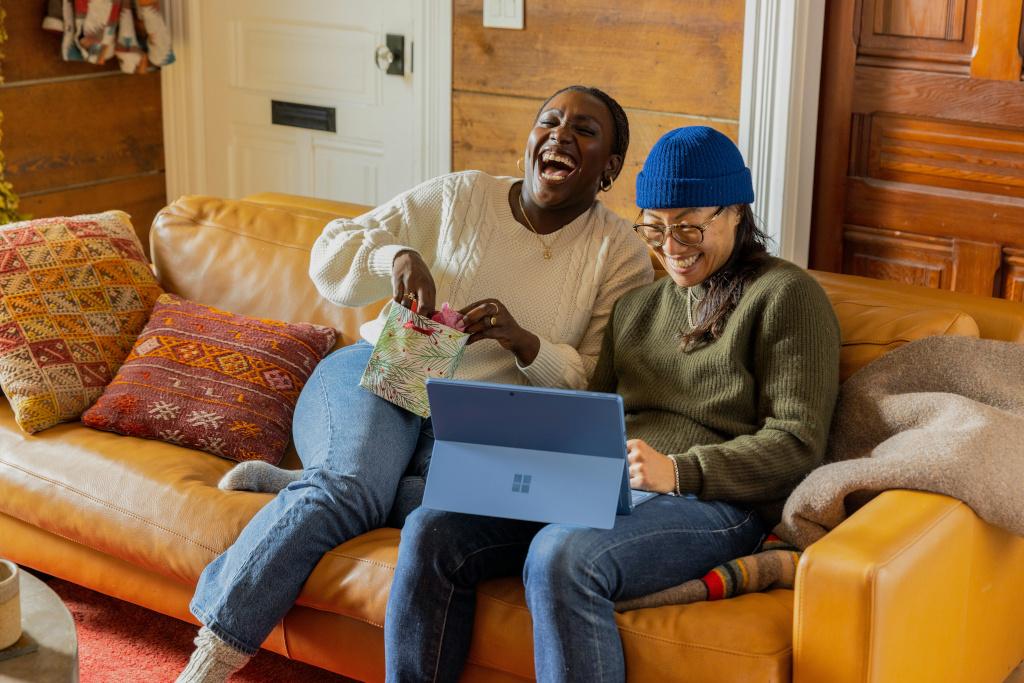
into this image:
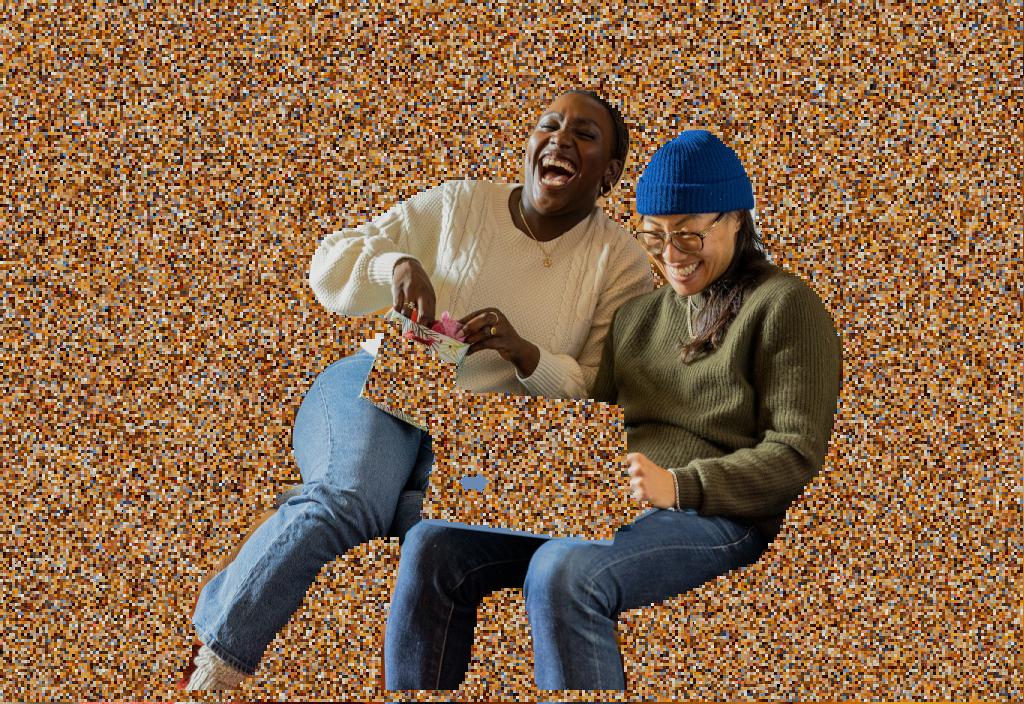
Installation
To install this application, either clone this repository, or simply install using
pip install bg-scrambler.
Usage
The application will keep the original image size, if its largest side is a multiple of 32 (a requisite of YOLOv11), up till sizes of 2016px. If the largest side exceeds 2016, the image will be resized so that this side becomes 2016px.
Note that the scrambler returns the processed image. By default, the output is NOT saved to disk.
To save the output (i.e., the processed image) to disk, specify out_file='path/to/output.jpg' (or png) when calling process_img().
When cloning the repo
See the example in scrambler.py, reprised here:
if __name__ == '__main__':
    # Create Scrambler instance
    proc = Scrambler()
    # Replace the line below to point at the image you want to parse
    _img = 'test_image_unsplash.jpg'
    # Parse image
    # block_size: size of the blocks (or patches if you prefer) that will be randomly swapped around
    # blur_radius: size of the blur to be applied to the scrambled part
    res = proc.process_img(_img, block_size=3, blur_radius=0, out_file=None, b_show=True)
When installing the package through pip:
A short demo:
from bg_scrambler import scrambler
import os


if __name__ == '__main__':
    proc = scrambler.Scrambler()
    _img = os.path.join(os.path.dirname(scrambler.__file__), 'test_image_unsplash.jpg')

    # Parse image
    # block_size: size of the blocks (or patches if you prefer) that will be randomly swapped around
    # blur_radius: size of the blur to be applied to the scrambled part
    res = proc.process_img(_img, block_size=3, blur_radius=0, out_file=None, b_show=True)
Licensing
This repository is made available under an MIT license (see LICENSE.md). This is in agreement with the original repository, which also uses an MIT license.
The test image is taken from Unsplash:
https://unsplash.com/photos/a-person-sitting-on-a-couch-with-a-laptop-X1GZqv-F7Tw
The image is distributed under the Unsplash license.
Author: Laurent Mertens
Mail: contact@laurentmertens.com
Release history Release notifications | RSS feed


Download files
Download the file for your platform. If you're not sure which to choose, learn more about installing packages.
Source Distribution
Built Distribution
Filter files by name, interpreter, ABI, and platform.
If you're not sure about the file name format, learn more about wheel file names.
Copy a direct link to the current filters
File details
Details for the file bg_scrambler-1.0.2.tar.gz.
File metadata
- Download URL: bg_scrambler-1.0.2.tar.gz
- Upload date:
- Size: 401.7 kB
- Tags: Source
- Uploaded using Trusted Publishing? No
- Uploaded via: twine/6.2.0 CPython/3.12.3
File hashes
| Algorithm | Hash digest | |
|---|---|---|
| SHA256 |
4b7294a635121f011f22b9517853a4f3d9e3383aa69a44d3044bdf82a001714e
|
|
| MD5 |
e4fdc0c274ed3dc1d89566ce179e9552
|
|
| BLAKE2b-256 |
874c44241c37d2377bb8e5ab16adad3c6f2ef347daa7595a99ea2d38ace64822
|
File details
Details for the file bg_scrambler-1.0.2-py3-none-any.whl.
File metadata
- Download URL: bg_scrambler-1.0.2-py3-none-any.whl
- Upload date:
- Size: 398.8 kB
- Tags: Python 3
- Uploaded using Trusted Publishing? No
- Uploaded via: twine/6.2.0 CPython/3.12.3
File hashes
| Algorithm | Hash digest | |
|---|---|---|
| SHA256 |
5ddd1e03c3f8e2faae49bc42e57e4fd59bf417780e141bfcf2918dd4b2481196
|
|
| MD5 |
694350063b46ae6291a728c636f9d474
|
|
| BLAKE2b-256 |
fb1f6a797c7b43ccae43e6e8fdaf050e15d54d4a673119c7256cba478ece0968
|






