
Deterministic code-graph context for AI coding agents.
Ask "why does the login timeout fire on the meeting webhook?" and get the eight symbols that actually answer it — ranked, budgeted, and reproducible.




Quick start · Use it from your agent · How it works · Supported models · Selector models · Documentation · Website · Türkçe
Why this exists
An agent working on an unfamiliar repository has to decide what to read before it can decide what to change. The usual answer is embedding search over chunked files. It is cheap to build and wrong in a specific way: it returns text that reads like the question rather than code that participates in the behaviour. Ask about a login timeout and you get the five files that mention timeouts, not the one function that sets it and the three callers that break when you change it.
That information is structural, and it has an exact answer. handleLogin calls
refreshSession, which reads SESSION_TTL, which is written in exactly one place. That is
a graph walk.
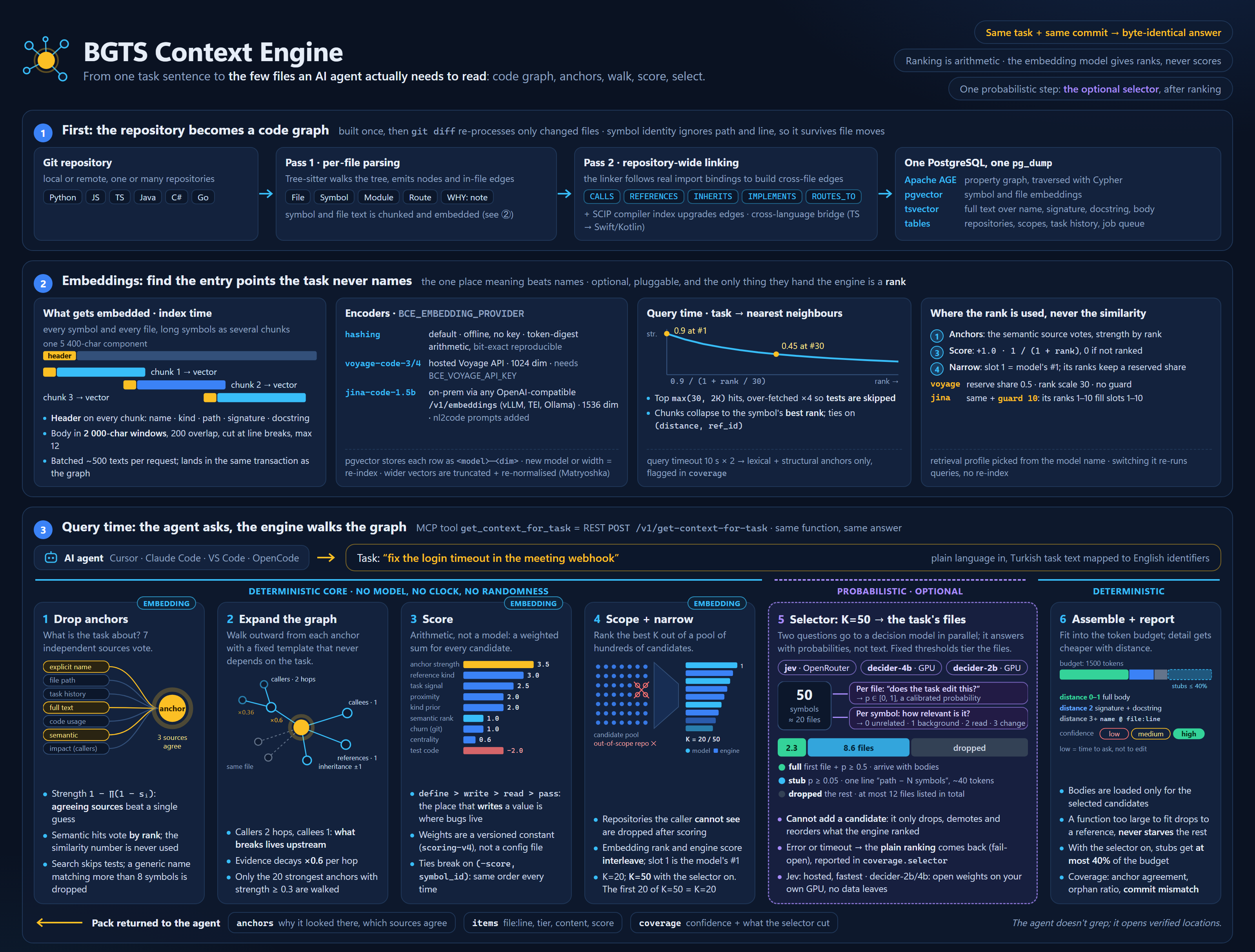
BGTS Context Engine indexes your repositories into that graph — symbols, calls, references, type hierarchies, HTTP routes, cross-language bridges — and answers questions by walking it. Embeddings are used in one place only: finding entry points when the task text names nothing recognisable. They never affect ranking.
The same task text, against the same commit, returns the same ranking. No model in the retrieval path, no clock, no randomness. When an agent makes a bad change you can replay exactly what it was told, find the stage that surfaced the wrong symbol, and fix that stage.
On top of that ranking sits one optional, clearly marked probabilistic step: a context
selector that asks a decision model which of the ranked files the task actually edits and
hands the agent those in full, the likely-related ones as one line each, and nothing else.
On 600 real changes it cut the context by 79 % for one point of recall. It is off until
BCE_SELECTOR names a model — hosted Jev, or decider-2b / decider-4b on your own GPU — and
--no-select gives back the byte-exact pack.
The engine is published so people can run it. Organisations that want the same thing inside their own perimeter — help with indexing, deployment, scoring tuned to their repositories, or the agent stack around it — can engage BGTS for consulting. Write to opensource-ai@bgts.com.
Quick start
# 1. PostgreSQL 16 with Apache AGE + pgvector, in one database
docker compose -f deploy/docker-compose.yml up -d

# 2. Install and migrate
pip install bgts-context-engine
cp .env.example .env
bce migrate

# 3. Index something
bce index --repo /path/to/your/repo --name my-service

# 4. Ask
bce context --task "fix the login timeout in the meeting webhook"
Then serve it:
bce serve        # REST at :8000/docs, web UI at :8000/ui/
bce serve-mcp    # MCP over stdio, for agents (install the [mcp] extra; see below)
Use it from your agent
The MCP surface is behind the mcp extra (Python MCP SDK 1.x: mcp>=1.0,<2). Install it
so bce is on the user PATH, not only inside a project .venv. Cursor and VS Code
spawn bce serve-mcp themselves and do not activate the venv:
pip install "bgts-context-engine[mcp]"
bce --version   # must work in a new terminal, with no venv activated
Every MCP client uses the same stdio command plus the database in the environment. Do not
leave bce serve-mcp running in a terminal for the editor: stdout is the protocol, so the
process stays silent, and the IDE starts its own copy.
One command per editor. Run it in the project the agent works on (the repository you
indexed), pointing at the engine's .env:
bce --env-file /path/to/engine/.env cursor-init --repo-id my-service   # Cursor
bce --env-file /path/to/engine/.env claude-init --repo-id my-service   # Claude Code
bce --env-file /path/to/engine/.env opencode-init --repo-id my-service # OpenCode
opencode-init merges the server into opencode.json (OpenCode's mcp format) and writes
the same agent guidance as a marked section of AGENTS.md.
cursor-init writes .cursor/mcp.json (merged into an existing one) and the rule
.cursor/rules/bgts-context-engine.mdc, which tells the agent to call
get_context_for_task first, treat its file:line entries as verified locations instead
of grepping for them, and not to edit a file just because it was listed. claude-init
writes .mcp.json, a marked section in CLAUDE.md, and a UserPromptSubmit hook
(bce precontext) that runs the graph once per prompt and hands the agent the answer
before its first turn — the flow the agent benchmark measured (−20 % tokens, half the search
output, same or better checks; 14 tasks on a React/TypeScript codebase, same model and machine).
Cursor's prompt hook cannot add context, so there the rule does that job. --no-hook,
--repo-id (repeatable) and --bce-command adjust the files; both commands are safe to rerun.
Two agent modes. BCE_AGENT_MODE sets how far the agent relies on the answer. All three
init commands write it into the server entry's env block (environment in
opencode.json); change it there and reload the MCP server to switch:
hint(starting point, the default): the agent starts frompayload.files, adds the files of identifiers the answer does not cover (coverage.unresolved_identifiers), and searches only when the engine says the answer is likely incomplete.trust(accept as correct):payload.filesis the answer; the agent opens those files and does not search the tree.
The server states the active mode's steps in the tool description and in every answer's
payload.workflow, and the rules tell the agent to follow them, so switching needs no rule
edit. --mode hint|trust picks it at init; a rerun keeps the configured value. Details:
docs/mcp.md.
After you add or change the MCP config, restart Cursor or VS Code (or Command Palette → “Developer: Reload Window”). The server should then show as enabled with eight tools (ten with indexing enabled). Setup detail: docs/mcp.md. The manual equivalents:
Cursor — user config ~/.cursor/mcp.json (applies to every project), or a project
.cursor/mcp.json that stays local (the directory is gitignored):
{
  "mcpServers": {
    "bgts-context-engine": {
      "command": "bce",
      "args": ["serve-mcp"],
      "env": { "BCE_DB_HOST": "localhost", "BCE_DB_NAME": "bce" }
    }
  }
}
VS Code — user MCP settings, or a project .vscode/mcp.json (also gitignored):
{
  "servers": {
    "bgts-context-engine": {
      "type": "stdio",
      "command": "bce",
      "args": ["serve-mcp"],
      "env": { "BCE_DB_HOST": "localhost", "BCE_DB_NAME": "bce" }
    }
  }
}
Claude Code — one command:
claude mcp add bgts-context-engine --env BCE_DB_HOST=localhost -- bce serve-mcp
Claude Desktop — same block as Cursor, in claude_desktop_config.json.
If command: "bce" stays disconnected, the editor cannot see bce on PATH. Install as
above, or skip a permanent install with uvx:
"command": "uvx",
"args": ["--from", "bgts-context-engine[mcp]", "bce", "serve-mcp"]
Then ask your agent something that needs the repository rather than the file you have open:
"what breaks if I change the session TTL?" The agent calls get_context_for_task, and the
other tools in docs/mcp.md let it drill from there — exact callers, the blast
radius of a change, the symbol behind a name — without guessing at file names.
What comes back
Not a list of file paths. A ranked pack, with the reasoning attached:
{
  "anchors": {
    "python::api::webhooks::handle_meeting_webhook#a3f1": ["explicit", "lexical"],
    "python::auth::session::refresh_session#88c2":        ["lexical", "semantic"]
  },
  "context": {
    "items": [
      { "symbol_id": "...refresh_session#88c2", "name": "refresh_session", "kind": "function",
        "file_id": "my-service:src/auth/session.py", "line": 41, "detail_level": "full",
        "graph_distance": 0, "score": 11.42, "tokens": 214, "content": "def refresh_session(...)" },
      { "symbol_id": "...SESSION_TTL#4b0d", "name": "SESSION_TTL", "kind": "constant",
        "file_id": "my-service:src/auth/config.py", "line": 12, "detail_level": "signature",
        "graph_distance": 2, "score": 6.10,  "tokens": 31,  "content": "SESSION_TTL: int" }
    ],
    "used_tokens": 1388, "budget": 1500, "included": 20, "skipped": 0
  },
  "coverage": {
    "anchor_source_count": 3, "connected_component_ratio": 0.875,
    "top_candidate_margin": 1.84, "orphan_ratio": 0.0,
    "touches_god_node": false, "commit_mismatch": false,
    "confidence": "high"
  }
}
Three things here that a vector store cannot give you:
anchors says why the engine looked where it did, and which independent sources
agreed. Three sources agreeing is usually right; one is a guess.
coverage is a trust report. confidence: "low" means the engine found something but
could not corroborate it — the moment for an agent to ask a follow-up question instead of
editing. commit_mismatch means the index is behind your working tree.
detail_level falls off with graph distance: the symbol you are changing arrives in
full, its neighbours as signatures, the outer ring as name @ file:line. That is how twenty
genuinely relevant symbols fit in 1500 tokens — short enough for an agent to carry on every
turn. Every item also names its file_id and line, so the agent opens the file instead of
searching for the symbol.
With the context selector on, items also carry a tier: full for the two or three
files the task most likely edits, stub — a single path - N candidate symbols: … line —
for files that are probably related, and coverage.selector says what was cut and why
(docs/retrieval.md; models and setup in
docs/selector.md).
How it works
task text
   │
   ├─ anchors       four independent sources nominate entry points:
   │                explicit names, task history, full-text, vector
   ├─ expansion     fixed-shape graph walk: callers 2 hops, callees 1,
   │                references, type hierarchy, same-file siblings
   ├─ scoring       weighted sum over reference kind, task signal, centrality,
   │                distance, leaf penalty, edge provenance
   ├─ scope         drop repositories this caller may not see
   ├─ narrowing     keep the top N
   ├─ selection     optional: a decision model tiers the N files into
   │                full / one-line stub / dropped
   ├─ assembly      fit the token budget, cheaper detail further out
   └─ coverage      report how much of this is trustworthy
Callers reach two hops and callees only one, on purpose: when you change a function, what breaks is upstream of it. Reference kind carries the heaviest weight, because a place that writes a value is where the bug lives while a place that reads it is usually just downstream. Centrality saturates at degree 20, because a logger touches everything and explains nothing.
The full formula, every weight, and the confidence thresholds are in docs/retrieval.md.
Features
- Code graph, not chunks. Symbols,
CALLS,REFERENCES,INHERITS,IMPLEMENTS,IMPORTS, HTTPROUTES_TOhandlers, andWHY:comments bound to what they explain. - Deterministic by construction. Sorted traversal, stable tiebreaks, versioned scoring
weights.
bce benchverifies it by running each case repeatedly and comparing output. - A fifth of the tokens, optionally. The context selector keeps the files a task edits and lists the rest in one line each: 8 310 → 1 714 tokens per answer on 600 real changes, file recall 94.4 → 93.4, fail-open to the plain ranking.
- Six languages. Python, JavaScript and TypeScript built in; Java, C# and Go behind the
langsextra. Adding one touches two files. - Cross-language call edges. React Native and Expo bridges connect
NativeModules.Foo.bar()in TypeScript tobarin Objective-C, Swift or Kotlin — a hole no single parser can see. - Edge provenance you can audit.
scipfrom a real compiler index,treesitterfrom syntax,heuristicfrom a pattern match. Scored differently, reported per response. - Incremental re-indexing.
git diffdecides what to re-parse. Symbol ids survive file moves and reformatting, so history and embeddings stay valid. - One database. Apache AGE and pgvector in the same PostgreSQL, so one query joins a
graph traversal, a vector search and a SQL filter — and one
pg_dumpbacks up the index. - MCP and REST from one implementation. A focused tool set over stdio, the same functions over HTTP. Nothing to drift.
- A UI that explains itself.
/uiships in the wheel and replays a real retrieval call stage by stage: anchors lighting up, expansion spreading, candidates scored and cut. - Runs offline. The default embedding provider is deterministic arithmetic over token
digests. No API key, no network, repeatable benchmarks.
openaitalks to any OpenAI-compatible/v1/embeddingsserver (vLLM, TEI, Ollama), so a model such as jina-code-embeddings-1.5b can run inside the perimeter.
Supported models
Embeddings only find entry points when the task text names nothing the graph already
knows. They never rank the answer. Out of the box that seed is hashing: deterministic
arithmetic, no API key, no network. For a real code model, set BCE_EMBEDDING_PROVIDER
and BCE_EMBEDDING_MODEL to one of these:
| Model | Provider | Dimension |
|---|---|---|
voyage-code-3 |
Voyage AI (voyage) |
1024 |
voyage-code-4 |
Voyage AI (voyage) |
1024 |
jina-code-embeddings-1.5b |
OpenAI-compatible (openai) |
1536 |
Voyage is a hosted API — pip install "bgts-context-engine[embed]" and
BCE_VOYAGE_API_KEY. Jina is the on-prem path: any server that speaks /v1/embeddings
(vLLM, TEI, Ollama). Switching the model or the dimension is a re-index
(bce migrate --reset-embeddings). The knobs are in
docs/deployment.md.
Coming next — same openai socket, not yet a fitted retrieval profile:
jina-code-embeddings-0.5b— the smaller sibling of 1.5b, for hosts that cannot hold 1.5B parameters.Nomic Embed Code— an open 7B code retriever.
Selector models
The optional context selector runs one of these decision models over the
ranked answer. Set BCE_SELECTOR to its name; unset (off), the engine returns the plain
ranking at K=20.
BCE_SELECTOR |
Model | Runs on | File recall @50 · tokens* |
|---|---|---|---|
jev |
Jev 1.13 (typesafe/jev-1.13, TypeSafe) |
hosted: OpenRouter or TypeSafe's API | 93.3 · 1 121 |
decider-2b |
Mapika/decider-2b (open weights, Apache-2.0) | your GPU (16 GB+), via decider.serve |
89.8 · 1 355 |
decider-4b |
Mapika/decider-4b (open weights, Apache-2.0) | your GPU (32 GB), via decider.serve |
92.1 · 1 193 |
* 600 real changes over 12 repositories, K=50, against 94.4 recall and 8 310 tokens without
a selector. Jev needs OPENROUTER_API_KEY and sends task text and code excerpts to a third
party; the deciders keep everything inside your perimeter and need no key.
Setup, the decider server install and RunPod notes: docs/selector.md.
Where it fits
| Embedding RAG | Language server | BGTS Context Engine | |
|---|---|---|---|
| Retrieval basis | text similarity | compiler index | code graph + anchors |
| Cross-file, cross-repo | weak | per project | yes |
| Cross-language edges | no | no | yes, heuristic |
| Same query, same answer | no | yes | yes |
| Ranked for a task | by similarity | not ranked | yes, with coverage |
| Token budget aware | chunk count | no | yes, detail by distance |
| Explains its own answer | no | no | anchors + provenance + confidence |
A language server is exact but scoped to what you have open. Embedding search is broad but unaccountable. This sits between them: repository-wide and cross-language like the former, exact and reproducible like the latter.
Measuring it
Retrieval quality claims are worthless without the task set they were measured on, so the harness ships instead of a leaderboard. You give it your own tasks and the symbols you believe answer them:
bce bench --cases my-tasks.json --out report.json
Each case is a task text plus its ground-truth symbol_ids. The report gives recall,
precision, precision@1 and MRR per case, median and p95 latency, and two pass/fail checks
that matter more than the scores: every case is run repeatedly and must return a
byte-identical ordering, and any case with a scoped principal must not surface a repository
that principal cannot read.
Building the case file is the real work — it means deciding, by hand, what the right answer is. It is also the only honest way to know whether a change to the scoring weights helped. The format and a worked example are in docs/deployment.md.
Roadmap
Ordered by how often it comes up, not by difficulty:
- Scope enforcement on every layer. Layer 3 applies the per-user repository filter; Layers 1 and 2 do not. Until that closes, the API belongs behind a proxy — see SECURITY.md.
- Streamable HTTP transport for MCP. Today the MCP surface is stdio only, so the server runs next to the agent. Remote transport makes one index serve a team.
- More languages. Rust, Kotlin and PHP are the most requested. The provider interface is the contribution path with the least friction — see docs/languages.md.
- Wider SCIP ingestion. Compiler-grade edges beat syntax-derived ones and are scored as
such; more toolchains means more of the graph carries
scipprovenance. - A published benchmark corpus. An open task set over public repositories, so results are comparable between projects rather than only between your own runs.
Requests and disagreements belong in issues — what people actually ask for reorders this list.
Documentation
| Architecture | the deterministic line, the three layers, indexing |
| Retrieval | anchors, expansion, every scoring weight, confidence |
| Selector models | Jev, decider-2b and decider-4b: choosing, installing, configuring the context selector |
| Data model | node labels, edge types, tables, symbol identity |
| MCP and API | every tool and endpoint, MCP configuration, the CLI |
| Languages | what each parser extracts, and how to add one |
| Deployment | configuration reference, jobs, backup, benchmarking |
| Web interface | developing the frontend |
Contributing
Contributions are welcome — especially new languages, which is the contribution the pipeline is most ready for.
Read CONTRIBUTING.md first. The one rule worth knowing up front: determinism is the product. A change that makes the same task return different results will not be merged without an explicit opt-in flag, and anything touching scoring or ordering needs a test that pins the output.
pip install -e ".[dev,mcp]"
ruff check src tests scripts && pytest
cd web && npm ci && npm test
Security
The engine has no authentication of its own and expects to sit behind something that does. Only the Layer-3 endpoints apply the per-user repository scope. Read SECURITY.md before exposing a port, and report vulnerabilities privately rather than in an issue.
License
MIT © BGTS.
1 maintainer

Metadata
1 maintainer
Release files for bgts-context-engine 1.0.0
For a detailed explanation of source distributions (sdists) and built distributions (wheels), please see the package formats documentation.
Source distribution (sdist)
| File | Size | Uploaded | |
|---|---|---|---|
| bgts_context_engine-1.0.0.tar.gz | 430.4 kB | Details |
Built distribution (wheel)
| File | Interpreter | ABI | Platform | Reset |
|---|---|---|---|---|
| bgts_context_engine-1.0.0-py3-none-any.whl | Python 3 | none | any | Details |
Total release size: 880.7 kB
Release files / bgts_context_engine-1.0.0.tar.gz
| Download URL | bgts_context_engine-1.0.0.tar.gz |
|---|---|
| Size | 430.4 kB |
| Tags | Source |
|
SHA-256 checksum How to use checksums |
3a8964358cfdf894c2a44f9e6becab2ca8900a5d78f790bd2cc4b15903973571
|
|
BLAKE2b-256 checksum How to use checksums |
469b0abc38f36046a798675cc6befb38789970077a8a75e1ad5814cbfdf3b8bc
|
| Upload date | |
|
Uploaded using Trusted Publishing? What is trusted publishing? |
No |
| Uploaded via |
twine/7.0.0 CPython/3.12.15
|
Release files / bgts_context_engine-1.0.0-py3-none-any.whl
| Download URL | bgts_context_engine-1.0.0-py3-none-any.whl |
|---|---|
| Size | 450.3 kB |
| Tags | Python 3 |
|
SHA-256 checksum How to use checksums |
27b5ab555eca07f6302dddf978934bfd715f032db6e98706b04a4712d326fd5f
|
|
BLAKE2b-256 checksum How to use checksums |
7c3adcccf7fc7c984a130753a60cc2d082eb300ac7169208d7e853579b508447
|
| Upload date | |
|
Uploaded using Trusted Publishing? What is trusted publishing? |
No |
| Uploaded via |
twine/7.0.0 CPython/3.12.15
|














