
A Jupyter-based assistant for data analysis tasks

Project description
bia-bob
BIA bob is a Jupyter-based assistant for interacting with data using large language models which generate python code.
It can make use of OpenAI's chatGPT, Google's Gemini, Helmholtz' blablador and Ollama.
You need an OpenAI API account or a Google Cloud account or a Helmholtz ID account to use it.
Using it with Ollama is free but requires running an Ollama server locally.

[!CAUTION] When using the OpenAI, Google Gemini API or any other endpoint via BiA-Bob, you are bound to the terms of service of the respective companies or organizations. The prompts you enter are transferred to their servers and may be processed and stored there. Make sure to not submit any sensitive, confidential or personal data. Also using these services may cost money.
Usage
You can initialize bob like this:
from bia_bob import bob
Code generation
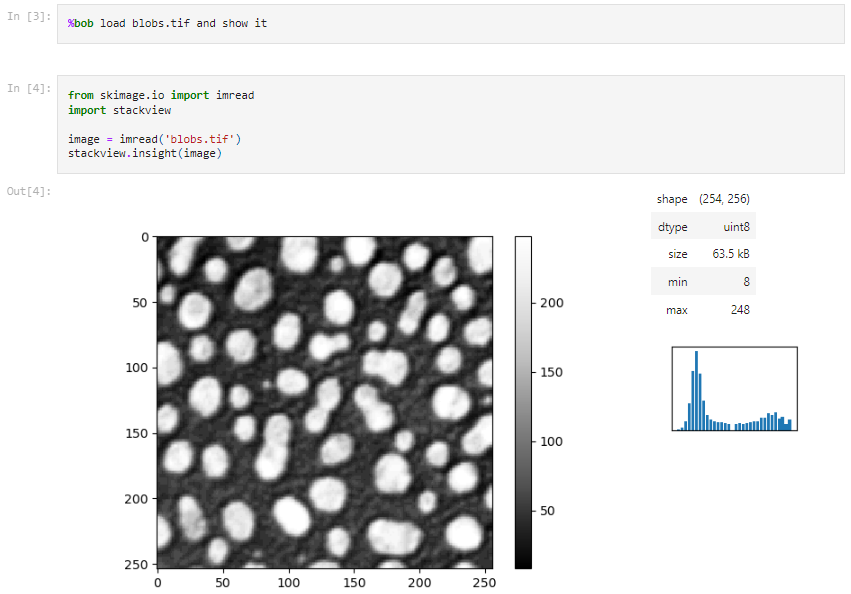
You can ask Bob to generate code like this:
%bob Load blobs.tif and show it
It will then respond with a python code snippet that you can execute (see full example):
Bug fixing
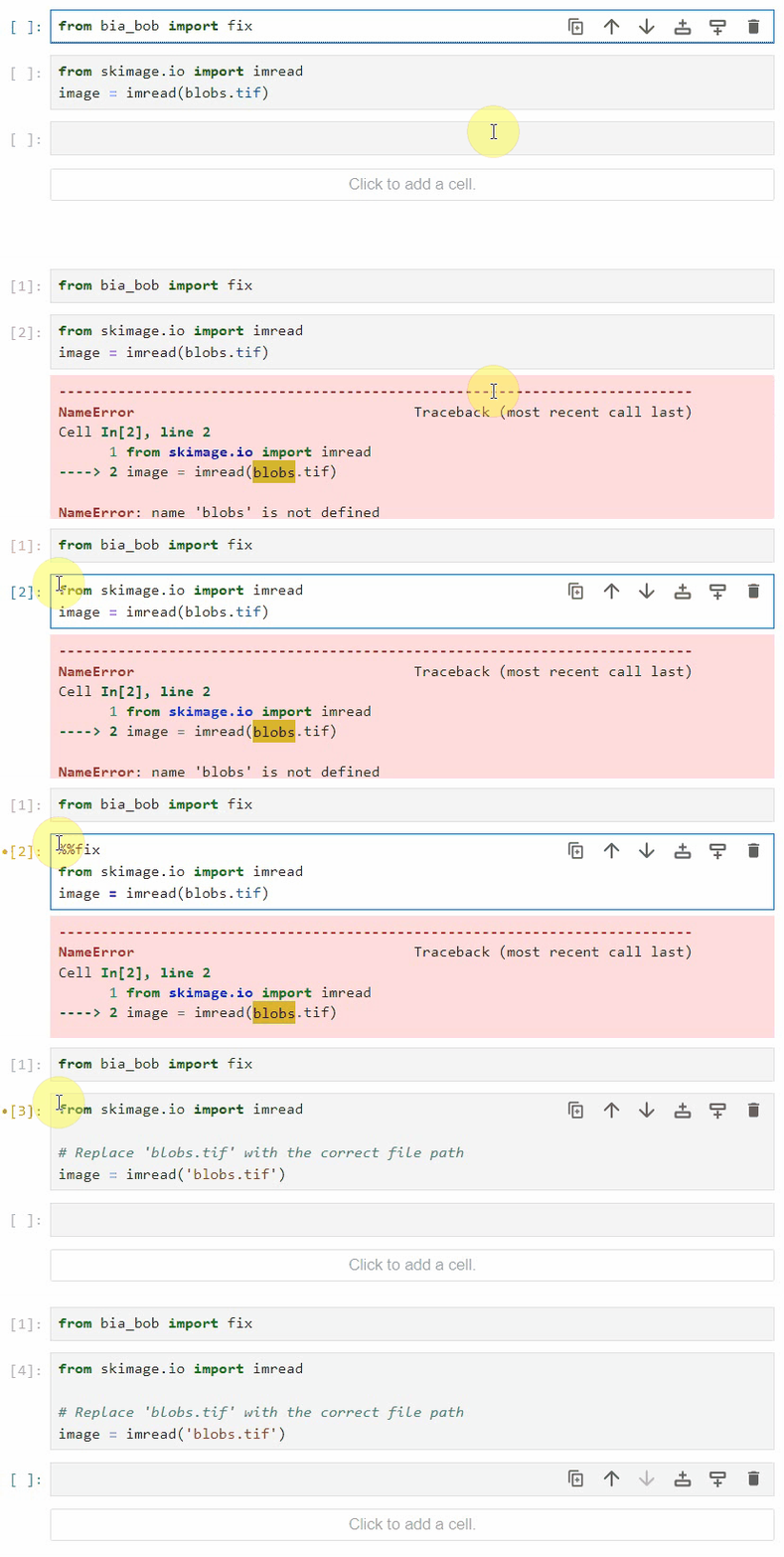
Bob can fix simple bugs in code you executed. Just add %%fix on top of the cell right after the error happened.
Code documentation
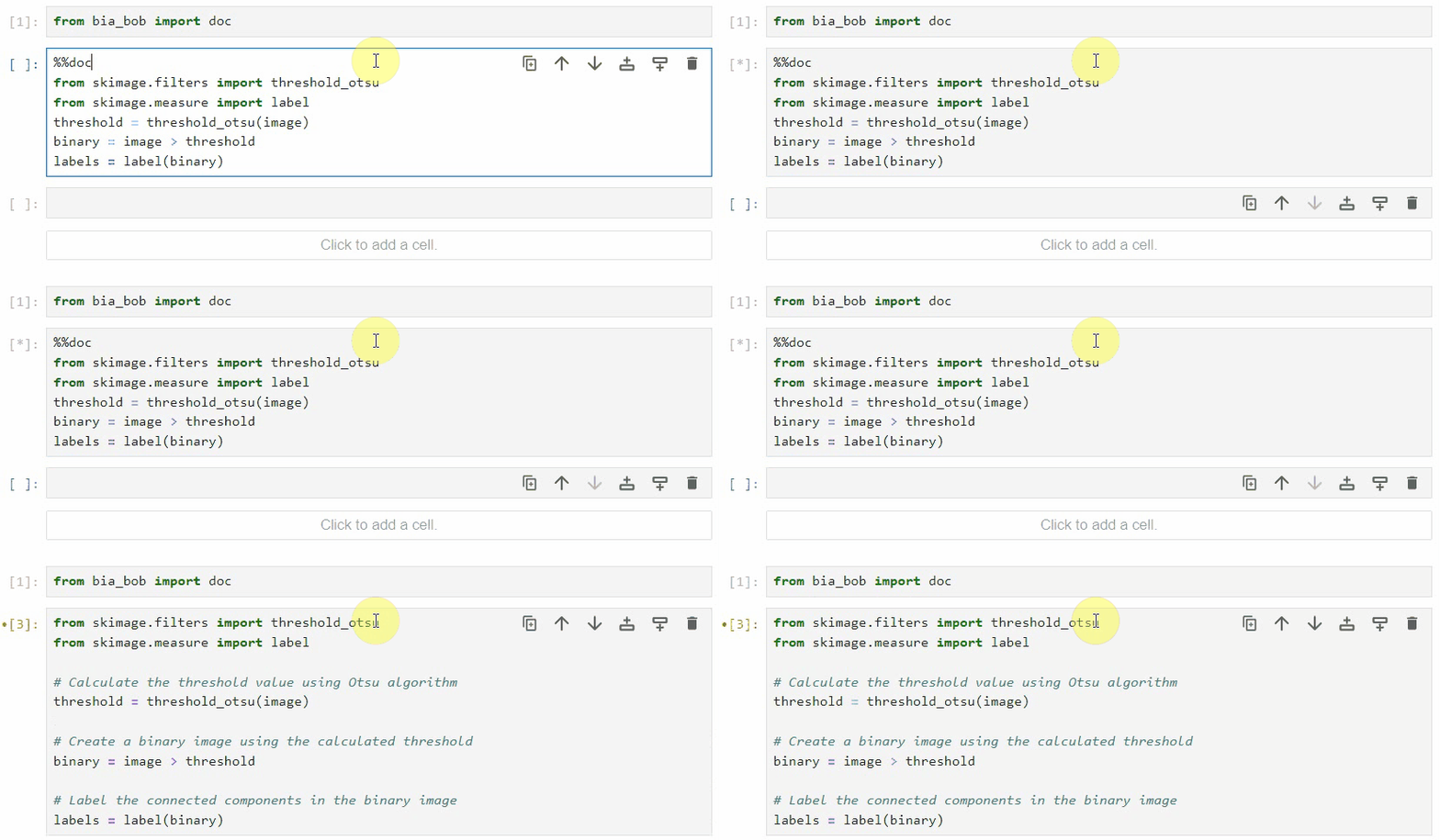
Using the %%doc magic, you can generate documentation for a given code cell.
GPU-acceleration
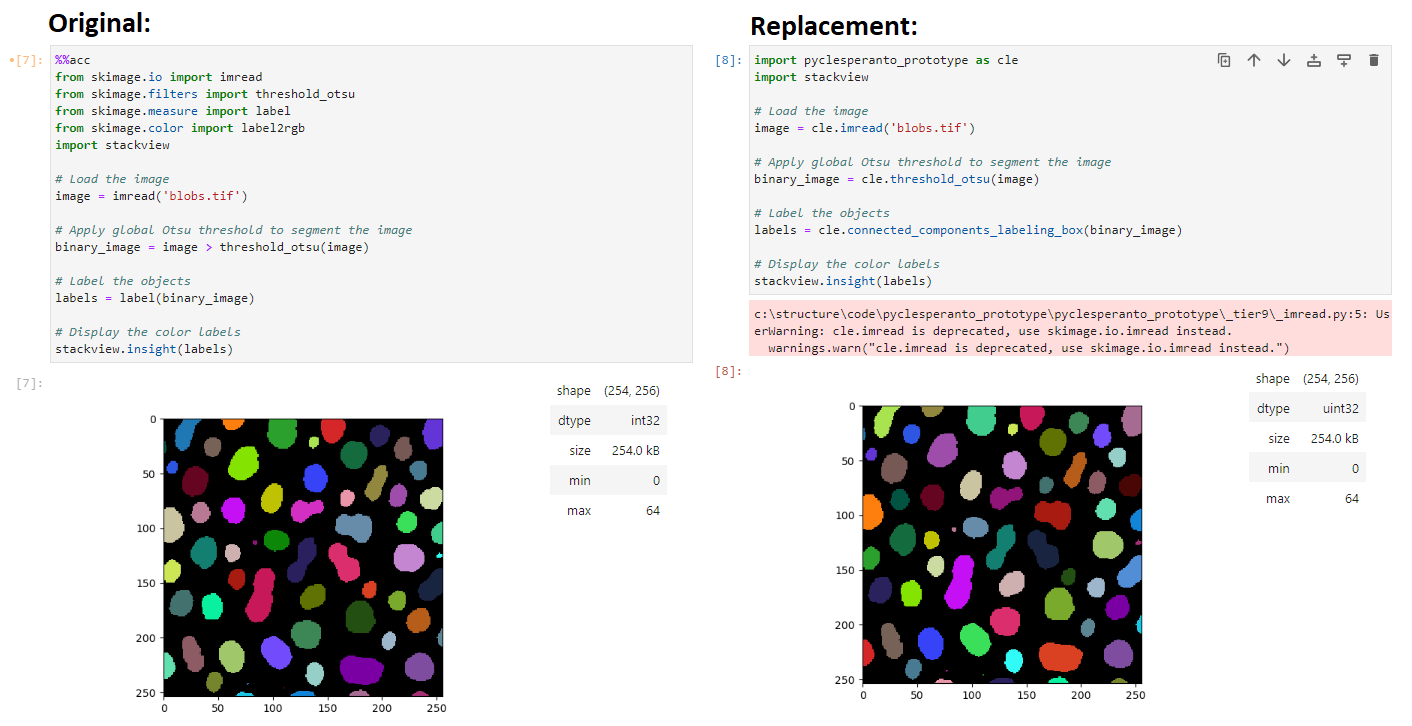
Using the %%acc magic, you can replace common image processing functions with GPU-accelerated functions. It is recommended to check if the image processing results remain the same. You can see an example in this notebook.
No-code custom Jupyter Kernel
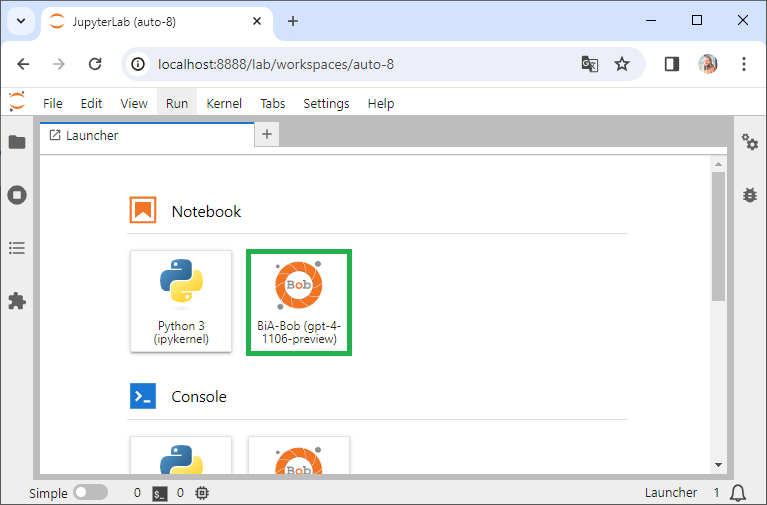
If installed, you can also choose the BiA-Bob from the Launcher in Jupyter lab:
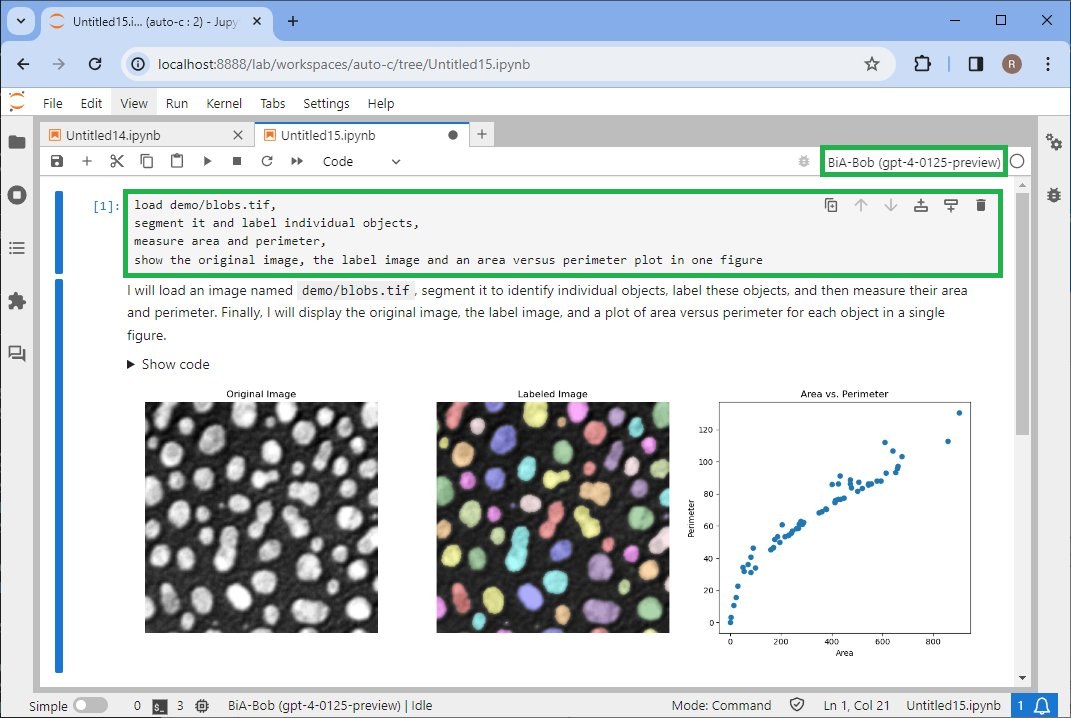
This will give you a Jupyter kernel that allows you to type in English language instead of code:
Example notebooks
- Basic demo
- Bio-image analysis workflow
- Choosing a model
- Using Gemini and chatGPT altenating
- Interpreting images
- Documenting code
- Fixing bugs
- Graphical user interfaces
- Exploring tabular data
Known issues
If you want to ask bob a question, you need to put a space before the ?.
%bob What do you know about blobs.tif ?
Installation
You can install bia-bob using pip. it is recommended to install it into via conda/mamba environment. If you have never used conda before, please read this guide first.
It is recommended to install bia-bob in a conda-environment together with useful tools for bio-image analysis.
mamba env create -f https://github.com/haesleinhuepf/bia-bob/raw/main/environment.yml
You can then activate this environment...
mamba activate bob_env
... and install bia-bob.
Using OpenAI as backend
Create an OpenAI API Key and add it to your environment variables as explained on this page.
Using custom endpoints
Custom endpoints can be used as well if they support the OpenAI API. Examples are blablador and ollama. An example is shown in this notebook:
For this, just install the openai backend as explained above (tested version: 1.5.0).
- If you want to use ollama and e.g. the
codellamamodel, you must runollama servefrom a separate terminal and then initialize bob like this:
bob.initialize(endpoint='ollama', model='codellama')
- If you want to use blablador, which is free for German academics, just get an API key as explained on
this page and store it int your environment as
BLABLADOR_API_KEYvariable.
bob.initialize(
    endpoint='blablador',
    model='Mistral-7B-Instruct-v0.2')
- Custom end points can be used as well, for example like this:
bob.initialize(
    endpoint='http://localhost:11434/v1',
    api_key='my_key',
    model='codellama')
Using Google's Cloud AI API as backend
pip install bia-bob google-cloud-aiplatform
(Recommended google-cloud-aiplatform version >= 1.38.1)
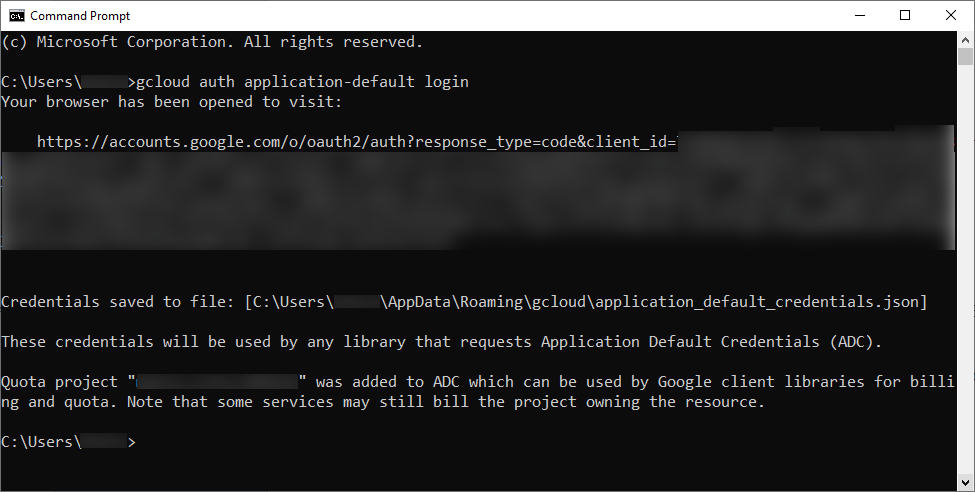
To make use of the Google Cloud API, you need to create a Google Cloud account here and a project within the Google cloud (for billing) here. You need to store authentication details locally as explained here. This requires installing Google Cloud CLI. In very short: run the installer and when asked, activate the "Run gcloud init' checkbox. Or run 'gcloud init' from the terminal yourself. Restart the terminal window. After installing Google Cloud CLI, start a terminal and authenticate using:
gcloud auth application-default login
Follow the instructions in the browser. Enter your Project ID (not the name). If it worked the terminal should approximately look like this:
BiA-Bob Jupyter kernel (optional)
If you want to use the BiA-Bob Jupyter kernel, please run additionally this command:
python -m bia_bob install
You can check if it's installed by printing out the list of installed kernels:
jupyter kernelspec list
And you can uninstall them using this command:
jupyter kernelspec uninstall bia-bob
Development
If you want to contribute to bia-bob, you can install it in development mode like this:
git clone https://github.com/haesleinhuepf/bia-bob.git
cd bia-bob
pip install -e .
Extensibility
If you are maintainer of a Python library and want to make BiA-bob aware of functions in your library, you can extend Bob's knowledge using entry-points. Add this to your library setup.cfg:
[options.entry_points]
bia_bob_plugins =
    plugin1 = your_library._bia_bob_plugins:list_bia_bob_plugins
In the above mentioned _bia_bob_plugins.py define this function (and feel to rename the function and the Python file):
def list_bia_bob_plugins():
    """List of function hints for bia_bob"""
    return """
    * Computes the sum of a and b
    your_library.compute_sum(a:int,b:int) -> int

    * Determines the difference between a and b
    your_library.compute_difference(a:int, b:int) -> int

    """
Note that the syntax should be pretty much as shown above: A bullet point with a short description and a code-snippet just below.
You can also generate the list_bia_bob_plugins function as demonstrated in this notebook.
Please only list the most important functions. If the list of all plugins extending BiA-Bob becomes too long, the prompt will exceed the maximum prompt length.
List of known Python libraries that provide extensions to Bob:
(Feel free to extend this list by sending a pull-request)
Similar projects
There are similar projects:
Issues
If you encounter any problems or want to provide feedback or suggestions, please create a thread on image.sc along with a detailed description and tag @haesleinhuepf .
Release history Release notifications | RSS feed


Download files
Download the file for your platform. If you're not sure which to choose, learn more about installing packages.
Source Distribution
Built Distribution
Filter files by name, interpreter, ABI, and platform.
If you're not sure about the file name format, learn more about wheel file names.
Copy a direct link to the current filters
File details
Details for the file bia_bob-0.14.0.tar.gz.
File metadata
- Download URL: bia_bob-0.14.0.tar.gz
- Upload date:
- Size: 21.1 kB
- Tags: Source
- Uploaded using Trusted Publishing? No
- Uploaded via: twine/5.1.0 CPython/3.9.19
File hashes
| Algorithm | Hash digest | |
|---|---|---|
| SHA256 |
b508fe991474650c237351c740284426a68a9910b520f30658f20f3230b28329
|
|
| MD5 |
f8b3cf92d4ddc9ef15a6f9bd72ce8a8d
|
|
| BLAKE2b-256 |
73d404b8890779b782505bb1530d81ace4d58ba2e033a689f91d83e83b9d0f40
|
File details
Details for the file bia_bob-0.14.0-py3-none-any.whl.
File metadata
- Download URL: bia_bob-0.14.0-py3-none-any.whl
- Upload date:
- Size: 19.2 kB
- Tags: Python 3
- Uploaded using Trusted Publishing? No
- Uploaded via: twine/5.1.0 CPython/3.9.19
File hashes
| Algorithm | Hash digest | |
|---|---|---|
| SHA256 |
3d80000543088588295ec96f6a4d3296de9a65224f634c5bfb219c37bfef74bd
|
|
| MD5 |
72a5227d6a38a87fc16caaacb8b5cbd1
|
|
| BLAKE2b-256 |
ff70303ef3ca02890440f8be4f90f0616f5102e4f2262840bd2d743dcd372d63
|






