
BiblioDash - An AI-powered Python package for bibliometric analysis, scientometrics, literature intelligence, and interactive research visualization.

Project description

Research Intelligence. Flowing Insights.
A local-first platform that transforms scientific literature collections into an
interactive bibliometric knowledge base powered by AI, citation analytics, and metadata enrichment.









What is BiblioDash?
BiblioDash is a local-first research intelligence platform that transforms collections of scientific literature into an interactive bibliometric knowledge base. It supports multiple data sources, runs entirely on your own hardware, and ships with 15+ analysis modules, AI-powered research intelligence via a local LLM, and multi-user support for team deployments.
The core workflow:
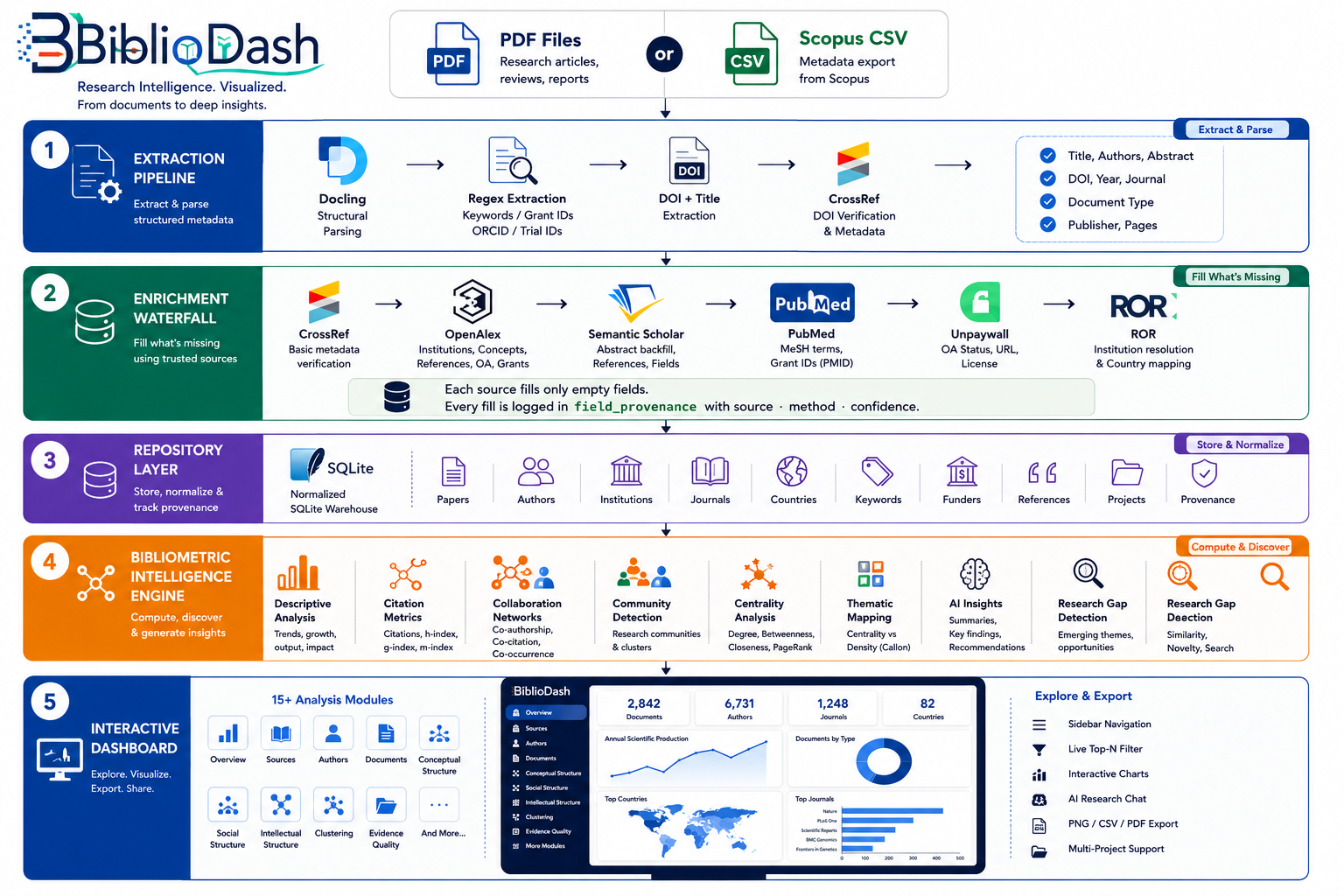
Import data → BiblioDash enriches metadata → Explore 15+ analysis modules
Supported import formats:
| Format | Source |
|---|---|
| PDF folder | Any research PDFs DOI extracted, CrossRef verified, enriched via 6 open APIs |
| Scopus CSV | Direct export from Scopus all fields imported |
| BibTeX (.bib) | Mendeley, Zotero, CrossRef, any reference manager |
| RIS (.ris) | Web of Science, PubMed, Mendeley, EndNote |
| PubMed XML | Direct PubMed export |
Everything runs locally no data is sent to any external service.
Architecture
Why BiblioDash?
- Local-first: no data leaves your machine; AI runs via Ollama
- Multi-user ready: authentication, per-user project isolation, WAL-mode SQLite
- One-command install:
pip install bibliodash && bibliodash - Multiple import formats: PDF, Scopus CSV, BibTeX, RIS, PubMed XML
- 15+ analysis modules: publication trends to co-citation networks
- AI research intelligence: corpus summary, RAG chat, claim extraction
- Semantic search: FAISS vector embeddings over all abstracts
- Research gap detection: KMeans clustering + TF-IDF gap scoring
- Production-ready: Gunicorn + Docker + docker-compose included
Installation
Option 1 - PyPI (recommended)
pip install bibliodash

# First launch:
bibliodash
The wizard detects your hardware, creates a workspace at ~/BiblioDash/, and optionally installs an AI model via Ollama.
Option 2 With optional features
# Semantic search, novelty scores, gap detection
pip install "bibliodash[semantic]"

# Local AI features (also install Ollama: https://ollama.com)
pip install "bibliodash[ai]"

# PDF extraction
pip install "bibliodash[pdf]"

# Everything
pip install "bibliodash[all]"
Usage
Launch
bibliodash                              # Launch dashboard (setup wizard on first run)
bibliodash --port 9000                  # Custom port
bibliodash --no-browser                 # Skip auto-open
bibliodash --workspace ~/MyResearch     # Custom workspace directory
Import data
bibliodash import-pdf ~/Papers/         # Import all PDFs from a folder
bibliodash import-scopus export.csv     # Import a Scopus CSV export
Or use the Import Data page in the dashboard drag in any path for PDF folder, or upload Scopus CSV, BibTeX, RIS, or PubMed XML files directly.
Manage projects
bibliodash new-project "Hypospadias Review 2026"
AI model setup
bibliodash setup                        # Re-run the setup wizard
bibliodash install-ai                   # Install or change AI model
Analysis Modules
Overview
Annual, monthly, quarterly, and decade-level publication production. Growth rates (CAGR), cumulative output, moving averages, publication heatmaps, and forecasting broken down by document type, country, institution, and journal.
Sources
Identifies the most productive journals and publishers. Applies Bradford's Law to reveal the core zone of journals. Shows journal H-index, citation impact, open-access distribution, and publication timelines.
Authors
Ranks authors by productivity and citation impact. Computes H-index, G-index, M-index, i10-index, citation velocity, and career trajectory. Maps co-author collaboration networks with Louvain community detection.
Documents
Lists the most-cited papers in your corpus. Analyses reference lists to find the most frequently co-cited works. Full funding intelligence: funder lollipop chart, category breakdown (Government / Industry / Other), funding trends, and multi-funded paper table.
Conceptual Structure
Identifies the most frequent keywords and concepts. Builds a Thematic Map plotting keyword clusters by Callon centrality vs. density to reveal motor, niche, emerging, and declining themes.
Social Structure
Maps collaboration at three levels (Author, Institution, and Country) as interactive network graphs with community detection. Renders a choropleth world map of collaboration arcs. Shows a collaboration timeline across years.
Intellectual Structure
Uncovers the citation backbone of your field. Identifies the most co-cited reference pairs. Builds a citation historiography showing how foundational works influenced one another over time.
Clustering
Detects research communities using four network types co-authorship, keyword co-occurrence, bibliographic coupling, and citation networks each analysed for degree, betweenness, closeness, eigenvector, and PageRank centrality.
Evidence Quality
Per-paper Evidence Score (0-100) and Reproducibility Score (0-100) computed from nine quality signals: trial registration, ethics approval, informed consent, funding declaration, PubMed indexing, open access, figures, tables, and data availability.
Duplicate Detection
Detects duplicate papers by exact DOI match and fuzzy title similarity (>=90% token-sort ratio via rapidfuzz). Reports cluster count, duplicate rate, and a full table of suspect pairs.
Provenance Explorer
Field-level data provenance heatmap showing which enrichment source filled each metadata field. Average confidence score per source and per field.
Research Timeline
Interactive bubble scatter plot of publications over time bubble size proportional to citation count, colour-coded by document type. Complementary year x document-type heatmap.
Semantic Search
Meaning-based search over all paper titles and abstracts using sentence-transformers (all-MiniLM-L6-v2) and a FAISS cosine-similarity index. Also provides Paper Novelty Scores and Paper Similarity detection.
Research Gap Detection
Clusters all paper abstracts with KMeans + FAISS embeddings, names each cluster with TF-IDF keywords, and scores it for research gap potential. Renders an interactive bubble chart and ranked gap card list.
AI Features
Three AI-powered views running via local Ollama zero data leaves your machine:
| View | What it does |
|---|---|
| AI Summary: | Corpus-level synthesis from your 50 most-cited abstracts: overall summary, main themes, emerging trends, research gaps, common methods, future directions, clinical implications. Cached per project. |
| Research Chat: | Multi-turn RAG chat retrieves 8 semantically relevant papers per question, injects them as grounded context, returns cited answers with paper title references. |
| Claim Extraction: | Per-paper structured extraction for top-50 cited papers: main finding, study design, sample size, key limitation, future work, evidence level. |
How Metadata Enrichment Works
Each imported paper passes through an enrichment waterfall a chain of open academic APIs where each source fills fields the previous one left empty:
CrossRef → OpenAlex → Semantic Scholar → PubMed → Unpaywall → ROR
- CrossRef: verifies DOI, fills publisher, document type, journal, page range
- OpenAlex: adds institutions with ROR IDs, country affiliations, full reference list, open-access status, grants
- Semantic Scholar: adds abstract backfill, references, fields of study
- PubMed: adds MeSH terms and grant IDs
- Unpaywall: adds open-access URL and licence
- ROR: resolves institution names to countries
Every field fill is recorded with its source, method, and confidence score in a field_provenance table.
Multi-User and Production
BiblioDash ships with full multi-user support:
- Authentication: registration and login with PBKDF2-SHA256 password hashing; 30-day persistent sessions
- First user = admin: the first account registered is automatically promoted to admin
- Per-user project isolation: users see their own projects plus shared (public) projects
- SQLite WAL mode: Write-Ahead Logging enables concurrent reads during imports;
busy_timeout = 15 sprevents lock contention - Gunicorn: gthread workers (2xCPU+1 x 2 threads), 120 s timeout, automatic worker recycling
# Scale configuration via environment variables
WEB_CONCURRENCY=8       # number of Gunicorn workers
THREADS_PER_WORKER=4    # threads per worker
WORKER_TIMEOUT=120      # seconds before worker is killed
SECRET_KEY=<hex-string> # required for session signing
Tech Stack
| Component | Technology |
|---|---|
| Dashboard: | Dash 4.x + Plotly 5.x |
| PDF extraction: | Docling, PyMuPDF, pdfplumber |
| Metadata enrichment: | CrossRef, OpenAlex, Semantic Scholar, PubMed, Unpaywall, ROR |
| Network analysis: | NetworkX 3.x Louvain, centrality, spring layout |
| Semantic search: | sentence-transformers (all-MiniLM-L6-v2) + FAISS (IndexFlatIP) |
| Gap detection: | scikit-learn KMeans + TF-IDF + PCA |
| Duplicate detection: | rapidfuzz token_sort_ratio |
| AI features: | Ollama local LLM qwen3 / llama3.1 (hardware-selected) |
| Storage: | SQLite WAL mode normalised warehouse + checksum cache |
| Auth: | Flask sessions + werkzeug PBKDF2-SHA256 |
| Production server: | Gunicorn (gthread workers) |
| Containers: | Docker + docker-compose |
| Data tables: | dash-ag-grid, dash-table |
| Geocoding: | geonamescache, pycountry |
| Language: | Python 3.11+ |
Current Limitations
| Area | Status |
|---|---|
| Author-institution attribution | Paper-level only cannot isolate a specific co-author's affiliation |
| Citation Half-Life | Not computable APIs return cumulative counts, not per-year breakdowns |
| Author/Journal co-citation | Not implemented requires resolving reference metadata per paper |
| Bibliographic coupling | Accuracy bounded by DOI resolution in reference lists |
| Entity deduplication | Institution and country name variants across providers not yet merged |
| Evidence signals from PDF | Trial IDs, ethics statements, figure counts require PDF extraction; Scopus CSV imports show 0 for these fields |
| AI chat streaming | Responses appear after full generation streaming not yet implemented |
| Report export (PDF/Word/PPT) | Planned |
| PostgreSQL backend | SQLite WAL handles ~100 concurrent users; PostgreSQL migration planned for larger deployments |
Documentation
For a full walkthrough of every page and feature, see the User Guide. Release history is tracked in the Changelog.
Author
Robin Tomar (itsrobintomar@gmail.com)
Dr Prabudh Goel's Lab, AIIMS New Delhi
Release history Release notifications | RSS feed


Download files
Download the file for your platform. If you're not sure which to choose, learn more about installing packages.
Source Distribution
Built Distribution
Filter files by name, interpreter, ABI, and platform.
If you're not sure about the file name format, learn more about wheel file names.
Copy a direct link to the current filters
File details
Details for the file bibliodash-4.0.8.tar.gz.
File metadata
- Download URL: bibliodash-4.0.8.tar.gz
- Upload date:
- Size: 2.0 MB
- Tags: Source
- Uploaded using Trusted Publishing? No
- Uploaded via: twine/6.2.0 CPython/3.13.13
File hashes
| Algorithm | Hash digest | |
|---|---|---|
| SHA256 |
a2166c21e3bff1036c4673723f15f23fcc28ceb79f6fd5a8a9270300cb0584e7
|
|
| MD5 |
aba622705aac6d556e7411d5f7936603
|
|
| BLAKE2b-256 |
a4b7c93c3d9e1b9e7e0c2b8aece2d5cfe1b6418dabeb3bc522b6f6c28e287ec9
|
File details
Details for the file bibliodash-4.0.8-py3-none-any.whl.
File metadata
- Download URL: bibliodash-4.0.8-py3-none-any.whl
- Upload date:
- Size: 2.0 MB
- Tags: Python 3
- Uploaded using Trusted Publishing? No
- Uploaded via: twine/6.2.0 CPython/3.13.13
File hashes
| Algorithm | Hash digest | |
|---|---|---|
| SHA256 |
7671faf6a28ee3cec3769983f4138077118d464138a466fcbffbc16aeb44185b
|
|
| MD5 |
0411ea848389399c337991f4c3e1cfc7
|
|
| BLAKE2b-256 |
acaacc3e9a3260d356d6e00a8c2c49a8752772be9da80e1a499d394ee48ed8e2
|






