
LLM-powered BibTeX cleaner

Project description
BibTeX Cleaner
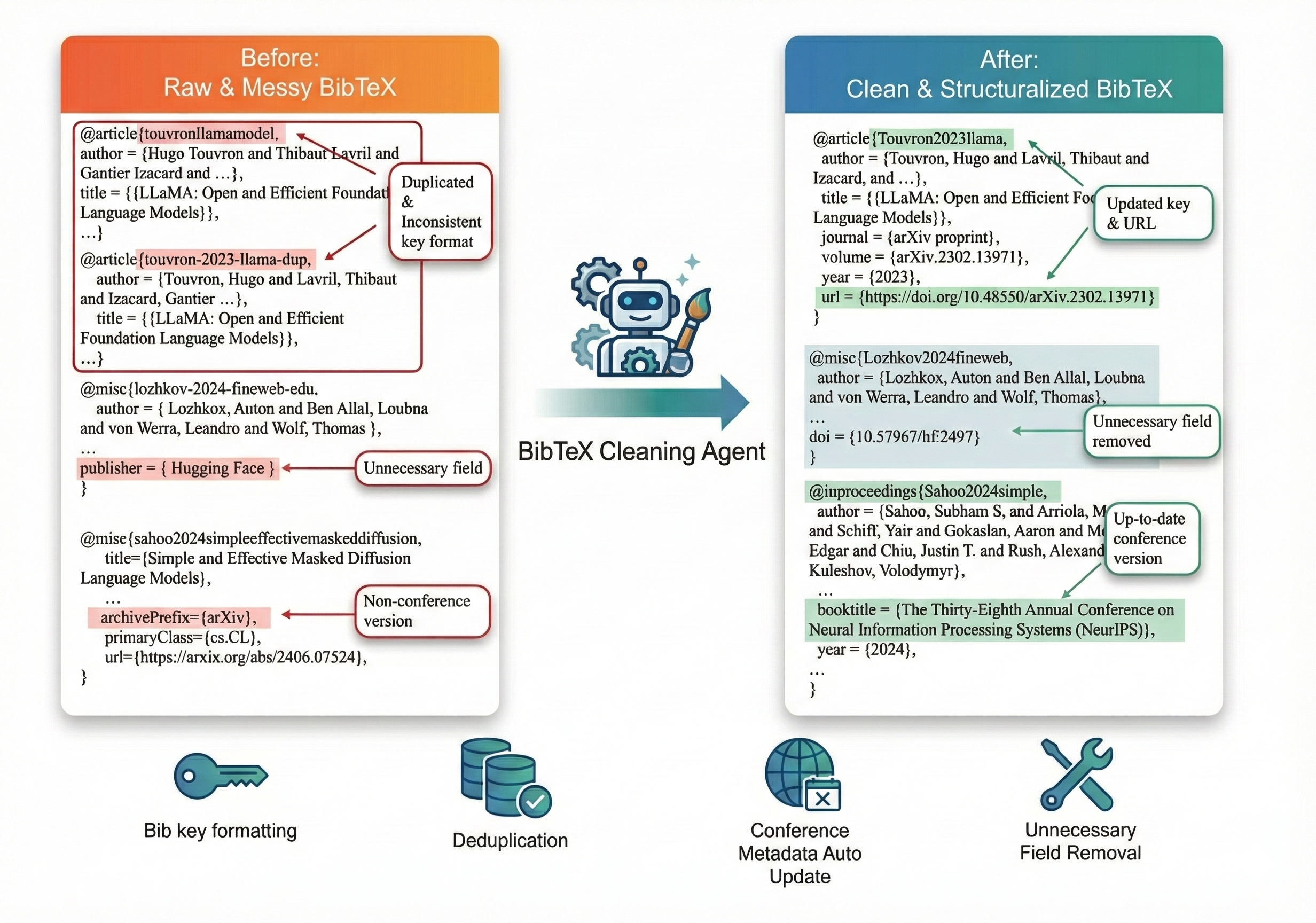
BibTeX Cleaner is an LLM-powered BibTeX cleaning agent and command-line tool that integrates with DBLP, Semantic Scholar, and arXiv to automatically clean, normalize, enrich, and deduplicate BibTeX entries, while optionally standardizing citation keys and conference/journal information.
Features
- Cleaning & Normalization: Standardizes BibTeX entries, fixes formatting, and ensures consistent fields.
- Metadata Enhancement: Fetches accurate metadata from DBLP, Semantic Scholar, and ArXiv.
- Conference Info: Updates venue information to official conference titles (e.g., "The 37th International Conference on Machine Learning (ICML)").
- Custom Citation Keys: Generates citation keys based on customizable patterns (e.g.,
{author}{year}{shorttitle}). - Deduplication: Detects and removes duplicate entries.
- Key Mapping JSON: Writes a JSON sidecar file that maps original BibTeX keys to their cleaned/deduplicated keys.
- Missing Field Diagnostics: Prints a summary of entries that are missing required core fields (e.g.,
pagesfor@inproceedings) so you can fix them manually.
Installation
You can install the package via pip or uv:
pip install bibtex-cleaner
# or
uv pip install bibtex-cleaner
API Key and Environment Variables
BibTeX Cleaner uses the OPENAI_API_KEY environment variable. There are two common ways to set it:
-
Using a
.envfile (recommended for per-project setup):Create a
.envfile in your LaTeX project root (where your.bibfile lives):echo 'OPENAI_API_KEY=your_api_key_here' > .env
The CLI automatically loads
.envwhen you runbibtex-cleaner. -
Using a shell environment variable:
export OPENAI_API_KEY=your_api_key_here
# or one-shot:
OPENAI_API_KEY=your_api_key_here bibtex-cleaner input.bib output.bib
Usage
Typical Workflow
-
From your LaTeX project root (where
myrefs.bibis located):bibtex-cleaner myrefs.bib cleaned_myrefs.bib
-
With default output from config (see below), you can omit the output path:
bibtex-cleaner myrefs.bib
Basic Cleaning
Clean a BibTeX file using default settings:
bibtex-cleaner input.bib output.bib
Configuration
The tool uses a bibtex_cleaner_config.yaml file for configuration. By default, it looks for this file in the current working directory, but you can also specify a custom path with the --config flag.
-
Create a config file in your LaTeX project (recommended):
- In the same directory as your
.bibfile, createbibtex_cleaner_config.yaml. - Either:
- Copy the example below into that file, or
- Copy the template from the GitHub repository (
bibtex_cleaner_config.yamlin the project root).
- In the same directory as your
-
Run the cleaner with your config:
# Uses bibtex_cleaner_config.yaml in the current directory
bibtex-cleaner myrefs.bib cleaned_myrefs.bib

# Or specify a custom config path explicitly
bibtex-cleaner myrefs.bib cleaned_myrefs.bib --config path/to/bibtex_cleaner_config.yaml
Example bibtex_cleaner_config.yaml:
# BibTeX Cleaner Configuration

# LLM Settings
model: "gpt-4o-mini"

# Processing Settings
batch_size: 5
delay: 1.0
retry_count: 3

# Feature Flags
enhance_conferences: false  # Set to true for deep conference metadata enhancement
key_format: "{author}{year}{shorttitle}"

# Output Settings
json: false
output: "cleaned.bib"
CLI Options
bibtex-cleaner input.bib [output.bib] [--config path/to/config.yaml]
Key Mapping JSON Output
When you specify an output.bib file (either via CLI or config), the cleaner also generates a JSON file with the same stem:
- Output: For
output.bib, aoutput.jsonfile is created alongside it. - Content: A mapping from original keys to their final keys and status, for example:
- original key that was successfully cleaned and kept ->
{ "status": "success", "new_key": "<final_key>" } - original key that was detected as a duplicate and removed ->
{ "status": "duplicate", "new_key": "<canonical_key>" } - original key that failed cleaning ->
{ "status": "failed" }
- original key that was successfully cleaned and kept ->
This makes it easy to update citations in your LaTeX project after renaming and deduplication.
Diagnostics and Known Limitations
- Missing field warnings: After cleaning, the CLI prints a short report to stderr listing entries that are missing important fields (for example,
pagesfor@inproceedings, orjournal/yearfor@article). These warnings do not stop the run; they are there to help you manually patch edge cases. - Upstream metadata gaps (e.g., pages): Sometimes DBLP / Semantic Scholar / arXiv do not provide complete metadata (most commonly page ranges for conference papers). In those cases the tool will warn about missing
pages, but it will not fabricate values.
Citation Key Formatting
You can customize the citation key format in the configuration file using placeholders:
{author}: First author's surname{year}: Publication year{title}: Full sanitized title{shorttitle}: First 3 meaningful words of title (default){veryshorttitle}: First 1 meaningful word of title{mediumtitle}: First 5 meaningful words of title{venue}: Venue/journal name{doi}: DOI
Example: key_format: "{author}-{year}-{veryshorttitle}" -> Smith-2023-Attention
Contributor of This Project
This idea was born from discussions between Kai Kamijo, Mengyu Ye, Ryosuke Takahashi, and Taïga Gonçalves (in alphabetical order).
Ryosuke Takahashi implemented the core LangChain-based cleaning pipeline, and Taïga Gonçalves developed the initial conference-metadata resolver prototype. Mengyu Ye refactored and streamlined these components, added parallel cleaning support, integrated them into a unified Python package, and finalized the current release.
Release history Release notifications | RSS feed


Download files
Download the file for your platform. If you're not sure which to choose, learn more about installing packages.
Source Distribution
Built Distribution
Filter files by name, interpreter, ABI, and platform.
If you're not sure about the file name format, learn more about wheel file names.
Copy a direct link to the current filters
File details
Details for the file bibtex_cleaner-0.1.1.tar.gz.
File metadata
- Download URL: bibtex_cleaner-0.1.1.tar.gz
- Upload date:
- Size: 5.0 MB
- Tags: Source
- Uploaded using Trusted Publishing? No
- Uploaded via: uv/0.8.22
File hashes
| Algorithm | Hash digest | |
|---|---|---|
| SHA256 |
e2f3449dc976701c2c023002532ad3e6f98e1a2025831a49a48f206859c54372
|
|
| MD5 |
979770b1845e0d46dcdb739bee7c6635
|
|
| BLAKE2b-256 |
a34fbce183902f0c243d5916928310114a106c0293ed2b28cce22e2ad84f0a25
|
File details
Details for the file bibtex_cleaner-0.1.1-py3-none-any.whl.
File metadata
- Download URL: bibtex_cleaner-0.1.1-py3-none-any.whl
- Upload date:
- Size: 22.9 kB
- Tags: Python 3
- Uploaded using Trusted Publishing? No
- Uploaded via: uv/0.8.22
File hashes
| Algorithm | Hash digest | |
|---|---|---|
| SHA256 |
22e9363692efedc554ab5ec91a171a75eea9a122475515f40ab830aa12627316
|
|
| MD5 |
2ddd9019de876415479260c3dc0ea14f
|
|
| BLAKE2b-256 |
71d83f4e56add7d141a3b43a60bd537b0ec96acb5de78ff6c3859db03e07bd8b
|






