
bibtui

A quiet, powerful home for your references.




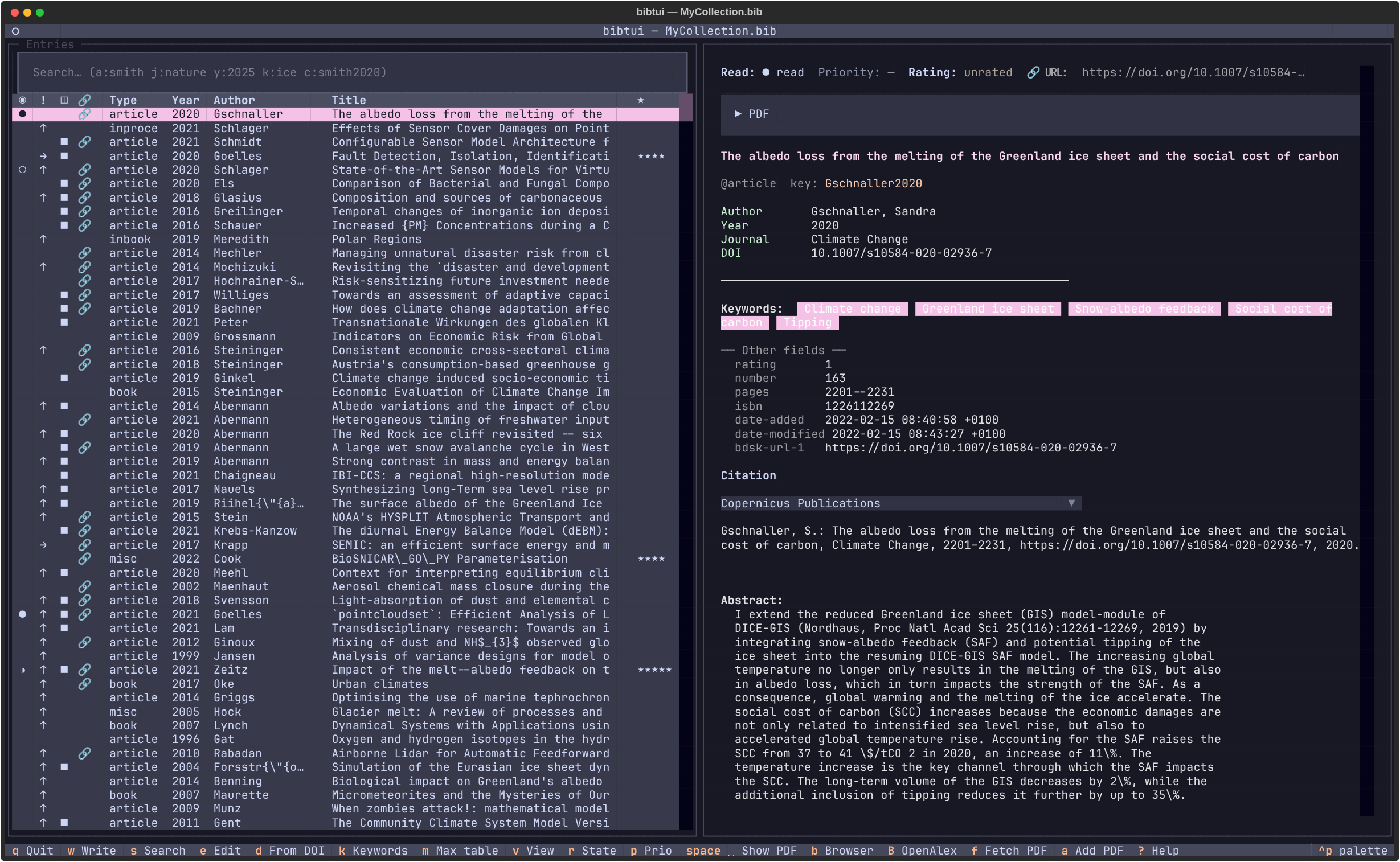
bibtui is a fast, keyboard-driven terminal app for researchers who work with
BibTeX. Open your .bib file, search thousands of references instantly, fetch
open-access PDFs with a single keystroke, and track what you've read — without
leaving the terminal. No database, no sync daemon, no account.
📖 Read the full documentation →
Quick start
# Run without installing — opens the built-in file browser
uvx bibtui

# Or open a specific library directly
uvx bibtui myrefs.bib

# Or install permanently
uv tool install bibtui
What you can do
- Find anything, instantly — search title, author, journal, keywords and
cite key as you type, with field prefixes like
a:,t:,k:,y:. - Download PDFs automatically — one keystroke fetches the open-access PDF from arXiv, Copernicus, OpenAlex or Unpaywall and links it to the entry.
- Import by DOI, PDF, or
.bibfile — paste a DOI, point at a folder of PDFs, or pick a downloaded.bibfile, and the metadata is fetched or parsed for you. - Organise — keywords, read states, priorities and star ratings, all stored
in your
.bibfile. - Collaborate with Git — your library is plain text, so a research group can share and review it like code. Learn how →
- Run anywhere — laptop, SSH, or an HPC cluster. Full Textual theming, keyboard and mouse.
Documentation
| Guide | |
|---|---|
| Installation | Get bibtui running |
| Getting started | The everyday workflow |
| Searching your library | Field prefixes and sorting |
| Fetching PDFs | Automatic open-access downloads |
| Working as a team | Share a library with Git |
| Configuration | Settings, themes, CSL styles |
Contributing
Bug reports, ideas and pull requests are welcome — see the development guide and open an issue.
License
MIT — see LICENSE.
1 maintainer

Metadata
1 maintainer
Release files for bibtui 1.2.0
For a detailed explanation of source distributions (sdists) and built distributions (wheels), please see the package formats documentation.
Source distribution (sdist)
| File | Size | Uploaded | Provenance | Actions |
|---|---|---|---|---|
| bibtui-1.2.0.tar.gz | 146.4 kB | Without provenance | Details for bibtui-1.2.0.tar.gz |
Built distribution (wheel)
| File | Interpreter | ABI | Platform | Actions Reset |
|---|---|---|---|---|
| bibtui-1.2.0-py3-none-any.whl | Python 3 | none | any | Details for bibtui-1.2.0-py3-none-any.whl |
Total release size: 308.9 kB
Release files / bibtui-1.2.0.tar.gz
| Download URL | bibtui-1.2.0.tar.gz |
|---|---|
| Size | 146.4 kB |
| Tags | Source |
|
SHA-256 checksum How to use checksums |
ee2e1d002c16651c6f5f3c37bf4a0f9759be0178ef5a29f7c776d530ddf60ec4
|
|
BLAKE2b-256 checksum How to use checksums |
2abf0e74535c5cf3d43318d5cf87640ca200402f301fed6da2a3dd453171c795
|
| Upload date | |
|
Uploaded using Trusted Publishing? What is trusted publishing? |
Yes |
| Uploaded via |
uv/0.13.6 {"installer":{"name":"uv","version":"0.13.6","subcommand":["publish"]},"python":null,"implementation":{"name":null,"version":null},"distro":{"name":"Ubuntu","version":"26.04","id":"resolute","libc":null},"system":{"name":null,"release":null},"cpu":null,"openssl_version":null,"setuptools_version":null,"rustc_version":null,"ci":true}
|
Release files / bibtui-1.2.0-py3-none-any.whl
| Download URL | bibtui-1.2.0-py3-none-any.whl |
|---|---|
| Size | 162.5 kB |
| Tags | Python 3 |
|
SHA-256 checksum How to use checksums |
f587697590199d7b3ef0372c98fefff3c616a95590046b17266b31e8d4f39c68
|
|
BLAKE2b-256 checksum How to use checksums |
c70de827891e215a09ffc7f3750f1b58e5ea8acacb0c9d5c30b980ae577c9074
|
| Upload date | |
|
Uploaded using Trusted Publishing? What is trusted publishing? |
Yes |
| Uploaded via |
uv/0.13.6 {"installer":{"name":"uv","version":"0.13.6","subcommand":["publish"]},"python":null,"implementation":{"name":null,"version":null},"distro":{"name":"Ubuntu","version":"26.04","id":"resolute","libc":null},"system":{"name":null,"release":null},"cpu":null,"openssl_version":null,"setuptools_version":null,"rustc_version":null,"ci":true}
|
Security for bibtui 1.2.0
Provenance
Provenance describes where a file came from. On PyPI, provenance is shared via attestations, which provide a verifiable record of the build or publishing details. View details, limitations and caveats.
No provenance found
None of the files in this release were uploaded with provenance metadata.
A note on package security
PyPI is a repository for distributing packages, not a service for auditing them. While third-party security researchers and our staff do their best to detect and remove malicious packages, PyPI cannot guarantee the quality, security or suitability of any given package.
To learn more about protecting yourself from malicious actors, visit our package security documentation.














