

BIDS Manager
From raw neuroimaging recordings to a curated, validated BIDS dataset, in one desktop application.




Documentation · Install · Learn step by step · What's new · Cite
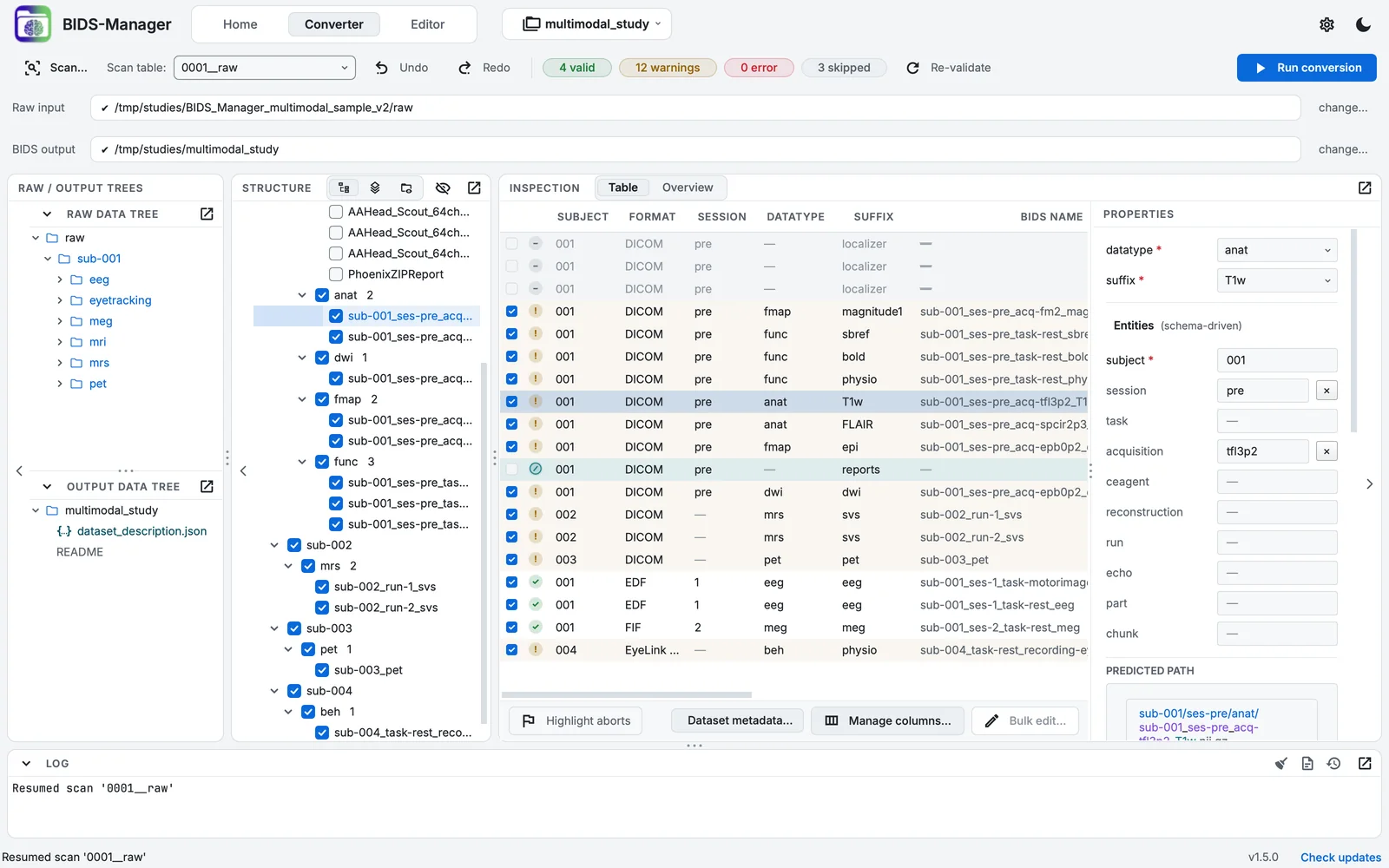
Overview
BIDS Manager prepares neuroimaging data in the Brain Imaging Data Structure (BIDS). It reads raw MRI, MR spectroscopy, PET, EEG, MEG, physiological and eye-tracking recordings, proposes a BIDS name for each one, converts them with the established engines, and then helps you complete, curate, inspect and validate the result.
It is curation software, not only a converter. Every decision is shown and can be changed before anything is written. The metadata a recording cannot carry is asked for by the BIDS schema itself. Every change is recorded, so curation can be resumed weeks later or undone, and the dataset you share is the one you checked.
Highlights
| Area | What it does |
|---|---|
| Scan and review | Reads every file rather than trusting its name, and shows each recording with its proposed BIDS name in an editable table. An overview compares what each subject has, and a preview shows the dataset before anything is converted. |
| Names from acquisition parameters | Names MRI series from how they were acquired (echo, repetition and inversion times, readout, diffusion, phase encoding, contrast agent), with dcm2niix's guess as a second opinion. Every threshold and rule is a setting. |
| Metadata from the standard | Forms generated from the BIDS schema ask for exactly what each file needs, at its real requirement level. Answer once per study and override per recording, or import a lab's own spreadsheet. |
| Safe, incremental conversion | Each subject is converted into a staging folder and committed only when it is complete. Name clashes are caught before writing, and new data can be added to an existing dataset. |
| Curation | Edit sidecars and tables, rename entities, add or remove sessions and delete recordings, with every reference to the files repaired and each change undone in one step. |
| Viewers and quality checks | MRI in planes and 3-D with overlays, PET against real time, MR spectra, EEG, MEG, physiology and eye tracking, with quick quality checks for MRI, EEG and MEG. |
| Privacy | Faces removed at conversion or afterwards, and participant identifiers removed from every sidecar. |
| Validation | Every finding names the schema rule it comes from and opens the field or the cell that needs the fix. |
The interface
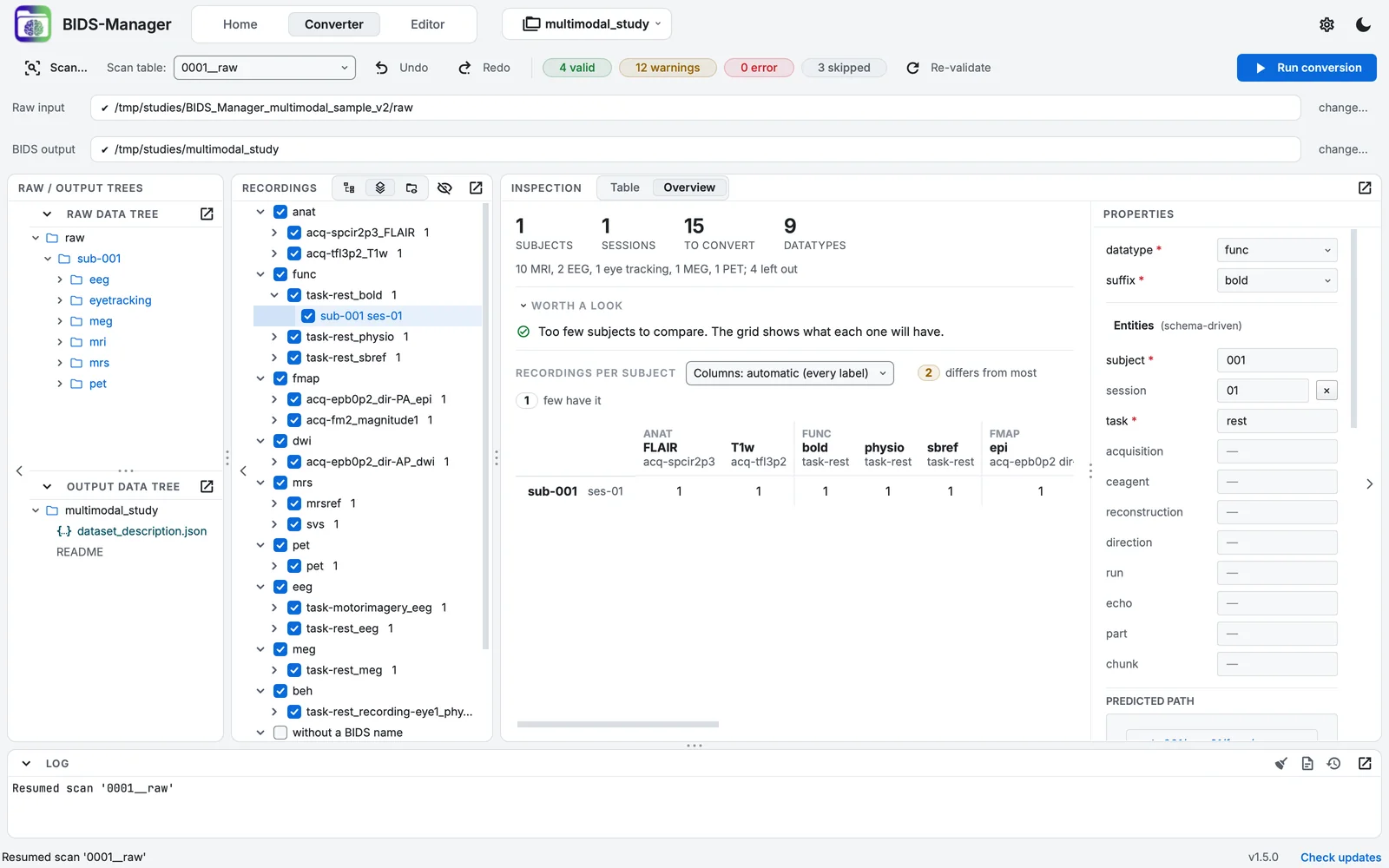
The overview
Headline counts, what is worth a look before converting, and a grid of what each subject has.
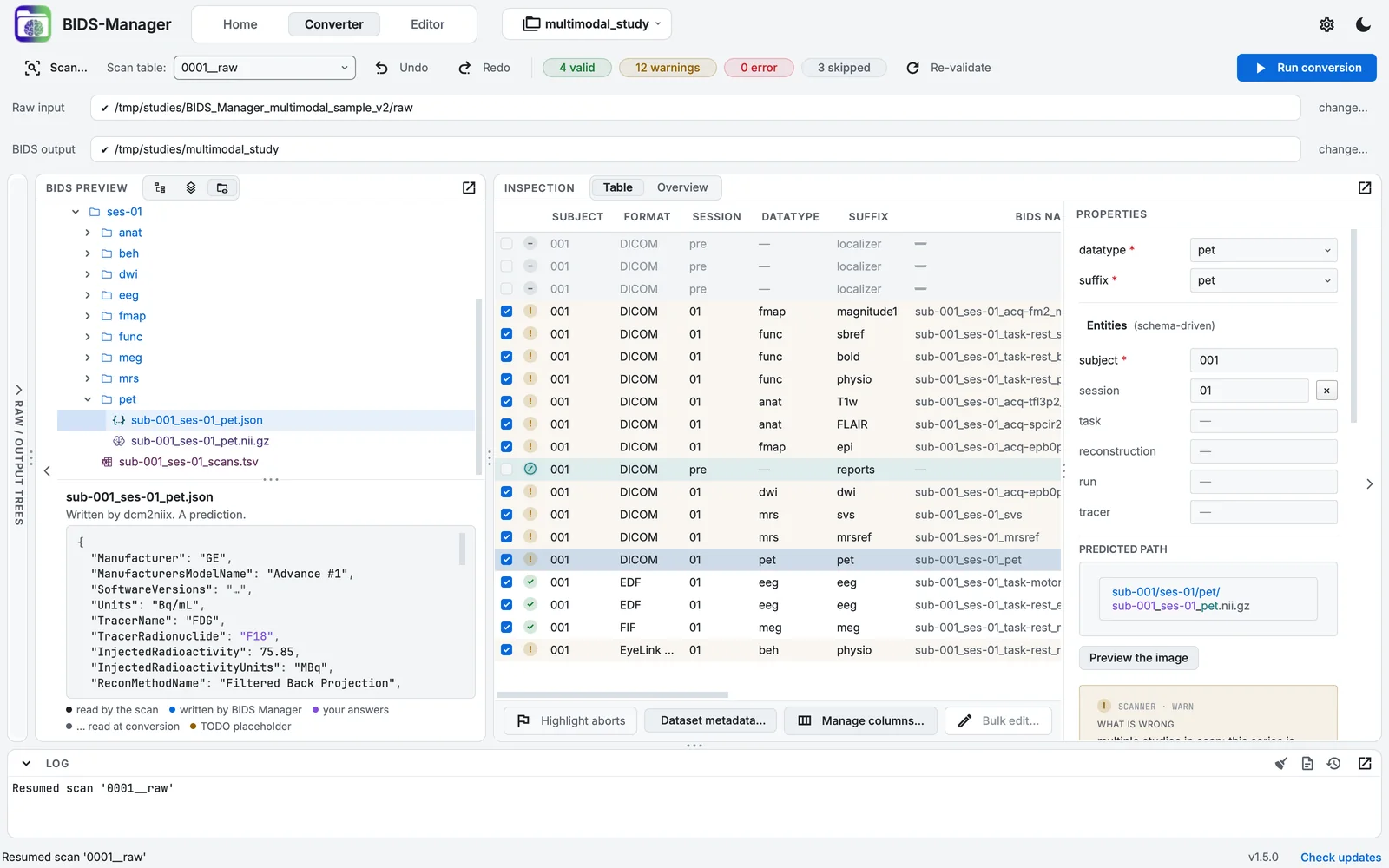
The BIDS preview
Every file the conversion will write, and where each of its values will come from: the scan, BIDS Manager, your answers, or still to answer.
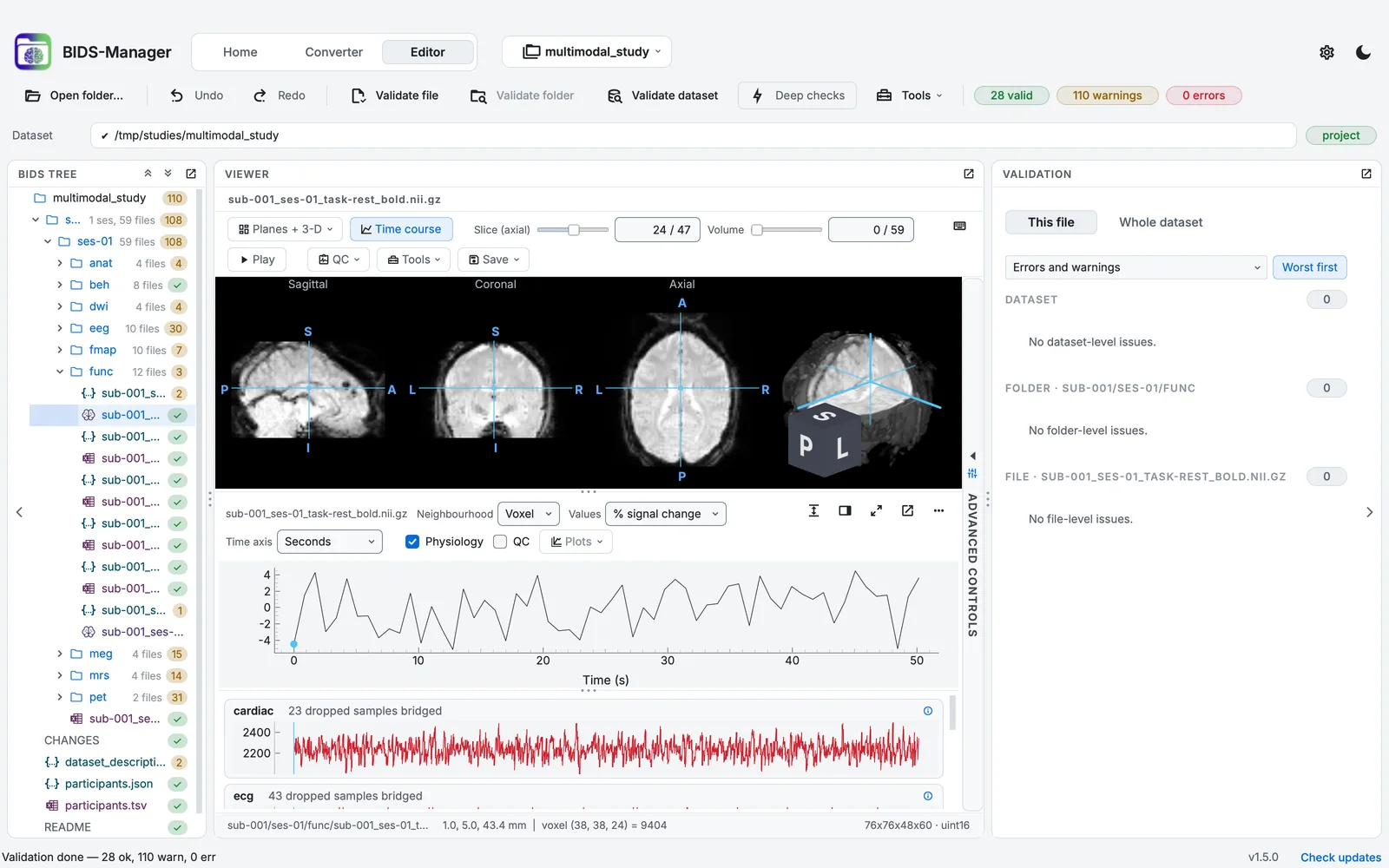
The Editor
The converted dataset as a tree, every recording in its own viewer, and validation beside it.
Supported data
| Data | Read from | Converted with |
|---|---|---|
| MRI | DICOM | dcm2niix |
| MR spectroscopy | DICOM | dcm2niix, written as NIfTI-MRS |
| PET | DICOM, ECAT 7 | dcm2niix, NiBabel |
| PET blood data | PMOD .bld |
PET2BIDS |
| EEG | EDF, BDF, BrainVision, EEGLAB; GDF and EGI MFF, converted to EDF | MNE-BIDS |
| MEG | Elekta and MEGIN FIF, CTF, KIT | MNE-BIDS |
| Physiology | The physiological recordings Siemens scanners store with an MRI run | bidsphysio |
| Eye tracking | EyeLink EDF | eyelinkio |
DICOM and ECAT files are recognised from their contents, not their names. MR spectroscopy, PET and eye tracking follow the latest version of the standard.
How it works
| Step | What happens | |
|---|---|---|
| 1 | Scan | Point BIDS Manager at a folder of raw data, of one kind or of several. |
| 2 | Review | Correct subjects, sessions, tasks and runs in the scan table; the BIDS name follows as you type. |
| 3 | Describe | Answer what the files cannot say: the EEG reference, the tracer and dose, the dataset's authors. |
| 4 | Convert | Each recording goes to the engine made for it; identifiers are removed and, if you choose, faces too. |
| 5 | Curate | Edit the converted dataset, change its shape, and look at every recording. |
| 6 | Validate | Check the dataset against the standard, with a report you can share. |
Every scan is kept as a version of the project and every edit is recorded, so any step can be resumed or undone. A dataset converted elsewhere can be adopted and curated the same way.
Installation
Installer (recommended). The installers for macOS, Windows and Linux download a portable Python, install BIDS Manager in its own environment and add an application launcher, so nothing else needs to be installed first. See Installing.
With pip. BIDS Manager supports Python 3.10 to 3.14:
pip install bids-manager
bidsmgr
Defacing and part of the quality check use niimath, which ships with BIDS
Manager on Python 3.10 to 3.13. It has no build for Python 3.14 yet: there,
defacing needs a niimath binary on the PATH, and the quality check uses its
built-in methods. The installers use Python 3.10.
Command line
Everything the GUI does can be scripted. The commands share the GUI's project, so work started in one continues in the other.
bidsmgr-create   ~/data/my_study
bidsmgr-scan     ~/raw/my_study --project ~/data/my_study
bidsmgr-convert  --project ~/data/my_study
bidsmgr-validate ~/data/my_study --html
| Command | Purpose |
|---|---|
bidsmgr |
Open the GUI |
bidsmgr-create |
Create a dataset and its project |
bidsmgr-adopt |
Manage a dataset converted with another tool |
bidsmgr-scan |
Scan raw data and write the scan table |
bidsmgr-classify |
Name an inventory's MRI series again, from their acquisition parameters |
bidsmgr-rebuild |
Rebuild BIDS names after editing entities |
bidsmgr-convert |
Convert to BIDS |
bidsmgr-metadata |
Write the dataset description, participants, phenotype and missing fields |
bidsmgr-deface |
Remove faces, or keep only the brain as a derivative |
bidsmgr-validate |
Validate a dataset, optionally with an HTML report |
bidsmgr-qc |
Check the quality of anatomical and diffusion images |
bidsmgr-view |
Open an image, a signal or a spectrum, or render one to a file |
bidsmgr-project |
List a project's scan versions |
Every command has --help; the
command reference
lists every option.
Documentation
The documentation has a step-by-step course built on one multimodal sample, guides for each kind of data, sample datasets to download, and a reference for every setting and command.
Privacy
BIDS Manager runs on your computer. It collects no usage data and sends nothing about you or your data anywhere. It uses the network only to install, to check for updates, to download a brain model the first time defacing or the quality check needs one, and to fetch a version of the BIDS schema it does not ship.
Citing
If BIDS Manager helped you prepare a dataset, please cite it, together with the tools your data went through:
López Vilaret, K. M. and Rieger, J. BIDS Manager (version 1.5.1). 2026.
https://github.com/ANCPLabOldenburg/BIDS-Manager
Citing BIDS Manager has a BibTeX entry and the references of the standard and of each engine.
Acknowledgements
BIDS Manager builds on the work of others: the BIDS specification and its schema, dcm2niix, MNE-Python and MNE-BIDS, NiBabel, PET2BIDS, bidsphysio, eyelinkio, pydicom, niimath and brainchop.
Part of the idea of naming MRI series from their acquisition parameters comes from SWIFTCAT, developed by Marta Loureiro, Rita G. Nunes and Rita Reis Nunes (Evolutionary Systems and Biomedical Engineering Lab, LaSEEB, University of Lisbon) and Patricia Clement (Department of Medical Imaging, Ghent University Hospital). BIDS Manager's classifier is its own, early implementation of that idea.
License
BIDS Manager is released under the MIT License. It includes third-party material under its own terms:
bidsmgr/vendor/bidsphysio/: derived from bidsphysio by Pablo Velasco and Chrysa Papadaniil (NYU Center for Brain Imaging), MIT License.bidsmgr/vendor/bidsval/: the schema-driven validator BIDS Manager maintains, MIT License.bidsmgr/vendor/dcm2niix_win/: a Windows build of Chris Rorden's dcm2niix with a larger stack, used only for MR spectroscopy series the released build cannot convert; its licence and build record ship beside it.bidsmgr/qc/templates/: 8-bit copies of the MNI ICBM 152 Nonlinear Asymmetrical template 2009c (Fonov et al.), with the notice its licence requires and a record of the conversion.- The interface typefaces, Inter and JetBrains Mono, under the SIL Open Font License.
bidsmgr/vendor/README.md records what changed in each vendored package.
Authors
Karel López Vilaret and Jochem Rieger, ANCP Lab, Carl von Ossietzky Universität Oldenburg.
Documentation · Release notes · Report a problem · Suggest a feature
1 maintainer

Metadata
1 maintainer
Release files for bids-manager 1.5.1
For a detailed explanation of source distributions (sdists) and built distributions (wheels), please see the package formats documentation.
Source distribution (sdist)
| File | Size | Uploaded | Provenance | Actions |
|---|---|---|---|---|
| bids_manager-1.5.1.tar.gz | 8.8 MB | Without provenance | Details for bids_manager-1.5.1.tar.gz |
Built distribution (wheel)
| File | Interpreter | ABI | Platform | Actions Reset |
|---|---|---|---|---|
| bids_manager-1.5.1-py3-none-any.whl | Python 3 | none | any | Details for bids_manager-1.5.1-py3-none-any.whl |
Total release size: 17.8 MB
Release files / bids_manager-1.5.1.tar.gz
| Download URL | bids_manager-1.5.1.tar.gz |
|---|---|
| Size | 8.8 MB |
| Tags | Source |
|
SHA-256 checksum How to use checksums |
f55ee85a9736e3e91f0ac9a4fae295d7097e866ff4e6f3c4b5fdccc4913d0393
|
|
BLAKE2b-256 checksum How to use checksums |
bbc2ddff406a6e3d978c56961481f387fa48017e767ca0fe2f531b37283b4999
|
| Upload date | |
|
Uploaded using Trusted Publishing? What is trusted publishing? |
No |
| Uploaded via |
twine/7.0.0 CPython/3.10.11
|
Release files / bids_manager-1.5.1-py3-none-any.whl
| Download URL | bids_manager-1.5.1-py3-none-any.whl |
|---|---|
| Size | 9.0 MB |
| Tags | Python 3 |
|
SHA-256 checksum How to use checksums |
6130a6868537dc8f9852bf6f0a5dd4ab1a83e6667e41d603832f0a46ad10913c
|
|
BLAKE2b-256 checksum How to use checksums |
affbba5f8f19b2a05493ea5aa2634397bcaa74b5cfc128154511a5d018a5cbaa
|
| Upload date | |
|
Uploaded using Trusted Publishing? What is trusted publishing? |
No |
| Uploaded via |
twine/7.0.0 CPython/3.10.11
|
Security for bids-manager 1.5.1
Provenance
Provenance describes where a file came from. On PyPI, provenance is shared via attestations, which provide a verifiable record of the build or publishing details. View details, limitations and caveats.
No provenance found
None of the files in this release were uploaded with provenance metadata.
A note on package security
PyPI is a repository for distributing packages, not a service for auditing them. While third-party security researchers and our staff do their best to detect and remove malicious packages, PyPI cannot guarantee the quality, security or suitability of any given package.
To learn more about protecting yourself from malicious actors, visit our package security documentation.














