
bifabrik
Microsoft Fabric ETL toolbox
The library aims to make BI development in Microsoft Fabric easier by providing a fluent API for common ETL tasks.
See the project page for info on all the features and check the changelog to see what's new.
If you find a problem or have a feature request, please submit it here: https://github.com/rjankovic/bifabrik/issues. Thanks!
Quickstart
First, let's install the library. Either add the bifabrik library to an environment in Fabric and attach that environment to your notebook.
Or you can add %pip install bifabrik at the beginning of the notebook.
Import the library
import bifabrik as bif
Also, make sure that your notebook is connected to a lakehouse. This is the lakehouse to which bifabrik will save data by default.
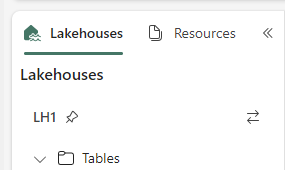
You can also configure it to target different lakehouses.
Load CSV files (JSON is similar)
Simple tasks should be easy.
import bifabrik as bif
bif.fromCsv('Files/CsvFiles/annual-enterprise-survey-2021.csv').toTable('Survey2021').run()
...and the table is in place
display(spark.sql('SELECT * FROM Survey2021'))
Or you can make use of pattern matching
# take all files matching the pattern and concat them
bif.fromCsv('Files/*/annual-enterprise-survey-*.csv').toTable('SurveyAll').run()
These are full loads, overwriting the target table if it exists.
Configure load preferences
Is your CSV is a bit...special? No problem, we'll tend to it.
Let's say you have a European CSV with commas instead of decimal points and semicolons instead of commas as separators.
bif.fromCsv("Files/CsvFiles/dimBranch.csv").delimiter(';').decimal(',').toTable('DimBranch').run()
The backend uses pandas, so you can take advantage of many other options - see help(bif.fromCsv())
Keep the configuration
What, you have more files like that? Well then, you probably don't want to repeat the setup each time. Good news is, the bifabrik object can keep all your preferences:
import bifabrik as bif

# set the configuration
bif.config.csv.delimiter = ';'
bif.config.csv.decimal = ','

# the configuration will be applied to all these loads
bif.fromCsv("Files/CsvFiles/dimBranch.csv").toTable('DimBranch').run()
bif.fromCsv("Files/CsvFiles/dimDepartment.csv").toTable('DimDepartment').run()
bif.fromCsv("Files/CsvFiles/dimDivision.csv").toTable('DimDivision').run()

# (You can still apply configuration in the individual loads, as seen above, to override the general configuration.)
If you want to persist your configuration beyond the PySpark session, you can save it to a JSON file - see Configuration
Consistent configuration is one of the core values of the project.
We like our lakehouses to be uniform in terms of loading patterns, table structures, tracking, etc. At the same time, we want to keep it DRY.
bifabrik configuration aims to cover many aspects of the lakehouse so that you can define your conventions once, use it repeatedly, and override when neccessary.
Spark SQL transformations
Enough with the files! Let's make a simple Spark SQL transformation, writing data to another SQL table - a straightforward full load:
bif.fromSql('''

SELECT Industry_name_NZSIOC AS Industry_Name
,AVG(`Value`) AS AvgValue
FROM LakeHouse1.Survey2021
WHERE Variable_Code = 'H35'
GROUP BY Industry_name_NZSIOC

''').toTable('SurveySummarized').run()

# The resulting table will be saved to the lakehouse attached to your notebook.
# You can refer to a different source warehouse in the query, though.
Data lineage
You can track column-level lineage of your data transformations - see the documentation
More options
bifabrik can help with incremental loads, identity columns (auto-increment), dataframe transformations and more
For example
import bifabrik as bif
from pyspark.sql.functions import col, upper

(
bif
  .fromCsv('CsvFiles/fact_append_*.csv')
  .transformSparkDf(lambda df: df.withColumn('CodeUppercase', upper(col('Code'))))
  .toTable('SnapshotTable1')
  .increment('snapshot')
  .snapshotKeyColumns(['Date', 'Code'])
  .identityColumnPattern('{tablename}ID')
  .run()
)
For more details, see the project page
1 maintainer

Release files for bifabrik 0.15.8
For a detailed explanation of source distributions (sdists) and built distributions (wheels), please see the package formats documentation.
Source distribution (sdist)
| File | Size | Uploaded | |
|---|---|---|---|
| bifabrik-0.15.8.tar.gz | 66.4 kB | Details |
Built distribution (wheel)
| File | Interpreter | ABI | Platform | Reset |
|---|---|---|---|---|
| bifabrik-0.15.8-py3-none-any.whl | Python 3 | none | any | Details |
Total release size: 160.8 kB
Release files / bifabrik-0.15.8.tar.gz
| Download URL | bifabrik-0.15.8.tar.gz |
|---|---|
| Size | 66.4 kB |
| Tags | Source |
|
SHA-256 checksum How to use checksums |
f78d963cf9f8f69e273accb7ee72103ee65491d3f0b528a7c8b04635bd270915
|
|
BLAKE2b-256 checksum How to use checksums |
889e436d48bf9933602dedaf7bd37b7d71e1b76d9371e7cec1a85822e87d45fd
|
| Upload date | |
|
Uploaded using Trusted Publishing? What is trusted publishing? |
No |
| Uploaded via |
twine/6.2.0 CPython/3.9.25
|
Release files / bifabrik-0.15.8-py3-none-any.whl
| Download URL | bifabrik-0.15.8-py3-none-any.whl |
|---|---|
| Size | 94.4 kB |
| Tags | Python 3 |
|
SHA-256 checksum How to use checksums |
4a0c58bbd3922408bd6faf245eac6e4ba6eb11fe8a345ffa09ea9e1f0b0c1d20
|
|
BLAKE2b-256 checksum How to use checksums |
984351a22d6ce14eb6f66b0beb5f080e4ae306fed9fc9191de32f3df25df10ec
|
| Upload date | |
|
Uploaded using Trusted Publishing? What is trusted publishing? |
No |
| Uploaded via |
twine/6.2.0 CPython/3.9.25
|














