
bili-dl
B 站视频、音频、字幕与评论下载工具。支持 Windows、macOS、Linux,提供中文交互菜单和命令行两种用法。


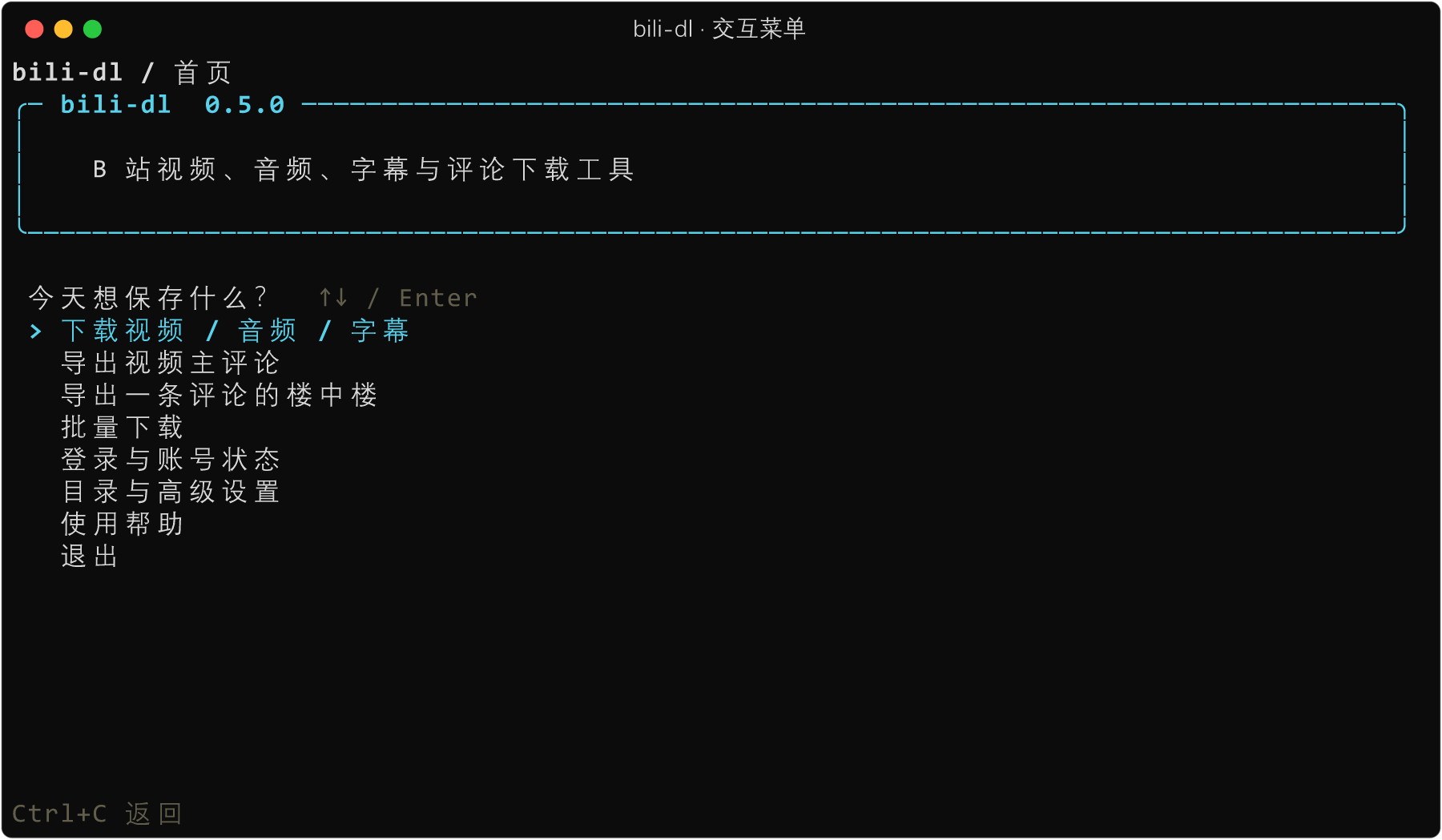
运行 bili-dl 打开菜单。选择任务、粘贴链接、确认设置,即可开始;也可直接用命令行执行。
安装 · 快速上手 · 常用命令 · 文件与配置 · 详细使用说明
能做什么
| 内容 | 保存结果 | 特点 |
|---|---|---|
| 视频 | 带声音的视频 | 按账号权限获取可用画质;可额外提取独立音频 |
| 音频 | 优先 M4A | 有 ffmpeg 时无损整理容器,改善 foobar2000 等播放器的起播体验 |
| 字幕 | 带时间戳的 SRT | 直接获取已有字幕,无需下载视频 |
| 主评论 / 楼中楼 | UTF-8 JSON | 主评论可排序;支持数量上限与精简 / 原始字段 |
交互操作覆盖下载、评论、批量任务、登录和设置。页面随终端尺寸重排,执行前展示任务摘要;批量失败时可只重试失败项。
扫码登录通过 B 站 App 建立独立会话,下载前按需检查续期。音视频下载保留 yt-dlp 原生进度,显示下载速度和剩余时间。
安装
需要 Python 3.11+。使用已安装的 pipx 安装到独立环境:
pipx install bili-dl
bili-dl -V
没有 pipx 时,可在自己的 Python 虚拟环境中运行 python -m pip install bili-dl。
下载音视频还需要 PATH 中的 yt-dlp;ffmpeg 用于合并、提取独立音频和无损容器修复:
pipx install yt-dlp
如果使用 Python 虚拟环境,改用 python -m pip install -U yt-dlp。
| 系统 | 安装 ffmpeg |
|---|---|
| Windows | winget install ffmpeg |
| macOS | brew install ffmpeg |
| Debian / Ubuntu | sudo apt install ffmpeg |
字幕、评论、扫码登录和账号状态查询仅需安装 bili-dl。
快速上手
1. 打开交互菜单
bili-dl
选择“登录与账号状态 → 扫码登录”,用 B 站 App 扫码并确认。也可直接运行 bili-dl login。会话保存后可供后续任务复用。
2. 选择要保存的内容
在首页选择下载、主评论、楼中楼或批量任务。交互界面支持视频链接、BV / AV 号及分享文本;楼中楼需要主评论的 rpid_str。
3. 确认任务并开始
开始前可检查保存内容、目录和网络设置。执行结束后显示结果文件;下载中按 Ctrl+C 取消并返回首页,在首页按 Ctrl+C 退出。
方向键选择,Enter 确认;小窗口中可用 PgUp / PgDn 查看较长内容。设置默认只影响当前会话,需主动导出配置才能在下次启动时复用。
常用命令
下面的 URL 替换为视频链接。命令行同样复用登录状态与配置。
| 任务 | 命令 |
|---|---|
| 视频 + 独立音频(内置默认) | bili-dl URL |
| 仅视频,保留声音 | bili-dl -v URL |
| 仅音频 | bili-dl -a URL |
| 仅字幕 | bili-dl -s URL |
| 最多 100 条主评论 | bili-dl comments URL --limit 100 |
| 热门主评论 | bili-dl comments URL --sort hot |
| 一条主评论及其楼中楼 | bili-dl replies URL ROOT_ID |
| 批量下载 | bili-dl --batch-file urls.txt |
| 查询登录与续期状态 | bili-dl --status |
批量文件使用 UTF-8,每行一个链接;空行和 # 注释会被跳过。任务顺序执行。
bili-dl --help
bili-dl login --help
bili-dl comments --help
bili-dl replies --help
文件与配置
视频、字幕和评论共用输出目录,音频使用独立目录:
| 系统 | 视频 / 字幕 / 评论 | 音频 |
|---|---|---|
| Windows | %USERPROFILE%\Videos\bilibili_videos |
%USERPROFILE%\Music\bilibili_audio |
| macOS | ~/Movies/bilibili_videos |
~/Music/bilibili_audio |
| Linux | $XDG_DOWNLOAD_DIR/bilibili_videos |
$XDG_DOWNLOAD_DIR/bilibili_audio |
Linux 未设置 XDG_DOWNLOAD_DIR 时使用 ~/Downloads。用 --output-dir DIR 和 --audio-dir DIR 覆盖目录,或在交互菜单中调整。
config.toml 可保存默认模式、目录和代理;命令行参数 > 配置文件 > 内置默认值。代理未配置时再读取环境变量,--proxy "" 明确直连。
配置文件需自行创建,或从交互菜单导出为新文件;已有文件不会被导出操作覆盖。配置位置、会话文件和完整示例见目录与配置。
使用前了解
- 画质受账号权限和 B 站接口限制;媒体模式按单个视频处理,不自动遍历合集、收藏夹或全部分 P。
- 字幕只取接口返回的第一条已有轨道,支持
?p=N指定分 P;不进行语音识别。 - 评论是当前账号可见的实时快照,数量可能变化;楼中楼上限包含主评论本身,暂不支持续传。
- 扫码会话可能失效,失效后需重新登录。导入 Cookie 时仅提取 B 站条目;扫码登录不访问浏览器资料,无遥测。
- 开启 Windows“受控文件夹访问”后,ffmpeg 写入视频或音乐目录可能被拦截,处理方法见常见问题。
文档与反馈
本项目使用 MIT 许可证。yt-dlp 与 ffmpeg 需单独安装,使用各自的许可证。
1 maintainer

Metadata
1 maintainer
Release files for bili-dl 0.5.0
For a detailed explanation of source distributions (sdists) and built distributions (wheels), please see the package formats documentation.
Source distribution (sdist)
| File | Size | Uploaded | Provenance | |
|---|---|---|---|---|
| bili_dl-0.5.0.tar.gz | 245.0 kB | With provenance | Details |
Built distribution (wheel)
| File | Interpreter | ABI | Platform | Reset |
|---|---|---|---|---|
| bili_dl-0.5.0-py3-none-any.whl | Python 3 | none | any | Details |
Total release size: 321.6 kB
Release files / bili_dl-0.5.0.tar.gz
| Download URL | bili_dl-0.5.0.tar.gz |
|---|---|
| Size | 245.0 kB |
| Tags | Source |
|
SHA-256 checksum How to use checksums |
68b8d221a9c87a83c5f763815b143351df48a1feac297f8ee63e46ade6c783c9
|
|
BLAKE2b-256 checksum How to use checksums |
83d674b53780b435441164ea91c8a0775dc7cb336460131fbc8cc21276a13248
|
| Upload date | |
|
Uploaded using Trusted Publishing? What is trusted publishing? |
Yes |
| Uploaded via |
twine/7.0.0 CPython/3.13.14
|
Provenance
Provenance describes where a file came from. On PyPI, provenance is shared via attestations, which provide a verifiable record of the build or publishing details. View details, limitations and caveats.


PyPI Publish Attestation
PyPI verified that this artifact, at this checksum, originated from the publisher listed below.
Signed by GitHub Actions, verified by PyPI on Oct 20, 2026.
Transparency logRelease files / bili_dl-0.5.0-py3-none-any.whl
| Download URL | bili_dl-0.5.0-py3-none-any.whl |
|---|---|
| Size | 76.5 kB |
| Tags | Python 3 |
|
SHA-256 checksum How to use checksums |
fc12d2434e0b82f5d7ee91fd9fa215bb737a87e0733e842d0a82068b32bdf34d
|
|
BLAKE2b-256 checksum How to use checksums |
89bac59c4ab81bc797f1d0233a06a541dd8a042a10044f28f7b5ce2875cfb0b7
|
| Upload date | |
|
Uploaded using Trusted Publishing? What is trusted publishing? |
Yes |
| Uploaded via |
twine/7.0.0 CPython/3.13.14
|
Provenance
Provenance describes where a file came from. On PyPI, provenance is shared via attestations, which provide a verifiable record of the build or publishing details. View details, limitations and caveats.
PyPI Publish Attestation
PyPI verified that this artifact, at this checksum, originated from the publisher listed below.
Signed by GitHub Actions, verified by PyPI on Oct 20, 2026.
Transparency logSecurity for bili-dl 0.5.0
Provenance
Provenance describes where a file came from. On PyPI, provenance is shared via attestations, which provide a verifiable record of the build or publishing details. View details, limitations and caveats.
Full provenance
All 2 files in this release have been uploaded with provenance metadata.
Attestation for bili_dl-0.5.0.tar.gz
PyPI Publish Attestation
PyPI verified that this artifact, at this checksum, originated from the publisher listed below.
Signed by GitHub Actions, verified by PyPI on Oct 20, 2026.
Transparency logA note on package security
PyPI is a repository for distributing packages, not a service for auditing them. While third-party security researchers and our staff do their best to detect and remove malicious packages, PyPI cannot guarantee the quality, security or suitability of any given package.














