

Bilinc





Hosted memory for AI agents. Save what your agents learn, recall it before they act, see who wrote each memory and what changed, and roll back when a run goes wrong.
The bilinc package on PyPI is the Python SDK, the bilinc CLI and the stdio MCP adapter for Bilinc Cloud. Its source is ReARCLabs/bilinc; the hosted service is not part of the package.
Start in 60 seconds
Claude, ChatGPT or Codex, without Python. In Claude, open Customize → Connectors → Add custom connector, name it Bilinc and paste https://mcp.bilinc.space/mcp. Sign in and choose read-only or read and write. In Claude Code:
claude mcp add --transport http --scope user bilinc https://mcp.bilinc.space/mcp
The same address works in ChatGPT and Codex: remote MCP guide.
Python, the CLI or any MCP client.
pip install -U bilinc
bilinc login        # browser sign-in, free, no card required
bilinc quicktest    # one hosted commit, one recall and a status check
bilinc login saves an API key for this computer with owner-only permissions; the key never appears in a URL or your terminal. Without a browser, use bilinc login --device. For CI and scripts, set BILINC_API_KEY.
Where Bilinc sits
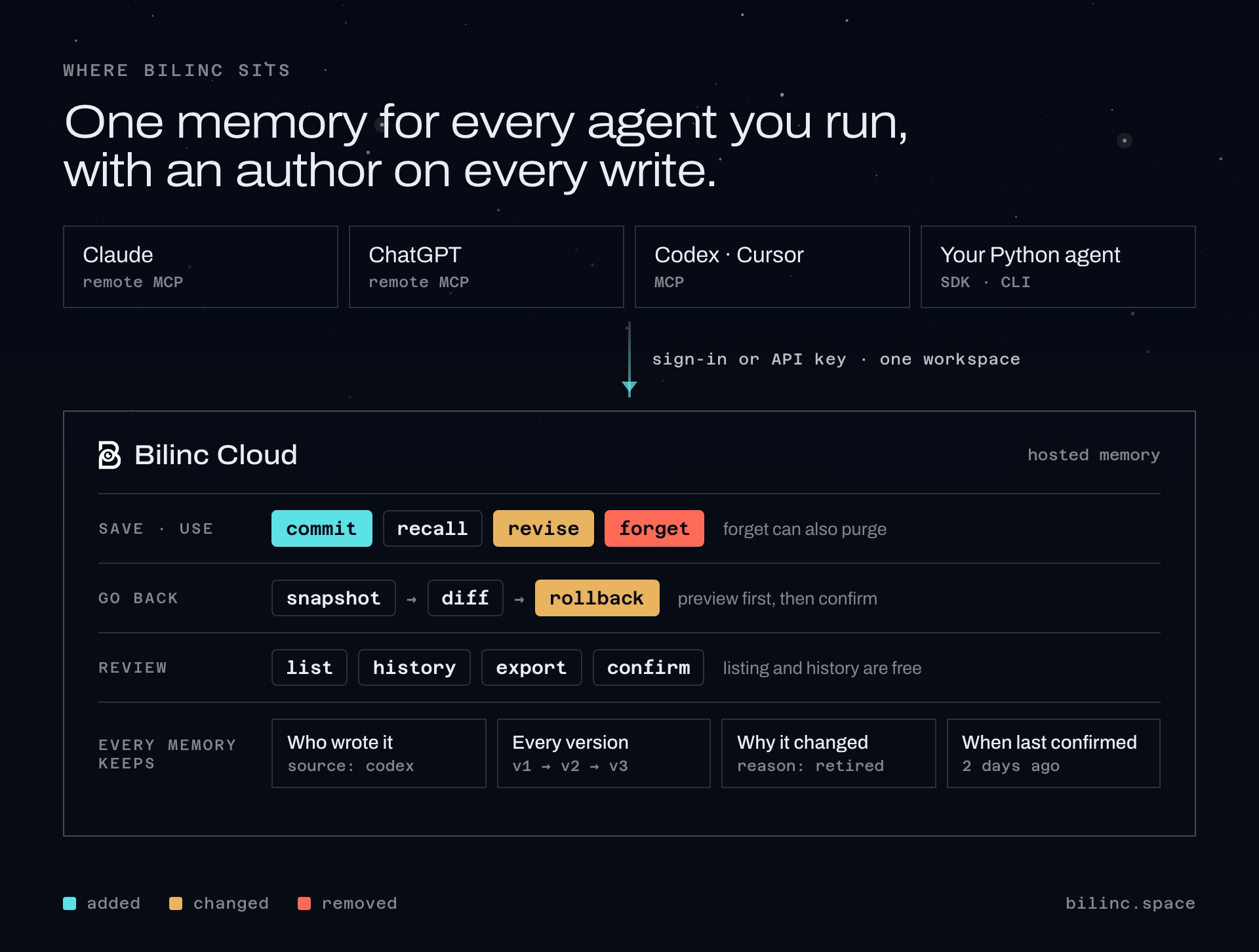
Every write records where it came from and returns a version you can pass back, so a change is refused if the memory moved since you read it. Forget requires a reason and revise accepts one. In the remote connector, recall shows when each memory was last confirmed and marks entries past their review window as possibly outdated; nothing is hidden or deleted by that check.
Similar is not the same as current
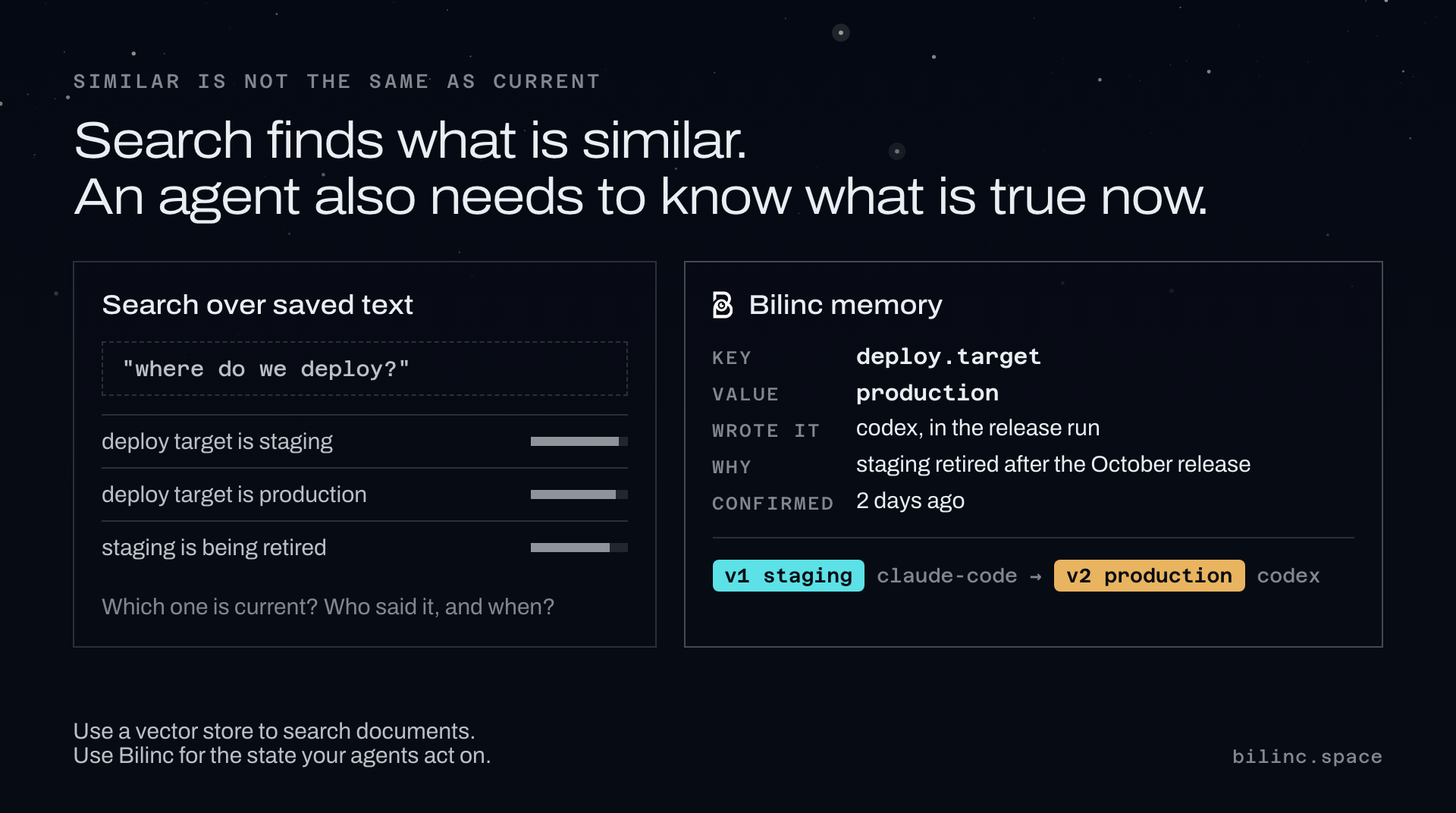
Use Bilinc when:
- a long-running agent (coding, support, research, a personal assistant) needs earlier decisions before a risky action;
- you need to know which run, tool or person wrote a piece of agent state;
- a bad run wrote wrong state and you need a way back, not a manual cleanup;
- several agents or teammates share one memory and you want per-key access and visible usage.
Reach for something else when you only need semantic search over documents (a vector database is the simpler tool), when you need an Apache-2.0, fully self-hosted runtime (this package is cloud-only and BUSL-1.1), or when you want the memory layer to also be your agent framework.
Python SDK
from bilinc import CloudClient

client = CloudClient()  # reads BILINC_API_KEY or the key saved by `bilinc login`

# Write, and keep the version for optimistic concurrency.
written = client.commit("agent.goal", {"ship": "reliable memory"}, memory_type="semantic")
results = client.recall("agent goal", limit=5)

# Correct something you already know. Fails if the key does not exist.
client.revise("agent.goal", {"ship": "verifiable memory"},
              reason="scope corrected", expected_version=written["entryVersion"])

# Checkpoint before risky work, then see what changed.
snapshot = client.create_snapshot(label="before-autonomous-run")["snapshot"]
client.diff(snapshot["id"])

# Recover. The preview is free; executing needs its token.
preview = client.rollback_preview(snapshot["id"], reason="undo bad agent run")
client.rollback(snapshot["id"], confirmation_token=preview["confirmationToken"],
                reason="undo bad agent run")

# Review what is stored. Listing, history and export are free reads.
for entry in client.iter_memories(prefix="agent."):
    print(entry["key"], entry["updatedAt"])
client.history("agent.goal")
client.confirm("agent.goal")   # still accurate; costs one write

# Take a memory out of use. A reason is required and recorded.
client.forget("agent.goal", reason="superseded by the planner service")
CLI
bilinc status                          # plan, capabilities, limits, usage
bilinc commit --key agent.goal --value '{"ship":"reliable memory"}'
bilinc recall --query "agent goal"
bilinc revise --key agent.goal --value '{"ship":"verifiable memory"}' --reason "scope corrected"
bilinc list --prefix agent.            # keys, types, update times, value previews
bilinc history agent.goal              # recorded changes, newest first
bilinc snapshot create --label before-autonomous-run
bilinc diff --from-snapshot snap_...
bilinc export -o bilinc-export.json    # full values; the file is readable only by you
bilinc forget --key agent.goal --reason "superseded by the planner service"
Rollback is two steps, and execute never prompts, so it is safe in automation:
bilinc rollback preview --snapshot snap_... --reason "undo bad agent run"
bilinc rollback execute --snapshot snap_... --reason "undo bad agent run" \
  --confirmation-token <token-from-preview>
MCP adapter
The stdio adapter works with any MCP client: Claude Code, Codex, Cursor, Hermes Agent, opencode and others. After bilinc login, let the CLI write the setup:
bilinc mcp install --client claude-code     # prints a ready `claude mcp add ...` command
bilinc mcp install --client claude-desktop  # prints the config and where Claude Desktop keeps it
bilinc mcp install                          # plain mcpServers JSON for any other client
The config carries no key; the adapter reads the one bilinc login saved. On a machine without one, add "env": { "BILINC_API_KEY": "..." }.
| Tool | What it does |
|---|---|
commit_mem |
Save durable state with its source; returns a version. |
recall |
Find earlier context and decisions before acting. |
revise |
Correct an existing memory. It never creates one. |
forget |
Take a memory out of use. Destructive; a reason is required. |
status |
Workspace, plan, capabilities, limits and usage. Never billed. |
snapshot |
Save a checkpoint before risky work, or list checkpoints. |
diff |
Compare a checkpoint with another one or with now. |
rollback |
Restore a checkpoint: a free preview, then a confirmed execute. |
list_memories |
Browse what is stored. Free. |
history |
One memory's changes, newest first. Free. |
confirm |
Record that a memory is still accurate. One write. |
The remote connector at https://mcp.bilinc.space/mcp has ten tools; a read-only connection lists only the four read tools. Client guides: Claude Code · Codex · Cursor · any MCP client.
Forget and purge
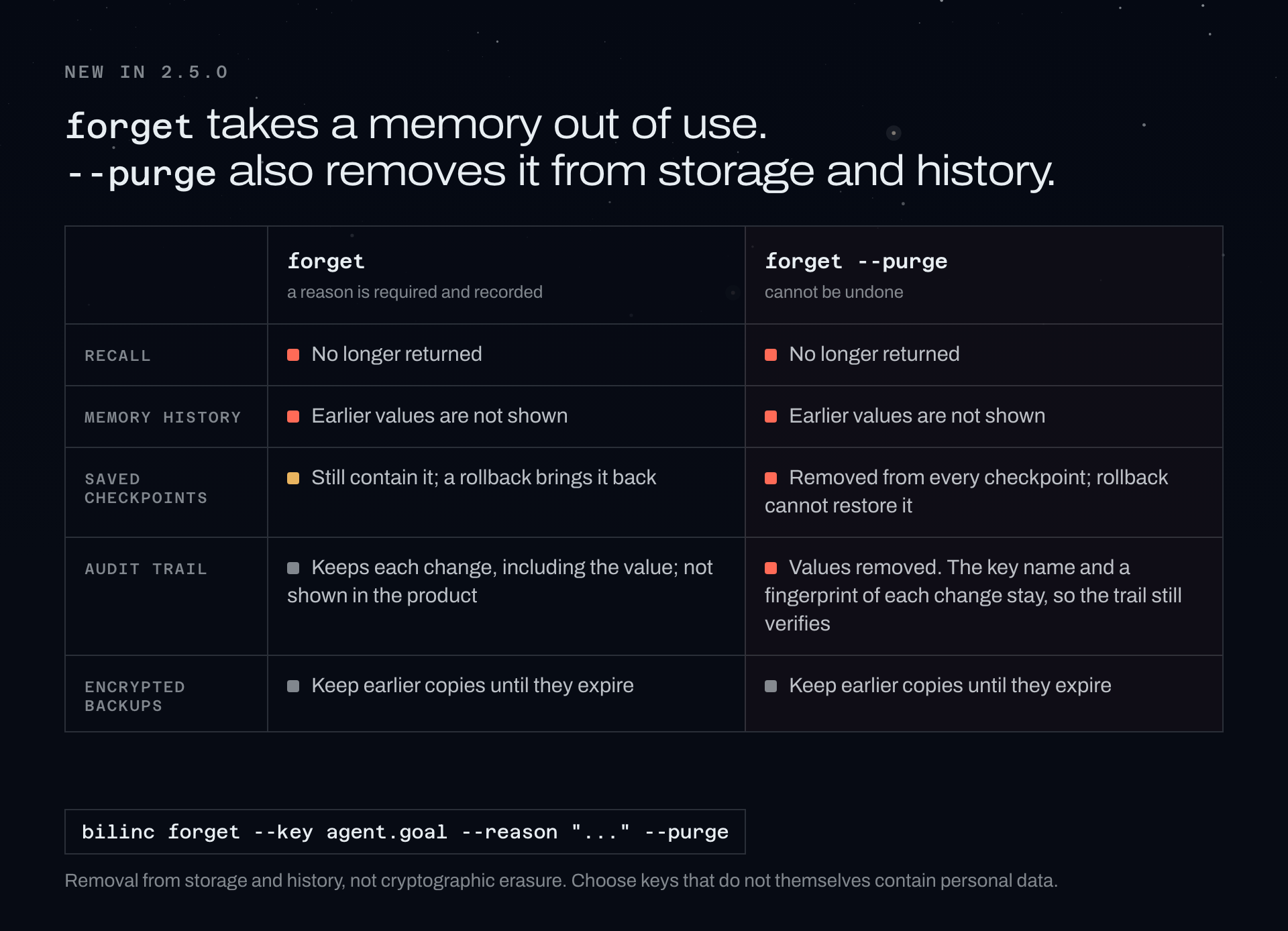
Since 2.5.0: client.forget(key, reason=..., purge=True), bilinc forget --key ... --reason ... --purge, or "purge": true in the REST API also removes the memory's stored content from storage and history. It works on a memory you forgot earlier and cannot be undone. See the privacy policy for what is kept and for how long.
Hosted API
All endpoints live under https://bilinc.space. Memory operations need an API key and an active Bilinc Cloud plan; the free plan needs no card.
| Endpoint | Notes |
|---|---|
GET /api/cloud/health |
Public service health. No key, never billed. |
GET /api/cloud/status |
What one key can do. Never billed. |
POST /api/cloud/memory/commit · recall · revise |
Write, read, correct. |
POST /api/cloud/memory/forget |
Destructive. Reason required; "purge": true also removes stored content. |
GET · POST /api/cloud/memory/snapshots |
List (free) or create checkpoints. |
POST /api/cloud/memory/diff |
Compare checkpoints. Free. |
POST /api/cloud/memory/rollback/preview |
Free. Returns a confirmation token. |
POST /api/cloud/memory/rollback |
Destructive. Requires that token. |
Send an Idempotency-Key header on any write you might retry: the same key with the same payload replays the original result and is billed once; a different payload is refused with 409 idempotency_conflict. Saves that contain a credential, such as an API key, token or private key, are refused with secret_detected and the value is never echoed back.
What's new in 2.6.0
- Sorted lists: list memories newest or oldest first, and filter them by which app saved them, from the SDK, the CLI, the
bilincMCP adapter and the dashboard. - Turkish search: hosted search ignores case, Turkish dotted and dotless I, and diacritics, so
girisimcifindsGirişimci. - Clearer write results: when a credential-looking field is stored redacted, the response says which field.
- Purge from the MCP adapter: the
bilincstdio MCP adapter'sforgettool takespurge.
Every release: changelog.
Links
- bilinc.space · Docs · Install guide · Pricing (free plan, no card) · Changelog · Trust
- Compare: vector memory · Mem0 · Zep · Letta
- Guides: What is AI agent memory? · Rolling back an agent memory write · Auditing what an agent remembered
- For machines: llms.txt · ai-index.json
Feedback and security
Questions, bugs and ideas: GitHub Issues. Report security issues privately to bilincsupport@rearclabs.com (see security.txt). Please keep memory values, API keys and production logs out of issues and screenshots.
License
Business Source License 1.1, licensed by ReARC Labs Inc. See LICENSE.
1 maintainer

Metadata
1 maintainer
Release files for bilinc 2.6.0
For a detailed explanation of source distributions (sdists) and built distributions (wheels), please see the package formats documentation.
Source distribution (sdist)
| File | Size | Uploaded | Provenance | |
|---|---|---|---|---|
| bilinc-2.6.0.tar.gz | 41.2 kB | Without provenance | Details |
Built distribution (wheel)
| File | Interpreter | ABI | Platform | Reset |
|---|---|---|---|---|
| bilinc-2.6.0-py3-none-any.whl | Python 3 | none | any | Details |
Total release size: 75.8 kB
Release files / bilinc-2.6.0.tar.gz
| Download URL | bilinc-2.6.0.tar.gz |
|---|---|
| Size | 41.2 kB |
| Tags | Source |
|
SHA-256 checksum How to use checksums |
7122ecd01c8232dc4f9ea3762a7d19c1671ca07652906c4240dc2f5ed2471823
|
|
BLAKE2b-256 checksum How to use checksums |
6ff6590170f1ae60aed0d06cd07621390978e5198ea70db5697e3ecaa563538b
|
| Upload date | |
|
Uploaded using Trusted Publishing? What is trusted publishing? |
No |
| Uploaded via |
twine/7.0.0 CPython/3.11.7
|
Release files / bilinc-2.6.0-py3-none-any.whl
| Download URL | bilinc-2.6.0-py3-none-any.whl |
|---|---|
| Size | 34.6 kB |
| Tags | Python 3 |
|
SHA-256 checksum How to use checksums |
203ee9e0e03004ad638fab43fa7785bb2b385f10a30d07f8f7c309f6c82476ae
|
|
BLAKE2b-256 checksum How to use checksums |
dbb940b1377fcc9a3f07b1d9182d5dc7e942e873ece373bf3817a644b6bc61af
|
| Upload date | |
|
Uploaded using Trusted Publishing? What is trusted publishing? |
No |
| Uploaded via |
twine/7.0.0 CPython/3.11.7
|
Security for bilinc 2.6.0
Provenance
Provenance describes where a file came from. On PyPI, provenance is shared via attestations, which provide a verifiable record of the build or publishing details. View details, limitations and caveats.
No provenance found
None of the files in this release were uploaded with provenance metadata.
A note on package security
PyPI is a repository for distributing packages, not a service for auditing them. While third-party security researchers and our staff do their best to detect and remove malicious packages, PyPI cannot guarantee the quality, security or suitability of any given package.














