
The Python toolkit package and cli designed for interaction with Bilibili

Project description
bilitool
简体中文 | English
欢迎使用,欢迎提供更多反馈,欢迎 PR 贡献此项目。
bilitool 是一个 python 的工具库,实现持久化登录,下载视频,上传视频到 bilibili 等功能,可以使用命令行 cli 操作,也可以作为其他项目的库使用。
功能
login记忆存储登录状态- 支持导出
cookies.json用于其他项目
- 支持导出
logout退出登录check检查登录状态upload上传视频- 支持多种自定义参数上传
- 支持上传视频的 yaml 配置与解析
download下载视频- 支持下载弹幕
- 支持下载多种画质
- 支持下载多 p 视频
ip显示请求 IP 地址- 支持查询指定 IP 地址
list查询账号过往投稿视频状态- 若视频审核未通过,同时会显示原因
- 显示已发布的视频信息(预计支持)
- 显示上传进度(正在开发)
- 追加视频到已有的视频(正在开发)
使用方法
安装
推荐 Python 版本 >= 3.10.
pip install bilitool
或者你也可以下载编译好的 cli 工具直接运行 下载地址。
帮助信息:
usage: bilitool [-h] [-V] {login,logout,upload,check,download,list,ip} ...

The Python toolkit package and cli designed for interaction with Bilibili

positional arguments:
  {login,logout,upload,check,download,list,ip}
                        Subcommands
    login               Login and save the cookie
    logout              Logout the current account
    upload              Upload the video
    check               Check if the user is logged in
    download            Download the video
    list                Get the uploaded video list
    ip                  Get the ip info

options:
  -h, --help            show this help message and exit
  -V, --version         Print version information
登录
bilitool login
然后你可以扫描二维码或点击链接登录,如果输入命令时加上 --export 参数,则会导出 cookie.json 文件到当前目录(cookie.json 文件可以用于其他项目)。
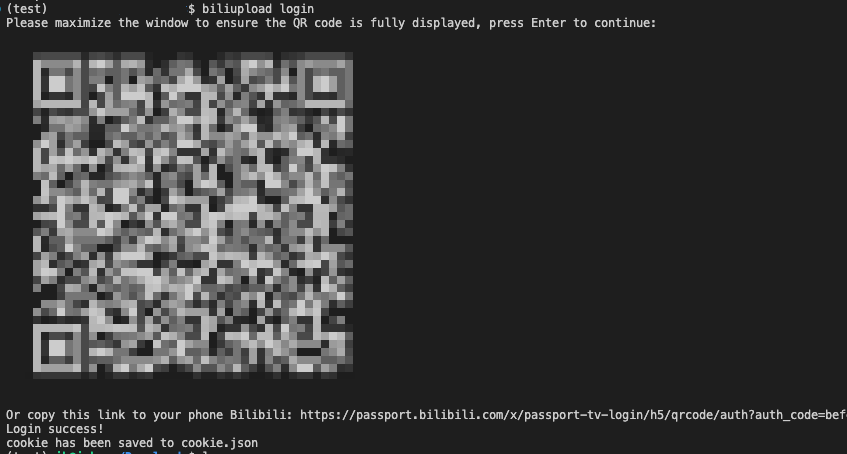
bilitool login -h 打印帮助信息:
usage: bilitool login [-h] [--export]

options:
  -h, --help  show this help message and exit
  --export    (default is false) export the login cookie file
检查登录状态
检查当前登录的账号名称
bilitool check
退出登录
退出登录后,同时会使
cookies.json文件失效(如果登录时使用了--export参数导出了 cookies)。
bilitool logout
上传
注意:上传功能需要先登录,登录后会记忆登录状态,下次上传时不需要再次登录。
bilitool upload -h 打印帮助信息:
usage: bilitool upload [-h] [-y YAML] [--copyright COPYRIGHT] [--title TITLE] [--desc DESC] [--tid TID] [--tag TAG] [--line LINE] [--source SOURCE] [--cover COVER]
                         [--dynamic DYNAMIC]
                         video_path

positional arguments:
  video_path            (required) the path to video file

options:
  -h, --help            show this help message and exit
  -y YAML, --yaml YAML  The path to yaml file(if yaml file is provided, the arguments below will be ignored)
  --copyright COPYRIGHT
                        (default is 2) 1 for original, 2 for reprint
  --title TITLE         (default is video name) The title of video
  --desc DESC           (default is empty) The description of video
  --tid TID             (default is 138) For more info to the type id, refer to https://biliup.github.io/tid-ref.html
  --tag TAG             (default is bilitool) video tags, separated by comma
  --line LINE           (default is bda2) line refer to https://biliup.github.io/upload-systems-analysis.html
  --source SOURCE       (default is 来源于网络) The source of video (if your video is re-print)
  --cover COVER         (default is empty) The cover of video (if you want to customize, set it as the path to your cover image)
  --dynamic DYNAMIC     (default is empty) The dynamic information
示例:
你可以参考 template/example-config.yaml 了解更多的 yaml 模板。
# 视频路径是必需的
bilitool upload /path/to/your/video.mp4

# 使用命令行参数上传视频
bilitool upload /path/to/your/video.mp4 --title "test" --desc "test" --tid 138 --tag "test" --line bda2

# 使用 yaml 配置上传视频
bilitool upload /path/to/your/video.mp4 -y /path/to/your/upload/template.yaml
下载
注意:如果要下载高清以上画质的视频,需要先登录才能获取下载。
bilitool download -h 打印帮助信息:
usage: bilitool download [-h] [--danmaku] [--quality QUALITY] [--chunksize CHUNKSIZE] [--multiple] bvid

positional arguments:
  bvid                  (required) the bvid of video

options:
  -h, --help            show this help message and exit
  --danmaku             (default is false) download the danmaku of video
  --quality QUALITY     (default is 64) the resolution of video
  --chunksize CHUNKSIZE
                        (default is 1024) the chunk size of video
  --multiple            (default is false) download the multiple videos if have set
示例:
# 下载序号为 bvid 的视频,并下载弹幕,设置画质为 1080p 高清,分段大小为 1024,如果有多 p,则一次性下载所有视频
bilitool download bvid --danmaku --quality 80 --chunksize 1024 --multiple
查询近期投稿视频状态
bilitool list -h 打印帮助信息:
usage: bilitool list [-h] [--size SIZE] [--status STATUS]

options:
  -h, --help       show this help message and exit
  --size SIZE      (default is 20) the size of video list
  --status STATUS  (default is all) the status of video list: pubed, not_pubed, is_pubing
示例:
# 默认显示近期所有投稿的 20 条视频信息
bilitool list
# 查询近期投稿审核未通过的 10 条视频
bilitool list --size 10 --status not_pubed
查询 IP 地址
bilitool ip -h 打印帮助信息:
usage: bilitool ip [-h] [--ip IP]

options:
  -h, --help  show this help message and exit
  --ip IP     the ip address you want to query
示例:
bilitool ip
bilitool ip --ip 8.8.8.8
# IP: 8.8.8.8, ISP: level3.com, Location: GOOGLE.COMGOOGLE.COM, Position: ,
Acknowledgments
- 感谢 bilibili-API-collect 提供的 API 集合。
- 感谢 biliup-rs 提供的方向。


Download files
Download the file for your platform. If you're not sure which to choose, learn more about installing packages.
Source Distribution
Built Distribution
Filter files by name, interpreter, ABI, and platform.
If you're not sure about the file name format, learn more about wheel file names.
Copy a direct link to the current filters
File details
Details for the file bilitool-0.1.0.tar.gz.
File metadata
- Download URL: bilitool-0.1.0.tar.gz
- Upload date:
- Size: 19.7 kB
- Tags: Source
- Uploaded using Trusted Publishing? No
- Uploaded via: twine/6.0.1 CPython/3.10.16
File hashes
| Algorithm | Hash digest | |
|---|---|---|
| SHA256 |
c4d2b89f9deeef2e2633f5646f9a8bcb13030281f3b391d63be41e082f1e3cb8
|
|
| MD5 |
7bd6bac0aca67793582b852a790840a2
|
|
| BLAKE2b-256 |
d27f17fe63daa02bc03f1e14722e7d51bccfa53452af3a64145f2adc0692193c
|
File details
Details for the file bilitool-0.1.0-py3-none-any.whl.
File metadata
- Download URL: bilitool-0.1.0-py3-none-any.whl
- Upload date:
- Size: 23.4 kB
- Tags: Python 3
- Uploaded using Trusted Publishing? No
- Uploaded via: twine/6.0.1 CPython/3.10.16
File hashes
| Algorithm | Hash digest | |
|---|---|---|
| SHA256 |
7a2d6292f98e0357599177fb00490b88af5d30a489c08627254812a56641eaf3
|
|
| MD5 |
6675cf16591f6f82fcb5ea15dea838f3
|
|
| BLAKE2b-256 |
d077821fb51b1d788fc1fb047203325e5e986ea1ead02dd574469f1263509610
|






