
🪙 Crypto gateway || Binance API (no merchant account needed) || all instant payout
Server-side SDK for connecting python applications through payerurl api . Use it with python code, Django, Flask , FastAPI .
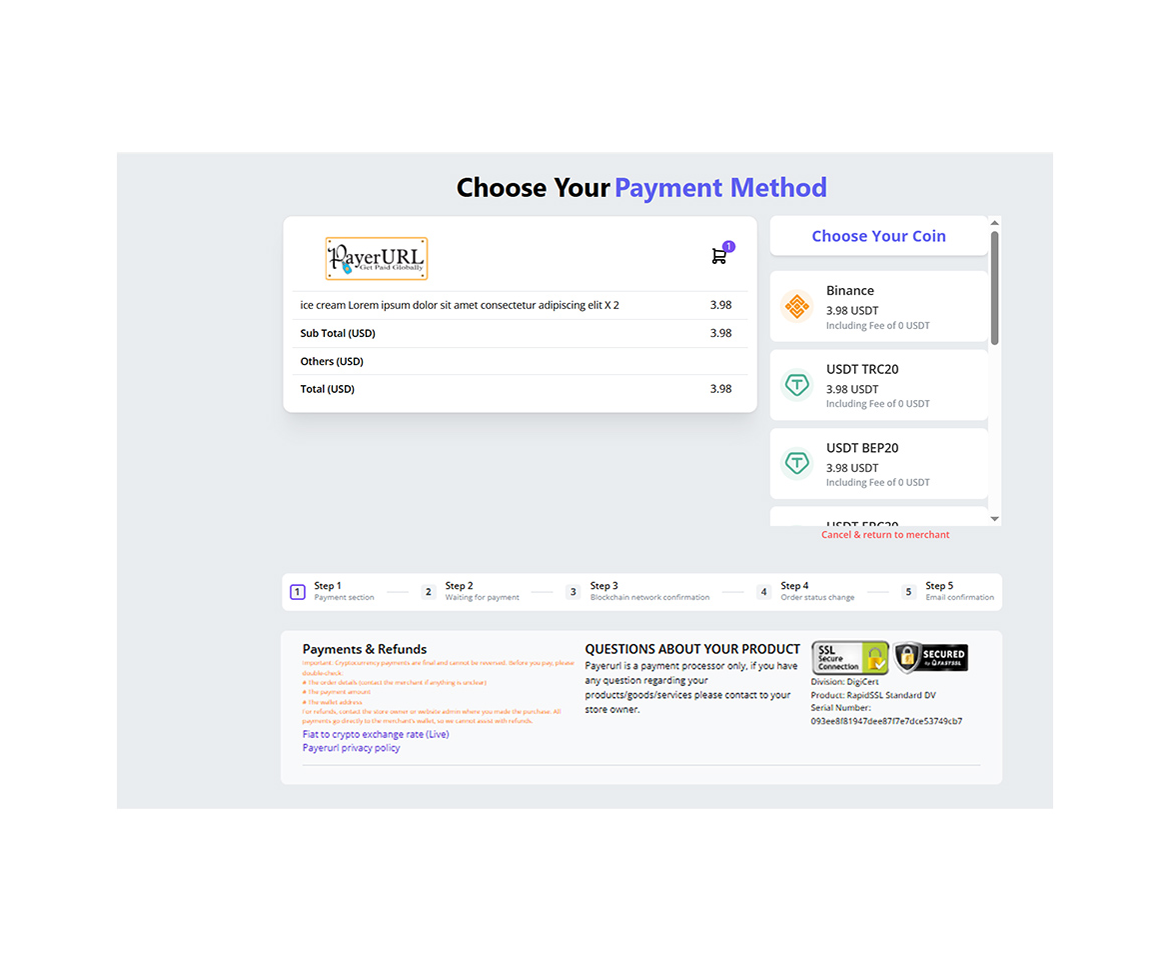
Receive customer payments directly and instantly in your crypto wallet. Accept BTC, ETH, USDT, and USDC from customers across all major networks.
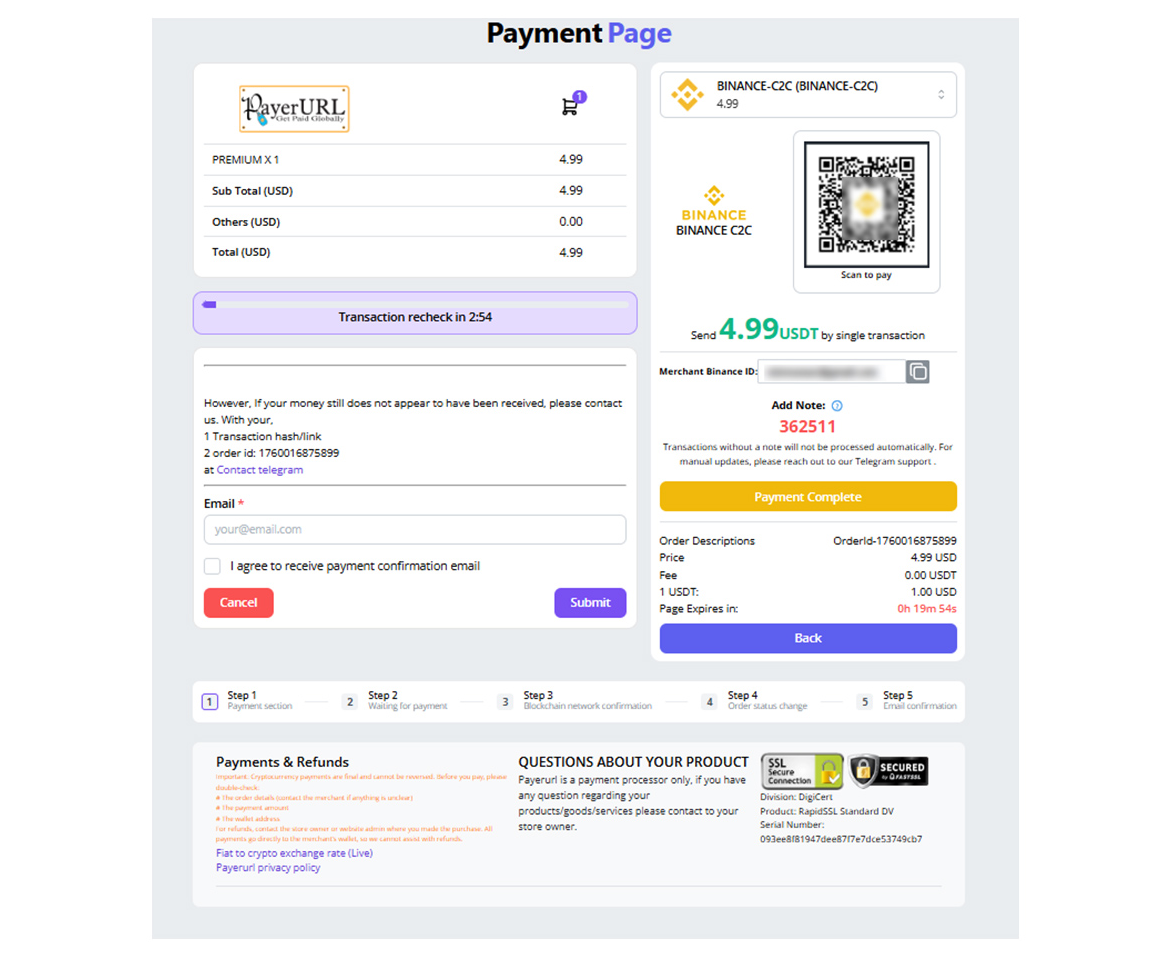
Accept payment using your binance regular account QR code payment (C2C).
Powered by PayerURL — the direct-to-wallet crypto payment processor for Python developers.





🔴 LIVE DEMO | 🔑 Get API Key | 💬 Telegram Support
Overview
This payment gateway lets customers pay directly on your store's checkout page. Once paid, the order automatically confirms via instant webhooks. Store owners can view complete transaction records in their PayerURL dashboard. PayerURL is safe, secure, and uses real-time exchange rates.
Depending on your PayerURL settings, your checkout offers:
- Popular Cryptos: Accepts Bitcoin, Ethereum, USDT, and USDC.
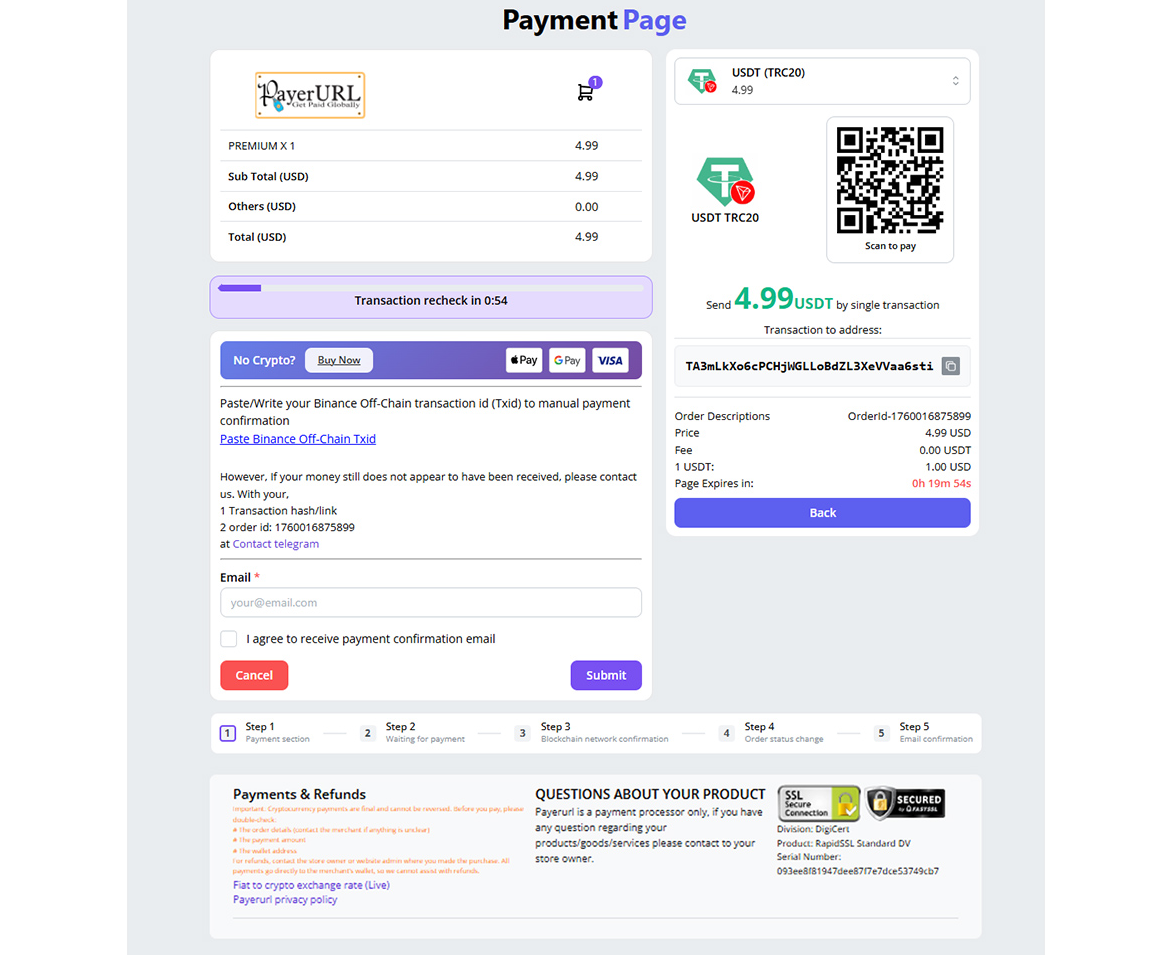
- Major Networks: Works on TRON (TRC20), Ethereum (ERC20), Binance Smart Chain (BEP20), and Bitcoin networks.
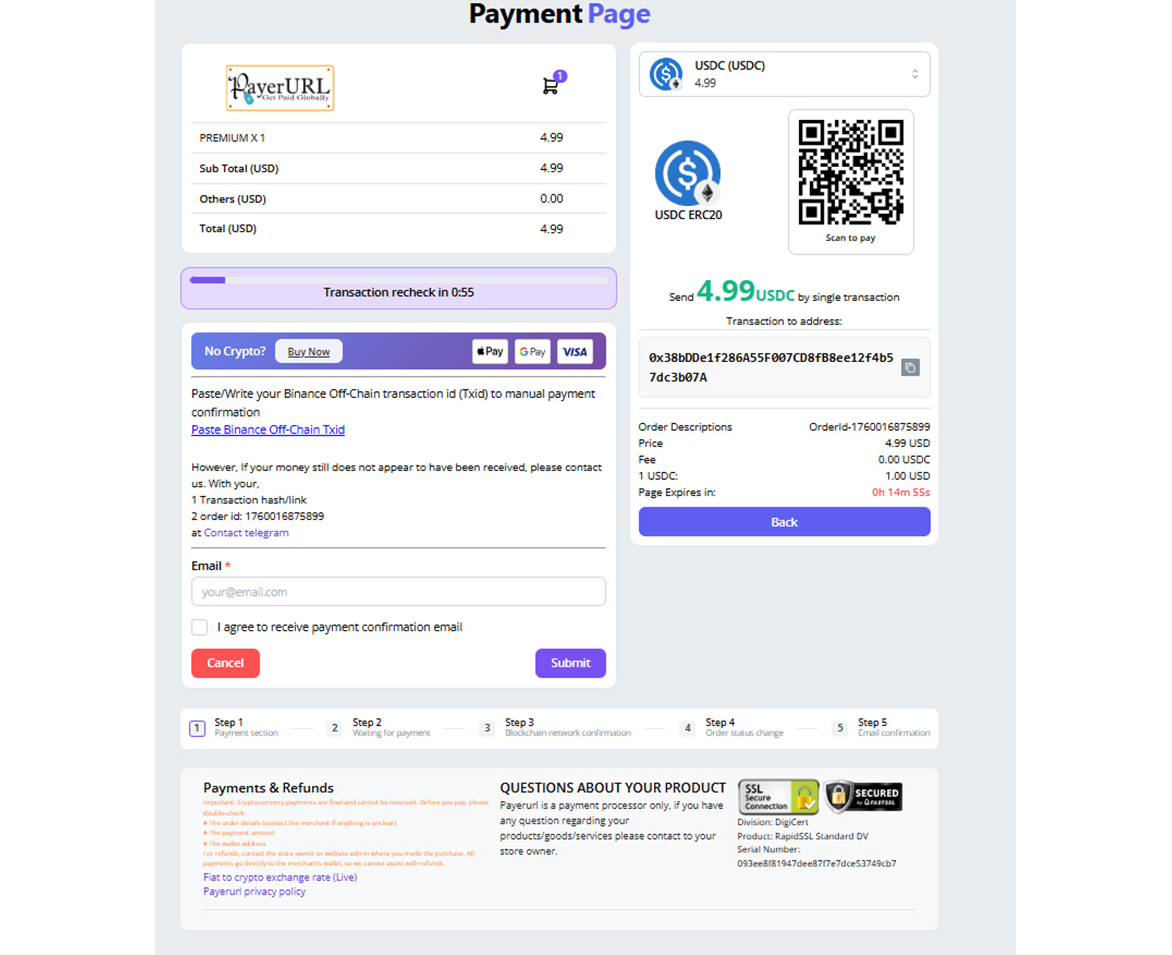
- Binance QR Code: Customers can pay by scanning a QR code with a personal Binance account—no merchant account needed.
- Global Currencies: Supports 169+ local currencies with automatic, live conversion to crypto.
- Card Payments: Options to buy crypto and pay instantly using credit cards, debit cards, Google Pay, or Apple Pay.
- New Address Per Order: Creates a unique receiving address for every order using XPUB to keep payments private and secure.
✅ Why Developers Choose This Package
PayerURL is a trusted, production-proven crypto payment processor used by 1,000+ active merchants worldwide. The WooCommerce plugin alone holds 29 five-star reviews with zero lower ratings on WordPress.org — praised consistently for responsive support, easy setup, and reliable payments.
| Feature | Detail |
|---|---|
| 🏦 No merchant account needed | Payments go directly to your crypto wallet |
| 🌍 169+ fiat currencies | USD, EUR, GBP, CAD and more — converted at live rates |
| ⚡ 10-minute integration | Simple API, clear docs, copy-paste code |
| 🔒 No KYC for withdrawals | Basic accounts withdraw without identity verification |
| 📱 Binance QR Code payments | Customers scan and pay without leaving your app |
| 💸 Zero hidden fees | No network surcharges or platform fees |
| 🛠️ Django, Flask & FastAPI ready | Works with any Python web framework |
| 🌐 Multi-platform | WooCommerce, OpenCart, PHP, Python, Node, Laravel |
| 🧑💻 24/7 support | Real humans via Telegram — fast, hands-on help |
| ⭐ 29 five-star reviews | Verified on WordPress.org — zero lower ratings |
📦 Installation
pip install binance-and-crypto-payment python-dotenv
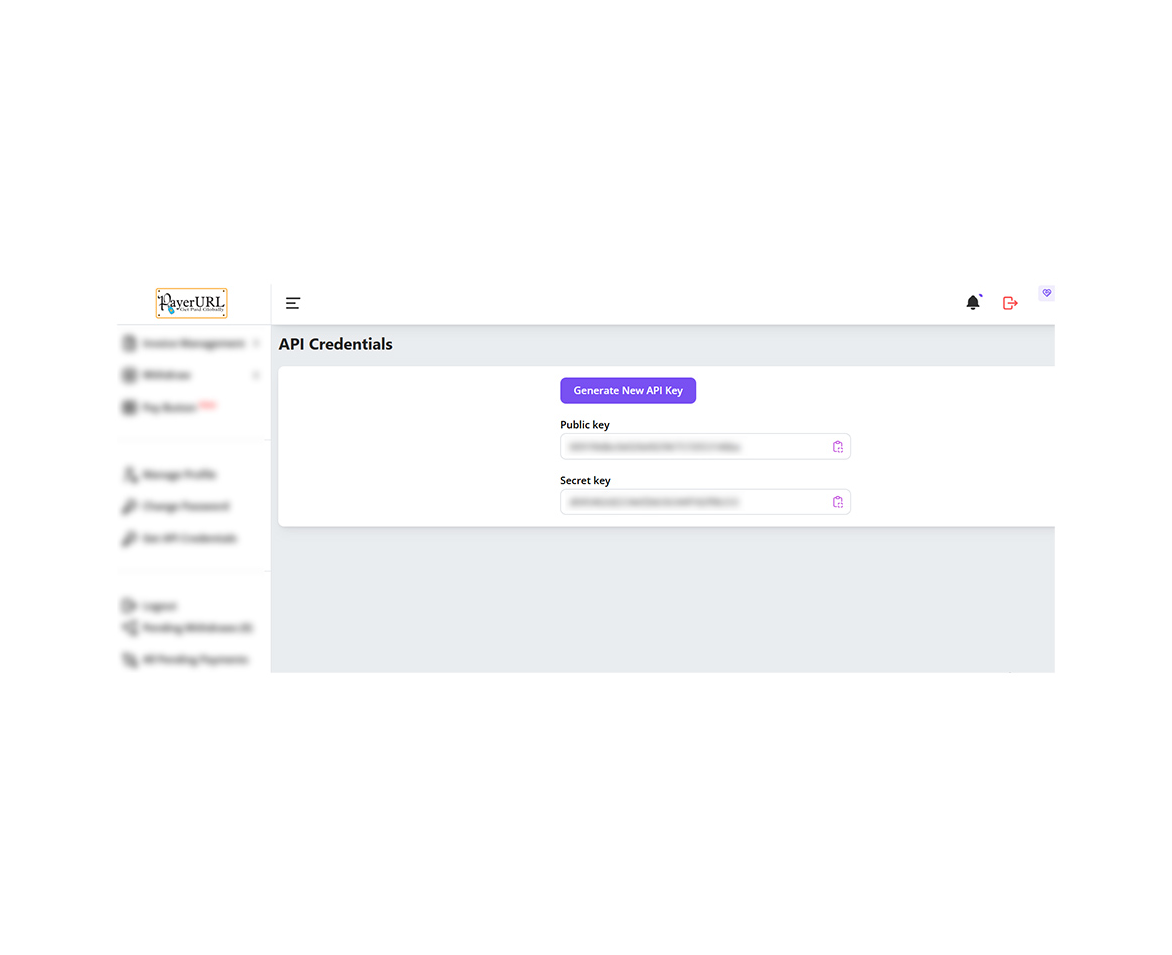
🔑 Get Your API Key (Free)
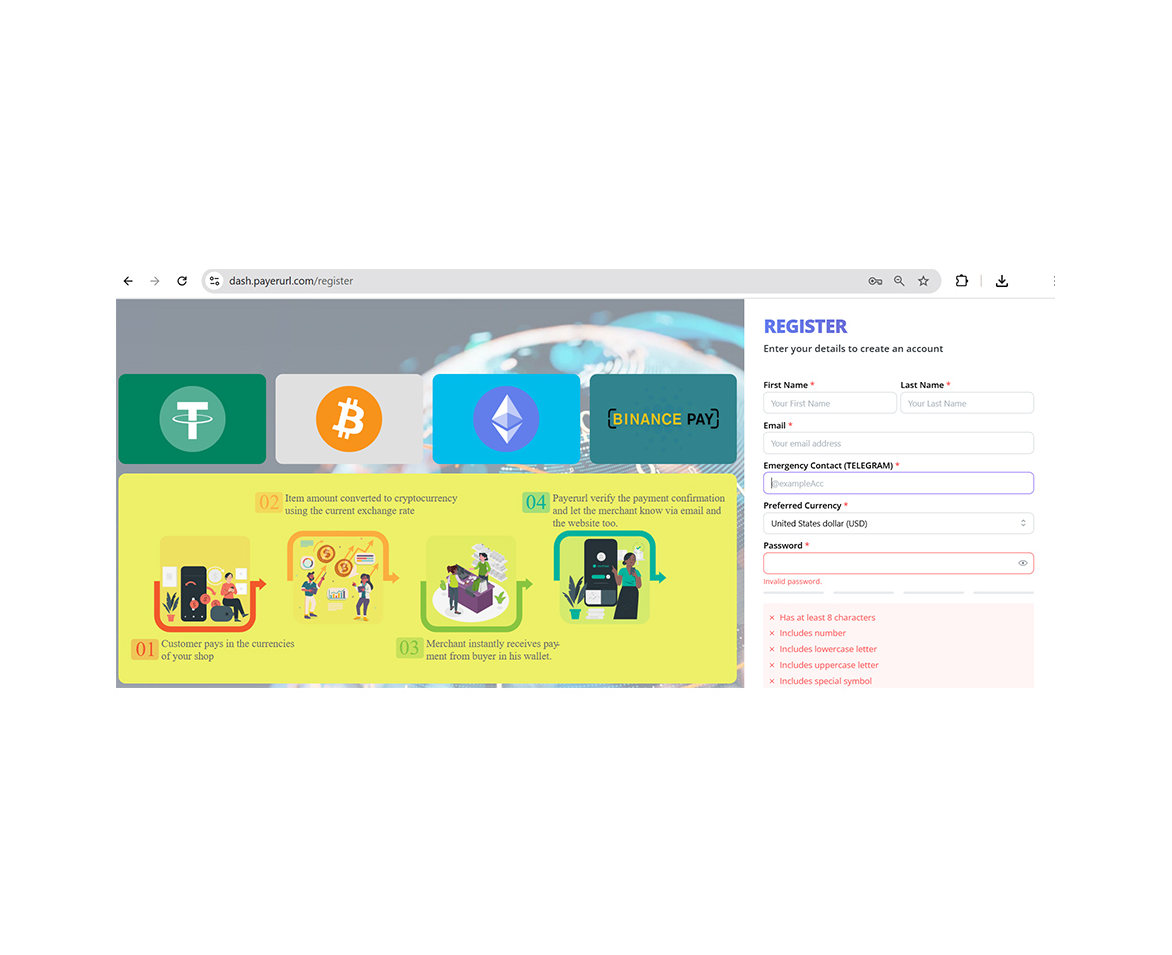
- Sign up at dash.payerurl.com
- Go to Dashboard → Get API Credentials
- Copy your Public Key and Secret Key
👉 Registration is free and takes under 2 minutes. No credit card required.
🔐 Secure Configuration
Create a .env file in your project root:
PAYERURL_PUBLIC_KEY=your_public_key
PAYERURL_SECRET_KEY=your_secret_key
BASE_URL=https://yourdomain.com
Add .env to .gitignore — never commit your keys:
.env
In production — skip the
.envfile entirely. Set these variables directly in your hosting dashboard (Railway, Render, Heroku, VPS).os.getenv()reads them automatically.
🚀 Quick Start
import os
import time
from dotenv import load_dotenv
from binance_and_crypto_payment import CryptoPaymentClient
load_dotenv()

# Payerurl API credentials
# Do not share the credentials
# Get your API key: https://dash.payerurl.com/profile/get-api-credentials
client = CryptoPaymentClient(
    public_key=os.getenv("PAYERURL_PUBLIC_KEY"),
    secret_key=os.getenv("PAYERURL_SECRET_KEY")
)
BASE_URL = os.getenv("BASE_URL", "http://localhost:8000").rstrip("/")

# Order item info
item_name = "Product"
item_qty = "1"
item_price = "10.00"

items = [
    {"name": item_name, "qty": item_qty, "price": item_price}
]

# Billing user info
first_name = "John"
last_name = "Doe"
email = "john@example.com"

# After successful payment customer will redirect to this url
redirect_url = f"{BASE_URL}/payment/success/"

# System will send payment response to this url
notify_url = f"{BASE_URL}/payment/notify/"

# If user cancels payment, they will redirect here
cancel_url = f"{BASE_URL}/payment/cancel/"

data = {
    "first_name": first_name,
    "last_name": last_name,
    "email": email,
    "redirect_url": redirect_url,
    "notify_url": notify_url,
    "cancel_url": cancel_url,
}

response = client.payment(
    invoice_id=f"PYP-{int(time.time())}",
    amount=10.00,
    currency="USD",
    items=items,
    data=data
)
print(response)
payment_url = response["redirect_to"]
🌐 Supported Cryptocurrencies & Networks
| Currency | Networks |
|---|---|
| USDT | TRC20 (Tron), ERC20 (Ethereum), BEP20 (BSC) |
| USDC | ERC20 (Ethereum), BEP20 (BSC) |
| Bitcoin (BTC) | Bitcoin Network |
| Ethereum (ETH) | ERC20 |
| BNB | BEP20 (BSC) |
| Binance Pay | Binance QR Code |
🔗 Django Integration
# views.py
import os
import time
import logging
from dotenv import load_dotenv
from django.shortcuts import redirect, render
from django.http import JsonResponse, HttpResponse
from django.views import View
from django.views.decorators.csrf import csrf_exempt
from django.views.decorators.http import require_POST
from binance_and_crypto_payment import CryptoPaymentClient, CryptoPaymentNotify, CryptoPaymentException

load_dotenv()

PUBLIC_KEY = os.getenv("PAYERURL_PUBLIC_KEY")
SECRET_KEY = os.getenv("PAYERURL_SECRET_KEY")
BASE_URL   = os.getenv("BASE_URL", "http://localhost:8000").rstrip("/")

if not PUBLIC_KEY or not SECRET_KEY:
    raise ValueError("PAYERURL_PUBLIC_KEY and PAYERURL_SECRET_KEY must be set in .env")

logger = logging.getLogger(__name__)


# ── Checkout ──────────────────────────────────────────────────────
class CheckoutView(View):
    def post(self, request):
        client = CryptoPaymentClient(public_key=PUBLIC_KEY, secret_key=SECRET_KEY)
        response = client.payment(
            invoice_id=f"PYP-{int(time.time())}",
            amount=float(request.POST.get("amount", 10.00)),
            currency="USD",
            items=[{
                "name":  request.POST.get("product", "Order"),
                "qty":   "1",
                "price": request.POST.get("amount", "10.00"),
            }],
            data={
                "first_name":   request.user.first_name,
                "last_name":    request.user.last_name,
                "email":        request.user.email,
                "redirect_url": f"{BASE_URL}/payment/success/",
                "notify_url":   f"{BASE_URL}/payment/notify/",
                "cancel_url":   f"{BASE_URL}/payment/cancel/",
            }
        )
        return redirect(response["redirect_to"])


# ── Success Callback ──────────────────────────────────────────────
def payment_success(request):
    order_id = request.GET.get("order_id", "")
    # YOUR LOGIC HERE — e.g. show order confirmation page
    return HttpResponse(f"Payment successful! Order: {order_id}")


# ── Cancel Callback ───────────────────────────────────────────────
def payment_cancel(request):
    order_id = request.GET.get("order_id", "")
    # YOUR LOGIC HERE — e.g. show cancel page or redirect to cart
    return HttpResponse(f"Payment cancelled. Order: {order_id}")


# ── Notify (Webhook) ──────────────────────────────────────────────
@csrf_exempt
@require_POST
def notify_payerurl(request):
    notify = CryptoPaymentNotify(public_key=PUBLIC_KEY, secret_key=SECRET_KEY)
    try:
        result = notify.process(request)
    except CryptoPaymentException as e:
        logger.warning(f"[NOTIFY] Failed: {e.code} | {e.message}")
        return JsonResponse({"status": e.code, "message": e.message}, status=200)
    except Exception as e:
        logger.exception(f"[NOTIFY] Unexpected error: {e}")
        return JsonResponse({"status": 5000, "message": "Internal error"}, status=200)

    if result["type"] == "cancelled":
        logger.info(f"[NOTIFY] Cancelled: {result['data'].get('order_id')}")
        return JsonResponse({"status": 20000, "message": "Order cancelled"}, status=200)

    data = result["data"]
    logger.info(f"[NOTIFY] Success: {data}")
    try:
        # data["order_id"]         → your invoice ID
        # data["transaction_id"]   → gateway transaction ID
        # data["confirm_rcv_amnt"] → amount received
        # data["coin_rcv_amnt"]    → crypto amount
        # data["txn_time"]         → transaction time
        # YOUR BUSINESS LOGIC HERE
        # e.g. update your DB, send email, activate subscription, etc.
        return JsonResponse({"status": 2040, "message": "Payment processed successfully"}, status=200)
    except Exception as e:
        logger.exception(f"[NOTIFY] Business logic error: {e}")
        return JsonResponse({"status": 5000, "message": "Internal error"}, status=200)
# urls.py
from django.urls import path
from .views import CheckoutView, payment_success, payment_cancel, notify_payerurl

urlpatterns = [
    path("payment/checkout/", CheckoutView.as_view(), name="checkout"),
    path("payment/success/",  payment_success,        name="payment_success"),
    path("payment/cancel/",   payment_cancel,         name="payment_cancel"),
    path("payment/notify/",   notify_payerurl,        name="payment_notify"),
]
🔗 Flask Integration
# app.py
import os
import time
from dotenv import load_dotenv
from flask import Flask, request, redirect, jsonify
from binance_and_crypto_payment import CryptoPaymentClient, CryptoPaymentNotify, CryptoPaymentException

load_dotenv()

PUBLIC_KEY = os.getenv("PAYERURL_PUBLIC_KEY")
SECRET_KEY = os.getenv("PAYERURL_SECRET_KEY")
BASE_URL   = os.getenv("BASE_URL", "http://localhost:5000").rstrip("/")

if not PUBLIC_KEY or not SECRET_KEY:
    raise ValueError("PAYERURL_PUBLIC_KEY and PAYERURL_SECRET_KEY must be set in .env")

app = Flask(__name__)


# ── Checkout ──────────────────────────────────────────────────────
@app.route("/payment/checkout/", methods=["POST"])
def checkout():
    client = CryptoPaymentClient(public_key=PUBLIC_KEY, secret_key=SECRET_KEY)
    response = client.payment(
        invoice_id=f"PYP-{int(time.time())}",
        amount=float(request.form.get("amount", 10.00)),
        currency="USD",
        items=[{
            "name":  request.form.get("product", "Order"),
            "qty":   "1",
            "price": request.form.get("amount", "10.00"),
        }],
        data={
            "first_name":   request.form.get("first_name"),
            "last_name":    request.form.get("last_name"),
            "email":        request.form.get("email"),
            "redirect_url": f"{BASE_URL}/payment/success/",
            "notify_url":   f"{BASE_URL}/payment/notify/",
            "cancel_url":   f"{BASE_URL}/payment/cancel/",
        }
    )
    return redirect(response["redirect_to"])


# ── Success Callback ──────────────────────────────────────────────
@app.route("/payment/success/")
def payment_success():
    order_id = request.args.get("order_id", "")
    # YOUR LOGIC HERE — e.g. show order confirmation page
    return f"Payment successful! Order: {order_id}"


# ── Cancel Callback ───────────────────────────────────────────────
@app.route("/payment/cancel/")
def payment_cancel():
    order_id = request.args.get("order_id", "")
    # YOUR LOGIC HERE — e.g. show cancel page or redirect to cart
    return f"Payment cancelled. Order: {order_id}"


# ── Notify (Webhook) ──────────────────────────────────────────────
@app.route("/payment/notify/", methods=["POST"])
def notify_payerurl():
    notify = CryptoPaymentNotify(public_key=PUBLIC_KEY, secret_key=SECRET_KEY)
    try:
        result = notify.process(request)
    except CryptoPaymentException as e:
        return jsonify({"status": e.code, "message": e.message}), 200
    except Exception:
        return jsonify({"status": 5000, "message": "Internal error"}), 200

    if result["type"] == "cancelled":
        return jsonify({"status": 20000, "message": "Order cancelled"}), 200

    data = result["data"]
    # data["order_id"]         → your invoice ID
    # data["transaction_id"]   → gateway transaction ID
    # data["confirm_rcv_amnt"] → amount received
    # data["coin_rcv_amnt"]    → crypto amount
    # data["txn_time"]         → transaction time
    # YOUR BUSINESS LOGIC HERE
    # e.g. update your DB, send email, activate subscription, etc.
    return jsonify({"status": 2040, "message": "Payment processed successfully"}), 200


if __name__ == "__main__":
    app.run(debug=True)
🔗 FastAPI Integration
# main.py
import os
import time
from dotenv import load_dotenv
from fastapi import FastAPI, Request, Form
from fastapi.responses import JSONResponse, RedirectResponse, PlainTextResponse
from binance_and_crypto_payment import CryptoPaymentClient, CryptoPaymentNotify, CryptoPaymentException

load_dotenv()

PUBLIC_KEY = os.getenv("PAYERURL_PUBLIC_KEY")
SECRET_KEY = os.getenv("PAYERURL_SECRET_KEY")
BASE_URL   = os.getenv("BASE_URL", "http://localhost:8000").rstrip("/")

if not PUBLIC_KEY or not SECRET_KEY:
    raise ValueError("PAYERURL_PUBLIC_KEY and PAYERURL_SECRET_KEY must be set in .env")

app = FastAPI()


# ── Checkout ──────────────────────────────────────────────────────
@app.post("/payment/checkout/")
async def checkout(
    amount:     float = Form(...),
    first_name: str   = Form(...),
    last_name:  str   = Form(...),
    email:      str   = Form(...),
    product:    str   = Form("Order"),
):
    client = CryptoPaymentClient(public_key=PUBLIC_KEY, secret_key=SECRET_KEY)
    response = client.payment(
        invoice_id=f"PYP-{int(time.time())}",
        amount=amount,
        currency="USD",
        items=[{"name": product, "qty": "1", "price": str(amount)}],
        data={
            "first_name":   first_name,
            "last_name":    last_name,
            "email":        email,
            "redirect_url": f"{BASE_URL}/payment/success/",
            "notify_url":   f"{BASE_URL}/payment/notify/",
            "cancel_url":   f"{BASE_URL}/payment/cancel/",
        }
    )
    return RedirectResponse(url=response["redirect_to"])


# ── Success Callback ──────────────────────────────────────────────
@app.get("/payment/success/")
async def payment_success(order_id: str = ""):
    # YOUR LOGIC HERE — e.g. return confirmation page
    return PlainTextResponse(f"Payment successful! Order: {order_id}")


# ── Cancel Callback ───────────────────────────────────────────────
@app.get("/payment/cancel/")
async def payment_cancel(order_id: str = ""):
    # YOUR LOGIC HERE — e.g. return cancel page or redirect to cart
    return PlainTextResponse(f"Payment cancelled. Order: {order_id}")


# ── Notify (Webhook) ──────────────────────────────────────────────
@app.post("/payment/notify/")
async def notify_payerurl(request: Request):
    notify = CryptoPaymentNotify(public_key=PUBLIC_KEY, secret_key=SECRET_KEY)
    try:
        result = notify.process(request)
    except CryptoPaymentException as e:
        return JSONResponse({"status": e.code, "message": e.message}, status_code=200)
    except Exception:
        return JSONResponse({"status": 5000, "message": "Internal error"}, status_code=200)

    if result["type"] == "cancelled":
        return JSONResponse({"status": 20000, "message": "Order cancelled"}, status_code=200)

    data = result["data"]
    # data["order_id"]         → your invoice ID
    # data["transaction_id"]   → gateway transaction ID
    # data["confirm_rcv_amnt"] → amount received
    # data["coin_rcv_amnt"]    → crypto amount
    # data["txn_time"]         → transaction time
    # YOUR BUSINESS LOGIC HERE
    # e.g. update your DB, send email, activate subscription, etc.
    return JSONResponse({"status": 2040, "message": "Payment processed successfully"}, status_code=200)
Run:
uvicorn main:app --reload
🔔 Handling Webhooks (notify_url)
When a payment completes, PayerURL sends a POST request to your notify_url. The CryptoPaymentNotify class handles all validation automatically — auth check, signature verification, and status detection.
result = notify.process(request)
# result["type"] → "success" or "cancelled"
# result["data"] → full webhook payload
Callback URL Summary
| URL | Trigger | Method |
|---|---|---|
redirect_url |
Customer paid successfully | GET (browser redirect) |
cancel_url |
Customer cancelled payment | GET (browser redirect) |
notify_url |
Gateway confirms payment server-side | POST (webhook) |
redirect_urlandcancel_urlare browser redirects — use them to show the customer a page.notify_urlis a server-side webhook — use it to update your database.
Webhook Payload Fields
| Field | Description |
|---|---|
order_id |
Your original invoice ID |
transaction_id |
Blockchain transaction hash |
status_code |
200 = completed, 20000 = cancelled |
confirm_rcv_amnt |
Amount received in fiat |
confirm_rcv_amnt_curr |
Fiat currency (e.g. USD) |
coin_rcv_amnt |
Amount received in crypto |
coin_rcv_amnt_curr |
Crypto symbol (e.g. USDT) |
txn_time |
Transaction timestamp |
Notify Response Codes
| Code | Meaning |
|---|---|
2040 |
Payment processed successfully |
2030 |
Auth error (key mismatch or missing) |
2031 |
Auth format error (invalid base64) |
2050 |
Validation error (missing fields or incomplete order) |
20000 |
Order cancelled |
5000 |
Internal server error |
Always return HTTP
200for all responses — including errors. PayerURL reads the JSONstatusfield, not the HTTP status code. Returning non-200 HTTP status will cause the gateway to retry indefinitely.
📲 How the Binance QR Payment Works
- Your app calls the API and gets a payment URL
- Customer is redirected to a secure checkout page
- Customer scans the QR code with their Binance app
- Payment is confirmed and funds land directly in your wallet
- Your
notify_urlreceives a webhook with the order status
No bank accounts. No intermediaries. No waiting.
🛡️ Security & Privacy
- ✅ Payments go directly to your wallet — PayerURL never holds your funds
- ✅ No mandatory KYC for basic accounts
- ✅ HMAC-SHA256 signature verification on all webhook calls via
CryptoPaymentNotify - ✅ MIT licensed — fully open source, audit it yourself
- ✅ No personal identity verification required to get started
🌍 Supported Fiat Currencies (169+)
USD, EUR, GBP, CAD, AUD, JPY, SGD, AED, INR, BRL, MXN, NGN, PKR, BDT, and 150+ more.
All fiat amounts are automatically converted to the equivalent crypto amount at live market rates.
📊 Full Payment Flow
Your App  ──►  PayerURL API  ──►  Checkout Page  ──►  Customer Pays
                                                              │
Your Wallet  ◄──  Funds (instant)  ◄──  Blockchain Confirmed ┘
                                                         │         │
                   redirect_url (success/cancel) ◄───────┘         │
                              notify_url (webhook) ◄────────────────┘
🆚 Compared to Other Solutions
| PayerURL (This Package) | Stripe / PayPal | Coinbase Commerce | |
|---|---|---|---|
| No merchant account | ✅ | ❌ | ✅ |
| Direct to your wallet | ✅ | ❌ | Partial |
| No KYC required | ✅ (Basic) | ❌ | ❌ |
| Binance QR support | ✅ | ❌ | ❌ |
| Python SDK | ✅ | ✅ | ✅ |
| Django / Flask / FastAPI | ✅ | ✅ | ❌ |
| 169+ fiat currencies | ✅ | Partial | ❌ |
| Zero platform fees | ✅ | ❌ | ❌ |
| Webhook support | ✅ | ✅ | ✅ |
❓ FAQ
Do I need a Binance account? Yes, to accept Binance QR payments. For USDT/BTC/ETH/USDC, you only need the corresponding wallet address configured in your PayerURL dashboard.
Is there a transaction fee? No platform fees from PayerURL. Standard blockchain network fees may apply depending on the coin and network.
Can I use this without KYC? Yes. Basic accounts can receive and withdraw crypto without mandatory identity verification.
What should my notify_url return?
Return {"status": 2040, "message": "Payment processed successfully"} with HTTP 200. Always return HTTP 200 for all responses — the gateway reads the JSON status field.
What is the difference between redirect_url and notify_url?
redirect_url is a browser redirect shown to the customer after payment. notify_url is a server-side webhook used to update your database — it fires independently of what the customer does.
How do I identify errors from the notify response?
Check the status field in the JSON body. 2030/2031 = auth errors, 2050 = validation error, 20000 = cancelled, 2040 = success, 5000 = internal error.
Does this work with Django REST Framework / FastAPI? Yes — it is a pure Python client that works with any Python web framework.
What Python versions are supported? Python 3.8 and above (3.8, 3.9, 3.10, 3.11, 3.12, 3.13).
📬 Support
| Channel | Link |
|---|---|
| 💬 Telegram | t.me/Payerurl |
| 🌐 Website | payerurl.com |
| 📊 Dashboard | dash.payerurl.com |
| 🔴 Live Demo | python.payerurl.com |
📄 License
MIT License — free for personal and commercial use.
🌐 Description
This SDK, powered by PayerURL, is a non-custodial crypto payment gateway that connects WooCommerce directly to your wallets. Payments receive in your wallet instantly, with no middlemen.
With XPUB (Extended Public Key) support, the plugin can rotate through unlimited receiving addresses. This suits high-volume stores, crypto exchanges, and enterprise merchants.
⚙️ How It Works
- The customer picks a cryptocurrency at checkout.
- Your fiat price (USD, EUR, GBP, JPY, CAD, AUD and 160+ more) is converted at the live exchange rate.
- The customer pays on-chain or with Binance Pay.
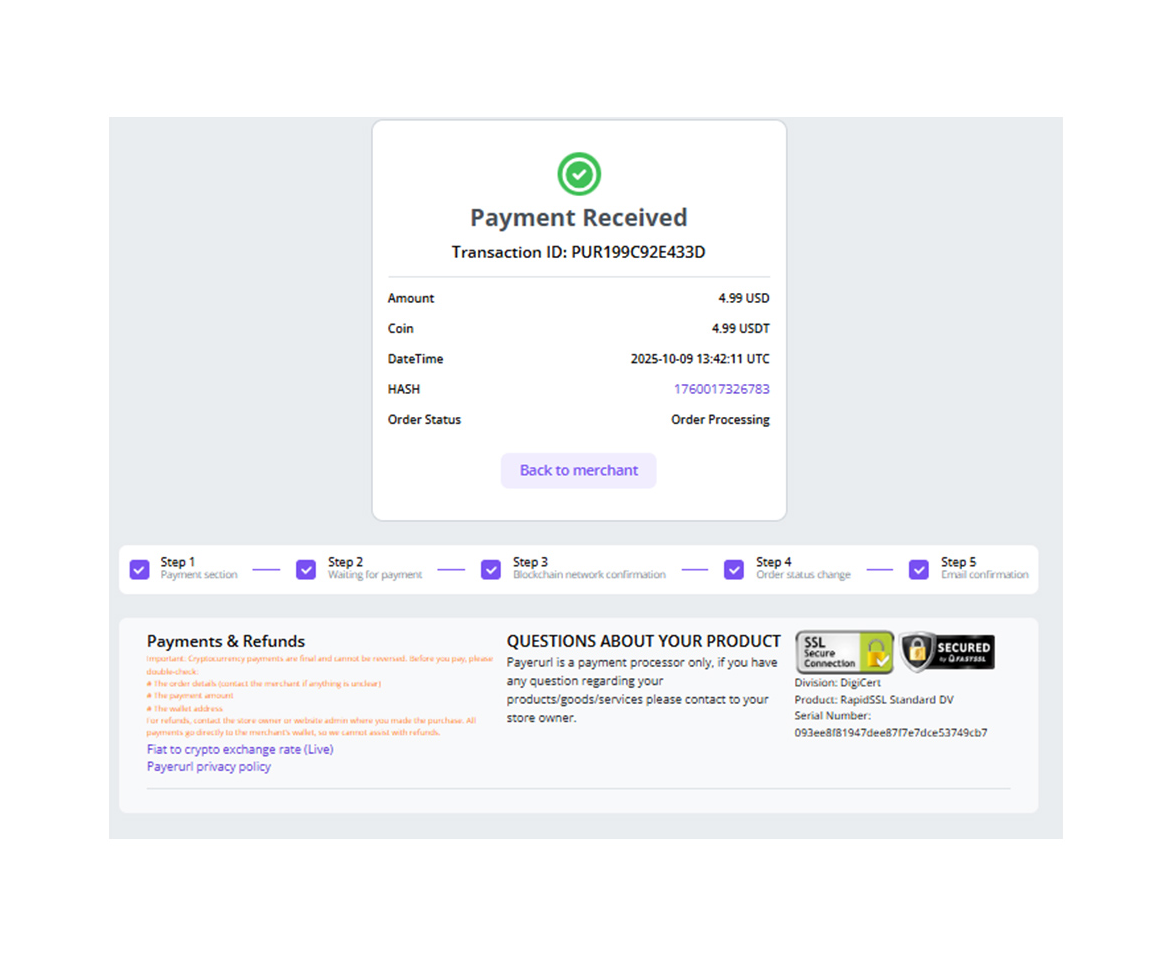
- Once the payment is confirmed, funds are credited instantly to your wallet.
- The WooCommerce order moves to Processing automatically through the API webhook. No manual steps are needed.
🌐 Supported Cryptocurrencies
| Currency | Network / Method | Notes |
|---|---|---|
| Bitcoin (BTC) | Bitcoin | The world's #1 cryptocurrency |
| Ethereum (ETH) | ERC20 | Leading smart-contract blockchain |
| USDT | TRC20 (TRON) | Ultra-low fees |
| USDT | ERC20 (Ethereum) | Tether on Ethereum |
| USDC | ERC20 (Ethereum) | Trusted stablecoin |
| Binance QR Code | Scan-to-pay | Contactless |
| TON | The Open Network | |
| XPUB addresses | HD wallet | Auto-rotating, unlimited transactions |
✨ Key Features
| Feature | Detail |
|---|---|
| 🔑 XPUB integration | A unique address is generated for every order, for mass-volume transactions |
| 🔗 10+ crypto networks | BTC, ETH, USDT (TRC20/ERC20), USDC (ERC20), Binance Pay, Binance QR, TON and more |
| 💱 169+ fiat currencies | USD, EUR, GBP, JPY, CAD, AUD, INR and more, at real-time rates |
| 🏦 Non-custodial & trustless | Funds go straight to your wallet. We never hold your crypto |
| 🆓 No KYC | No identity verification on the Basic (free) plan |
| 🚫 No bank account needed | Accept crypto with no traditional banking setup |
| 💳 Buy crypto with card or bank | Customers can pay with Visa, Mastercard, credit/debit card or bank transfer. It is auto-converted to crypto for you |
| ⏳ Pay Later | Flexible payment timing for customers |
| ➗ Auto partial-payment handling | Order is marked Processing when ≥ 90% of the payment is received |
| 🏷️ Crypto discounts | Offer crypto-specific discounts to encourage on-chain payments |
| 📈 Live exchange rate | Real-time crypto/fiat conversion at checkout |
| 🧱 WooCommerce Blocks compatible | Fully supports the modern checkout blocks |
| 🚀 HPOS compatible | Ready for WooCommerce High-Performance Order Storage |
| 🌍 5 languages | English, Spanish, Russian, Arabic and Portuguese |
| ⚡ Easy API key setup | One-click credential check and save |
| 📖 Free & open source | No hidden fees on the plugin itself |
🖼 Screenshots
🏷️ Keywords
crypto payment bitcoin payment laravel binance payment gateway usdt payment laravel usdc payment laravel crypto checkout laravel binance qr code laravel binance pay api laravel crypto gateway best crypto payment gateway fiat to crypto payment gateway cryptocurrency payment gateway
1 maintainer

Metadata
1 maintainer
Release files for binance-and-crypto-payment 0.1.27
For a detailed explanation of source distributions (sdists) and built distributions (wheels), please see the package formats documentation.
Source distribution (sdist)
| File | Size | Uploaded | |
|---|---|---|---|
| binance_and_crypto_payment-0.1.27.tar.gz | 20.7 kB | Details |
Built distribution (wheel)
| File | Interpreter | ABI | Platform | Reset |
|---|---|---|---|---|
| binance_and_crypto_payment-0.1.27-py3-none-any.whl | Python 3 | none | any | Details |
Total release size: 34.7 kB
Release files / binance_and_crypto_payment-0.1.27.tar.gz
| Download URL | binance_and_crypto_payment-0.1.27.tar.gz |
|---|---|
| Size | 20.7 kB |
| Tags | Source |
|
SHA-256 checksum How to use checksums |
1ead5517ff709592f6c507a2a0f5b53c7652b08826d94a00002c2df1472b2dcf
|
|
BLAKE2b-256 checksum How to use checksums |
22878fae00be018b125945ab1b47dcfeb9dc346dc01f6a7e394f3d201bd65412
|
| Upload date | |
|
Uploaded using Trusted Publishing? What is trusted publishing? |
No |
| Uploaded via |
twine/7.0.0 CPython/3.11.17
|
Release files / binance_and_crypto_payment-0.1.27-py3-none-any.whl
| Download URL | binance_and_crypto_payment-0.1.27-py3-none-any.whl |
|---|---|
| Size | 14.0 kB |
| Tags | Python 3 |
|
SHA-256 checksum How to use checksums |
dd9d54a41ec38553f79c3309179990347e5761cd1b05bdadee7ff5c17200281f
|
|
BLAKE2b-256 checksum How to use checksums |
f8c5a3c1e2c2f509560e121693cc78f7de0829f74e213c0ffe46eefb379165ba
|
| Upload date | |
|
Uploaded using Trusted Publishing? What is trusted publishing? |
No |
| Uploaded via |
twine/7.0.0 CPython/3.11.17
|














