
A protocol framework for agent-to-agent communication

Project description

The identity, communication & payments layer for AI agents
🇬🇧 English • 🇩🇪 Deutsch • 🇪🇸 Español • 🇫🇷 Français • 🇮🇳 हिंदी • 🇮🇳 বাংলা • 🇨🇳 中文 • 🇳🇱 Nederlands • 🇮🇳 தமிழ்










Bindu (read: binduu) is an operating layer for AI agents that provides identity, communication, and payment capabilities. It delivers a production-ready service with a convenient API to connect, authenticate, and orchestrate agents across distributed systems using open protocols: A2A, AP2, and X402.
Built with a distributed architecture (Task Manager, scheduler, storage), Bindu makes it fast to develop and easy to integrate with any AI framework. Transform any agent framework into a fully interoperable service for communication, collaboration, and commerce in the Internet of Agents.
🌟 Register your agent • 🌻 Documentation • 💬 Discord Community
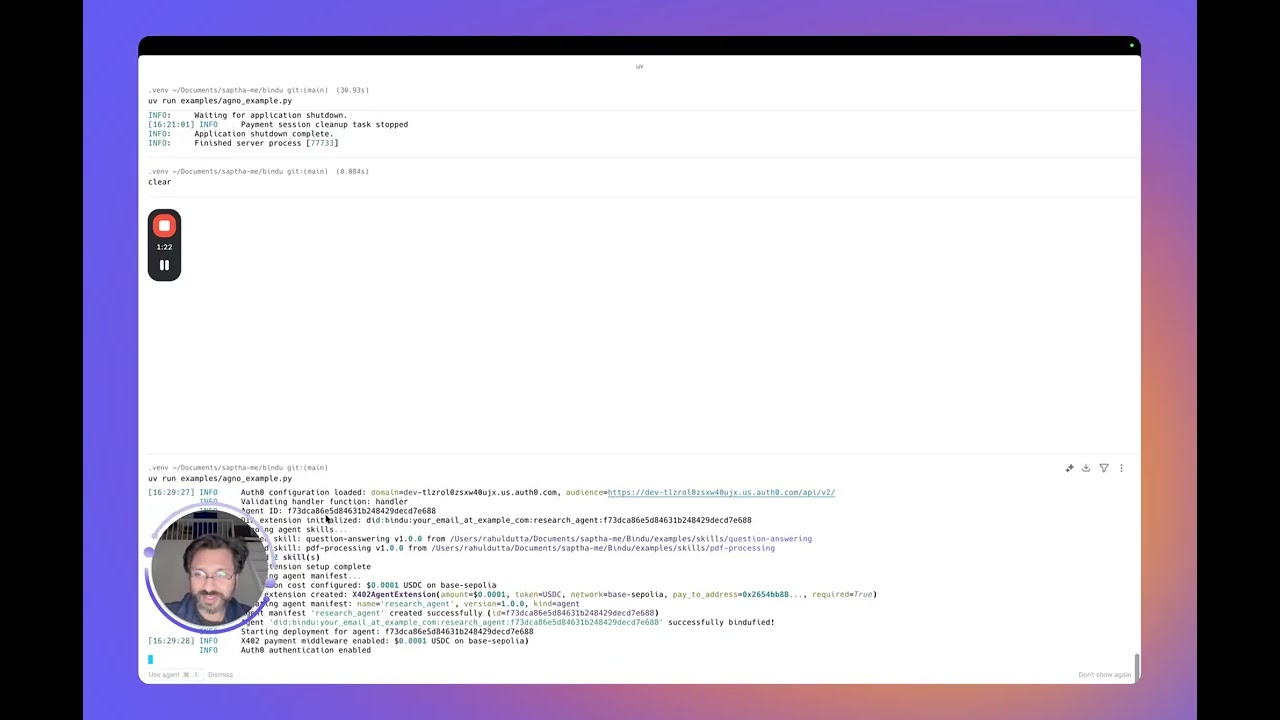
🎥 Watch Bindu in Action
📋 Prerequisites
Before installing Bindu, ensure you have:
- Python 3.12 or higher - Download here
- UV package manager - Installation guide
- API Key Required: Set
OPENROUTER_API_KEYorOPENAI_API_KEYin your environment variables. Free OpenRouter models are available for testing.
Verify Your Setup
# Check Python version
uv run python --version  # Should show 3.12 or higher

# Check UV installation
uv --version
📦 Installation
Users note (Git & GitHub Desktop)
On some Windows systems, git may not be recognized in Command Prompt even after installation due to PATH configuration issues.
If you face this issue, you can use GitHub Desktop as an alternative:
- Install GitHub Desktop from https://desktop.github.com/
- Sign in with your GitHub account
- Clone the repository using the repository URL: https://github.com/getbindu/Bindu.git
GitHub Desktop allows you to clone, manage branches, commit changes, and open pull requests without using the command line.
# Install Bindu
uv add bindu

# For development (if contributing to Bindu)
# Create and activate virtual environment
uv venv --python 3.12.9
source .venv/bin/activate  # On macOS/Linux
# .venv\Scripts\activate  # On Windows

uv sync --dev
Common Installation Issues (click to expand)
| Issue | Solution |
|---|---|
uv: command not found |
Restart your terminal after installing UV. On Windows, use PowerShell |
Python version not supported |
Install Python 3.12+ from python.org |
| Virtual environment not activating (Windows) | Use PowerShell and run .venv\Scripts\activate |
Microsoft Visual C++ required |
Download Visual C++ Build Tools |
ModuleNotFoundError |
Activate venv and run uv sync --dev |
🚀 Quick Start
Option 1: Using Cookiecutter (Recommended)
Time to first agent: ~2 minutes ⏱️
# Install cookiecutter
uv add cookiecutter

# Create your Bindu agent
uvx cookiecutter https://github.com/getbindu/create-bindu-agent.git

Your local agent becomes a live, secure, discoverable service. Learn more →
💡 Pro Tip: Agents created with cookiecutter include GitHub Actions that automatically register your agent in the Bindu Directory when you push to your repository.
Option 2: Manual Setup
Create your agent script my_agent.py:
from bindu.penguin.bindufy import bindufy
from agno.agent import Agent
from agno.tools.duckduckgo import DuckDuckGoTools
from agno.models.openai import OpenAIChat

# Define your agent
agent = Agent(
    instructions="You are a research assistant that finds and summarizes information.",
    model=OpenAIChat(id="gpt-4o"),
    tools=[DuckDuckGoTools()],
)

# Configuration
config = {
    "author": "your.email@example.com",
    "name": "research_agent",
    "description": "A research assistant agent",
    "deployment": {"url": "http://localhost:3773", "expose": True},
    "skills": ["skills/question-answering", "skills/pdf-processing"]
}

# Handler function
def handler(messages: list[dict[str, str]]):
    """Process messages and return agent response.

    Args:
        messages: List of message dictionaries containing conversation history

    Returns:
        Agent response result
    """
    result = agent.run(input=messages)
    return result

# Bindu-fy it
bindufy(config, handler)

# Use tunnel to expose your agent to the internet
# bindufy(config, handler, launch=True)

Your agent is now live at http://localhost:3773 and ready to communicate with other agents.
Option 3: Zero-Config Local Agent
Try Bindu without setting up Postgres, Redis, or any cloud services. Runs entirely locally using in-memory storage and scheduler.
python examples/beginner_zero_config_agent.py
Option 4: Minimal Echo Agent (Testing)
View minimal example (click to expand)
Smallest possible working agent:
from bindu.penguin.bindufy import bindufy

def handler(messages):
    return [{"role": "assistant", "content": messages[-1]["content"]}]

config = {
    "author": "your.email@example.com",
    "name": "echo_agent",
    "description": "A basic echo agent for quick testing.",
    "deployment": {"url": "http://localhost:3773", "expose": True},
    "skills": []
}

bindufy(config, handler)

# Use tunnel to expose your agent to the internet
# bindufy(config, handler, launch=True)
Run the agent:
# Start the agent
python examples/echo_agent.py
Test the agent with curl (click to expand)
Input:
curl --location 'http://localhost:3773/' \
--header 'Content-Type: application/json' \
--data '{
    "jsonrpc": "2.0",
    "method": "message/send",
    "params": {
        "message": {
            "role": "user",
            "parts": [
                {
                    "kind": "text",
                    "text": "Quote"
                }
            ],
            "kind": "message",
            "messageId": "550e8400-e29b-41d4-a716-446655440038",
            "contextId": "550e8400-e29b-41d4-a716-446655440038",
            "taskId": "550e8400-e29b-41d4-a716-446655440300"
        },
        "configuration": {
            "acceptedOutputModes": [
                "application/json"
            ]
        }
    },
    "id": "550e8400-e29b-41d4-a716-446655440024"
}'
Output:
{
    "jsonrpc": "2.0",
    "id": "550e8400-e29b-41d4-a716-446655440024",
    "result": {
        "id": "550e8400-e29b-41d4-a716-446655440301",
        "context_id": "550e8400-e29b-41d4-a716-446655440038",
        "kind": "task",
        "status": {
            "state": "submitted",
            "timestamp": "2025-12-16T17:10:32.116980+00:00"
        },
        "history": [
            {
                "message_id": "550e8400-e29b-41d4-a716-446655440038",
                "context_id": "550e8400-e29b-41d4-a716-446655440038",
                "task_id": "550e8400-e29b-41d4-a716-446655440301",
                "kind": "message",
                "parts": [
                    {
                        "kind": "text",
                        "text": "Quote"
                    }
                ],
                "role": "user"
            }
        ]
    }
}
Check the status of the task
curl --location 'http://localhost:3773/' \
--header 'Content-Type: application/json' \
--data '{
    "jsonrpc": "2.0",
    "method": "tasks/get",
    "params": {
        "taskId": "550e8400-e29b-41d4-a716-446655440301"
    },
    "id": "550e8400-e29b-41d4-a716-446655440025"
}'
Output:
{
    "jsonrpc": "2.0",
    "id": "550e8400-e29b-41d4-a716-446655440025",
    "result": {
        "id": "550e8400-e29b-41d4-a716-446655440301",
        "context_id": "550e8400-e29b-41d4-a716-446655440038",
        "kind": "task",
        "status": {
            "state": "completed",
            "timestamp": "2025-12-16T17:10:32.122360+00:00"
        },
        "history": [
            {
                "message_id": "550e8400-e29b-41d4-a716-446655440038",
                "context_id": "550e8400-e29b-41d4-a716-446655440038",
                "task_id": "550e8400-e29b-41d4-a716-446655440301",
                "kind": "message",
                "parts": [
                    {
                        "kind": "text",
                        "text": "Quote"
                    }
                ],
                "role": "user"
            },
            {
                "role": "assistant",
                "parts": [
                    {
                        "kind": "text",
                        "text": "Quote"
                    }
                ],
                "kind": "message",
                "message_id": "2f2c1a8e-68fa-4bb7-91c2-eac223e6650b",
                "task_id": "550e8400-e29b-41d4-a716-446655440301",
                "context_id": "550e8400-e29b-41d4-a716-446655440038"
            }
        ],
        "artifacts": [
            {
                "artifact_id": "22ac0080-804e-4ff6-b01c-77e6b5aea7e8",
                "name": "result",
                "parts": [
                    {
                        "kind": "text",
                        "text": "Quote",
                        "metadata": {
                            "did.message.signature": "5opJuKrBDW4woezujm88FzTqRDWAB62qD3wxKz96Bt2izfuzsneo3zY7yqHnV77cq3BDKepdcro2puiGTVAB52qf"  # pragma: allowlist secret
                        }
                    }
                ]
            }
        ]
    }
}
🚀 Core Features
| Feature | Description | Documentation |
|---|---|---|
| Authentication | Secure API access with Ory Hydra OAuth2 (optional for development) | Guide → |
| 💰 Payment Integration (X402) | Accept USDC payments on Base blockchain before executing protected methods | Guide → |
| 💾 PostgreSQL Storage | Persistent storage for production deployments (optional - InMemoryStorage by default) | Guide → |
| 📋 Redis Scheduler | Distributed task scheduling for multi-worker deployments (optional - InMemoryScheduler by default) | Guide → |
| 🎯 Skills System | Reusable capabilities that agents advertise and execute for intelligent task routing | Guide → |
| 🤝 Agent Negotiation | Capability-based agent selection for intelligent orchestration | Guide → |
| 🌐 Tunneling | Expose local agents to the internet for testing (local development only, not for production) | Guide → |
| 📬 Push Notifications | Real-time webhook notifications for task updates - no polling required | Guide → |
| 📊 Observability & Monitoring | Track performance and debug issues with OpenTelemetry and Sentry | Guide → |
| 🔄 Retry Mechanism | Automatic retry with exponential backoff for resilient agents | Guide → |
| 🔑 Decentralized Identifiers (DIDs) | Cryptographic identity for verifiable, secure agent interactions and payment integration | Guide → |
| 🏥 Health Check & Metrics | Monitor agent health and performance with built-in endpoints | Guide → |
🎨 Chat UI
Bindu includes a beautiful chat interface at http://localhost:5173. Navigate to the frontend folder and run npm run dev to start the server.

🌐 Bindu Directory
The Bindu Directory is a public registry of all Bindu agents, making them discoverable and accessible to the broader agent ecosystem.
✨ Automatic Registration with Cookiecutter
When you create an agent using the cookiecutter template, it includes a pre-configured GitHub Action that automatically registers your agent in the directory:
- Create your agent using cookiecutter
- Push to GitHub - The GitHub Action triggers automatically
- Your agent appears in the Bindu Directory
Note: Collect your
BINDU_PAT_TOKENfrom bindus.directory to register your agent.
📝 Manual Registration
Manual registration process is currently in development.
🌌 The Vision
a peek into the night sky
}}}}}}}}}}}}}}}}}}}}}}}}}}}}}}}}}}}}}}}}}}}}}}}}}}}}}}}}}}}}}}}}
{{            +             +                  +   @          {{
}}   |                *           o     +                .    }}
{{  -O-    o               .               .          +       {{
}}   |                    _,.-----.,_         o    |          }}
{{           +    *    .-'.         .'-.          -O-         {{
}}      *            .'.-'   .---.   `'.'.         |     *    }}
{{ .                /_.-'   /     \   .'-.\.                   {{
}}         ' -=*<  |-._.-  |   @   |   '-._|  >*=-    .     + }}
{{ -- )--           \`-.    \     /    .-'/                   }}
}}       *     +     `.'.    '---'    .'.'    +       o       }}
{{                  .  '-._         _.-'  .                   }}
}}         |               `~~~~~~~`       - --===D       @   }}
{{   o    -O-      *   .                  *        +          {{
}}         |                      +         .            +    }}
{{ jgs          .     @      o                        *       {{
}}       o                          *          o           .  }}
{{{{{{{{{{{{{{{{{{{{{{{{{{{{{{{{{{{{{{{{{{{{{{{{{{{{{{{{{{{{{{{{
Each symbol is an agent — a spark of intelligence. The tiny dot is Bindu, the origin point in the Internet of Agents.
NightSky Connection (In Progress)
NightSky enables swarms of agents. Each Bindu is a dot annotating agents with the shared language of A2A, AP2, and X402. Agents can be hosted anywhere—laptops, clouds, or clusters—yet speak the same protocol, trust each other by design, and work together as a single, distributed mind.
💭 A Goal Without a Plan Is Just a Wish.
🛠️ Supported Agent Frameworks
Bindu is framework-agnostic and tested with:
- Agno
- CrewAI
- LangChain
- LlamaIndex
- FastAgent
Want integration with your favorite framework? Let us know on Discord!
🧪 Testing
Bindu maintains 64%+ test coverage:
uv run pytest -n auto --cov=bindu --cov-report= && coverage report --skip-covered --fail-under=64
🔧 Troubleshooting
Common Issues
| Issue | Solution |
|---|---|
Python 3.12 not found |
Install Python 3.12+ and set in PATH, or use pyenv |
bindu: command not found |
Activate virtual environment: source .venv/bin/activate |
Port 3773 already in use |
Change port in config: "url": "http://localhost:4000" |
| Pre-commit fails | Run pre-commit run --all-files |
| Tests fail | Install dev dependencies: uv sync --dev |
Permission denied (macOS) |
Run xattr -cr . to clear extended attributes |
Reset environment:
rm -rf .venv
uv venv --python 3.12.9
uv sync --dev
Windows PowerShell:
Set-ExecutionPolicy RemoteSigned -Scope CurrentUser
🤝 Contributing
We welcome contributions! Join us on Discord. Pick the channel that best matches your contribution.
git clone https://github.com/getbindu/Bindu.git
cd Bindu
uv venv --python 3.12.9
source .venv/bin/activate
uv sync --dev
pre-commit run --all-files
📜 License
Bindu is open-source under the Apache License 2.0.
💬 Community
We 💛 contributions! Whether you're fixing bugs, improving documentation, or building demos—your contributions make Bindu better.
- 💬 Join Discord for discussions and support
- ⭐ Star the repository if you find it useful!
👥 Active Moderators
Our dedicated moderators help maintain a welcoming and productive community:

Raahul Dutta |

Paras Chamoli |

Gaurika Sethi |

Abhijeet Singh Thakur |
Want to become a moderator? Reach out on Discord!
🙏 Acknowledgements
Grateful to these projects:
🗺️ Roadmap
- GRPC transport support
- Increase test coverage to 80% (in progress)
- AP2 end-to-end support
- DSPy integration (in progress)
- MLTS support
- X402 support with other facilitators
We will make this agents bidufied and we do need your help.
🎓 Workshops
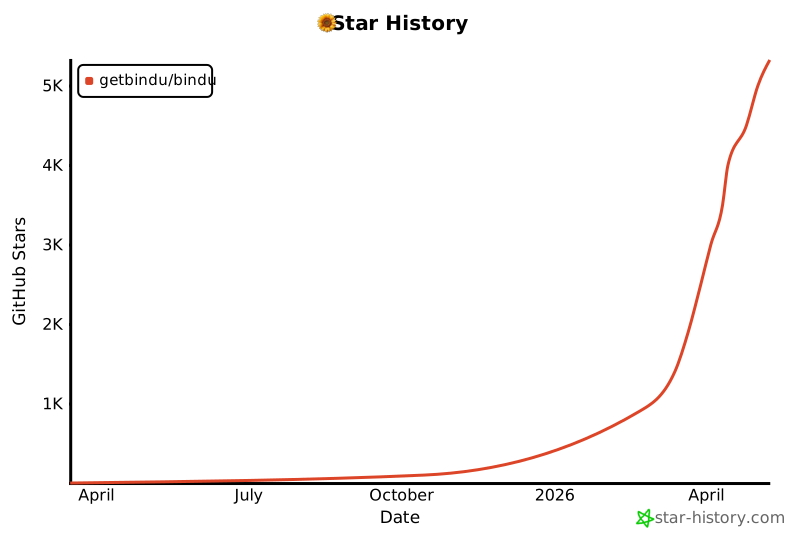
⭐ Star History
Built with 💛 by the team from Amsterdam
Happy Bindu! 🌻🚀✨
From idea to Internet of Agents in 2 minutes.
Your agent. Your framework. Universal protocols.
Release history Release notifications | RSS feed


Download files
Download the file for your platform. If you're not sure which to choose, learn more about installing packages.
Source Distribution
Built Distribution
Filter files by name, interpreter, ABI, and platform.
If you're not sure about the file name format, learn more about wheel file names.
Copy a direct link to the current filters
File details
Details for the file bindu-2026.9.2.2.tar.gz.
File metadata
- Download URL: bindu-2026.9.2.2.tar.gz
- Upload date:
- Size: 9.2 MB
- Tags: Source
- Uploaded using Trusted Publishing? No
- Uploaded via: uv/0.10.4 {"installer":{"name":"uv","version":"0.10.4","subcommand":["publish"]},"python":null,"implementation":{"name":null,"version":null},"distro":{"name":"Ubuntu","version":"24.04","id":"noble","libc":null},"system":{"name":null,"release":null},"cpu":null,"openssl_version":null,"setuptools_version":null,"rustc_version":null,"ci":true}
File hashes
| Algorithm | Hash digest | |
|---|---|---|
| SHA256 |
17466da4930c53aa4a5c46af73c606edc6cf2cde7dce73971a19c7eb153148f7
|
|
| MD5 |
8ea03251902670a910f5703b3d13030e
|
|
| BLAKE2b-256 |
0c1b7369f1154869188e12da464a34e22a0562cc36aba788b981f38287f2b4b1
|
File details
Details for the file bindu-2026.9.2.2-py3-none-any.whl.
File metadata
- Download URL: bindu-2026.9.2.2-py3-none-any.whl
- Upload date:
- Size: 236.3 kB
- Tags: Python 3
- Uploaded using Trusted Publishing? No
- Uploaded via: uv/0.10.4 {"installer":{"name":"uv","version":"0.10.4","subcommand":["publish"]},"python":null,"implementation":{"name":null,"version":null},"distro":{"name":"Ubuntu","version":"24.04","id":"noble","libc":null},"system":{"name":null,"release":null},"cpu":null,"openssl_version":null,"setuptools_version":null,"rustc_version":null,"ci":true}
File hashes
| Algorithm | Hash digest | |
|---|---|---|
| SHA256 |
6a613ae172400ad15e5c82d5ed0c04eede8b4a61c294126db3f55b145ffc95a4
|
|
| MD5 |
724188aa1f02e2abaee5d8ccd9820431
|
|
| BLAKE2b-256 |
b31d3330f1f1ae83edca4ab7b2e8a100d74d9945b6e6bd207682ba8171499155
|






