
binquery v0.2.0
Describe a shot in one sentence; get back a ranked shortlist of clips from your own
footage folder. Local CLI, local ffmpeg, local OpenCLIP ViT-B-32. Search shortlists
candidates for review. It does not assemble a timeline or export a finished edit.
Install from PyPI with pip install binquery, or from source (see 安裝 below).
Docs are in Traditional Chinese.
剪輯助理的痛是素材盒很大:想用一句意圖先縮成可看的排序短名單,而不是把整庫翻一遍。
本機 CLI。對自己的影片資料夾建盒,再用一句意圖撈短名單 JSON。查詢只編碼句子,不重抽幀、不重算整庫。建盒用本機 ffmpeg + 本機 OpenCLIP。
短名單長這樣(本機 10 條自有預覽):
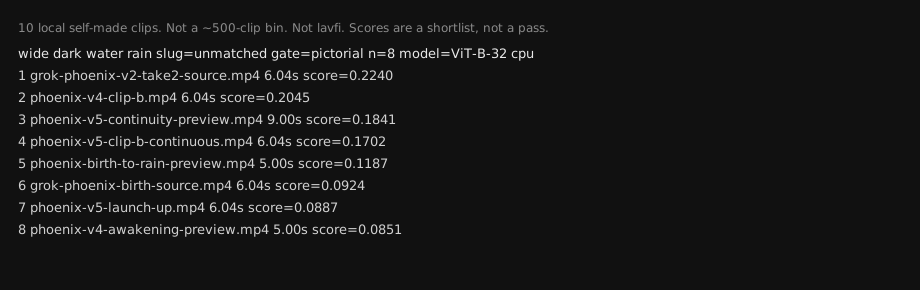
主要欄位包括:
path— 相對檔名score— 排序用分數,不是過關門檻gate— 這次查詢走的閘門reasons— **排名訊號,不是可靠的語義解釋。**它交代分數的組成,不保證能說明「為什麼這條適合你的剪輯」
範圍與限制
它不是:
- 自動成片、自動剪預告、把結果貼進時間軸的工具
- Premiere 或任何 NLE 的替代或整合(盒不會從檔案還原 Premiere 順序)
- 素材瀏覽器
- highlight 偵測、依靜音切、YouTube/TikTok 自動 clip
尚未驗證的範圍:
- 沒有對真實剪輯專案規模的素材盒做過品質驗證
- 沒有對實況錄影跑過
- CI 的 lavfi 測試圖案只是機械煙霧測試,不是實況 clipping 演示,也不是 rushes/場次序列演示
真演示需要將用戶自己的本機長片先 split 再 index,或將本機影片資料夾直接 index 成盒。
已知邊界:
- 分數只用來排短名單,不是過關。人還是要看
- CLIP 看靜幀,長得像的會排在一起(例如白天岩縫透天,分數可以像月亮)
- 長片仍可能排高;時長是加分,不是硬切
motion_label目前只是索引 metadata,不是查詢條件- 多場次的查詢順序留給用戶自己當場次記憶
安裝
python3 -m venv .venv
.venv/bin/pip install binquery
開發或從原始碼執行時,clone 本倉庫後改用 .venv/bin/pip install -e .。
也可以 pip install -r requirements.txt 再跑 ./binquery。
PyPI 套件名是 binquery。
還要本機有 ffmpeg / ffprobe。
CPU。模型是 OpenCLIP ViT-B-32 / laion2b_s34b_b79k。權重快取:
$BINQUERY_CLIP_CACHE,或~/.cache/binquery/open_clip
第一次跑可能把權重下載進這個快取(本機檔,不是查詢 API)。之後可設 BINQUERY_OFFLINE=1。
Python 順序:$BINQUERY_PYTHON → ./.venv/bin/python → python3。
用法
export BINQUERY_INDEX=./my-box

./binquery split --input ./long.mp4 --out ./split-out --seconds 8
./binquery index --input ./split-out --index "$BINQUERY_INDEX"
./binquery doctor --index "$BINQUERY_INDEX"
./binquery query --index "$BINQUERY_INDEX" "<intent>" [--limit 12] [--out path.json]
./binquery list
已有影片資料夾就跳過 split,直接 index --input ./my-videos。
split --input 是一條本機長片。--out 要空目錄或新目錄(預設在長片旁邊的 split-out,不寫進程式樹)。--seconds 預設 8,夾在 4–60。預設 -c copy,切在 keyframe,時長不會剛好。可選 --reencode(本機 libx264 + aac)會比較接近目標時長。split 不建盒、不查詢。
index --input 是你自己的影片資料夾(split 出來的夾,或本來就有的夾)。index --index 要給盒根,程式會在底下建立並寫入 index/。
query 用一句 pictorial 意圖回短名單。--limit 預設 12,夾在 8–15:傳小於 8 當 8、大於 15 當 15;候選不足時結果可以少於 8。--out 會把結果寫成 JSON 檔。未對上凍結導演句也當 pictorial 跑,不必改 src/binquery/intents.py。
對已存在的路徑,query --index 與 doctor --index 會優先使用底下的 index/;若沒有該子目錄,就把給定路徑本身視為 index 目錄。
doctor 只檢查檔在不在、能不能讀。缺必備 index 就列檔名、exit 2,不假裝能查、不解包。
多場次就一場一句 query。預告從 rushes 找鏡頭:對自己的 rushes 資料夾 index,再丟一句預告意圖。
自備盒
- 影片放在你自己的資料夾,不要拷進這個倉庫。
- 建盒:
export BINQUERY_INDEX=./my-box
./binquery index --input ./my-videos --index "$BINQUERY_INDEX"
會用本機 ffmpeg 每條抽 3 幀(約 1s/中點/結尾前 1s),再用本機 ViT-B-32 算向量,寫出:
index/clip.jsonindex/clip_vectors.npyindex/mechanical.jsonindex/empty_hard.json(person_clip:每條 max(cos 人 − cos 空),空鏡 gate 直接讀。不必自己加 json。)index/motion.json(包含 coarse 三幀幀差+phaseCorrelate 產生的motion_label:lock/pan/handheld/moving,以及複製的person_clip。目前查詢只讀其中的person_clip,不依motion_label排名或篩選。)
- 先
doctor,再query。MISS 就停。 - pictorial 不需要 person。空鏡 gate 用
person_clip。 - 影片、幀、向量留在盒裡。本倉庫只放程式和說明。
.gitignore已擋.DS_Store、Python 快取與虛擬環境、*.npy、支援的影片格式、index/。
例子
本機 10 條自有預覽。doctor 0 之後:
./binquery query --index "$BINQUERY_INDEX" "wide dark water rain" --limit 8
export BINQUERY_INDEX=./my-box
./binquery index --input ./my-videos --index "$BINQUERY_INDEX"
./binquery doctor --index "$BINQUERY_INDEX"
./binquery query --index "$BINQUERY_INDEX" "工人與車" --limit 12
凍結分數見 test-run.md(相對檔名,不含素材)。
未對上凍結句的場次名/預告意圖/clip 意圖也可以直接丟給 query,走 pictorial:
./binquery query --index "$BINQUERY_INDEX" "scene 2 empty hallway lock-off"
./binquery query --index "$BINQUERY_INDEX" "第三場:傍晚空街遠景"
./binquery query --index "$BINQUERY_INDEX" "cold open wide empty night"
./binquery query --index "$BINQUERY_INDEX" "close-up reaction pause"
./binquery query --index "$BINQUERY_INDEX" "excited reaction close-up"
./binquery query --index "$BINQUERY_INDEX" "talking to chat medium"
一條長錄影要拆成可發的 clips:先 split 成資料夾(本機 ffmpeg 時間格,切在 keyframe),再 index 那個資料夾 → doctor → 一句「哪種 clip」查短名單。這是 this kind of ask(r/NewTubers, 2026-08-17: How do small streamers handle clipping workflows)。
Agent Skill
給 agent 用:一句剪輯意圖 → 本機短名單。裝這個倉庫的 Skill:
npx -y skills add jennifferweslowski-design/binquery
或把 skills/binquery/ 拷進專案的 .agents/skills/binquery 或 .claude/skills/binquery(夾裡要有 SKILL.md)。
這只裝給 agent 的說明,不會裝 Python 套件。CLI 仍要另外執行 pip install binquery。
場次很多、或預告要從自己的 rushes/dailies 找鏡頭:Skill 裡有未對上凍結句的示例意圖(一場一句,或一句預告意圖)。
agent 的行為約束寫在 skills/binquery/SKILL.md。使用時遵守上方的範圍與限制。
禁止
雲端視覺查詢 API、unpack 素材進本倉庫、把影片或 index 向量提交上來。
CI
推 main 或開 PR 時,ci 先跑 query 單元測試,再在官方 runner 上用 lavfi 自製 30s 測試圖案,split 成至少 2 段,接著跑 index → doctor → query 煙霧測試。素材和 index 只活在 runner,不進倉庫。
本機也可先用 lavfi 試 split:
ffmpeg -f lavfi -i testsrc=duration=30:size=320x240:rate=25 \
  -f lavfi -i sine=frequency=440:duration=30 \
  -c:v libx264 -pix_fmt yuv420p -c:a aac -shortest /tmp/long.mp4
./binquery split --input /tmp/long.mp4 --out /tmp/split-out --seconds 8
常見結果是 3 個檔、各約 10s(-c copy 切在 keyframe)。然後可 index 那個資料夾再 doctor。
怎麼提 issue/PR 見 CONTRIBUTING.md。
1 maintainer

Download files
Download the file for your platform. If you're not sure which to choose, learn more about installing packages.
Source Distribution
Built Distribution
Filter files by name, interpreter, ABI, and platform.
If you're not sure about the file name format, learn more about wheel file names.
Copy a direct link to the current filters
File details
Details for the file binquery-0.2.0.tar.gz.
File metadata
- Download URL: binquery-0.2.0.tar.gz
- Upload date:
- Size: 31.7 kB
- Tags: Source
- Uploaded using Trusted Publishing? No
- Uploaded via:
twine/7.0.0 CPython/3.12.14
File hashes
| Algorithm | Hash digest | |
|---|---|---|
| SHA256 |
16e53db4d3b8734d74a3680630a8ae3581b240e37652fb6d7c09278e2ff90af8
|
|
| MD5 |
62904fee8614c1e3d6292e132169f971
|
|
| BLAKE2b-256 |
f1dbe3e5143c684bfcace8fcf3f834d19a4c4b1090577c419be1bb4ced7fc4ac
|
File details
Details for the file binquery-0.2.0-py3-none-any.whl.
File metadata
- Download URL: binquery-0.2.0-py3-none-any.whl
- Upload date:
- Size: 28.4 kB
- Tags: Python 3
- Uploaded using Trusted Publishing? No
- Uploaded via:
twine/7.0.0 CPython/3.12.14
File hashes
| Algorithm | Hash digest | |
|---|---|---|
| SHA256 |
003f8a7512f5b7b4cd9637ab759740e456a6429f7ca225a342a59fd5e889cb8a
|
|
| MD5 |
7aeae1384ca7b939264c9cfe98eb46b7
|
|
| BLAKE2b-256 |
3e5926417ff3588ecf04b457b7dbe64807cf02a8c915fe9ce3cb2313afc73606
|







