
Striate
Binary visualiser & triage tool: linked interactive views (entropy, histograms, image/dot-plot surfaces, control-flow graphs) over a single shared address-space model.
What it does
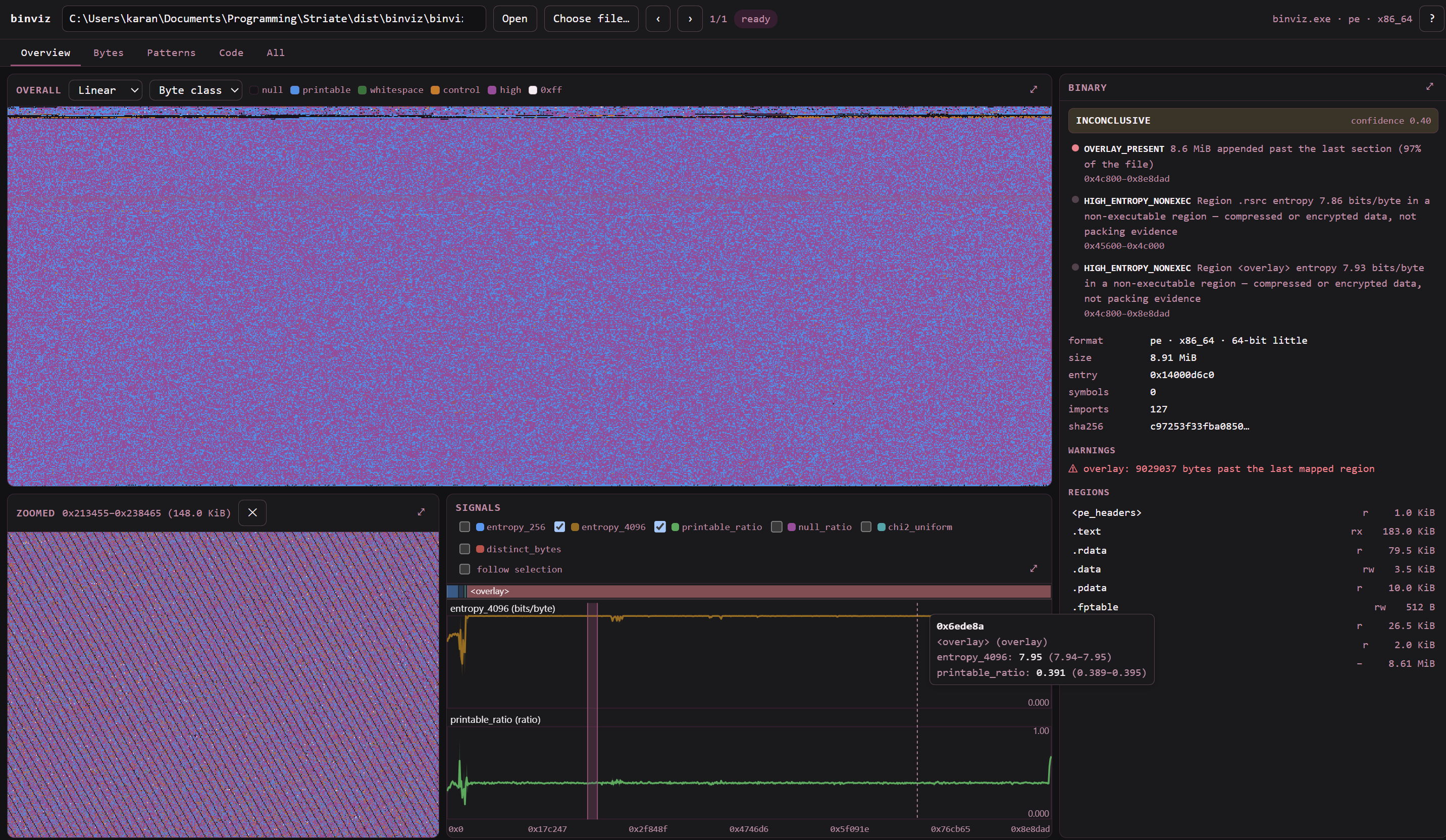
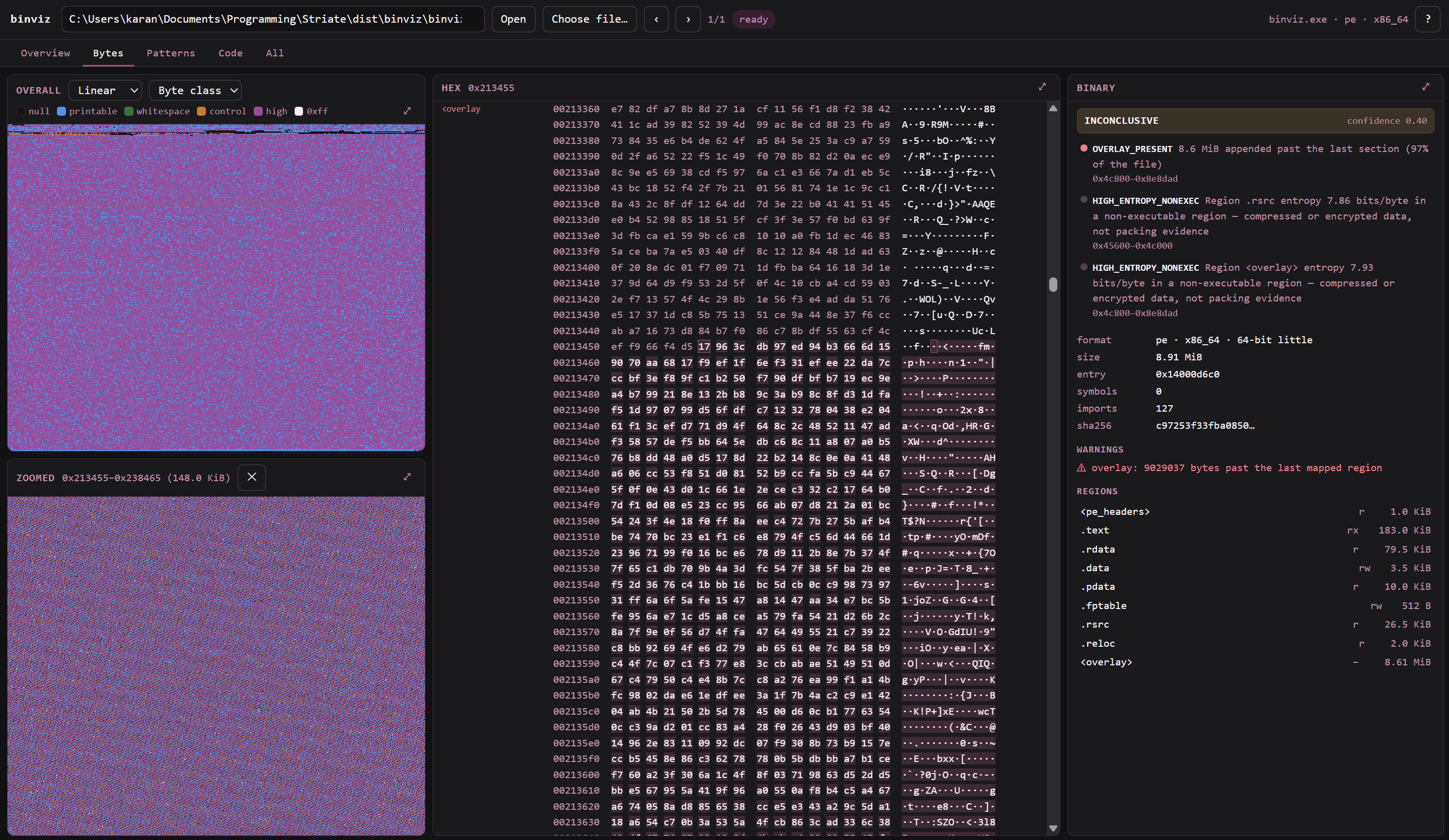
Open a file and every view is looking at the same address space. Select a range in one and the rest follow — the point is to answer "what is this region" by looking at it several ways at once.
- Map it.
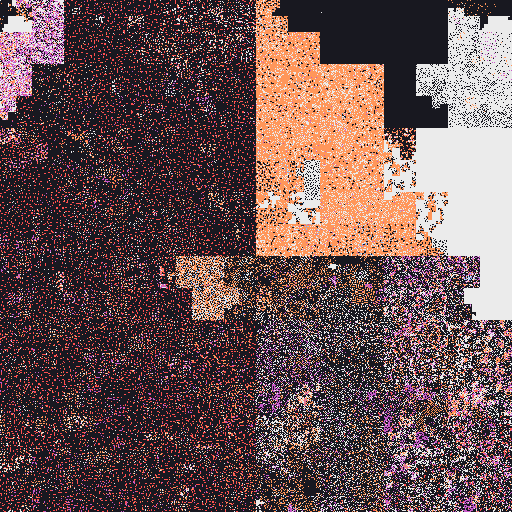
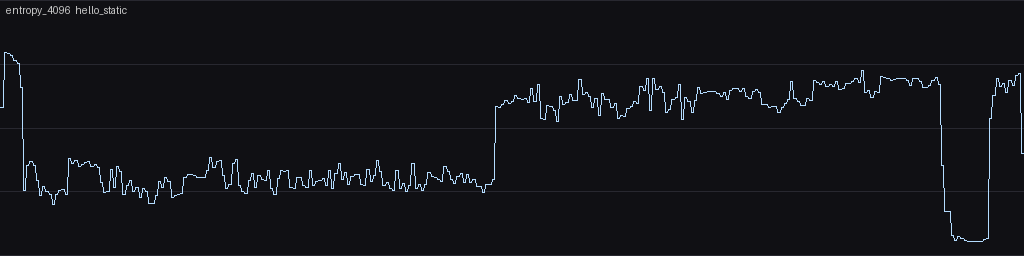
binviz modelparses ELF/PE/Mach-O through LIEF into regions, symbols and an offset↔virtual-address mapping, materialising gaps and overlays. Malformed input falls back to a raw model rather than failing. - Find the parts worth looking at. Windowed entropy and other named signals, byte-class and Hilbert surfaces, and window classification against thresholds measured from a ground-truth corpus rather than picked (ARCHITECTURE.md §2.1). Packed, encrypted, code and padding do not look alike.
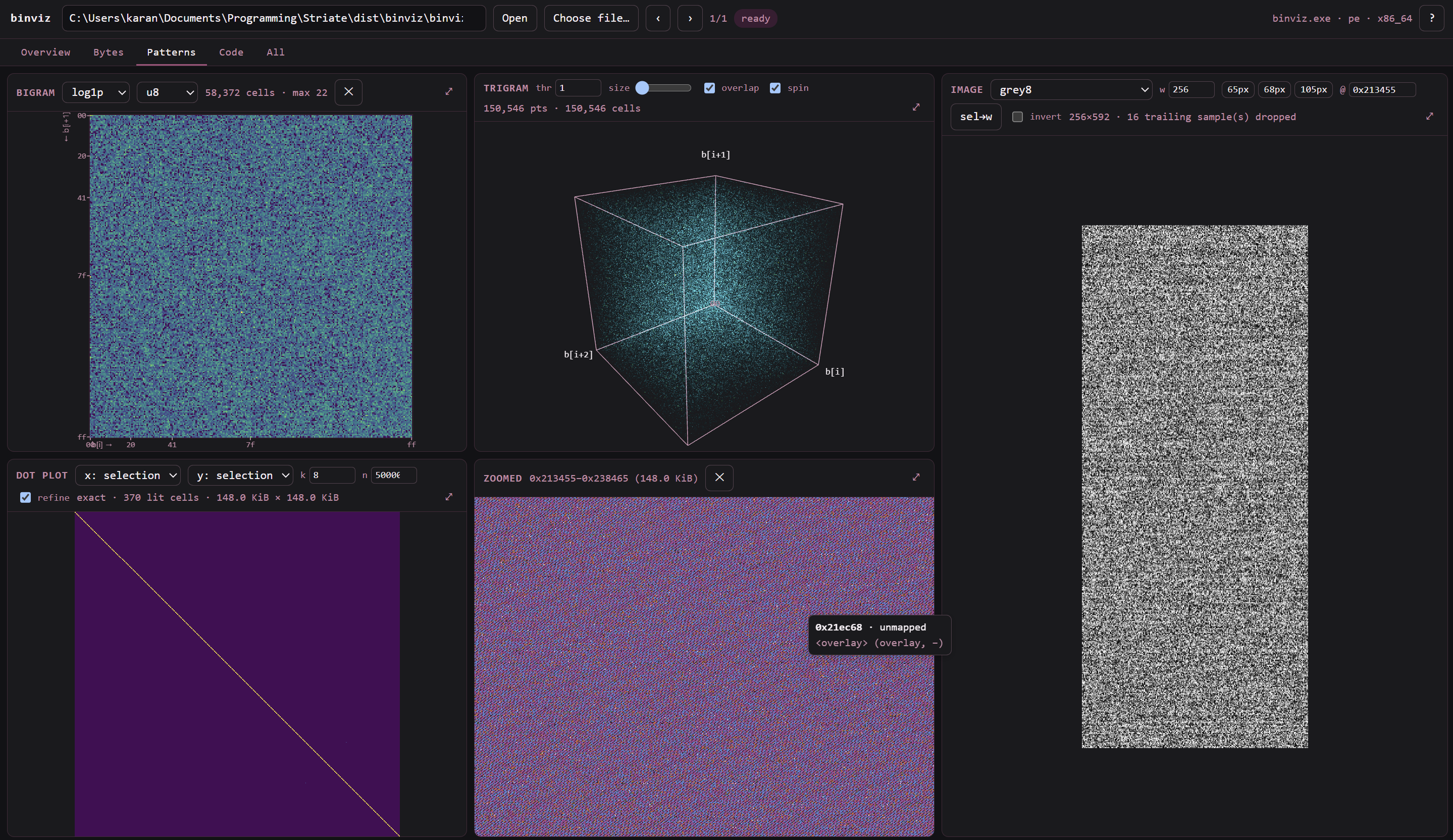
- Identify an encoding. Bigram and sparse-trigram histograms, a dot plot for repeats and self-similarity, and an image view over 15 packed pixel formats and 24 Bayer modes — with a stride suggester, because the wrong row stride turns a photograph into diagonal noise and you conclude there is no photograph.
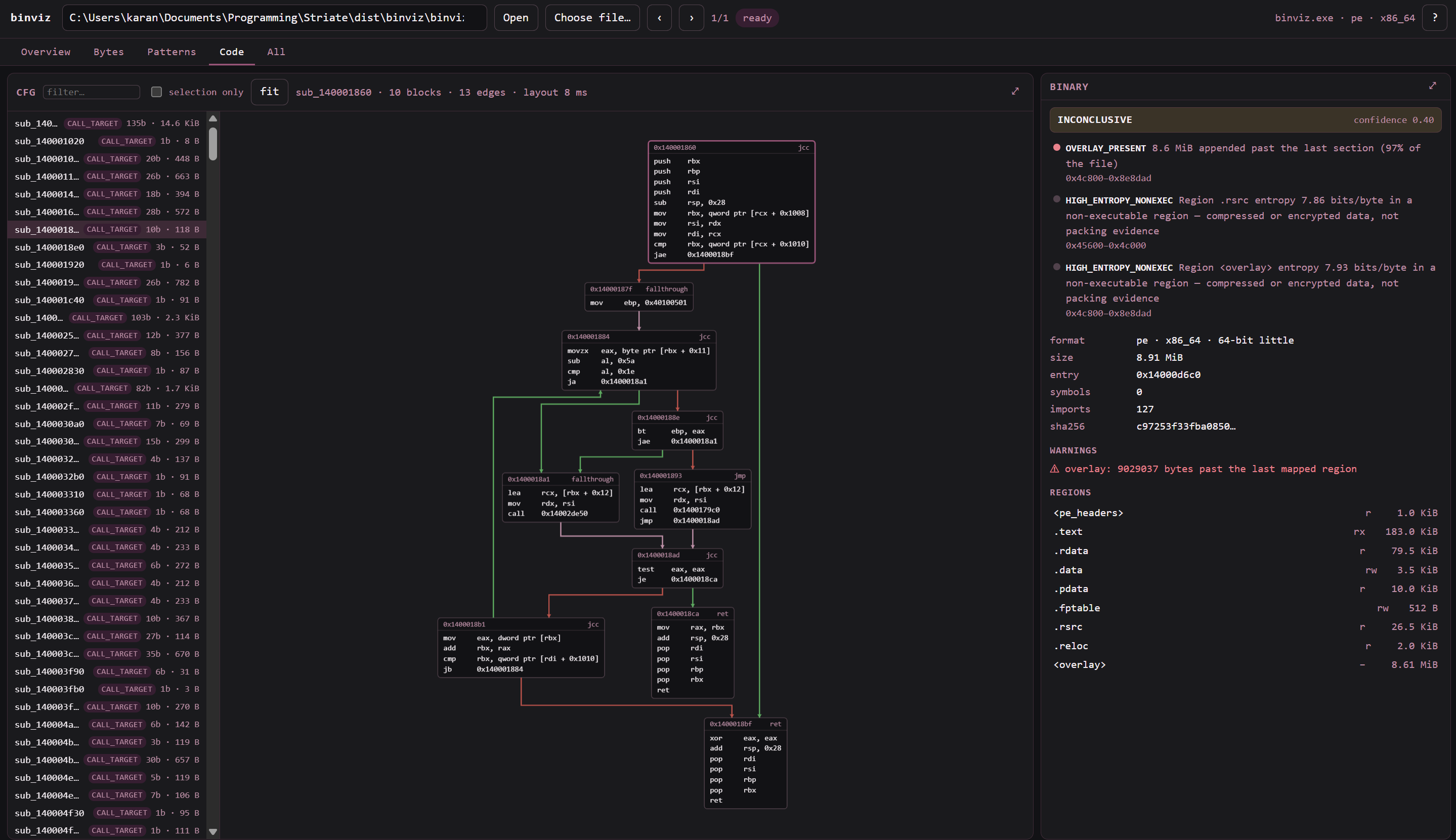
- Read the code. Capstone decode by linear sweep and recursive descent (differentially tested against objdump), a five-tier function-discovery cascade including jump tables, and control-flow graphs laid out in a worker — with the uncertainty of a recovered boundary drawn rather than hidden.
- Get a verdict.
binviz triagesays what the file looks like and why; in the UI each finding clicks through to the bytes it was derived from.
The UI is five workspaces — Overview, Bytes, Patterns, Code, and All — over the same selection. Static analysis only: samples are parsed, never executed.
Screenshots
Plates
Rendered by the same code the UI draws with, straight from the CLI —
regenerate with python docs/make_plates.py.
| A static binary | The same program, UPX-packed |
|---|---|
 |
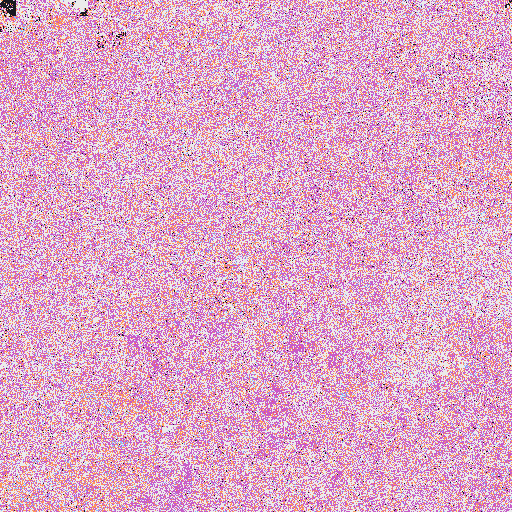 |
| Code, strings and padding separate into visible territories. | Structure collapses into uniform noise — the signature of packing. |
 |
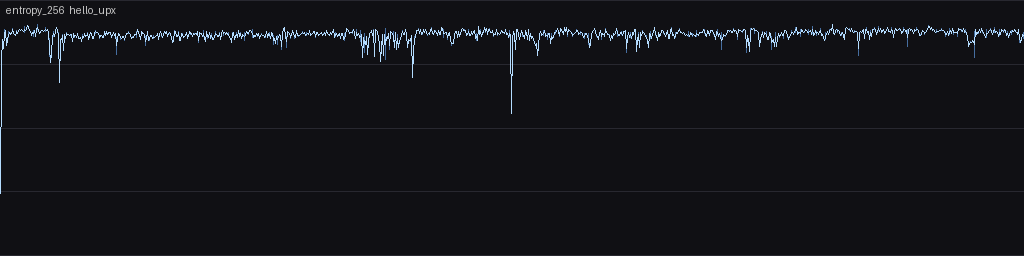 |
| Windowed entropy stays banded and low. | Flat and high, right up to the unpacking stub. |
| Right row stride | Wrong row stride |
|---|---|
 |
 |
Same bytes, one number different. That is why the stride suggester exists: the wrong row stride turns a photograph into diagonal noise, and you conclude there is no photograph.
ARCHITECTURE.md is how it is put together: what ships, the branding every
surface inherits, the conventions a new screen must follow, and the
limitations that are deliberate. SECURITY.md is the security posture.
Quickstart
python -m venv .venv
# -c pins to the exact versions the suite is green against; pyproject.toml
# publishes ranges, so without it you get whatever resolves today
.venv/Scripts/pip install -e ".[dev]" -c constraints-dev.txt   # POSIX: .venv/bin/pip

# build the ground-truth corpus (uses zig cc from the ziglang pip package;
# needs UPX on PATH, in $UPX, or unzipped into corpus/tools/upx-*/)
make -C corpus                            # or: python corpus/build.py

# thresholds are measured, never hardcoded (see ARCHITECTURE.md §2.1)
python corpus/calibrate.py                # writes corpus/calibration.json

pytest                                    # functional suite
pytest -m perf -s                         # 100 MB performance targets

binviz probe  corpus/out/hello_O2
binviz model  corpus/out/hello_upx
binviz signal corpus/out/hello_upx --name entropy_4096 --png out.png
binviz hist   corpus/out/ramp16.bin --n 2 --dtype u16le --png bigram.png

# surfaces: -p passes surface parameters
binviz surface corpus/out/hello_static --name hilbert -p mode=byteclass --png h.png
binviz surface corpus/out/rgb_raw.bin  --name image -p mode=rgb8 -p width=320 --png i.png
binviz surface corpus/out/repeats.bin  --name dotplot -p mode=exact --png d.png
binviz stride  corpus/out/bayer_raw.bin --mode bayer_RGGB_RGB_12

# code
binviz disasm    corpus/out/hello_O2 --limit 20
binviz functions corpus/out/hello_static --sort size
binviz cfg       corpus/out/hello_O2 --func main --dot main.dot

# the verdict, and why
binviz triage corpus/out/hello_upx
Running the server
binviz serve # 127.0.0.1:8000
It prints a URL containing a session token — open that. Every /api route
requires the token, because "it only listens on localhost" is not a defence
against a web page in another tab, which reaches 127.0.0.1 just like any
other origin. SECURITY.md has the reasoning.
File access is confined to --root (default: the working directory), so
paths outside it are refused.
Limits
All four have a flag and an environment variable, and all four exist to stop a local caller consuming more than you intended. Defaults are chosen for a laptop; raise them if your machine is bigger.
| Flag | Env | Default | What it bounds |
|---|---|---|---|
--max-cache BYTES |
BINVIZ_MAX_CACHE |
5 GiB | Total size of cached analyses. Past this, least-recently-used entries are evicted — never one being analysed or viewed. |
--max-upload BYTES |
BINVIZ_MAX_UPLOAD |
8 GiB | Largest accepted upload. |
--max-analyses N |
— | 4 | Simultaneous analyses; beyond it /api/open returns 503. |
--root DIR |
— | cwd | Directory the server may read files from. |
Analyses are cached under ~/.cache/binviz (or $BINVIZ_CACHE), keyed by
content hash, so reopening a binary is instant. Raise --max-cache if you
would rather keep more of them; the cache is safe to delete by hand at any
time — the worst case is that the next open re-analyses.
Other flags: --token to pin a token across restarts (useful with the Vite
dev proxy, which reads BINVIZ_TOKEN), --port, --cache, and --no-auth
for CI. --no-auth prints a banner telling you what it turned off; do not
use it on a machine you share.
Desktop window
pip install "binviz[app]"
binviz app                    # native window; --browser for your browser
Same server, same token, same --root confinement as binviz serve — the
only difference is what displays it. Without pywebview installed, binviz app opens your browser instead.
It prints the URL it is serving on, deliberately: wrapping the UI in a
window does not remove the network listener, it only makes it easier to
forget there is one. The listener is authenticated either way, and there is
no --no-auth on binviz app.
The window exposes exactly one function to the page — a native file picker —
and nothing else. See src/binviz/app.py for why that list is as short as
it is.
Building a standalone app
Releases ship a wheel and nothing else. An unsigned frozen Python executable that bundles capstone and lief and exists to dissect packed binaries is exactly the profile SmartScreen and AV heuristics false-positive on — so instead of shipping one, the repo carries what you need to build it yourself, which sidesteps code signing entirely.
pip install pyinstaller                # 6.x
python tools/build_ui.py               # builds web/ and stages it into the package
pyinstaller packaging/binviz.spec      # -> dist/binviz/
Expect ~100 MB, dominated by numpy and lief. It is a onedir bundle, not a
single self-extracting file: launch dist/binviz/binviz.exe (or
double-click it) for the desktop window, or give it any subcommand —
dist/binviz/binviz.exe triage sample.exe — because the frozen build is
the whole CLI, not just the window.
The staging step is not optional. web/dist lives outside the Python
package, so skipping it produces an app whose window opens on a JSON 404;
the spec refuses to build rather than let that happen quietly.
On macOS the same command also produces dist/Striate.app, branded from
packaging/icons/icon.icns. Neither has been run on a Mac — see
ARCHITECTURE.md §5.
--root still defaults to the working directory, so a double-clicked
executable is confined to the folder it starts in — which is usually the
app's own folder. Set the shortcut's "Start in", or launch it with
--root DIR.
A double-clicked executable asks for a credential. With no arguments the
frozen build runs binviz app --auth local, which is the one difference from
the wheel's own default of no sign-in screen. The two answer different
questions: binviz app typed into a terminal is already a deliberate act by
whoever owns the session, while a double-click establishes nothing — it is the
only launch path with no terminal, no typed command and no confinement
decision behind it. Asking for the credential is how the window says out loud
what the terminal would have said. Run binviz passwd first to set one, or
pass --auth none explicitly to skip it; anything you supply on the command
line still wins.
Signing in
By default there is no login screen and nothing to copy: the server mints a
session token and injects it into the page it serves, so opening
http://127.0.0.1:8000/ just works while every API call is still
authenticated.
On a machine you share, turn on the sign-in screen:
binviz passwd                 # prompts; scrypt digest, mode 0600
binviz serve --auth local
If you skip binviz passwd, the first sign-in claims the install — the
startup banner warns about that, because whoever reaches the port first
becomes the account.
A double-clicked frozen executable turns --auth local on for itself; see
Building a standalone app for why that default
differs from the wheel's.
The login screen is not the security boundary; the token check on every
/api route is. Anything on the machine can skip the form and call the API
directly, which is exactly why the token exists. See SECURITY.md.
Security
binviz opens files an attacker chose — that is the job, not an edge case, and a triage tool where analysing malware compromises the analyst is the worst failure available. Samples are parsed, never executed. What is done about the rest:
Against a hostile binary
- Parsing degrades rather than fails: a binary LIEF cannot make sense of falls back to a raw model, so the malformed sample you most want to look at is still inspectable.
- Every mapping is clamped to EOF, and whatever got trimmed is reported in the model's warnings rather than silently corrected.
- Disassembly cannot loop forever — the sweep caps at 1M instructions and carries a visited set, so a jump-to-self terminates structurally rather than by timeout. Jump-table recovery caps at 256 entries.
- Cache paths cannot be traversed: the
idin every/api/{id}/…route must be exactly 64 hex characters before it is used to build a path. - Large files stream rather than buffer, so a file bigger than RAM is slow rather than an out-of-memory crash.
Against a hostile browser — the threat "it only listens on localhost" does
not address, because a page in another tab reaches 127.0.0.1 like any other
origin:
- Every
/apiroute requires a token. It is minted at startup and injected into the page, so nothing is pasted by hand and no route is left open. - The login screen is not the security boundary — the token check is. The form can be skipped; the token cannot.
- File access is confined to
--root, which defaults to the working directory. Paths outside it are refused. Hostallowlist and narrow CORS, so the origin that needs access is the only one that gets it.- Binary metadata cannot become script: strings lifted from a sample — section names, symbols — go through one escaper, backed by a CSP.
- Requests are bounded and validated — upload size, cache size, raster dimensions and analysis concurrency all have ceilings (see Limits).
The desktop window does not remove the network listener, it only makes it
easier to forget. So there is no --no-auth on binviz app, and the js_api
bridge exposes exactly one method — pick_file(), which takes no arguments and
returns a path through the same --root confinement. A test fails if a second
method ever appears.
Credentials for --auth local are scrypt digests written mode 0600; binviz
stores no plaintext password.
SECURITY.md has the threat model, the reasoning behind each control, what
is deliberately not done yet, and how to report a vulnerability privately.
Licence
MIT — see LICENSE.
The corpus cross-compiles ELF samples with zig cc, so no Linux toolchain is
needed on Windows/macOS — samples are parsed, never executed.
1 maintainer

Download files
Download the file for your platform. If you're not sure which to choose, learn more about installing packages.
Source Distribution
Built Distribution
Filter files by name, interpreter, ABI, and platform.
If you're not sure about the file name format, learn more about wheel file names.
Copy a direct link to the current filters
File details
Details for the file binviz-0.0.3.tar.gz.
File metadata
- Download URL: binviz-0.0.3.tar.gz
- Upload date:
- Size: 688.0 kB
- Tags: Source
- Uploaded using Trusted Publishing? Yes
- Uploaded via:
twine/7.0.0 CPython/3.13.14
File hashes
| Algorithm | Hash digest | |
|---|---|---|
| SHA256 |
fd289c37a71dff67cd9abc7e9a1f9212e0718a2f2e6c6f0bfa55409100034035
|
|
| MD5 |
b4f0626f26d4f57ed23575fe56f4fc0d
|
|
| BLAKE2b-256 |
74e3de64a73c74317444e4eb034fad85af170cbc82aea8fa8e334372704aed34
|
Provenance
The following attestation bundles were made for binviz-0.0.3.tar.gz:
Publisher:
publish.yml on karankantaria/Striate
-
Statement:
-
Statement type:
https://in-toto.io/Statement/v1 -
Predicate type:
https://docs.pypi.org/attestations/publish/v1 -
Subject name:
binviz-0.0.3.tar.gz -
Subject digest:
fd289c37a71dff67cd9abc7e9a1f9212e0718a2f2e6c6f0bfa55409100034035 - Sigstore transparency entry: 2589915709
- Sigstore integration time:
-
Permalink:
karankantaria/Striate@a277ba6eb47c74add26472763521d2ff85a27e79 -
Branch / Tag:
refs/tags/v0.0.3 - Owner: https://github.com/karankantaria
-
Access:
public
-
Token Issuer:
https://token.actions.githubusercontent.com -
Runner Environment:
github-hosted -
Publication workflow:
publish.yml@a277ba6eb47c74add26472763521d2ff85a27e79 -
Trigger Event:
release
-
Statement type:
File details
Details for the file binviz-0.0.3-py3-none-any.whl.
File metadata
- Download URL: binviz-0.0.3-py3-none-any.whl
- Upload date:
- Size: 641.3 kB
- Tags: Python 3
- Uploaded using Trusted Publishing? Yes
- Uploaded via:
twine/7.0.0 CPython/3.13.14
File hashes
| Algorithm | Hash digest | |
|---|---|---|
| SHA256 |
f7b83ea58e17cf6310ae4cd8b9840d628dc1e8cac9c99c28c71542d46b2b9b72
|
|
| MD5 |
83716eea2d5d7cbd49ce7b1e1b1e793b
|
|
| BLAKE2b-256 |
6b9f99623cd1a05d6ea6ed6559ffd404b7f982121df7b9ab214370cfe3008974
|
Provenance
The following attestation bundles were made for binviz-0.0.3-py3-none-any.whl:
Publisher:
publish.yml on karankantaria/Striate
-
Statement:
-
Statement type:
https://in-toto.io/Statement/v1 -
Predicate type:
https://docs.pypi.org/attestations/publish/v1 -
Subject name:
binviz-0.0.3-py3-none-any.whl -
Subject digest:
f7b83ea58e17cf6310ae4cd8b9840d628dc1e8cac9c99c28c71542d46b2b9b72 - Sigstore transparency entry: 2589916049
- Sigstore integration time:
-
Permalink:
karankantaria/Striate@a277ba6eb47c74add26472763521d2ff85a27e79 -
Branch / Tag:
refs/tags/v0.0.3 - Owner: https://github.com/karankantaria
-
Access:
public
-
Token Issuer:
https://token.actions.githubusercontent.com -
Runner Environment:
github-hosted -
Publication workflow:
publish.yml@a277ba6eb47c74add26472763521d2ff85a27e79 -
Trigger Event:
release
-
Statement type:







