A high-performance bionic reading traceback and log formatter for the terminal.

Project description
<img src="https://raw.githubusercontent.com/Pranay-Bhaskar/fovea/main/assets/bionify_logo.png" alt="Bionify Logo" width="180"" alt="Bionify Logo" width="220"/>



Bionify is a lightning-fast, C++ powered terminal formatter that applies Bionic Reading algorithms to your Python tracebacks and logs.
By strategically bolding the first half of words, Bionify guides your eyes through massive walls of terminal text, allowing you to parse crash logs, errors, and system outputs in a fraction of the time.
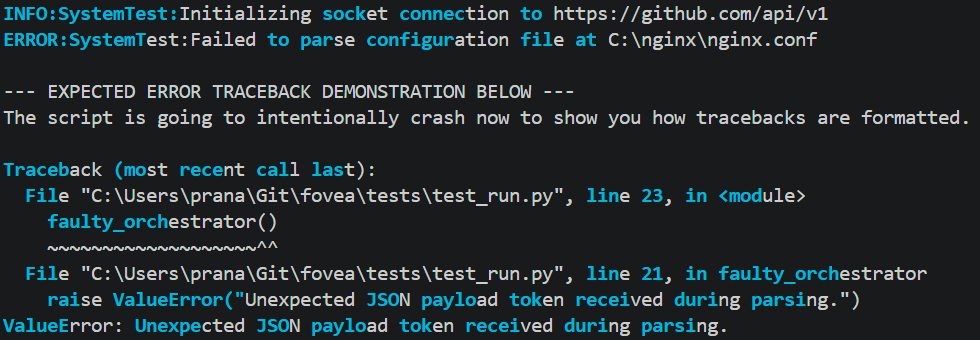
Features
- Zero-Config Hooks: Import it once, and Fovea automatically intercepts and styles your unhandled exceptions and
stderroutputs. - Native Logging Integration: Includes a custom formatter for Python's standard
logginglibrary. - Hyperlink Protection: Smart enough to leave URLs (
https://) and file paths (C:\) unformatted so they remain clickable in modern terminals like VS Code. - Blazing Fast Backend: The text parsing engine is written entirely in C++ using
nanobind, ensuring zero latency even on massive stack traces. - Custom Aesthetics: Easily configure intensity, bolding, and ANSI colors to match your terminal theme.
Installation
Currently available for Windows (64-bit).
pip install bionify
Quick Start
The easiest way to use Fovea is to simply import it at the top of your entry-point file. It will automatically hook into sys.excepthook and sys.stderr.
import bionify

# Bionify is now active! Any unhandled exceptions will be styled.
raise RuntimeError("This traceback will be styled for rapid reading!")
Advanced Usage
Customizing the Aesthetic
Fovea defaults to Bold Cyan with a 50% reading intensity. You can easily adjust this to match your terminal theme:
import bionify

# Change the fixation intensity (0.1 to 1.0)
bionify.set_prescription(0.6)

# Change the color (cyan, magenta, yellow, red, green, blue, white)
bionify.set_style(bold=True, color="magenta")

# Power user? Pass your own raw ANSI escape sequences
bionify.set_color_ansi(prefix="\033[1;95m", suffix="\033[0m")
Using with the logging Library
If you want to apply Bionify to your standard Python logs, use the provided BionicFormatter:
import logging
from bionify.hook import BionicFormatter

logger = logging.getLogger("MyBackend")
handler = logging.StreamHandler()

# Attach the Fovea formatter
handler.setFormatter(BionicFormatter("%(levelname)s: %(message)s"))
logger.addHandler(handler)
logger.setLevel(logging.INFO)

logger.info("Database connection established successfully.")
Contributing
Contributions, issues, and feature requests are welcome! Feel free to check the issues page.
License
This project is licensed under the MIT License © 2026 Pranay.


Download files
Download the file for your platform. If you're not sure which to choose, learn more about installing packages.
Source Distribution
Built Distribution
Filter files by name, interpreter, ABI, and platform.
If you're not sure about the file name format, learn more about wheel file names.
Copy a direct link to the current filters
File details
Details for the file bionify-0.1.2.tar.gz.
File metadata
- Download URL: bionify-0.1.2.tar.gz
- Upload date:
- Size: 104.5 kB
- Tags: Source
- Uploaded using Trusted Publishing? No
- Uploaded via: twine/6.2.0 CPython/3.13.2
File hashes
| Algorithm | Hash digest | |
|---|---|---|
| SHA256 |
089f33ccc0fdb2192fd61120e9795c87304e428449db49dfa9f1f6f88c7ca634
|
|
| MD5 |
c4f095e0a3bc660befd3f3012267f9bb
|
|
| BLAKE2b-256 |
83618e3edc8f9cb2380fc02432a0dbcc56c6bf12f2aecd5fe029237148185ca9
|
File details
Details for the file bionify-0.1.2-cp313-cp313-win_amd64.whl.
File metadata
- Download URL: bionify-0.1.2-cp313-cp313-win_amd64.whl
- Upload date:
- Size: 44.0 kB
- Tags: CPython 3.13, Windows x86-64
- Uploaded using Trusted Publishing? No
- Uploaded via: twine/6.2.0 CPython/3.13.2
File hashes
| Algorithm | Hash digest | |
|---|---|---|
| SHA256 |
b3575426977113b0984e0f418c0457a8e31cb41b84cf6277decf245b96355730
|
|
| MD5 |
5c1e208a2c94f479286555c26188f48b
|
|
| BLAKE2b-256 |
41f54dd1edb49e49e667ff82b1148e5b00773f9a86a04ad3921aeb233eb8aeb6
|