
MorseKey — type a phrase in Morse, get a BIP39 mnemonic. And back. Offline, deterministic, open-source.
Verified details
These details have been verified by PyPIProject links
GitHub Statistics
Maintainers

Project description

MorseKey
also known as bip39-morse (the package / repo / CLI name)
BIP39 seed phrases ⇄ Morse code · offline · deterministic · open-source



Interactive TUI that converts a Morse-typed phrase into a BIP39 mnemonic (and back), with pluggable per-locale Morse alphabets.
Demo
[!CAUTION] The phrase below is the iroha — a classical Heian-era pangram of the kana, globally known public text. The wallet derived from it is therefore public too: anyone running the same command produces the same mnemonic. This is illustration, not a usage recipe.
If the SVG above does not animate in your viewer, the final frame as PNG:
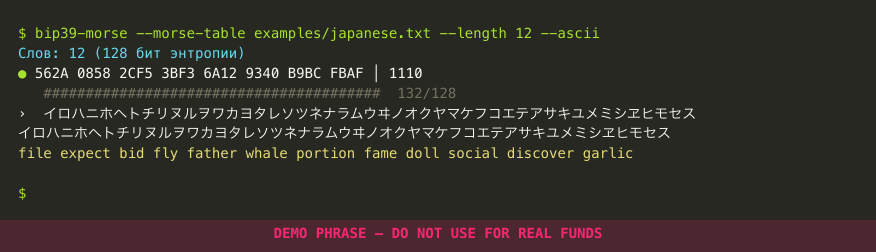
The iroha (色は匂へど…) is a 9th–10th c. Buddhist meditation on impermanence. Its 47 syllables use each kana exactly once, making it simultaneously a famous poem and a pangram of the syllabary. Approximate translation:
Beautiful colours fade away — who in this world endures forever? Today I cross the deep mountain of impermanence, and shall not dream shallow dreams, nor be intoxicated.
The demo feeds the iroha kana-by-kana through the Japanese Wabun alphabet (loaded from examples/japanese.txt). The 47 kana produce 186 bits, well past the 132 bits needed for a 12-word seed — the indicator turns green on the 36th kana when entropy_bits=128 is reached, the rest is overflow that goes only into the visual buffer.
Reproduce locally:
bip39-morse --morse-table examples/japanese.txt --length 12 --ascii
# then type the iroha and press Enter
Reverse direction — mnemonic → Morse text
Same demo run in --reverse mode. The 12 BIP39 words from above are typed in (prefix-autocomplete commits each word as soon as it's unique), and the tool decodes the resulting 128 entropy bits back into Morse-shaped Latin text. The final print is formatted as --group-size 4 --per-line 4, i.e. blocks of 4 characters, 4 blocks per row:
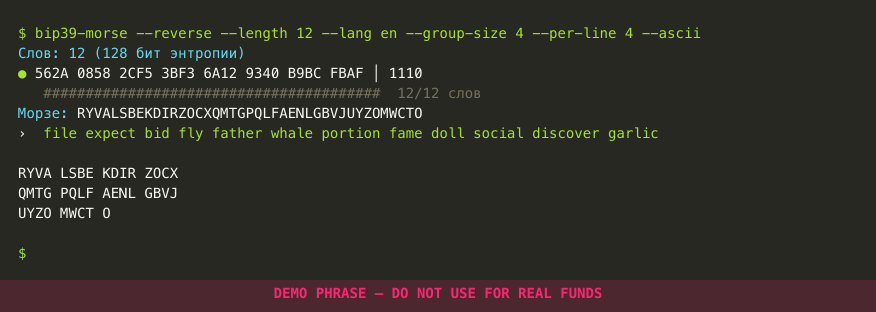
The decoded text round-trips through forward mode: feeding it back as a Morse phrase reproduces the same 128 entropy bits, hence the same first 11 mnemonic words (BIP39's last-word-checksum behaviour is the usual caveat). See the round-trip self-check under the security warning.
Pipeline
The full demo pipeline is in docs/generate_demo.py — python3 docs/generate_demo.py regenerates both casts (forward + reverse) and renders them via termtosvg (loop delay 5 s, so the final frame lingers long enough to read) plus watermark injection, then rasterises each static SVG to PNG via rsvg-convert. To rebuild from scratch: pip install termtosvg and brew install librsvg.
Security warning — read this before generating anything real
Generating a real BIP39 phrase on a general-purpose computer is inherently risky and is done entirely at your own risk. Only proceed on a machine you are completely certain is not under an attacker's control — and even then, treat the result as compromised the moment anything unexpected happens during the session.
-
Windows 11 is strongly discouraged as the host OS. Telemetry, Recall snapshots, OneDrive auto-sync, the clipboard history service, screen-capture pipelines, third-party update agents, and the long tail of unaudited drivers all make it a poor environment for handling seed entropy. The same caution applies, in varying degrees, to any consumer OS that you have not personally hardened.
-
Recommended setup. Boot a clean live OS (e.g. Tails or a minimal Linux ISO) from a USB stick on a known-trusted machine. Disconnect the network. Run the tool. Never persist the phrase, the mnemonic, or any intermediate hex to a disk or cloud drive — type it directly into the offline cold-storage device that will hold the seed.
-
Round-trip self-check before you trust the output. This tool is fully deterministic and reversible — verify that yourself, on the spot:
- Run forward mode on your typed phrase → note the entropy hex (the part to the left of
│on the green-indicator line) and the resulting mnemonic. - Run
--reversewith the same--length/--wordlist, enter the mnemonic → it prints the decoded "reverse trash" text. - Run forward mode again on that reverse-trash text → it must produce the same entropy hex as step 1 (and hence the same mnemonic).
If the hex in steps 1 and 3 does not match exactly, do not use the mnemonic — something in the environment is interfering with the tool.
- Run forward mode on your typed phrase → note the entropy hex (the part to the left of
-
Wipe traces. After verification, shut down the live OS cleanly so swap and tmpfs are gone with it. Do not screenshot the TUI, do not paste anything into a chat or a note-taking app, and remember that anything you typed may still be in scrollback until the terminal process exits.
How it works
The script is a bridge between two representations of the same entropy:
- a phrase in Morse code (a sequence of characters whose International Morse codes, written as
0/1for./-, concatenate into a bit string), and - a BIP39 mnemonic (a list of 12/18/24 words drawn from a 2048-word dictionary, where each word encodes 11 bits of a longer string formed by
entropy ‖ SHA256(entropy)).
It runs as an interactive TUI (prompt_toolkit) and has two opposite directions:
Morse alphabet
bip39_morse/morse.py keeps three kinds of lookup data:
- Letters are organised as a layered registry: an ordered list of
(locale, mapping)pairs. Two layers are built in —en(LATIN, 26 codes) andru(CYRILLIC, 33 codes incl.ё, sharing the code ofе). Extra layers can be appended at runtime via--morse-table PATH(see below). When two layers define the same character, the later layer wins. - Digits
0–9— all 5-symbol ITU codes (shared across all locales). - Punctuation —
.,,,-,!,?,:(5–6 symbols, shared).
For any character, char_to_bits(ch) looks up its Morse code in the merged forward map (every loaded layer collapsed into one char → morse dict) and rewrites it as a bit string (. → 0, - → 1). Space yields the empty bit string — it acts only as a visual word separator and contributes no entropy.
Reverse decoding (bits_to_text(bits, locale=...)) reads only the layers tagged with the chosen locale, so the same bit pattern can decode into different alphabets depending on which locale you ask for.
A key property exploited later for the built-in en/ru locales: both e/е map to the single bit 0 and both t/т map to the single bit 1, so every possible bit string is decodable into letters without padding. Custom locales need not satisfy this; the decoder falls back to digits, then punctuation, if no letter matches at any length.
Custom Morse tables
Pass --morse-table PATH (repeatable) to extend or override the built-ins from a file. Format:
# locale: jp
# name: Japanese Wabun code (optional)
# Comments and blank lines are ignored.
# Lines: <single-char> <whitespace> <morse>      (morse uses '.' and '-')
イ .-
ロ .-.-
ハ -...
...
- The
# locale: <code>header is required and assigns the layer to a locale (any short string —jp,de,es, …). - Each subsequent definition of the same character — within the file or across files — overrides earlier ones (including the built-in
en/rulayers, so you can patch a single letter if needed). - Letters are stored case-insensitively (
forward_table()keys are lowercased; lookup also lowercases).
A ready example lives at examples/japanese.txt — the standard 48-katakana Wabun code plus dakuten/handakuten/long-vowel marks, transcribed from ITU-R M.1677-1 and the JARL Wabun standard. Load it with:
python -m bip39_morse --morse-table examples/japanese.txt --reverse --lang jp
Then reverse-mode output will be rendered in katakana. (The same bit pattern 01 decodes as A for --lang en, А for --lang ru, イ for --lang jp, and Α for --lang el — bits_to_text only reads layers tagged with the requested locale.)
A second new-alphabet example: examples/greek.txt — the 24-letter Greek alphabet (Α–Ω) from ITU-R M.1677-1, section 1.1.4. Like Japanese, it's a standalone locale (# locale: el), not a layer over Latin. Load it with:
python -m bip39_morse --morse-table examples/greek.txt --reverse --lang el
Greek mirrors the Latin alphabet's 1-bit coverage: Ε (.) and Τ (-) cover the single-bit codes 0 and 1, so reverse decoding in el has the same letter-only round-trip guarantee as the built-in en/ru locales — the digit and punctuation fallbacks are never reached. The file also includes final sigma ς as an encode-only convenience entry sharing σ's code (...).
Latin accent extensions (German / French / Spanish / Polish)
Several Western-European languages don't need a separate alphabet — they just add a handful of accented letters on top of A–Z. The repository ships four ITU-R M.1677-1 extensions tagged with locale: en, so they layer onto the built-in English alphabet instead of creating a new locale:
| File | Adds |
|---|---|
examples/german.txt |
Ä, Ö, Ü, ß |
examples/french.txt |
À, Ç, É, È |
examples/spanish.txt |
Ñ, Ü |
examples/polish.txt |
Ą, Ć, Ę, Ł, Ń, Ó, Ś, Ź, Ż |
You can load any combination — they don't conflict with each other (the few overlapping letters, e.g. Ü in both German and Spanish, share the same ITU code). Polish is a special case: six of its nine letters share a bit-string with another extension (Ą≡Ä, Ć≡Ç, Ę≡É, Ł≡È, Ń≡Ñ, Ó≡Ö). Forward direction is unaffected; in reverse direction the first-loaded file's character wins for any shared code, so reorder the --morse-table flags if you want a particular language to dominate the decoded output.
Example: French session
python -m bip39_morse --morse-table examples/french.txt --length 12
After this, the forward-mode TUI accepts à / ç / é / è (both cases) alongside the regular A–Z. Type a French passphrase:
Слов: 12 (128 бит энтропии)
🟢 A3F2 B1C4 0911 7E2D 5C8A 6F03 D4E1 9B25 │ 1100
   ████████████████████████████████████████  132/128
›  Le café à Paris est très bon_
Press Enter:
LE CAFÉ À PARIS EST TRÈS BON
island legal forest above ... (12 words)
Because the file extends locale: en, no --lang flag is needed — --reverse still defaults to en, and the decoder may emit Ä / É / etc. where their ITU codes don't collide with a base Latin letter.
Caveat. ITU-R M.1677-1 defines official codes only for the accented letters listed in each example file. Other diacritics (e.g. Â, Ê, Î, Ô, Ï, Ë, Ù, Û in French; Á, Í, Ó, Ú in Spanish) have no standard Morse code — radio operators traditionally drop the accent. If your convention requires them, add the rows yourself; later entries override earlier ones in the merged forward table.
Bit math
For N words the BIP39 layout is:
total_bits = 11 · N
entropy_bits = total_bits · 32 / 33   (= 128, 192, or 256)
checksum_bits = entropy_bits / 32     (= 4, 6, or 8)
The TUI accepts a --length of 12/18/24 and derives entropy_bits from this table.
Forward mode — phrase → mnemonic
Implemented in bitstream.py + tui.py. The data flow on each keystroke:
- The character is mapped to its Morse bit string via
char_to_bits. BitStream.push(char, bits)appends the bits to an internal accumulator and the displayed character to a visual buffer. Each push is also recorded on a stack soBackspacecan roll the exact same bits back off.- While
accumulated_bits < entropy_bits, the hex view shows the completed bytes of the accumulator (groups of 4 hex chars). The indicator is red. - As soon as
accumulated_bits ≥ entropy_bits, the firstentropy_bitsbits are treated as the entropy;SHA-256(entropy)is computed and its topchecksum_bitsbits are appended. The hex view switches toentropy_hex │ checksum_bitsand the indicator turns green. Extra characters typed after that point still appear in the visual buffer and contribute to normalization, but they are ignored for mnemonic derivation. - On
Enter(only while green) theentropy ‖ checksumstring is split into 11-bit groups, each group indexes the wordlist, and the program prints two lines: the normalized phrase (uppercased, whitespace collapsed to single spaces) and the BIP39 mnemonic.
Pasting via Cmd/Ctrl+V iterates the pasted text and feeds each allowed character through the same push pipeline; unsupported characters are skipped with a hint.
Reverse mode — words → Morse text
Implemented in reverse.py + tui_reverse.py. Here the user types words from the BIP39 wordlist and the script renders the resulting bits as readable Morse text.
-
Word entry —
WordEntry.push_charappends a character to the current partial word and checks how many wordlist entries still start with it:- 1 match → the word is auto-completed and committed (a space is implicit; the next char starts a new word).
- 0 matches → the character is rejected.
- 2+ matches → it stays in the buffer; up to 8 candidates are shown live as a hint.
For words that are themselves a prefix of longer ones (e.g.
vanvsvanish) auto-complete cannot fire, soSpace,Tab, andEntercallcommit_current()to commit the exact typed word.
-
Paste —
WordEntry.paste_text(text)splits the pasted string on any of space/tab/CR/LF, prepends the current partial buffer to the first token, then resolves each token as either an exact wordlist word (winning over prefix-of-others) or a unique prefix. It stops at the first ambiguous/unknown token. -
Bits — once
Nwords are committed, their 11-bit indices concatenate into the sameentropy ‖ checksumlayout that forward mode produces. -
Bits → text —
bits_to_text(bits, locale)walks the firstentropy_bitsbits left-to-right. At every position it considers all letter codes that prefix the remaining bits at any length 1..6, picks the least-used letter so far (tie-break: longest code, then alphabetical), and consumes that many bits. If no letter matches at any length, the algorithm falls back to digits, then punctuation. Because letters always match at length 1, the bit string is always exhausted exactly — no padding is needed and no backtracking can occur. The least-used rule spreads the output across letters: 128 zero bits becomeHSIE HSIE … HSErather than a long run ofH. -
Display & finalize — the TUI shows the live Morse text, a hex dump (same format as forward mode, with the user-provided checksum after the
│once all words are entered), a progress barN_completed / N_target, and the red/green indicator.Enterwhile green prints the decoded Morse text.
Round-trip
Forward and reverse are inverses with one caveat. If the user types a Morse phrase, derives a mnemonic, and then in reverse mode re-enters those words, the printed Morse text — fed back into forward mode — will reproduce exactly the same entropy, hence the same first N−1 words. The last word may differ only when the original word set did not have a valid BIP39 checksum (forward mode always recomputes the checksum, so an inconsistent input is silently corrected). This is the standard BIP39 invariant, not a quirk of this tool.
Installation
pip install -e ".[test]"
Usage
python -m bip39_morse [--length {12|18|24}] [--wordlist english|russian|<path>] [--reverse] [--morse-table PATH ...] [--lang LOCALE] [--group-size N] [--per-line N] [--ascii]
Or via the installed entry point:
bip39-morse --length 12
Options
| Flag | Description |
|---|---|
--length |
Number of mnemonic words: 12, 18, or 24. Default: 24. |
--wordlist |
Wordlist to use: english (default), russian, or a path to a custom 2048-word file. |
--reverse |
Reverse mode: type BIP39 words with autocompletion, render the resulting Morse-decoded text. |
--morse-table PATH |
Load an extra Morse alphabet from a file (see Custom Morse tables). Repeatable; later files override earlier ones (and the built-in tables) for any character defined more than once. |
--lang LOCALE |
Output Morse alphabet for --reverse (locale code: en, ru, or any locale registered via --morse-table, e.g. jp). Default: the locale of the last loaded --morse-table file if any; otherwise auto-detected from --wordlist (russian → ru, else en). |
--group-size N |
For --reverse output: split the printed Morse text into space-separated groups of N characters. Default: 5. |
--per-line N |
For --reverse output: insert a newline after every N groups. If omitted, all groups are printed on a single line. |
--ascii |
Use ANSI-colored ● instead of emoji indicators (for terminals without UTF-8 emoji support). |
Forward mode (default)
Type a phrase → Morse bits → BIP39 mnemonic.
Keys
| Key | Action |
|---|---|
Latin/Cyrillic letters, digits 0-9, ., ,, -, !, ?, :, Space |
Add character to phrase |
| Paste (Cmd/Ctrl+V) | Bulk-insert text — unknown characters are skipped with a hint |
Backspace |
Remove last character and roll back its bits |
Enter |
Finalize and print mnemonic (only when indicator is green) |
Ctrl+C |
Exit without output (exit code 130) |
Example session
Слов: 12 (128 бит энтропии)
🟢 A3F2 B1C4 0911 7E2D 5C8A 6F03 D4E1 9B25 │ 1100
   ████████████████████████████████████████  132/128
›  Привет, мир!_
After pressing Enter:
ПРИВЕТ, МИР!
island cat forest above ... (12 words)
Reverse mode (--reverse)
Type BIP39 words (with prefix-autocomplete) → indices → bits → Morse-decoded text.
- As you type a word, up to 8 wordlist candidates are shown (the first 8 of the wordlist before you start typing).
- When a single candidate matches the prefix, the word is committed automatically and a space is appended.
- For words that are themselves prefixes of other words (e.g.
vanvsvanish), press Space or Tab (or Enter) to commit the typed word explicitly. - Paste (Cmd/Ctrl+V) accepts a full mnemonic with any whitespace separators (space, tab, CR, LF). Each pasted token may be either a complete BIP39 word or a prefix that uniquely identifies one. The first pasted token is concatenated with any partial input already in the buffer. Paste stops on the first unresolvable (ambiguous or unknown) token, leaving everything before it committed.
- A hex dump of the accumulated bits is shown live, identical in style to forward mode (
entropy_hex │ checksum_bitsonce all words are entered). - The decoded Morse text is displayed live above the input.
- After the last word, the indicator turns green; press
Enterto print the text.
Output formatting: the decoded Morse text printed after Enter is split into space-separated groups of --group-size characters (default 5). If --per-line N is given, a newline is inserted after every N groups so the output lays out as a block — useful when you need to memorise or write down a long reverse-trash string and man -k chunking instinct kicks in:
$ bip39-morse --reverse --length 24 --group-size 4 --per-line 5
... (enter mnemonic) ...
ХФЬД НЯЙБ ТЮЖУ ЛЧПЗ БВЬИ
ЦГСЫ РАЕД НПКЯ ХВЖЛ МЭЦК
СЩФЩ УРЙЮ АИЪТ ЕФБГ ЬЗДЦ
ПЖКУ ВЯЙЛ ЫРСМ АИНТ ЕЯН
Without --per-line (default) the same text is printed on a single line as ХФЬДН ЯЙБТЮ ЖУЛЧП ЗБВЬИ ЦГСЫР АЕДНП …. The TUI itself always shows the live preview on one line — these flags only shape the final printed text.
Morse alphabet selection: explicit --lang <locale> takes precedence. If omitted, the default is the locale of the last loaded --morse-table file (so --morse-table examples/japanese.txt without --lang renders in katakana); if no extra tables were loaded, it falls back to auto-detection from --wordlist (russian ⇒ Cyrillic, else Latin). This lets you mix — e.g. enter a Russian mnemonic and render the Morse text in Latin alphabet, or in any custom locale you have loaded.
Decoding strategy: at each position, the algorithm picks the least-used letter so far (tie-break: longer code wins, then alphabetical). This rotates through letters instead of collapsing into long runs (e.g. 128 zero bits become HSIE HSIE … HSE rather than HHHH…). If no letter matches at any length, it falls back to digits, then punctuation. Since e/е and t/т cover the 1-bit cases, letters always match, so the output is letters-only and no backtracking is needed.
The text round-trips through forward mode: feeding it back reproduces the same first 23 words; the last word may differ if the original 24-word input did not have a valid BIP39 checksum (which is standard BIP39 behavior).
Running tests
pytest
Coverage report is printed automatically. The minimum threshold is 85% for morse, bitstream, and bip39 modules.
Project structure
bip39_morse/
  __main__.py      entry point for python -m
  cli.py           argparse + main()
  morse.py         Morse tables (layered registry) + char↔bits converters
  bitstream.py     bit accumulator, hex display, backspace, checksum
  bip39.py         wordlist loading, entropy→mnemonic
  reverse.py       word-entry model with prefix-autocomplete
  tui.py           prompt_toolkit TUI (forward mode)
  tui_reverse.py   prompt_toolkit TUI (reverse mode)
  wordlists/
    english.txt    2048-word BIP39 English wordlist
    russian.txt    2048-word BIP39 Russian wordlist
examples/
  japanese.txt    Sample Wabun (Japanese) Morse table (locale: jp)
  greek.txt       ITU-R M.1677-1 Greek alphabet (locale: el)
  german.txt      ITU-R M.1677-1 German accent extension (locale: en)
  french.txt      ITU-R M.1677-1 French accent extension (locale: en)
  spanish.txt     ITU-R M.1677-1 Spanish accent extension (locale: en)
  polish.txt      ITU-R M.1677-1 Polish accent extension (locale: en)
docs/
  generate_demo.py        Full demo pipeline (forward + reverse, SVG + PNG, watermark)
  demo.cast               asciinema v2 source for the forward (iroha → mnemonic) demo
  demo.svg                animated SVG of the forward demo
  demo-final.svg          static SVG of the forward final state
  demo-final.png          static PNG of the forward final state
  demo-reverse.cast       asciinema v2 source for the reverse (mnemonic → Morse) demo
  demo-reverse.svg        animated SVG of the reverse demo
  demo-reverse-final.svg  static SVG of the reverse final state
  demo-reverse-final.png  static PNG of the reverse final state
tests/
  test_morse.py
  test_morse_tables.py
  test_bitstream.py
  test_bip39.py
  test_reverse.py
  test_e2e.py
  vectors/
    trezor_vectors.json   official Trezor test vectors
Security notes
These are properties of the tool itself; see the security warning at the top for the much larger question of the environment you run it in.
- No entropy is saved to disk.
- No network calls at runtime.
- No randomness injected — entropy comes exclusively from your typed phrase.
- Do not share your phrase; it is the seed for your mnemonic.
Project details
Verified details
These details have been verified by PyPIProject links
GitHub Statistics
Maintainers
Release history Release notifications | RSS feed


Download files
Download the file for your platform. If you're not sure which to choose, learn more about installing packages.
Source Distribution
Built Distribution
Filter files by name, interpreter, ABI, and platform.
If you're not sure about the file name format, learn more about wheel file names.
Copy a direct link to the current filters
File details
Details for the file bip39_morse-1.0.2.tar.gz.
File metadata
- Download URL: bip39_morse-1.0.2.tar.gz
- Upload date:
- Size: 65.2 kB
- Tags: Source
- Uploaded using Trusted Publishing? Yes
- Uploaded via: twine/6.1.0 CPython/3.13.12
File hashes
| Algorithm | Hash digest | |
|---|---|---|
| SHA256 |
b16f05168a9d4b9daa58b2fbb87ca3e7113f6ab24e5cb1a3bc084f2e87029d53
|
|
| MD5 |
cd152960dae069066daaa982e4dd13e4
|
|
| BLAKE2b-256 |
dcdd93689659e846591f5eda0ed284c396c45a76704c6c13fffcda00b4cc12aa
|
Provenance
The following attestation bundles were made for bip39_morse-1.0.2.tar.gz:
Publisher:
release-pypi.yml on sftwnd/bip39-morse
-
Statement:
-
Statement type:
https://in-toto.io/Statement/v1 -
Predicate type:
https://docs.pypi.org/attestations/publish/v1 -
Subject name:
bip39_morse-1.0.2.tar.gz -
Subject digest:
b16f05168a9d4b9daa58b2fbb87ca3e7113f6ab24e5cb1a3bc084f2e87029d53 - Sigstore transparency entry: 1561676414
- Sigstore integration time:
-
Permalink:
sftwnd/bip39-morse@f81e23e8e85ce94e09f1e61539e66d25ecd5f9bd -
Branch / Tag:
refs/tags/v1.0.2 - Owner: https://github.com/sftwnd
-
Access:
public
-
Token Issuer:
https://token.actions.githubusercontent.com -
Runner Environment:
github-hosted -
Publication workflow:
release-pypi.yml@f81e23e8e85ce94e09f1e61539e66d25ecd5f9bd -
Trigger Event:
release
-
Statement type:
File details
Details for the file bip39_morse-1.0.2-py3-none-any.whl.
File metadata
- Download URL: bip39_morse-1.0.2-py3-none-any.whl
- Upload date:
- Size: 44.2 kB
- Tags: Python 3
- Uploaded using Trusted Publishing? Yes
- Uploaded via: twine/6.1.0 CPython/3.13.12
File hashes
| Algorithm | Hash digest | |
|---|---|---|
| SHA256 |
88f3c5bf1cca98d098216d19ce32ef3b9d734965930dcd433d9cf471c6e85227
|
|
| MD5 |
95167cd49a73138af983d2ffc241a749
|
|
| BLAKE2b-256 |
8d97f4e79efa3ff7e3ba4f825e471593bc2f08ddbd0f8ed395cdc167a86b7118
|
Provenance
The following attestation bundles were made for bip39_morse-1.0.2-py3-none-any.whl:
Publisher:
release-pypi.yml on sftwnd/bip39-morse
-
Statement:
-
Statement type:
https://in-toto.io/Statement/v1 -
Predicate type:
https://docs.pypi.org/attestations/publish/v1 -
Subject name:
bip39_morse-1.0.2-py3-none-any.whl -
Subject digest:
88f3c5bf1cca98d098216d19ce32ef3b9d734965930dcd433d9cf471c6e85227 - Sigstore transparency entry: 1561676518
- Sigstore integration time:
-
Permalink:
sftwnd/bip39-morse@f81e23e8e85ce94e09f1e61539e66d25ecd5f9bd -
Branch / Tag:
refs/tags/v1.0.2 - Owner: https://github.com/sftwnd
-
Access:
public
-
Token Issuer:
https://token.actions.githubusercontent.com -
Runner Environment:
github-hosted -
Publication workflow:
release-pypi.yml@f81e23e8e85ce94e09f1e61539e66d25ecd5f9bd -
Trigger Event:
release
-
Statement type:






