
BirdCrop 🐦✂️
BirdCrop is a Python command-line utility and library designed to automatically detect objects (like birds, people, etc.) in images using YOLO models and save cropped images of those detections. It offers flexible configuration for targeting specific classes, adding margins, sorting detections, and customizing output filenames and locations using powerful templating.
Originally developed to rapidly identify and extract avian subjects from high-speed burst photography, the system has since been expanded to support multiple and diverse object classes beyond birds. It excels in its primary application: processing large volumes of in-flight bird imagery where subjects occupy only a small pixel area within the frame. By automating detection and cropping workflows for burst sequences, the tool eliminates time-intensive manual adjustments like zooming and panning while retaining analytical accuracy, making it ideal for rapid wildlife surveys and high-throughput curation of still-image datasets.
Before (original folder)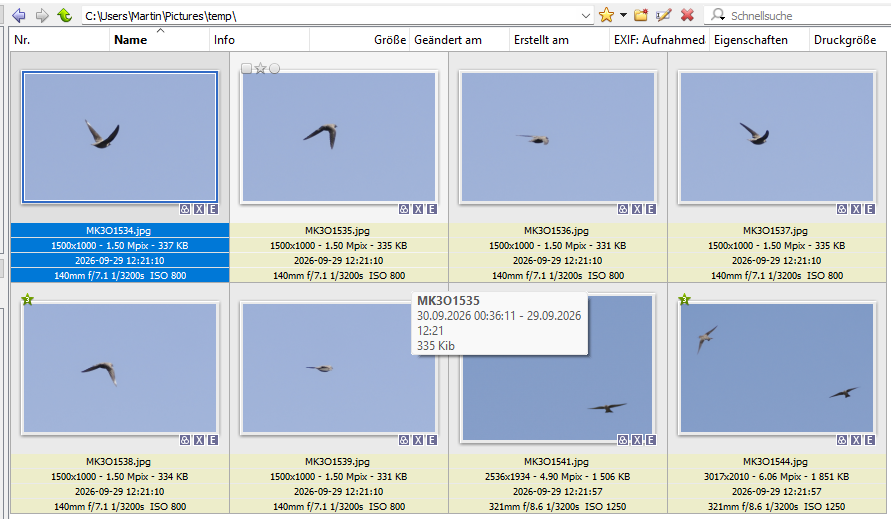
|
After Cropping (output folder)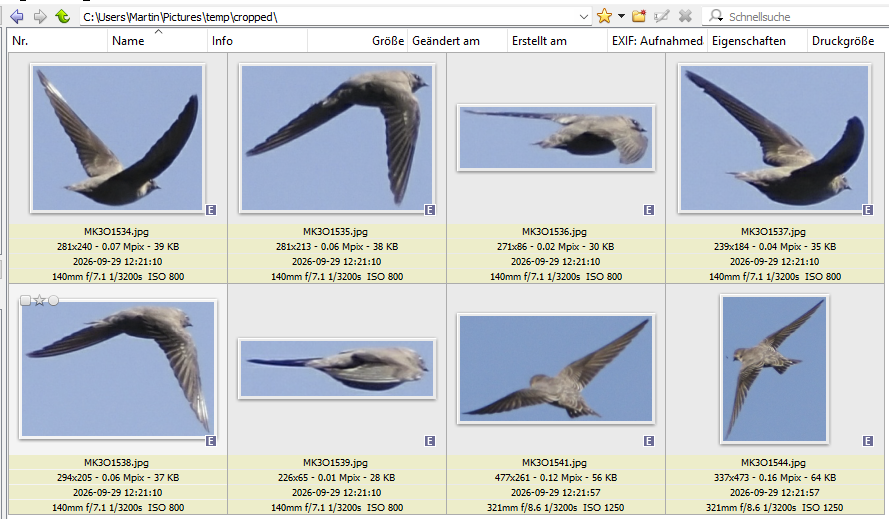
|
Key Features
- YOLO-Powered Detection: Uses YOLO26 models by default for faster, more accurate bird detection. You can also provide a YOLOv8 or custom model with
--model. - Flexible Class Targeting: Specify which object classes to detect using their names (e.g.,
"bird,dog,cat") or their model-specific IDs (e.g.,"14,16,15"). The tool adapts to the classes present in the loaded model. - List Model Classes: Easily list all classes and their IDs available within a specific YOLO model file using the
--list-classesoption. - Customizable Output Paths: Define complex output file paths and names using Python's format string syntax via
--output-template. Access detailed information about the input file, detection, and crop (see Template Variables below). - Cropping Margin: Add a specified pixel margin around the detected bounding box before cropping using
--margin. - Detection Sorting: Sort multiple detections within an image by
confidenceor bounding boxsize(default) using--sortby. - Single or Multiple Crops: Choose to save only the single "best" detection (highest confidence or largest size) per image or save crops for all detected objects using
--multiple. - Per-Category Numbering: Use the
{pcnr}template variable for sequential numbering within each category for a given input image. - Directory Processing: Process all supported images within specified directories, optionally searching recursively (
-r). - Concurrent Processing: Speed up processing on multi-core systems using parallel worker threads (
-w). - Overwrite Control: Prevent accidental data loss by default; use
--force(-f) to allow overwriting existing crop files.
Installation
Install the package and its runtime dependencies from PyPI:
python -m pip install bird-crop
For development from a checkout:
git clone https://github.com/variance/bird_crop.git
cd bird_crop
python -m pip install .
This installs the birdcrop library and the birdcrop, birdcrop-upgrade,
and birdcrop-setup command-line commands. The legacy run_birdcrop.py and
upgrade_birdcrop.py launchers remain available when running from a checkout.
Windows Drag & Drop
On Windows, run the optional setup command once to create a BirdCrop.lnk
desktop shortcut:
birdcrop-setup
Images or folders can then be dragged onto the shortcut. The shortcut uses the
Python interpreter from the environment in which birdcrop-setup was run, so
it does not depend on the Windows PATH. The installed batch launcher also
resolves the interpreter relative to the package installation when possible.
Calling the batch file without arguments prints usage examples instead of
starting a crop operation.
The shortcut is an optional user-created file and cannot be removed reliably
by pip uninstall, because pip has no package uninstall hook. Before
uninstalling on Windows, remove an unchanged shortcut safely with:
birdcrop-setup --remove-shortcut
python -m pip uninstall bird-crop
If the shortcut was changed to point somewhere else, the cleanup command keeps it and reports the reason.
BirdCrop uses the small model size (yolo26s.pt) by default. If the selected model is not present in
the platform-specific BirdCrop user cache directory, the CLI downloads it
automatically from the Ultralytics assets release. Once downloaded, the model
is reused by subsequent CLI runs. You can select another YOLO26 model size with --model-size (nano, small, medium,
large, or xlarge), or specify the path of an existing YOLOv8/custom model with
--model.
The default model cache directory is provided by platformdirs and depends on
the operating system. The birdcrop-upgrade command uses the same directory
by default. Use --output-dir to download models to a different location.
Model Selection
The default model is yolo26s.pt. Use --model-size to choose another YOLO26 model:
# default: yolo26s.pt
python run_birdcrop.py path/to/images

# use the large YOLO26 model
python run_birdcrop.py --model-size large path/to/images

# use a specific model file, including YOLOv8 or a custom model
python run_birdcrop.py --model path/to/model.pt path/to/images
When using --model-size, a missing model file is downloaded automatically. A user-specified --model must already exist locally.
Usage
The installed command is birdcrop:
birdcrop [options] [INPUT_PATH ...]
The equivalent checkout command is python run_birdcrop.py [options] [INPUT_PATH ...].
Update Checks
BirdCrop can check for upstream updates at startup.
- Package versions: https://pypi.org/pypi/ultralytics/json
- YOLO asset release tags: https://api.github.com/repos/ultralytics/assets/releases/latest
CLI flags:
# enabled by default
python run_birdcrop.py --check-updates [options] [INPUT_PATH ...]

# disable all online checks
python run_birdcrop.py --no-update-check [options] [INPUT_PATH ...]

# network timeout per endpoint in seconds
python run_birdcrop.py --update-check-timeout 2.0 [options] [INPUT_PATH ...]
Upgrading
To keep BirdCrop and its YOLO models up to date, use the birdcrop-upgrade command:
# upgrade both the ultralytics package and download latest models
birdcrop-upgrade

# upgrade package only
birdcrop-upgrade --package-only

# download latest models only
birdcrop-upgrade --models-only

# download specific YOLO26 models
birdcrop-upgrade --models yolo26s.pt,yolo26l.pt

# download models to a specific directory instead of the default cache
birdcrop-upgrade --output-dir ./models

# verbose output
birdcrop-upgrade --verbose
From a checkout, python upgrade_birdcrop.py remains an equivalent launcher.
The upgrade utility:
- Updates
ultralyticspackage viapip install --upgrade ultralytics - Downloads the latest YOLO model files from the latest ultralytics/assets release
- Skips models that already exist locally (use
--package-onlyor--models-onlyto update just one component)
Building and publishing
To build distributable artifacts locally:
python -m pip install build
python -m build
This creates a source distribution and wheel in dist/. After configuring
your PyPI credentials, upload them with:
python -m pip install twine
python -m twine upload dist/*
1 maintainer

Metadata
1 maintainer
Release files for bird-crop 0.1.7
For a detailed explanation of source distributions (sdists) and built distributions (wheels), please see the package formats documentation.
Source distribution (sdist)
| File | Size | Uploaded | Provenance | Actions |
|---|---|---|---|---|
| bird_crop-0.1.7.tar.gz | 24.7 kB | Without provenance | Details for bird_crop-0.1.7.tar.gz |
Built distribution (wheel)
| File | Interpreter | ABI | Platform | Actions Reset |
|---|---|---|---|---|
| bird_crop-0.1.7-py3-none-any.whl | Python 3 | none | any | Details for bird_crop-0.1.7-py3-none-any.whl |
Total release size: 52.5 kB
Release files / bird_crop-0.1.7.tar.gz
| Download URL | bird_crop-0.1.7.tar.gz |
|---|---|
| Size | 24.7 kB |
| Tags | Source |
|
SHA-256 checksum How to use checksums |
e4eeb3452ab7055602870647f8873f1a8970721aa2e7019637721155c632e89f
|
|
BLAKE2b-256 checksum How to use checksums |
3b08f127cad104c1659e0481ee29525f19bea3c76b26d7c5082f39b3a28beab8
|
| Upload date | |
|
Uploaded using Trusted Publishing? What is trusted publishing? |
No |
| Uploaded via |
twine/7.0.0 CPython/3.13.15
|
Release files / bird_crop-0.1.7-py3-none-any.whl
| Download URL | bird_crop-0.1.7-py3-none-any.whl |
|---|---|
| Size | 27.8 kB |
| Tags | Python 3 |
|
SHA-256 checksum How to use checksums |
2ddf151d9fd944bfb27ca076a194a180cd6d4180ba51107967c50c13332de699
|
|
BLAKE2b-256 checksum How to use checksums |
7678ab1b2c5e1f137bb479cf1929d37a3f1903395dc7d1eae13ec8307f7d9df3
|
| Upload date | |
|
Uploaded using Trusted Publishing? What is trusted publishing? |
No |
| Uploaded via |
twine/7.0.0 CPython/3.13.15
|
Security for bird-crop 0.1.7
Provenance
Provenance describes where a file came from. On PyPI, provenance is shared via attestations, which provide a verifiable record of the build or publishing details. View details, limitations and caveats.
No provenance found
None of the files in this release were uploaded with provenance metadata.
A note on package security
PyPI is a repository for distributing packages, not a service for auditing them. While third-party security researchers and our staff do their best to detect and remove malicious packages, PyPI cannot guarantee the quality, security or suitability of any given package.
To learn more about protecting yourself from malicious actors, visit our package security documentation.














