
birdcage-tui
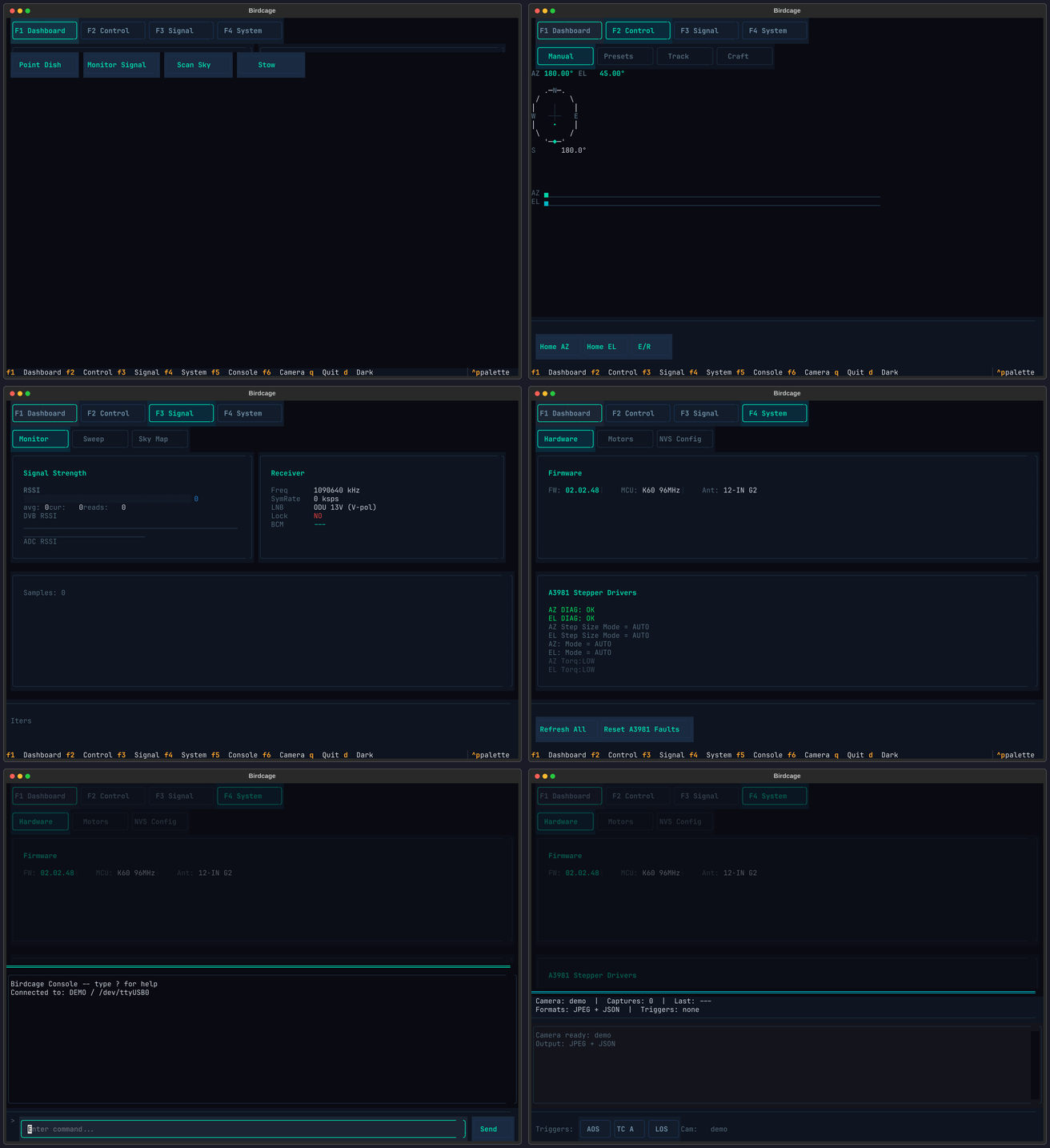
Terminal UI for controlling Winegard satellite dishes. Built on Textual with six screens covering everything from manual pointing to live satellite tracking.
Try it without hardware:
uvx birdcage-tui --demo
Install
pip install birdcage-tui

# With camera capture support (JPEG annotation, FITS export)
pip install birdcage-tui[camera]
Screens
| Key | Screen | What it does |
|---|---|---|
| F1 | Dashboard | Live AZ/EL readout, compass rose, motor status, signal gauge |
| F2 | Control | Manual jog, satellite presets, Track mode (rotctld), Craft mode (live TLE) |
| F3 | Signal | RSSI bargraph, azimuth sweep plot, sky heatmap |
| F4 | System | NVS editor, firmware ID, motor dynamics, PID tuning, A3981 diagnostics |
| F5 | Console | Raw serial terminal to the dish firmware |
| F6 | Camera | Capture overlay with multi-trigger pipeline (requires camera extra) |
The collage below shows all six screens. On PyPI this image may not render -- see the TUI guide for full screenshots.
Usage
# Demo mode (no dish required)
birdcage-tui --demo

# Connect to hardware
birdcage-tui --port /dev/ttyUSB0 --firmware hal205

# Carryout G2 at 115200 baud
birdcage-tui --port /dev/ttyUSB2 --firmware g2 --baud 115200
Documentation
Detailed screen walkthroughs and configuration: birdcage.warehack.ing/guides/tui
Credits
- Gabe Emerson (KL1FI / saveitforparts) -- original Winegard rotor scripts
- Chris Davidson (cdavidson0522) -- Carryout G2 sky scan and rotator control
License
MIT
1 maintainer

Metadata
1 maintainer
Release files for birdcage-tui 2026.2.18
For a detailed explanation of source distributions (sdists) and built distributions (wheels), please see the package formats documentation.
Source distribution (sdist)
| File | Size | Uploaded | |
|---|---|---|---|
| birdcage_tui-2026.2.18.tar.gz | 102.4 kB | Details |
Built distribution (wheel)
| File | Interpreter | ABI | Platform | Reset |
|---|---|---|---|---|
| birdcage_tui-2026.2.18-py3-none-any.whl | Python 3 | none | any | Details |
Total release size: 179.9 kB
Release files / birdcage_tui-2026.2.18.tar.gz
| Download URL | birdcage_tui-2026.2.18.tar.gz |
|---|---|
| Size | 102.4 kB |
| Tags | Source |
|
SHA-256 checksum How to use checksums |
46bda86ec164201e01582d62cc1b485a521915db23210ce251444160759a6a32
|
|
BLAKE2b-256 checksum How to use checksums |
457ceea4a68dadcef5f4d889a2ea00cd0cc5b88d102930ec8f8e81e7e9622dde
|
| Upload date | |
|
Uploaded using Trusted Publishing? What is trusted publishing? |
No |
| Uploaded via |
uv/0.9.26 {"installer":{"name":"uv","version":"0.9.26","subcommand":["publish"]},"python":null,"implementation":{"name":null,"version":null},"distro":{"name":"EndeavourOS","version":null,"id":null,"libc":null},"system":{"name":null,"release":null},"cpu":null,"openssl_version":null,"setuptools_version":null,"rustc_version":null,"ci":null}
|
Release files / birdcage_tui-2026.2.18-py3-none-any.whl
| Download URL | birdcage_tui-2026.2.18-py3-none-any.whl |
|---|---|
| Size | 77.5 kB |
| Tags | Python 3 |
|
SHA-256 checksum How to use checksums |
5b3afe188fd5b5ffc637732db3c20f79bf0179c125da3607c92a4bdc37ed1122
|
|
BLAKE2b-256 checksum How to use checksums |
bd8c0259b5392bebc03d83e3f6ebe406428650ced209a0ed8f1f04e8482442d4
|
| Upload date | |
|
Uploaded using Trusted Publishing? What is trusted publishing? |
No |
| Uploaded via |
uv/0.9.26 {"installer":{"name":"uv","version":"0.9.26","subcommand":["publish"]},"python":null,"implementation":{"name":null,"version":null},"distro":{"name":"EndeavourOS","version":null,"id":null,"libc":null},"system":{"name":null,"release":null},"cpu":null,"openssl_version":null,"setuptools_version":null,"rustc_version":null,"ci":null}
|














