
birdears









| Licensed with GNU AGPLv3 |
|---|
 |
Support Channels
| Channel | Site | Description |
|---|---|---|
| Chat (Matrix) | #birdears:mozilla.org | chat channel |
| GitHub Discussions | discussions | general discussion |
| GitHub Issues | issues | for issues with the software |
| Documentation | https://birdears.readthedocs.io/ | extended documentation at ReadTheDocs |
| PyPI | https://pypi.python.org/pypi/birdears | python package/repository |
| GitHub | https://github.com/iacchus/birdears | mainline repository |
TUI
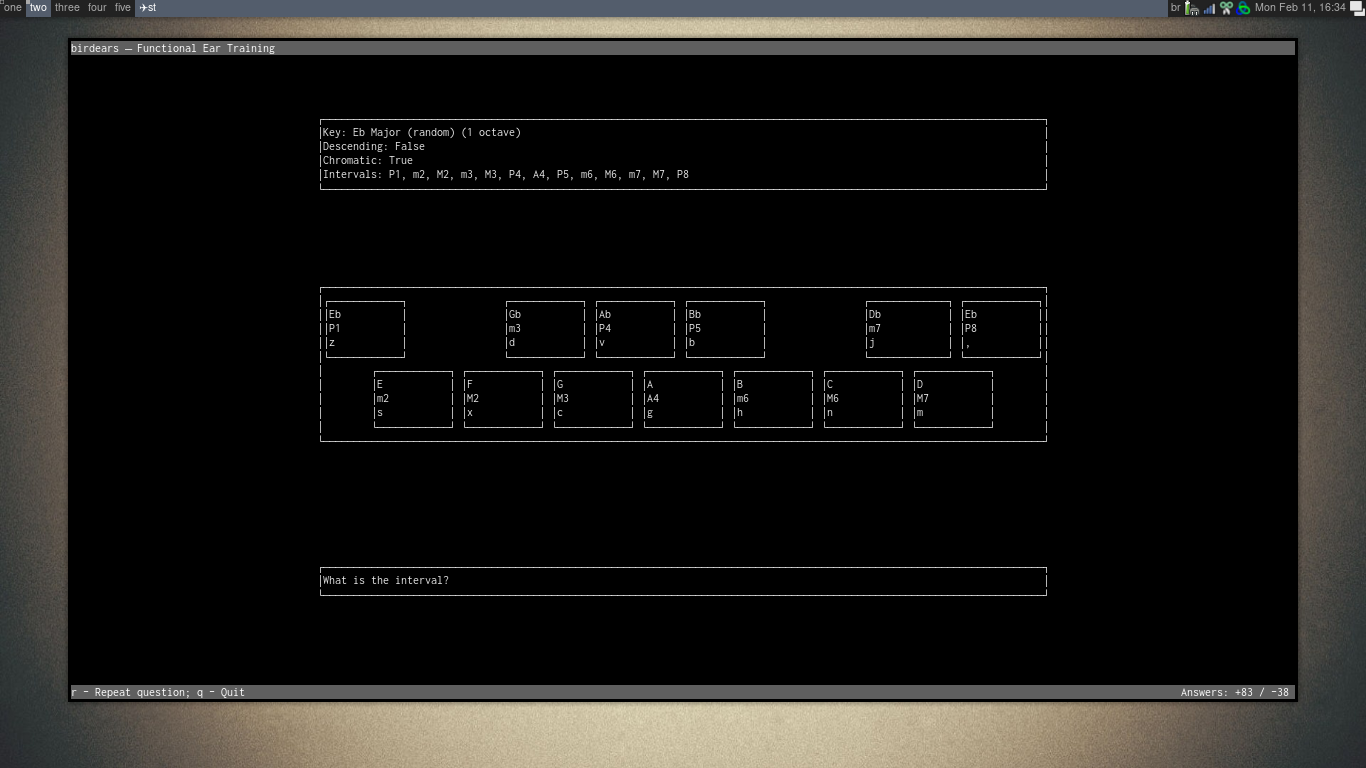
CLI

Introduction
birdears
birdears is a software written in Python 3 for ear training for musicians
(musical intelligence, transcribing music, composing). It is a clone of the
method used by Funcitional Ear Trainer app for Android.
It has five different kinds of musical exercises, which are:
melodic interval, harmonic interval, melodic dictation, instrumental,
and note name.
In resume, with the melodic interval mode two notes are played one after the
other and you have to guess the interval; with the harmonic interval mode,
two notes are played simoutaneously (harmonically) and you should guess the
interval.
With the melodic dictation mode, more than 2 notes are played (ie., a melodic dictation) and you should tell what are the all intervals composing the melody played.
The instrumental mode works in a fashion similar to the melodic dictation mode, but you will be expected to play the notes on your instrument, ie., birdears will not wait for a typed reply and you should prectice with your own judgement. The melody can be repeated as much times as necessary so you can the time you need to try out.
The notename is made for you to learn the note names inside a scale by its
melodic interval from the tonic. For example, in a tonic of 'C',
when a P5 interval is played, you are expected to reply with the C's 5th,
this is, G.
What is musical ear training
this needs to be written. The method.
It is currently being written here
Features
- Different kind of exercises for ear training.
- Pretty much configurable: you can create more difficult exercises as you progress.
- Exercises from configuration files: you can make presets and share them
- Can be used interactively from a Python console. (docs needed)
- Can be used as a Python library. (docs needed)
Installing
1. Installing the dependencies
birdears depends on python >= 3.7 and sox; the latter should be installed
by your distribution's package manager (supposing you're using GNU/Linux) and
provides the play command.)
(Please send the steps for your OS)
Arch Linux
sudo pacman -Syu sox python python-pip
Debian/Ubuntu
sudo apt install sox python3 python3-pip python3-venv
2. Installing birdears
- After installing the above stated dependencies for your operating system, you can install the software with the following command:
pip3 install --user --upgrade --no-cache-dir birdears
- Then add the installation directory to your PATH via your
.bashrc,.zshrc, or the respective file for your shell:
export PATH="$(python3 -m site --user-base)/bin:${PATH}"
This path is where the command will be installed when using --user method.
If you prefer, you can skip step 2 and start the software with:
python -m birdears --help
3. Running
After installing just run:
birdears --help
or
python3 -m birdears --help
What is 'pip'?
The software pip is the python package installer. The arguments used are the following:
| arg | meaning |
|---|---|
| pip3 install | install command |
| --user | installs on the user home; no need to root access/ global install |
| --upgrade | if it is already installed, upgrade nonetheless if there is an upgrade available |
| --no-cache-dir | avoid previously downloaded versions; always check PyPI server for newer versions |
| birdears | the software to be installed |
pip will then download and install the software from the Python's official repository, the package in here.
Addendum: In-depth installation using a virtualenv
You can choose to use a virtualenv to use birdears; this should give you an idea on how to setup one virtualenv.
You should first install virtualenv (for python3) using your distribution's package (supposing you're on linux), then on terminal:
use python or python3 depending on your operating system distribution.
python -m venv ~/.venv       # create the virtualenv in the  ~/.venv/ directory

source ~/.venv/bin/activate   # activate the virtualenv; this should be done
                              # every time you may want to run the software
                              # installed here. You can also put this line in
                              # your .bashrc or .zshrc etc, so to start with
                              # the shell.

pip install birdears         # this will install the software

birdears --help               # and this will run it
Upgrading birdears
The same command that installs upgrades it:
pip3 install --user --upgrade --no-cache-dir birdears
Keybindings
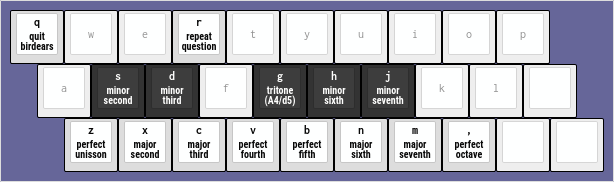
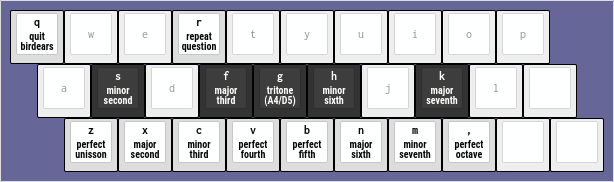
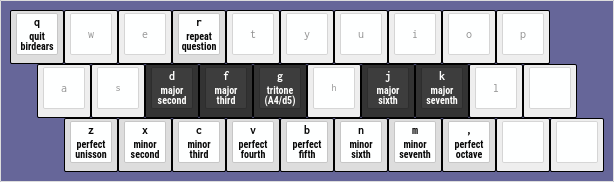
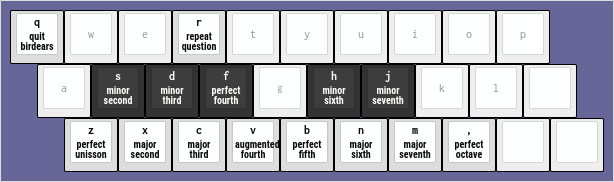
The following keyboard diagrams should give you an idea on how the keybindings work. Please
note how the keys on the line from z (unison) to , (comma, octave) represent the notes
that are natural to the mode, and the line above represent the chromatics.
Also, for exercises with two octaves, the uppercased keys represent the second octave. For
example, z is unison, , is the octave, Z (uppercased) is the double octave. The same
for all the other intervals.
Ionian (Major)
These are the keybindings for the Ionian (Major) Scale; black keys are the chromatic notes.
Dorian
Phrygian
Lydian
Mixolydian
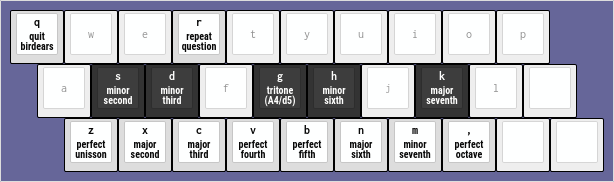
Aeolian (minor)
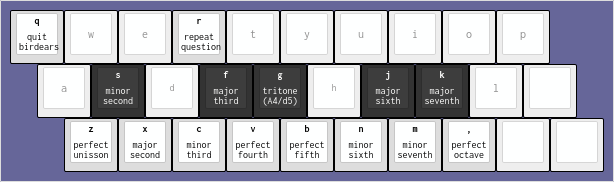
Locrian
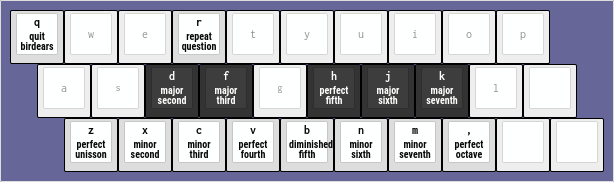
Advanced
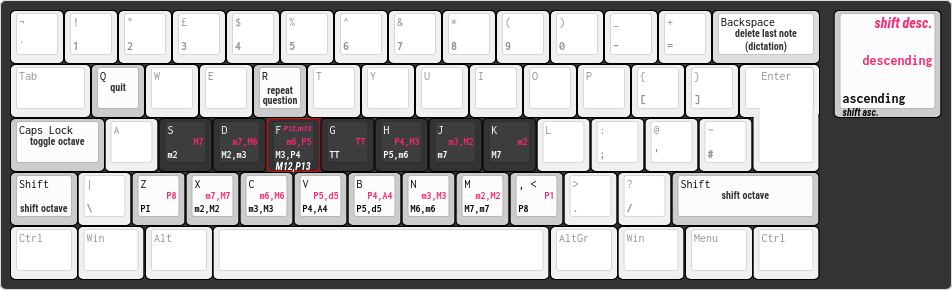
this is still being improved
Legend for the keys on the diagram above:
| Text Format | Scale Direction | Octave |
|---|---|---|
| blue (bold italic) | descending | second octave (shift or caps lock) |
| pink (bold) | descending | first octave |
| black/white (bold) | ascending | first octave |
| black (italic) | ascending | second octave (shift or caps lock) |
White keys are the diatonic notes, black keys are the chromatic ones.
Descendent mode are usable for exercises with -d or --descendent.
Chromatic keys are usable for exercises with -c or --chromatic.
Second octave is usable for exercises with -n 2 or --n_octaves 2
Documentation
Full documentation for this software is available at birdears Read The Docs and also in PDF format.
Contributors

Made with contrib.rocks.
Contributing
Those who want to contribute to this project can read CONTRIBUTING.md.
1 maintainer

Release files for birdears 0.3.16
For a detailed explanation of source distributions (sdists) and built distributions (wheels), please see the package formats documentation.
Source distribution (sdist)
| File | Size | Uploaded | |
|---|---|---|---|
| birdears-0.3.16.tar.gz | 994.4 kB | Details |
Built distribution (wheel)
| File | Interpreter | ABI | Platform | Reset |
|---|---|---|---|---|
| birdears-0.3.16-py3-none-any.whl | Python 3 | none | any | Details |
Total release size: 1.1 MB
Release files / birdears-0.3.16.tar.gz
| Download URL | birdears-0.3.16.tar.gz |
|---|---|
| Size | 994.4 kB |
| Tags | Source |
|
SHA-256 checksum How to use checksums |
c8bf5cf178f8b2909953941ca98ce572dbfb012ae232d086a488d345042fecfd
|
|
BLAKE2b-256 checksum How to use checksums |
3687eb26c1fa4c3bba3972f701723c53a8d6f8acad65092652983b09efe49051
|
| Upload date | |
|
Uploaded using Trusted Publishing? What is trusted publishing? |
No |
| Uploaded via |
twine/6.1.0 CPython/3.12.12
|
Release files / birdears-0.3.16-py3-none-any.whl
| Download URL | birdears-0.3.16-py3-none-any.whl |
|---|---|
| Size | 60.4 kB |
| Tags | Python 3 |
|
SHA-256 checksum How to use checksums |
059247e086f9eb2cef3be24fc1a34f0e404be8fc648fa71dcfc4193e6bb32a00
|
|
BLAKE2b-256 checksum How to use checksums |
dbb9be23012b42e04f4fd861c48ac93a07ff1534f0ed0174f5f5b3e1e9e52a18
|
| Upload date | |
|
Uploaded using Trusted Publishing? What is trusted publishing? |
No |
| Uploaded via |
twine/6.1.0 CPython/3.12.12
|














